🥇

Podcast Player
Software Version: iOS 12
Created May 7, 2012 · Updated Apr 28, 2020 · ★ 4.80 (10) · 111 sales
🥇
Podcast Player
Software Version: iOS 12
Created May 7, 2012 · Updated Apr 28, 2020 · ★ 4.80 (10) · 111 sales
🥈

ImportWP Pro - WordPress XML & CSV Importer
Import WP Pro makes it possible to import any XML or CSV file into WordPress. It’s easy to use interface with inline previews makes customizing your import a simple process.
Created Apr 7, 2017 · Updated Oct 28, 2025 · ★ 4.66 (29) · 1.4K sales
🥉

EzziFarmer - Farms management system
The farm management application is an intricate, multifunctional digital platform designed to offer comprehensive support for the diverse and dynamic nature of agricultural management. By integrating a variety of modules, each tailored to specific aspects of farm operation, the application provides a centralized system for farmers to optimize their resources, manage their operations efficiently, and make data-driven decisions.
Created May 6, 2024 · Updated Oct 5, 2026 · 19 sales
#4

JQuery XML Shopping Cart - Store - Shop
This is easy to use fully XML Driven Store / Shop / Shopping Cart built using JQuery & Twitter Bootstrap Framework . Its having 2 options for the checkout Using PayPal or/and Submit order by Email
Created Mar 8, 2012 · Updated Jun 22, 2023 · ★ 4.35 (66) · 803 sales
#5

Javascript map - dynamic XML content(with tooltip)
As you know the biggest companies on the internet (Yahoo and Google) have created web applications/API’s and that have a positive effect on mapping applications and that’s the main reason that their number has increased substantially.
Created Oct 26, 2010 · Updated May 19, 2015 · ★ 4.92 (12) · 87 sales
#6

Music Player XML List jQuery Plugin
This is a jQuery plugin music web player standalone work only in modern browsers which support html5, easy embed in your html page load sounds dynamically from xml data.
Created Nov 16, 2014 · Updated Apr 16, 2022 · ★ 5.00 (7) · 59 sales
#7

XML Timeline Animation Banner
XML Timeline Animation Banner Before the iPhones and iPads, Flash has been the best cost-effective solution in delivering quality animations in the web. But with the increased popularity of iOS devices with no flash support, the industry is slowly shifting to open standards. Developers mostly rely on Javascript animation libraries for their animation needs. Unfortunately, most of these libraries still have some limitations which XML Timeline Animation Banner would like to address. Check out the features below. It might just be what your looking for. Features 1. CSS Animation This uses the power of JQuery to select DOM Elements and Greensock Animation Platform (GSAP) v12 for the really crazy fast animation and sequencing. You can animate almost any CSS property of DOM elements including border, color, percentages, opacity, cool transforms like skewX, skewY, scaleX, scaleY, rotation, x, and y. There are no predetermined CSS parameters in the XML that you need to input. Simply animate only the properties you need to one or more DOM elements.Below is an example showing the css animation. 2. Javascript Object Property and Function-based Property Tweening XML Timeline Animation Banner is not only limited to DOM Element animation. It also provides a way to tween object properties. You can target a single object or even multiple objects using arrays. This great feature provides a flexible way to animate graphical objects in a Canvas element. Another feature is the ability to tween function-based properties. It will work if you have an object with a function rotation() that gets and sets a value. Also, it can also tween even if you have functions like setRotation() and getRotation(). 3. Advanced Timeline Sequencing Using timelines, you can offset the insertion point, align animations at the same start time or align them one after the other. You can even set a time that can be added to the start time of each animation. You can even go further by nesting timelines(timeline within a timeline). You can also have multiple banners that have separate controls in one page. 4. Cross-browser, PC, Mac, Android and iOS compatible Using a PC, Mac, Android or IOS Device? No problem. Since it’s written in Javascript, it should work on your devices. Standard CSS properties including special transforms like rotation, scaleX, scaleY, scale, skewX, skewY, x, y, transformOrigin will work in all modern browsers even with a classic browser such as Internet Explorer 6. Non-standard CSS properties will depend on browser support. So if your browser supports it, it can be animated. 5. Advanced User Controls Users will now have video-like controls (without the buffering) when viewing the animation. Repeat, pause, play or seek(time or label) anytime so your users don’t have to miss a thing. You can use labels that are precisely marked in the seek bar so your users will know when the next set of animation begins. All of which can be set in the XML. 6. Multiple Banners in One Page You can set multiple banners in one page using one XML. Each banner can have its own timeline sequence and controls. 7. One XML, Multiple Banner Sizes One xml can be reused in different pages requiring different banner sizes. This can cut cost because there will be no need to rework the same animation with different banner sizes. This can be achieved by using a combination of % based position and size. 8. Slice your images with ImageSlicer ImageSlicer uses CSS to conveniently slice and animate images just by setting the number of rows and columns in the XML. Combined with timeline sequencing, it creates cool image slice transitions. 9. Intelligent Autoplay Most of the time you don’t need a banner animation to play when it is not currently visible in the page. With this feature, you can optionally specify to pause the banner animation when not shown in your page. This saves additional processor overhead especially with mobile devices. 10. DOM Element Event Handler This helps attach events to DOM Elements without coding. Note: Images are not included in your purchase.
Created Sep 10, 2012 · Updated Sep 12, 2012 · ★ 5.00 (6) · 81 sales
#8

Export HTML Table to Open Formats
Export HTML Table to Open Formats is a collection of classes written in PHP (5.x) and JavaScript which allows to export of HTML tables into open formats such as XML or CSV files without any database. The data is taken directly from the HTML table and then converted to these formats.
Created Jul 20, 2010 · ★ 4.41 (22) · 188 sales
#9

Tic Tac Toe
Software Version: Android 9.0
Created Oct 7, 2019 · Updated Oct 26, 2020 · ★ 5.00 (7) · 32 sales
#10

Starter - Premium HTML5 Landing Page Template
Starter is a responsive landing HTML template. It is simple and modern design. It is optimized and clean code using the latest HTML5 and CSS3 technologies allows to make changes in the page structure of the template. By purchasing our template you will get the most valuable thing – our time to solve problems that may arise while setting up the template.
Created Oct 7, 2019 · 14 sales
#11

XML Toolkit With E-Invoice export for Perfex CRM.
This module facilitates compliance with e-invoicing regulations by enabling the export of financial data in XML format. It offers functionality for bulk export, automates the generation of XML files for invoices, and integrates seamlessly into existing workflows. Features include settings configuration, email attachment of XML files, permissions management, and support for multiple e-invoice schemes. Designed for easy integration into administrative panels, the module enhances financial data handling while ensuring regulatory compliance.
Created Nov 6, 2023 · Updated Mar 5, 2025 · ★ 3.50 (8) · 96 sales
#12

OctopusCodes - XML Shopping Cart
High Resolution: No, Compatible Browsers: IE9, IE10, IE11, Firefox, Safari, Opera, Chrome, Edge, Software Version: PHP 5.x
Created Aug 11, 2017 · ★ 0.00 (1) · 5 sales
#13

JQuery XML Product Showcase & Quote Cart
JQuery XML Product Showcase & Quote Cart is solutions for those who needs to display products & and get a request for Quote by their customers its powered by jQuery, XML & Bootstrap. Using this product you can list unlimited categories & its products, where buyers can request a quote for those products. One can use this product very easily as customer just need to click on Add for Quote button products goes in cart & then they can submit request for the same, You will get an email with request details. So you can respond to it.
Created Jul 20, 2015 · Updated Jun 23, 2023 · ★ 3.29 (7) · 137 sales
#14

CameraX & Machine learning
Software Version: Kotlin 1.x, Android 15.0, Android 12.0, Android 11.0, Android 10.0, Android 9.0
Created Apr 7, 2021 · Updated Jun 23, 2026 · 19 sales
#15
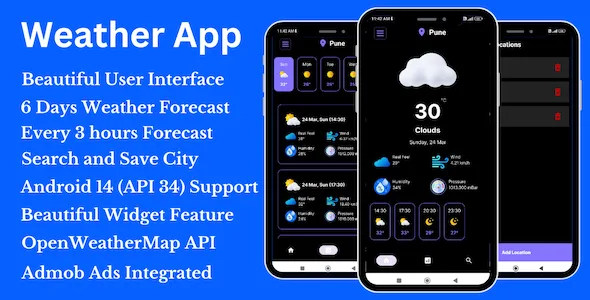
Weather App - Hourly and Daily Weather Forecast Android App
Weather App is an Hourly and Daily weather forecast Android App made in Android Studio using Kotlin and Xml. It has the following features: The Weather App represents a meticulously crafted Android application designed within Android Studio, employing Kotlin and Xml. Its functionalities include: Upon initiation, the app presents an aesthetically pleasing Splash Screen followed by an Admob App Open Ad, ensuring a visually engaging entry point. The user interface is not only visually appealing but also provides access to crucial weather parameters such as Weather type, Temperature, Real Feel, Humidity, Wind, and Pressure, offering a comprehensive forecast experience. Moreover, users can access a 6-day weather forecast, with each day segmented into 8 timestamps, providing detailed weather insights at 3-hour intervals. Additionally, the app facilitates global weather search capabilities, enabling users to swiftly retrieve forecast data for any city worldwide.
Created Dec 25, 2025
#16
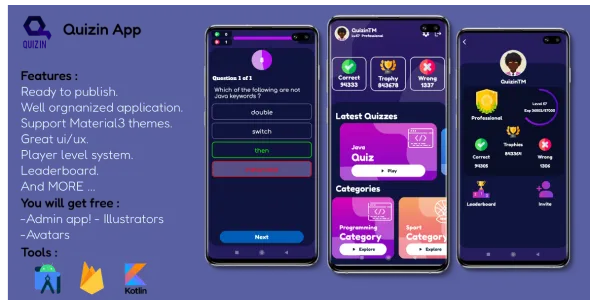
Quizin App - Quiz Application | Quiz Game | Level Up | Rank Up
Quizin App is a Quiz application which is about answering multiple questions of a single quiz of a specific category. Every quiz has 3 difficulties which is easy, normal and hard. So that every difficulty has its own amount of collectable trophies (The more difficult, the more trophies you get). Besides, the ability to choose the time of every question, so that the less time you choose, the more trophies you get. The app also support the level system. When the quiz is finished, you will get a specific amount of exp based on your performance of the quiz you have played. Every time you level up, the next level will be harder than the previous one. The level system has 3 stages : Beginner, Intermediate and professional. Each one has its own Badge. Every Player Will start with the Beginner stage, so that to get to the next stage (Intermediate) you have to finish as many quizzes as possible to level up to level 20 then you will be an Intermediate player. The same thing, to get the Professional stage you need 20 levels more to get it (level +40). Furthermore, don’t forget to get as many trophies as possible because they are the main thing in Quizin App leaderboard. So that you can reach higher ranks with other players.
Created Dec 24, 2025
#17
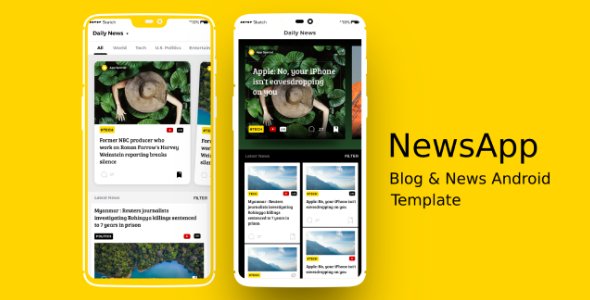
NewsApp - News & Blog Android App Template
Ideal for your magazine, blog, news portal. Take your news agency, personal blog, journal, local news or online newspaper to the next level with this news system. Includes all required source code.
Created Dec 24, 2025
#18
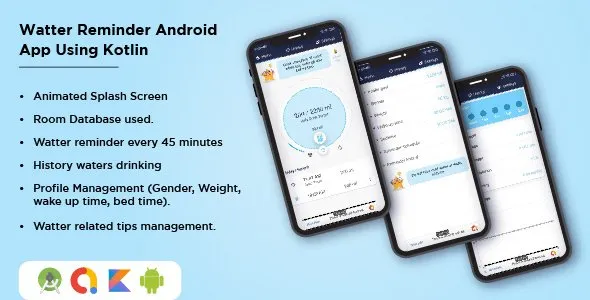
NewsApp - News & Blog Android App Template
Water Reminder App reminds you to drink water, a great application that take care of your health.The best healthcare application for you. And it’s totally free.
Created Dec 24, 2025
#19
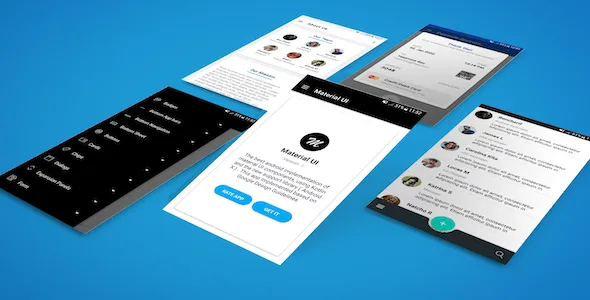
Material UI "Kotlin"
The best android implementation of material UI components, using Kotlin and the new support library ( Android X ) . This app implemented based on Google Design Guidelines.
Created Dec 24, 2025
#20
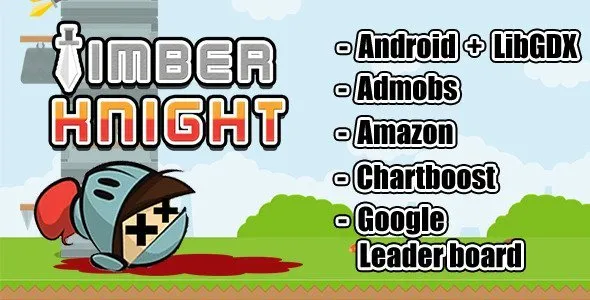
Timber Knight
This game design for non-programming person. You can config all necessary value in one xml file. About images, I prepare PSD files that will help you to easily create all images.
Created Dec 24, 2025