
CameraX & Machine learning

Description
Last update
V 5.0.4 • 24/06/2026
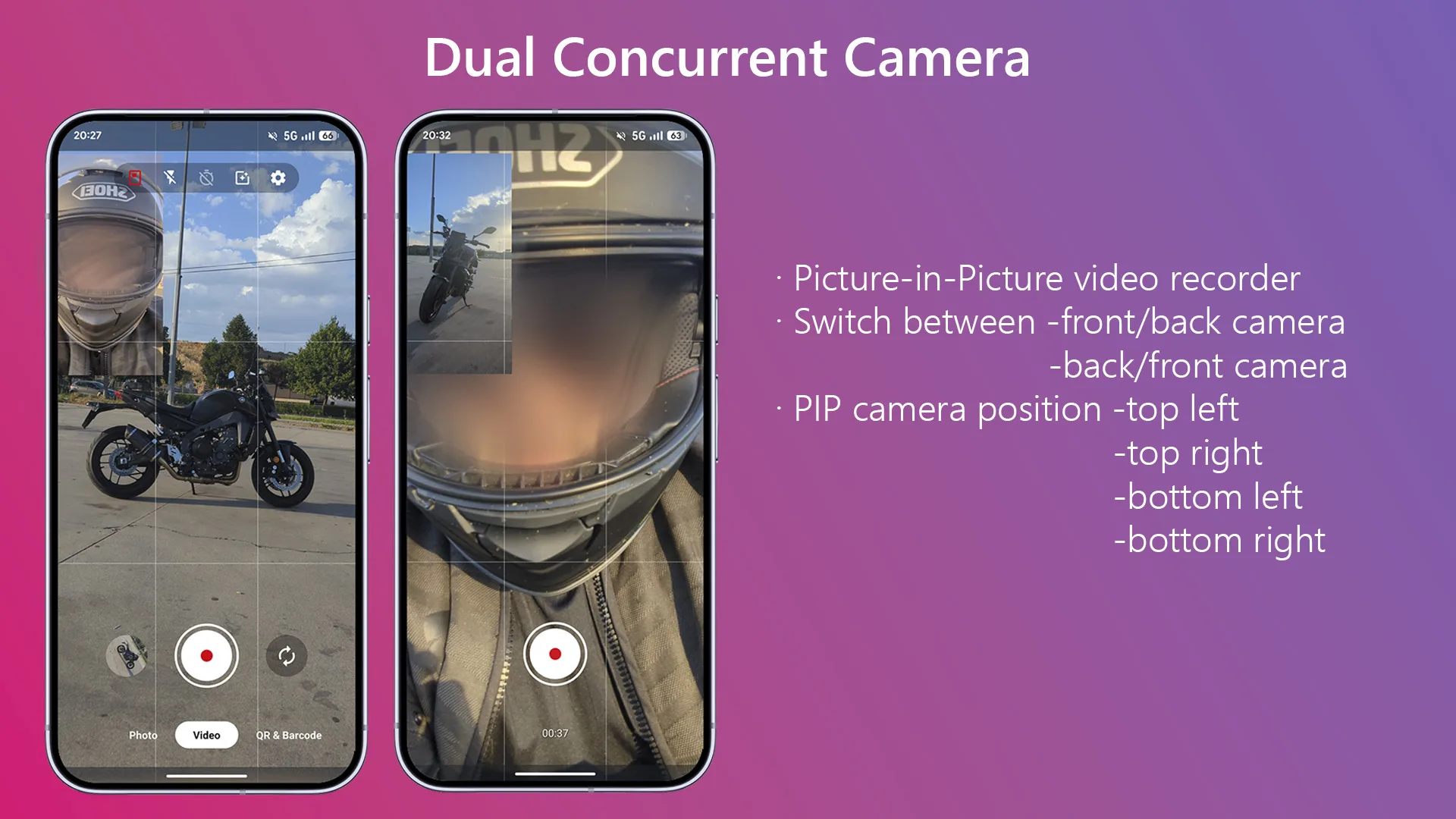
- Dual camera mode: Switch between front/back & back/front camera
CameraX & Machine learning with option to take photo, record video, image labeling, barcode scanning, text recognition and translate text.


DEVELOPMENT REQUIREMENTS
- Android Studio Quail 1 | 2026.1.1 Patch 2
- Java: Version 17
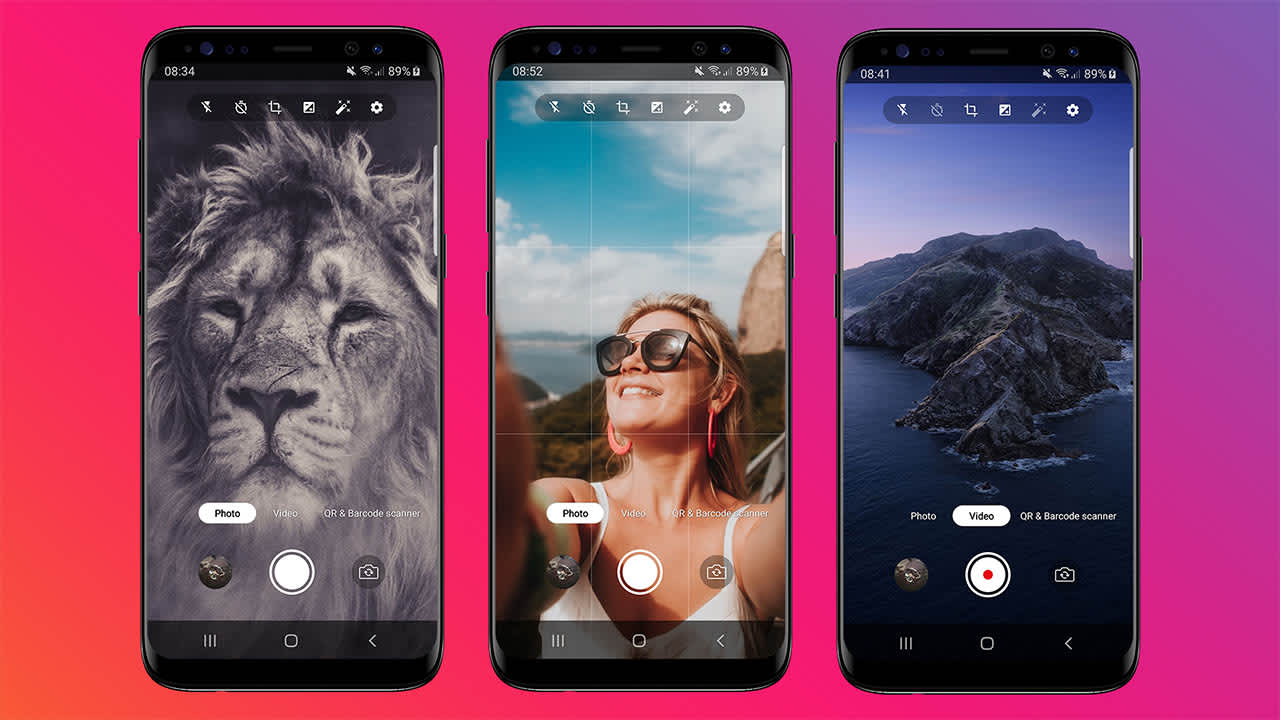
Photo
- Take photos in high quality
- Flash mode: on, off or auto
- Countdown timer: off, 3s or 10s
- Switch front-back camera
- Photo viewer
- Record video in high quality
- Flash mode: on or off
- Chronometer
- Switch front-back camera
- Video viewer
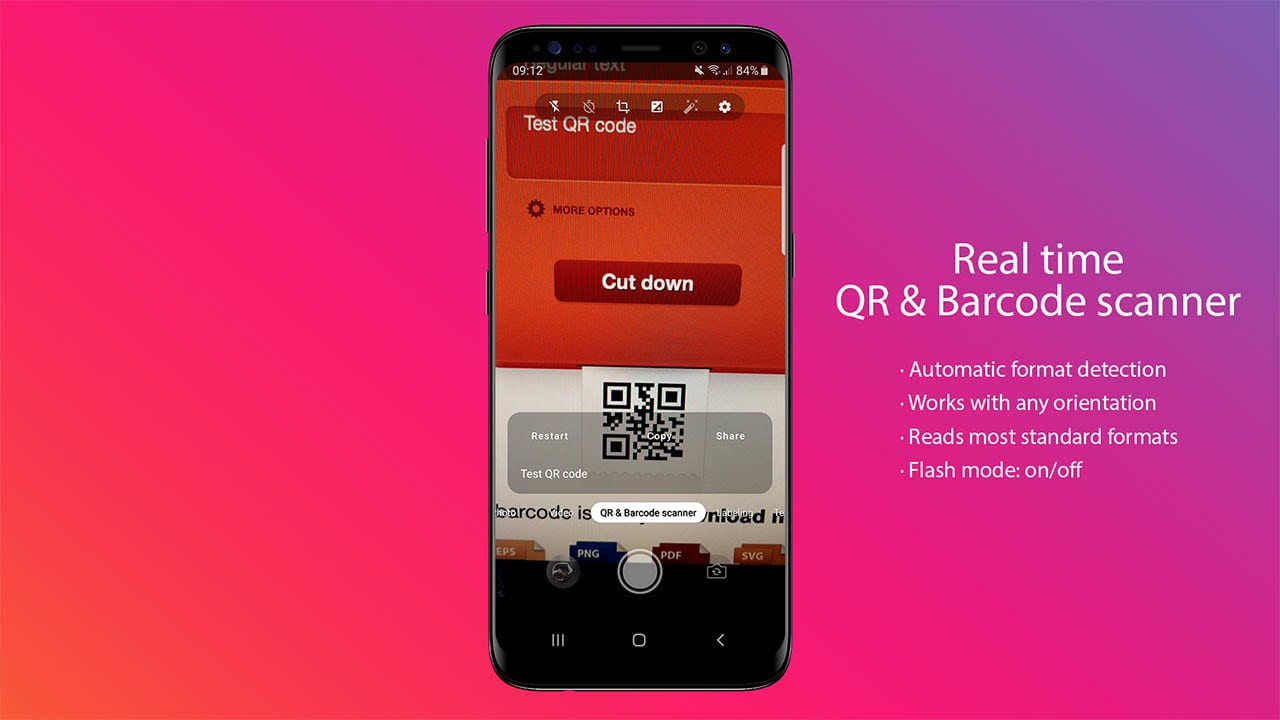
- Real time scanner
- Flash mode: on/off
- Works with any orientation
- Automatic format detection
- Reads most standard formats: -Linear formats: Codabar, Code 39, Code 93, Code 128, EAN-8, EAN-13, ITF, UPC-A, UPC-E -2D formats: Aztec, Data Matrix, PDF417, QR Code
- Restart action
- Copy result to clipboard
- Share result
- Real time image labeling
- Flash mode: on/off
- You can detect and extract information about entities in an image across a broad group of categories. The default image labeling model can identify general objects, places, activities, animal species, products, and more.
- More than 400 entities that cover the most commonly-found concepts in photos.
- Possibility to use custom model
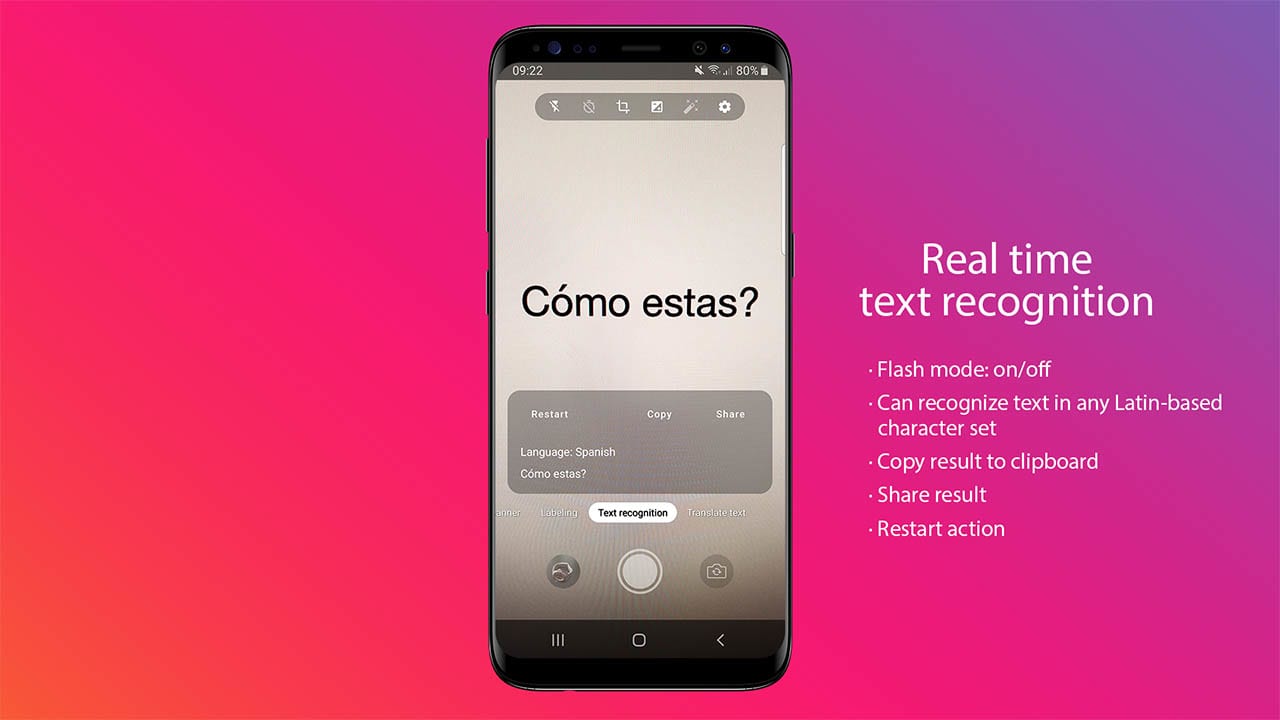
- Real time text recognition
- Flash mode: on/off
- Restart action
- Copy result to clipboard
- Share result
- Show recognized text
- Show language
- Can recognize text in any Latin-based character set. They can also be used to automate data-entry tasks such as processing credit cards, receipts, and business cards.
- Possibility to recognize text from a Bitmap, media.Image, ByteBuffer, byte array, or a file on the device.
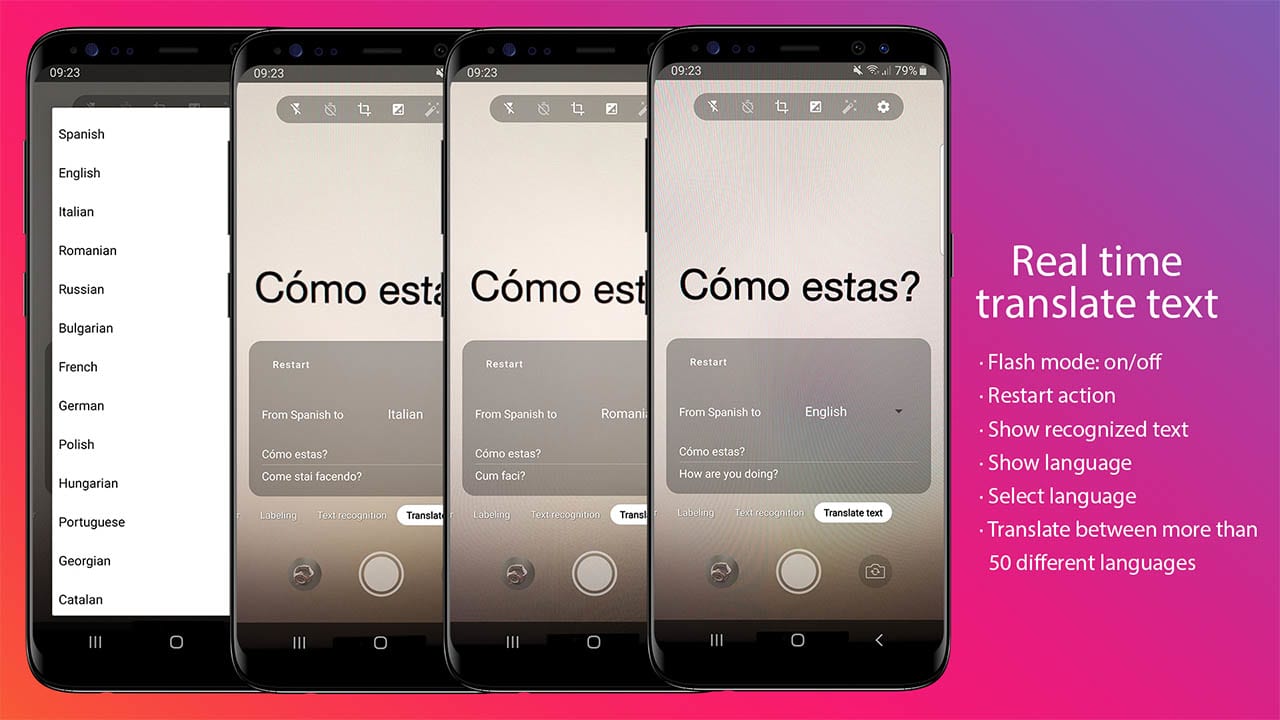
- Real time text recognition & translate
- Flash mode: on/off
- Restart action
- Show recognized text
- Show translated text
- Show language
- Select language to translate to
- Translate between more than 50 different languages COMPLETE LIST
- Powered by the same models used by the Google Translate app’s offline mode
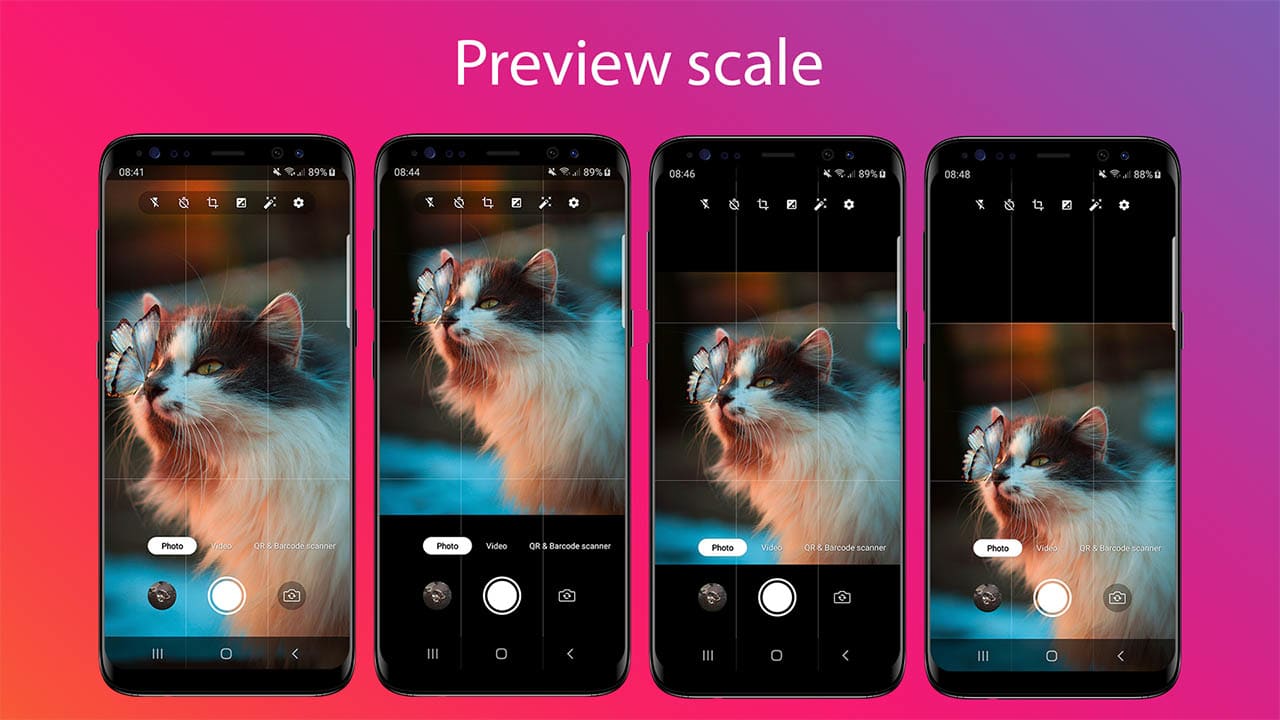
- Fill
- Top
- Center
- Bottom
- From -4 to 4
- Original
- Bokeh
- HDR
- Beauty
- Night mode
- Sepia
- Aqua
- Mono
- Negative
- Posterize
- Solarize
- View available space and total space of device
- Change image size and aspect ratio
- Enable/Disable image max quality
- Change video resolution
- Change video fps
- Enable/Disable sound (timer, take photo and stop recording video)
- Show/Hide grid lines
- Available in all modes
- Available in all modes
- With animation
Video
QR & Barcode scanner
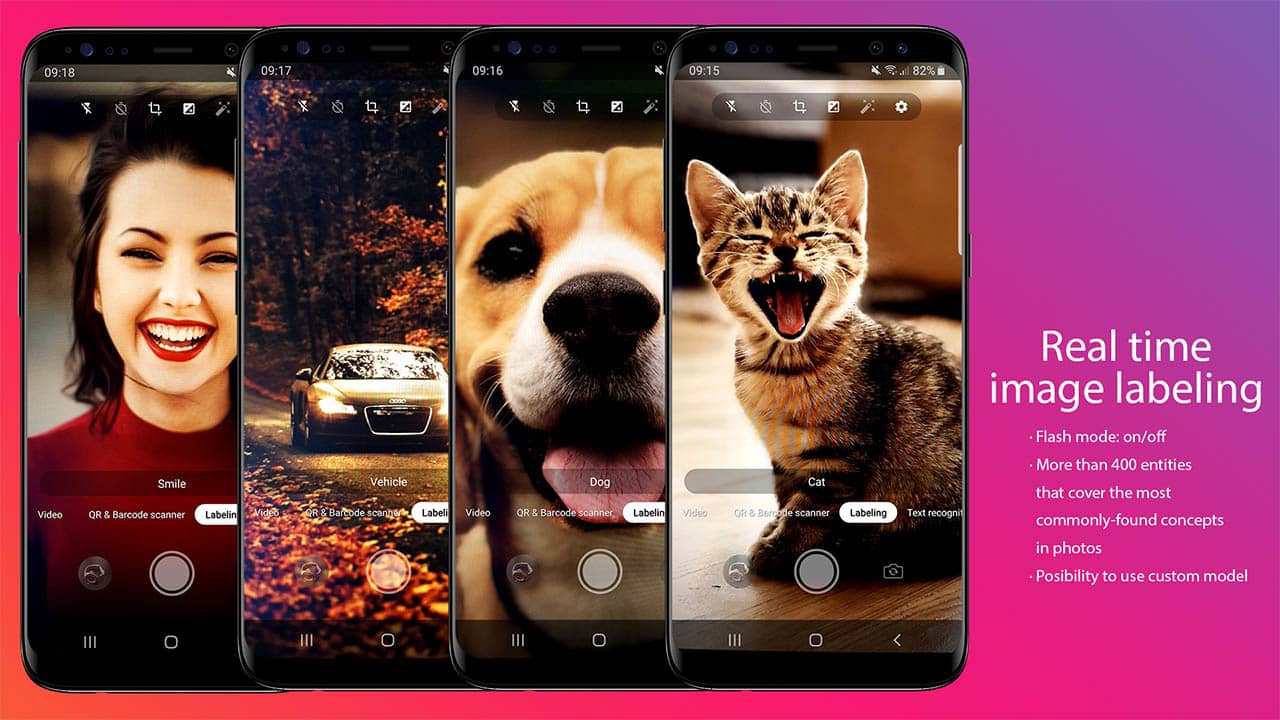
Image labeling
Text recognition
Translate text
Preview scale
Exposure
Photo mode
**Bokeh, HDR, Beauty and Night mode is not available in all devices
Settings
Pinch to zoom
Tap to focus
Take photo, start-stop recording from volume buttons
Change log
V 5.0.4 • 24/06/2026
- Dual camera mode: Switch between front/back & back/front camera
V 5.0.3 • 24/06/2026
- Android Studio Quail 1 | 2026.1.1 Patch 2
- Android 17 - SDK 37
- Dependencies
- Code refactoring
- Feature: Dual camera mode (front/back video recording)
- Feature: PIP camera position (top left, top right, bottom left & bottom right)
- Admob: Banner & Interstitial
V 5.0.1 • 14/01/2026
- Dependencies update
V 5.0 • 12/04/2025
- Android Studio Meerkat | 2024.3.1 Patch 1
- Migrate to Android 16 (SDK 36)
- Dependencies update
V 4.0 • 22/02/2024
- Android Studio Hedgehog | 2023.1.1 Patch 2
- Migrate to Android 14 (SDK 34)
- Dependencies update
- Code refactoring
V 3.0 • 08/03/2023
- Migrate to Android 13 (SDK 33)
- Dependencies update
- Permissions Android 13
- Code refactoring & optimization
- Design changed
- Get media from gallery updated for android 13
- Warning: Change video fps it's not available by now
| Type | Android App |
|---|---|
| Author | iSomlea |
| Category | Mobile / Android / Full Applications |
| Price | $19 |
| Sales | 19 |
| Published | Apr 7, 2021 |
| Last Update | Jun 23, 2026 |
| Compatible Software | Kotlin 1.x, Android 15.0, Android 12.0, Android 11.0, Android 10.0, Android 9.0 |
| Mobile Files Included | .java, .xml |
| Video Preview Resolution | 1080x1920 |
Categories
Tags
External listing. code.market does not sell this product and does not process payment for it. Pricing, payment, delivery, licensing, refunds, and support are handled by the third-party merchant on its own website. We may earn an affiliate commission from a referral. Details.
Products of the Week.
Submit🥇

STOP GUESSING WHAT TO POST
AI that learns your brand voice and builds a month of consistent, on-brand social content: carousels, posts and hooks that sound like you, not like everyone else's AI.
SaaS · 4,294 views · 38 clicksSaaS · Week 45 · 4,294 views · 38 clicks
🥈

Conversational Backlinks for Busy Founders
Place Backlink Relevant Conversation for your domain across Forums and Conversations
Website · 42,008 views · 223 clicksWebsite · Week 45 · 42,008 views · 223 clicks
🥉

upvote.club
Free Social Media Engagement that Helps Boost Your Content. Upvote Club supports 19 social networks with 100+ engagement actions in one dashboard. Add links to your posts and get free engagement from real users.
SaaS · 40,051 views · 117 clicksSaaS · Week 45 · 40,051 views · 117 clicks
#4

Substack Posting API
Onboard your Agent to Substack. Write Publish on Substack via API
SaaS · 59,060 views · 198 clicksSaaS · Week 45 · 59,060 views · 198 clicks
#5

Seenshot App
Free, Fast, MacOS Screenshot app. Make Screenshot cmd+shift+2 and send it via link
Desktop App · 28,437 views · 122 clicksDesktop App · Week 45 · 28,437 views · 122 clicks
#6

Hand-Placed Backlinks $9.99 per link. Flat rate.
Buy hand-placed forum, Q-A and directory backlinks. Flat $9.99 per link, no subscriptions — you only pay for approved listings.
Website · 4,269 views · 19 clicksWebsite · Week 45 · 4,269 views · 19 clicks
#7

Free Invoice Generator - PDF Invoices in Your Browser, No Sign-Up
A free invoice maker for freelancers and small businesses: fill in the invoice, check the live preview, and download a PDF that looks exactly like it. Any currency, tax per item, three templates, no sign-up, and nothing leaves your device.
2,944 views · 17 clicksWeek 45 · 2,944 views · 17 clicks
#8

Merge PDF Files Free - Combine PDFs in Your Browser, No Upload
A free PDF merger for office workers, students, and freelancers: combine PDFs and images into one file in the browser, reorder files and pages, pick page ranges, keep bookmarks, and open password-protected PDFs. Nothing is uploaded, no sign-up, no watermark.
2,719 views · 13 clicksWeek 45 · 2,719 views · 13 clicks