
Number System Conversion Android
Description

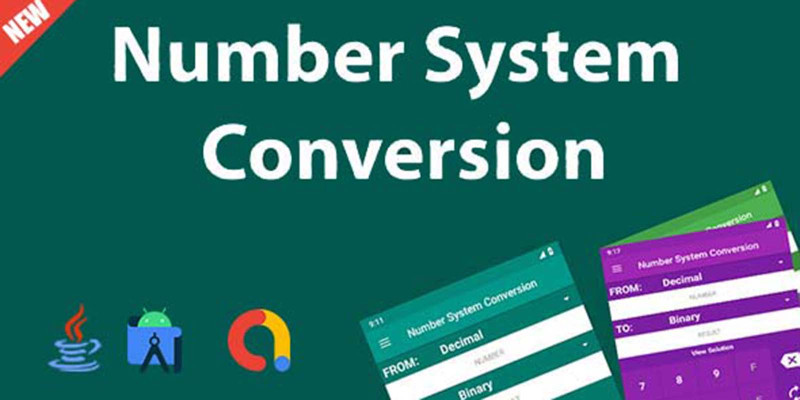
Numeral System Converter is a converter which allows you to convert between different numeral systems like the binary system, hexadecimal system, octal number system, decimal system and vice versa.
You can also convert fraction value easily.
It is very easy to use and shows you the calculation method if you want to.
It has calculation mode, you can calculate Decimal, Binary, Octal and Hexadecimal number.
Binary Coded Decimal to Decimal and Decimal to Binary Coded Decimal conversion.

Try Demo before Purchasing


Thanks for purchasing! Don’t Forget to Rate!
Your Ratings motivate us for more creative work.
Support
If you need support, please send us an email using the contact form on the user page. We usually respond to support requests within 24 hours so please feel free to contact us with problems of any kind or even simple questions, We don’t mind responding.
Features
Features:
- Binary Calculator
- ASCII List
- Binary Converter
- AdMob Integration
- One time investment, Lifetime Admob earning system
- More than 10+ themes
- Simple to setup
- Best Admob earning model
- Fast and smooth
- Atractive and minimalist UI design
- Clean documentaion
Requirements
- Android Studio
- Basic Android development knowledge
- AdMob Account
- Play Store Account
Instructions
Documentation
· How to change application name?
· How to change package name?
· How to change application id?
· How to integrate AdMob Ads?
· How to add Envato username and purchased code?
· How to change publisher id and report email address?
Change Application Name:
Open application in your android studio. After that open string.xml file from app>src>main>res>values>string.xml. Now, change app_name value. Please follow image instruction below:
Change Package Name:
At first unchecked Flatten Packages from left side option menu in your android studio. Now you can see your package name will divided into part by part. Now, refactor and rename package name In Whole Project. Please follow image instruction below:
Change Application ID:
Open build.gradle file from your app folder. Now, find and change you application id. After changed your application id sync your project.
N.B. Don’t forget to change your google-services.json file.
Please follow image instruction below:
Integrate Admob ads:
Open string.xml file from app>src>main>res>values>string.xml. Now, change ADMOB_APP_ID, ADMOB_BANNER_ID, ADMOB_INTERESTITIEL_ID value. Please follow image instruction below:
Add Envato username and purchased code:
Open string.xml file from app>src>main>res>values>string.xml. Now, change ENVATO_USER_NAME, ENVATO_ITEM_PURCHASED_CODE value. Please follow image instruction below:
Change publisher id and report email address:
Open _V.java file from app>src>main>java>com>madlab>utils>_V.java. Now, change PUB_ID and EMAIL value. Please follow image instruction below:
| Author | MadLabIT |
|---|---|
| Category | App Templates / Android / Applications / Miscellaneous |
| Price | $25 |
| Extended License | $75 |
| Likes | 1 |
| First Release | May 17, 2022 |
| Last Update | May 17, 2022 |
| Files included | .apk, .java, .xml |
| Operating systems | Android 8.0, Android 9.0, Android 10.0, Android 11.0, Android 12.0 |
External listing. code.market does not sell this product and does not process payment for it. Pricing, payment, delivery, licensing, refunds, and support are handled by the third-party merchant on its own website. We may earn an affiliate commission from a referral. Details.
Products of the Week.
Submit🥇

Perceptle
Perceptle is a daily browser-based game that challenges you to test your sensory intuition through five quick estimation and rhythm-based rounds.
Other · 1,800 views · 11 clicksOther · Week 47 · 1,800 views · 11 clicks
🥈

Free LinkedIn Likes From Real
Get free LinkedIn likes on your posts from real members who react by hand. No
SaaS · 1,935 views · 11 clicksSaaS · Week 47 · 1,935 views · 11 clicks
🥉

STOP GUESSING WHAT TO POST
AI that learns your brand voice and builds a month of consistent, on-brand social content: carousels, posts and hooks that sound like you, not like everyone else's AI.
SaaS · 9,478 views · 76 clicksSaaS · Week 47 · 9,478 views · 76 clicks
#4

aaas.market
407 reliable micro tools for solo founders, marketers and creators. They work in your browser
SaaS · 1,899 views · 5 clicksSaaS · Week 47 · 1,899 views · 5 clicks