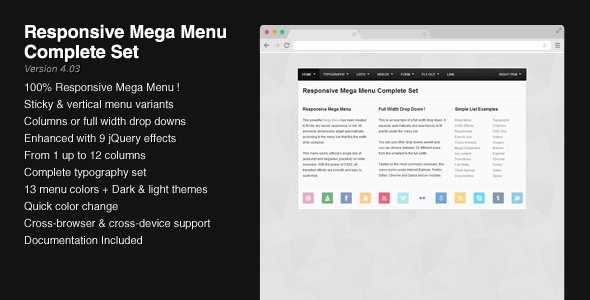
Responsive Mega Menu Complete Set
Description




This Mega Drop Down Menu Complete Set is perfect for creating unique menus by using one of the 9 jQuery effects and one of the color schemes.
Based on a custom grid, this menu allows you to organize your content into columns (from 1 up to 12) with a lot of typography examples such as headings, lists, images styling, tables, form elements, etc.
Main Features
- Completely responsive
- Horizontal and vertical versions
- Dark & Light Themes + 13 Additional Colors
- Up to 12 columns
- 9 jQuery powered effects (slide, fade, toggle…)
- Fly-out Menu with Unlimited Sublevels
- Degrades gracefully if Javascript is disabled
- Valid XHTML / CSS 3 markup
- Cross Browser Support (tested)
- Many typography examples ready to be used
- Form elements styling
- Help documentation
jQuery Effects
- Fade on click
- Slide on click
- Toggle on click
- Fade on hover
- Slide on hover
- Toggle on hover
- Open / Close effects (1 click to open, 1 click to close – fade, slide or toggle)
- First drop down already opened when the page loads
- ... Or any other drop down opened when the page loads
Compatible Browsers
This menu has been tested (and works !) in all the following browsers :
- Internet Explorer 7+
- Firefox 2+
- Safari 4+
- Opera 11+
- Chrome 4+
Changelog
05/26/2014 – Version 4.02
- Improved behavior on orientation change in megamenu.js
04/23/2014 – Version 4.01
- Fixed an issue with fly-outs occurring on mobiles in megamenu.js
03/23/2014 – Version 4.0
- Revamped and improved megamenu.js
- Added a working contact form with a captcha
- Cosmetic changes in the CSS for the form elements
01/18/2014 – Version 3.32
- Improved the script megamenu.js
10/29/2013 – Version 3.31
- Improved the script megamenu.js to handle better the switch between the desktop and mobile versions
- Added the Hammer plugin for better mobile compatibility
03/02/2013 – Version 3.3
- Improved mobile compatibility in megamenu.js
- Added the Hammer plugin for better mobile compatibility
02/21/2013 – Version 3.21
- Fixed a selector issue in megamenu.js
02/13/2013 – Version 3.2
- Improved the script in megamenu.js
- Removed the custom Modernizr biuld in megamenu_plugins.js
- Added a fixed version of the menu (changes in megamenu.css)
- Changed the behavior of the menu on mobile devices : the menu bar becomes a button to toggle the menu on small screen resolutions.
01/23/2013 – Version 3.11
- Fixed an issue occurring on mobile devices in megamenu.js
01/18/2013 – Version 3.1
- Made some improvements in megamenu.js
01/17/2013 – Version 3.01
- Fixed a minor issue in megamenu.js
12/06/2012 – Version 3.0 – Major Update !
- Rewrote the entire script megamenu.js
- Modified megamenu.css and added Media Queries
- The whole menu is now fully responsive
- Adapted all the HTML files according to the above changes
- Dropped IE6 support
This is an important update that was necessary to improve this menu and make it responsive. Updating from any previous version will require to check all the assets and adapt your HTML markup. There are so many changes that you won’t be able to update just by replacing the javascript and CSS files.
06/23/2012 – Version 2.11
- Fixed an issue occurring under IE7 in megamenu.js
04/17/2012 – Version 2.1
- Improved compatibility with touch screen devices (added the ability to open and close drop downs)
03/17/2012 – Version 2.0
- Rewrote entirely the mega menu script
- Added a javascript file containing the script plugins (HoverIntent and Modernizr)
- Removed the csshover3.htc
- IE6 now requires the ie7-js library to work properly
- Updated jQuery
IMPORTANT : since the version 2.0, and because the whole script was changed, some comments on the item page are not relevant anymore.
11/01/2011 – Version 1.4
- Improved compatibility with touchscreen devices
10/27/2011 – Version 1.3
- Improved / modified the mega menu CSS markup
- Reintroduced form elements (and fixed an issue with the drop downs closing when clicking on form elements)
- Changed important classes (CSS)
07/17/2011 – Version 1.2
- Fixed an issue with the “hover fade” effect
- Added 2 effects : slide and toggle on mouse click (open / close)
07/06/2011 – Version 1.1
- Updated jquery
- Reorganized all the files and folders
- All menu variants use the same assets (JS, CSS)
- Removed the cufon examples
- Removed the file layout.css which was not necessary
- Enabled IE6 compatibility
Categories
Tags
External listing. code.market does not sell this product and does not process payment for it. Pricing, payment, delivery, licensing, refunds, and support are handled by the third-party merchant on its own website. We may earn an affiliate commission from a referral. Details.
Products of the Week.
Submit🥇

STOP GUESSING WHAT TO POST
AI that learns your brand voice and builds a month of consistent, on-brand social content: carousels, posts and hooks that sound like you, not like everyone else's AI.
SaaS · 3,683 views · 33 clicksSaaS · Week 45 · 3,683 views · 33 clicks
🥈

Conversational Backlinks for Busy Founders
Place Backlink Relevant Conversation for your domain across Forums and Conversations
Website · 41,231 views · 222 clicksWebsite · Week 45 · 41,231 views · 222 clicks
🥉

upvote.club
Free Social Media Engagement that Helps Boost Your Content. Upvote Club supports 19 social networks with 100+ engagement actions in one dashboard. Add links to your posts and get free engagement from real users.
SaaS · 39,286 views · 114 clicksSaaS · Week 45 · 39,286 views · 114 clicks
#4

Substack Posting API
Onboard your Agent to Substack. Write Publish on Substack via API
SaaS · 58,323 views · 198 clicksSaaS · Week 45 · 58,323 views · 198 clicks
#5

Seenshot App
Free, Fast, MacOS Screenshot app. Make Screenshot cmd+shift+2 and send it via link
Desktop App · 27,711 views · 120 clicksDesktop App · Week 45 · 27,711 views · 120 clicks
#6

Hand-Placed Backlinks $9.99 per link. Flat rate.
Buy hand-placed forum, Q-A and directory backlinks. Flat $9.99 per link, no subscriptions — you only pay for approved listings.
Website · 3,587 views · 18 clicksWebsite · Week 45 · 3,587 views · 18 clicks
#7

Free Invoice Generator - PDF Invoices in Your Browser, No Sign-Up
A free invoice maker for freelancers and small businesses: fill in the invoice, check the live preview, and download a PDF that looks exactly like it. Any currency, tax per item, three templates, no sign-up, and nothing leaves your device.
2,276 views · 16 clicksWeek 45 · 2,276 views · 16 clicks
#8

Merge PDF Files Free - Combine PDFs in Your Browser, No Upload
A free PDF merger for office workers, students, and freelancers: combine PDFs and images into one file in the browser, reorder files and pages, pick page ranges, keep bookmarks, and open password-protected PDFs. Nothing is uploaded, no sign-up, no watermark.
2,112 views · 13 clicksWeek 45 · 2,112 views · 13 clicks