The Largest Curatorial Library
With Codecanyon Documentation

Site Switcher (jQuery)

Site Switcher (jQuery)

The “Site Switcher” is modular application with three components; switcher, assign and dashboard. Any of the three plug-ins can be used on their own, or together. The application lets you create an inter-domain or cross-domain website switcher to easily navigate between different URLs. It can be useful for corporate or other websites where such kind of functionality is required. It can also be quite handy for things like presentations, top-frames, navigation, online documentation etc.

Created Feb 1, 2011 · Updated Feb 4, 2011 · ★ 4.39 (28) · 203 sales

Pexdoc - Knowledgebase Customer Support & Helpdesk Ticketing CMS

Pexdoc - Knowledgebase Customer Support & Helpdesk Ticketing CMS

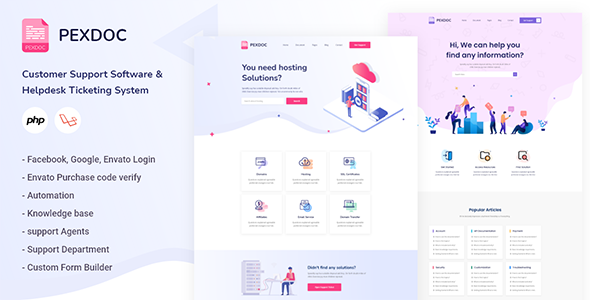
Pexdoc is a Knowledgebase Customer Support & Helpdesk Ticketing CMS. it build using PHP Laravel framework and bootstrap 4. it has 02 page home page variant along with necessary inner pages. it comes with drag & drop menu builder , drag & drop form builder, drag & drop widget builder. in support ticket it has automation ( admin can take action based on various kind of condition dynamically), has agent system, todo adding features, also has option to customise support ticket form. For envato author it has option to verify purchase. it comes with facebook & google & envato login feature which make user life easy to login to the website, a lot of others features.

Created Dec 24, 2025

Slope - Flat Pricing Table

Slope - Flat Pricing Table

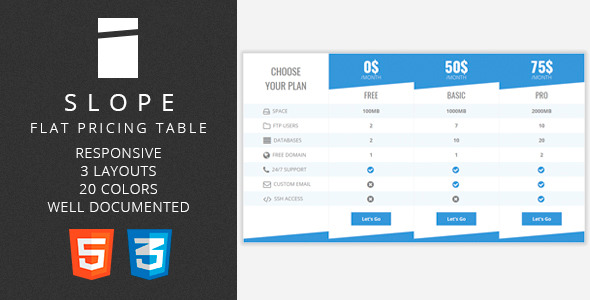
The pricing table is coming in 3 layouts — 3 plans, 4 plans, 3 plans + features column. Each layout is present in 28 common flat colors. Changing the color is also very easy and described in the documentation. All layouts are optimized for smartphones and tablets Detailed documentation will guide you through the installation and customization process. You are also welcome get your hands dirty and edit the code ‐ HTML and CSS files are well commented. If you have any questions about the pricing table or just want to say “Hi” ‐ just send me a message.

Created Dec 23, 2025

Content Swapper (jQuery)

Content Swapper (jQuery)

“Content Swapper” is a JavaScript class that helps organize content on a single page in a way that navigating through it becomes very easy and user-friendly. It does so by swapping content based on a Fragment Identifier link (e.g. #some-id) that refers to an anchor element on the same page which has an attribute string equal to the fragment value (e.g. id=”some-id”). This script can be very useful for creating help files, faq pages, presentations etc.

Created Nov 1, 2010 · ★ 4.50 (12) · 114 sales

{Keyworder} - Manage Keywords With A Smile

{Keyworder} - Manage Keywords With A Smile

{Keyworder} v1.0 is a lightweight and versatile jQuery plugin providing an easy way to manage your content keywords, acronyms and abbreviations in a tooltiped way. But this is not the only application for this code, as it can also be used to detect text patterns such as emails, URLs, IP addresses, numbers, dates and smileys and format them with default or custom templates. It comes with a whole set of built-in detectors and converters, such as the smileys dictionary, which automatically detects the text signs and converts them into smileys

Created Jul 20, 2012 · ★ 5.00 (4) · 33 sales

Interactive Readme File

Interactive Readme File

The Readme 2.0 is a unique and engaging alternative to traditional readme.txt files. It utilizes a console-style interface inspired by the popular “The Matrix” movie franchise to present project instructions and information to users in an entertaining and memorable way. The interface includes a scrolling console for displaying messages, and an input field for users to enter commands or respond to prompts. This provides a clear understanding of how to use your project, making it suitable for a wide range of applications, including software applications, websites, and games. it can also be used as a supplementary or interactive way to engage users with the README file. For example, if the README file includes a section on frequently asked questions, the Matrix Messages interface could be used to display some of those questions and answers in an engaging way. Overall, Readme 2.0 is a great choice for anyone looking to add some personality to their project or make it more engaging for users. It provides a unique and memorable user experience that can be used in a variety of applications. Additionally, the console includes a feature that allows users to save the messages as a text file, making it a practical alternative to traditional readme files.

Created May 22, 2023 · Updated Mar 26, 2025 · 4 sales