
Zumbla Deluxe (Admob + GDPR + Android Studio)

Description
UPDATE AUGUST 2025 – API-36
Update respecting Google recommendations for android development.

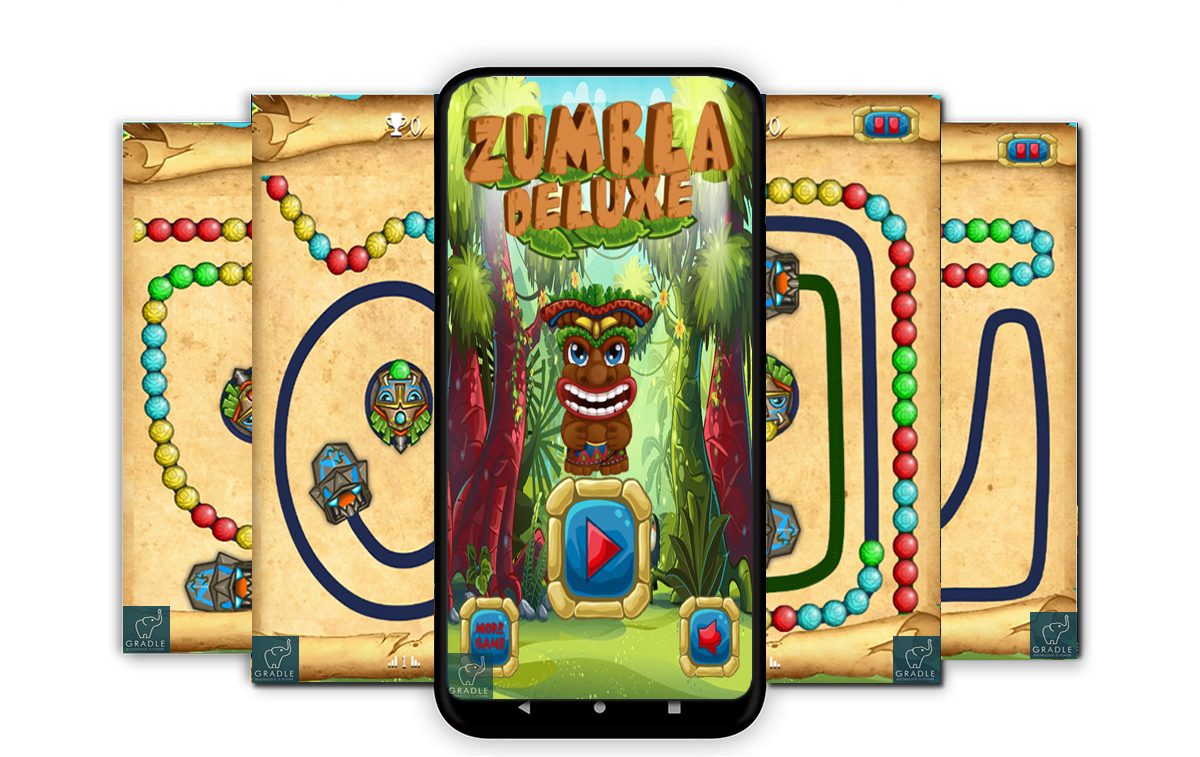
Zumbla Deluxe is a type of Marble shooter games, where you have to marble shoot rows of colorful marble lines to eliminate them. The Zumbla classic, the balls or marbles will come in the Marble and you have to aim your marble shooter carefully to create match three marbles of the same colors.
Levels 26 to 30 : https://youtu.be/p5PfYM39rBs Levels 31 to 35 : https://youtu.be/vkbmSRWRSD8
✅ Features
– Designed for tablets and phones. – APK 64 Bits – Supports both APPLIANCES ANDROID ARM & x86. – Admob Ads : Banner and Interstitials
✅ Documentation demo videos :
Run Android Studio
Video 1
Generate a signed APK
Video 2
Edit a project
Video 3
(demo – some parts are included exclusively for buyers in the documentation)


✅ Change log
2024_08_24 :
==========
+ Added support for API-34 & API-35

2022_03_26 :
===========
+ Added support for API-32
+ new GDPR Consent : based on User Messaging Platform (as Google recommendations)
+ mode : under_age  (for games targeting childrens -13)
+ improve the loading of the game
+ fix security issues and deprecated function
+ update all libraries to support last gradle version
+ new documentation

2021-09-20 :
============
+ create a new model and remove cordova plugins completly
+ integrate the last API-31 (build tools version : 31.0.0)
+ upgrade gradle to last version 7.0.2
+ fix security issues september 2021
+ update the documentation

version 2020-09-02 :
===============
+ Fix a bug related to interstitial appear on click backbutton
+ added support to build tools 4.0.1 (Android Studio) update September2020

 version 2020-05-23 :
 ================
 - Fix the issue exit game : was working on some phones for others it was just reduced. now is closed on all phones.
 - Fix the issue background music play while interstitial is showed. now is resolved.

 version 2020_05_18 :
 ================
 - update the project for compatibility with the last version of android 3.6 build tools
 - increase the loading time and fix issues of loading progression

 version 2020-01-20 :
 ===============
 - Add the PSD file of ui.png

 version 2020-01-10 :
 ===============
 - Integrate firebase
 - Improve the documentation

 version 2019_12_25 :
 ================
 - Documentation : How to create your own Policy Privacy

 version 2019_11_23 :
 ================
 - Fixed an error related to the security of the game (it is highly recommended to use this version)

 version 2019_11_22 :
 ================
 - Fix the backbutton issue : return to the previous screen.
 - Fix sound issues.
 - Fix button play to respect rules of Ads.
 - Add more security to the game.
 - Improve the loading time.
 - Update the build tools to 3.5.2

 version 2019_11_01 :
 ================
 - resolve the problem Google: "we don’t allow: Ads that aren’t clearly labeled"

 version 2019_10_31 :
 ================
 - Added backbutton confirmation message
 - Resolve some warnings

 version 2019_10_14 :
 ================
 - Documentation : add a video for design, how to change the color of path.

 version 2019_10_06 :
 ================
 - Integrate new levels (Total : 100)
 - Improve the quality of the code
 - remove two warnings
 - button (i) add function to enable or disable link for more games
 - correct an error of indexing on the libraries.

 version 2019_08_25 :
 ================
 - improve organization of images to be easy to change
 - add compatilibity with android studio 3.5.0
 - build tools sdk 29.0.2
 - respect the new rules google August 2019 API-29
✅ How To : (video documentation included)
- Open Project Into Android Studio.
- Change the package name
- How to Change Graphics game.
- How to Change Audio game.
- How to change the Admob Banner and Interstitial ID .
- Change Your Privacy policy, and review Url. (GDPR)
If you require any further information, feel free to contact me.
!!! this is a notification this game is not based on unity, this game is not based on buildbox. /!\
You’ll need only android studio.
✅ Popular questions:
Q: How can I manage my console well and win with my Admob?
A: My first advice, do not waste a lot of time with the code, many buyers really have good skills, and good ideas for improvement.
But, improve nothing is the number 1 winning rule.
Publish and when it works well improve.
Q: So, what do I do?
We did all, to provide you with a functional game without any errors during the play.
You have been provided with a good documentation to launch in Android Studio even for someone who has never worked with it, by following the documentation video.
So, quickly skinning your game, create an id banner and an interstitial id in your console and integrate them into the project. In general, make a skin and all these stages of publication will take you 3 days the first time. For a professional less than a day.
Q: Interesting, and then?
A: Publish a game is good, but you have a new job: make it known. Do not rely on the passenger consulting Playstore.
Add posts on Facebook, Twitter, Pinterest, LinkedIn, ... join groups or forums. Register in CPA offers or Send mailing. This is the winning rule number 2.
This is what Envato is doing, to be at the top of the digital sales markets : advertising campaigns for mailing, and attractive offers for the referal  .
Q: How much will I earn ?
A game in its first time, with your console little known, emm it can bring you a $ 1 per day, which is $ 30 per month.
Q: No, no, I do not break my head for $ 30 in a month? I will give up so !!!
- Like all investment, a game that will take you 2 or 3 days to launch. If you start 10 games, you will earn $ 300 a month (but respecting rule 2), and this is only in the beginning, month after month it improves.
So if your strategy is based on launching a single game: give up.
- A good console that contains 15 games can earn an average of $ 1800 a month, when it is well-known, so focus on the good reviews and the number of stars for each game released.
- I know people, who have consoles with 60 games, so imagine how much they earn .
.
Q: How much will I earn ?
A game in its first time, with your console little known, emm it can bring you a $ 1 per day, which is $ 30 per month.
Q: No, no, I do not break my head for $ 30 in a month? I will give up so !!!
- Like all investment, a game that will take you 2 or 3 days to launch. If you start 10 games, you will earn $ 300 a month (but respecting rule 2), and this is only in the beginning, month after month it improves.
So if your strategy is based on launching a single game: give up.
- A good console that contains 15 games can earn an average of $ 1800 a month, when it is well-known, so focus on the good reviews and the number of stars for each game released.
- I know people, who have consoles with 60 games, so imagine how much they earn .
Q: I saw on youtube people who earn 1k per day!!! A: Respecting, the rules of the advertising and by no inter at startup. you win little but forever.
Do not fall into the trap of spam, it will only cause you a suspension of your console, and finally to start again from the beginning, even with much limitation because you would have lost your reputation, even if you change the phone, mailbox or vpn, you will always be traced, don’t ask me why, because I don’t have the right
More Games :
===========


░░░░░░░░░░░░░░░░░░░░░░░░░░░░░░░░░░░░░░░░░░░░░░░░░░░ ░░░░░░░░░░░░░░░░░░░░░░░░░░░░░░░░░░░░░░░░░█░█░░░░░░░ ░░░░░░░░░░░░░░░░░░░░░░░░░░░░░░░░░░░░░░░░█░█░█░░░░░░ ░░░░░░░░░░░░░░░░░░░░░░░░░░░░░░░░░░░░░░░█░░░░█░░░░░░ ░░░░░░░░░░░░░░░░░░░░░░░░░░░░░░░░░░░░░░░░█░░░█░░░░░░ ░░░░░░░░░░░░░░░░░░░░░░░░░░░░░░░░░░░░░░░░░█░░░█░░░░░ ░░░░░░░░░░░░░░░░░░░░░░░░░░░░░░░░░░░░░░░░█░░░░█░░░░░ ░░░░░░░░░░░░░░░░░░░░░░░░░░░░░░░░░░░░░░░░█░░░░█░░░░░ ░░░░░░░░░░░░░░░░░░░░░░░░░░█░░██████░░░░█░░░░░░█░░░░ ░░░░░░░░░░░░░░░░░░░░░░░███░██░░░░░░██░█░░░░░░░█░░░░ ░░░░░░░░░░░░░░░░░░█████░░░░░░░░██░░░░█░░░░░░░░█░░░░ ░░░░░░░░░░░░░░████░░░░░█░░░░░░░░░░░░░░░░░░░░░░█░░░░ ░░░░░░░░░░░░██░░░░░░░░░░█░░░░░░░░░░░░░░░░░░░░█░░░░░ ░░░░░░░░░░░█░░░░░░░░░░░░░███░░░░░░░░░░░░░░░░█░░░░░░ ░░░░░░░░░░█░░░░░░░░░░░░░░░░░░░░░░░░░░░██████░░░░░░░ ░░░░░░░░░░░█░░░░░░░░░░░░░░░░░░░░░░░░░█░░░░░░░░░░░░░ ░░░░░░░░░░░░█░░░░░░░░░░░░░░░░░░░░░░░░█░░░░░░░░░░░░░ ░░░░░░░░░░░░░█░░░░░░░░░░░░░░░░░░░░░░█░░░░░░░░░░░░░░ ░░░░░░░░░░░░░░█░░░░░░░░██████░░░░░░█░░░░░░░░░░░░░░░ ░░░░░░░░░░░░░░░█░░░░░░█░░░░░░█░░░░█░░░░░░░░░░░░░░░░ ░░░░░░░░░░░░░░░░█░░░░█░░░░░░░░█░░░█░░░░░░░░░░░░░░░░ ░░░░░░░░░░░░░░░░░█░░░█░░░░░░░░█░░░█░░░░░░░░░░░░░░░░ ░░░░░░░░░░░░░░░░░██████░░░░░░██████░░░░░░░░░░░░░░░░ ░░░░░░░░░░░░░░░░░░░░░░░░░░░░░░░░░░░░░░░░░░░░░░░░░░░ ░░░░░░░░░░░░░░░░░░░░░░░░░░░░░░░░░░░░░░░░░░░░░░░░░░░ ░░░░░░░░░░░░░░░░░░░░░░░░░░░░░░░░░░░░░░░░░░░░░░░░░░░
| Type | Android App |
|---|---|
| Author | gradle |
| Category | Mobile / Android / Games |
| Price | $18 |
| Sales | 632 |
| Rating | 4.75 from 53 ratings |
| Published | Jul 22, 2019 |
| Last Update | Nov 3, 2025 |
| Compatible Software | Android 15.0, Android 12.0, Android 11.0, Android 10.0, Android 9.0, Other |
| Mobile Files Included | .java, .xml, Layered PSD, JavaScript JS |
| Video Preview Resolution | 720x1280 |
Categories
Tags
External listing. code.market does not sell this product and does not process payment for it. Pricing, payment, delivery, licensing, refunds, and support are handled by the third-party merchant on its own website. We may earn an affiliate commission from a referral. Details.
Products of the Week.
Submit🥇

STOP GUESSING WHAT TO POST
AI that learns your brand voice and builds a month of consistent, on-brand social content: carousels, posts and hooks that sound like you, not like everyone else's AI.
SaaS · 4,294 views · 38 clicksSaaS · Week 45 · 4,294 views · 38 clicks
🥈

Conversational Backlinks for Busy Founders
Place Backlink Relevant Conversation for your domain across Forums and Conversations
Website · 42,008 views · 223 clicksWebsite · Week 45 · 42,008 views · 223 clicks
🥉

upvote.club
Free Social Media Engagement that Helps Boost Your Content. Upvote Club supports 19 social networks with 100+ engagement actions in one dashboard. Add links to your posts and get free engagement from real users.
SaaS · 40,051 views · 117 clicksSaaS · Week 45 · 40,051 views · 117 clicks
#4

Substack Posting API
Onboard your Agent to Substack. Write Publish on Substack via API
SaaS · 59,060 views · 198 clicksSaaS · Week 45 · 59,060 views · 198 clicks
#5

Seenshot App
Free, Fast, MacOS Screenshot app. Make Screenshot cmd+shift+2 and send it via link
Desktop App · 28,437 views · 122 clicksDesktop App · Week 45 · 28,437 views · 122 clicks
#6

Hand-Placed Backlinks $9.99 per link. Flat rate.
Buy hand-placed forum, Q-A and directory backlinks. Flat $9.99 per link, no subscriptions — you only pay for approved listings.
Website · 4,269 views · 19 clicksWebsite · Week 45 · 4,269 views · 19 clicks
#7

Free Invoice Generator - PDF Invoices in Your Browser, No Sign-Up
A free invoice maker for freelancers and small businesses: fill in the invoice, check the live preview, and download a PDF that looks exactly like it. Any currency, tax per item, three templates, no sign-up, and nothing leaves your device.
2,944 views · 17 clicksWeek 45 · 2,944 views · 17 clicks
#8

Merge PDF Files Free - Combine PDFs in Your Browser, No Upload
A free PDF merger for office workers, students, and freelancers: combine PDFs and images into one file in the browser, reorder files and pages, pick page ranges, keep bookmarks, and open password-protected PDFs. Nothing is uploaded, no sign-up, no watermark.
2,719 views · 13 clicksWeek 45 · 2,719 views · 13 clicks