Zenwares - Kitchen Interior & Appliances WooCommerce WordPress Theme icon

Zenwares - Kitchen Interior & Appliances WooCommerce WordPress Theme

Hot or Not
Zenwares - Kitchen Interior & Appliances WooCommerce WordPress Theme

Description

WELCOME OUR NEW SERVICE

UPDATE latest version 1.2.11: Released on Jan-18-2023| Changelog

[+] Update WordPress 6.1.1
[+] Update WooCommerce 7.2
[+] WP Bakery 6.10.0
[+] Revolution 6.6.8
[#] Bug fix: Fix bug not receiving woocommerce thumbnail config on listing page
[#] Bug fix: Fix bug out of stock error showing in search page when choosing hide out of stock option of Woocommerce

Zenwares – A Stunning Responsive Kitchen Interior WordPress eCommerce Theme

Zenwares is a responsive WordPress theme that is ideal solution for any interior or materials website in kitchen house. It works well for creating a better navigation and neatly organized content structure. With clean and styled design, this beautiful template will make your site brighter, more attractive and help your sales volume up.

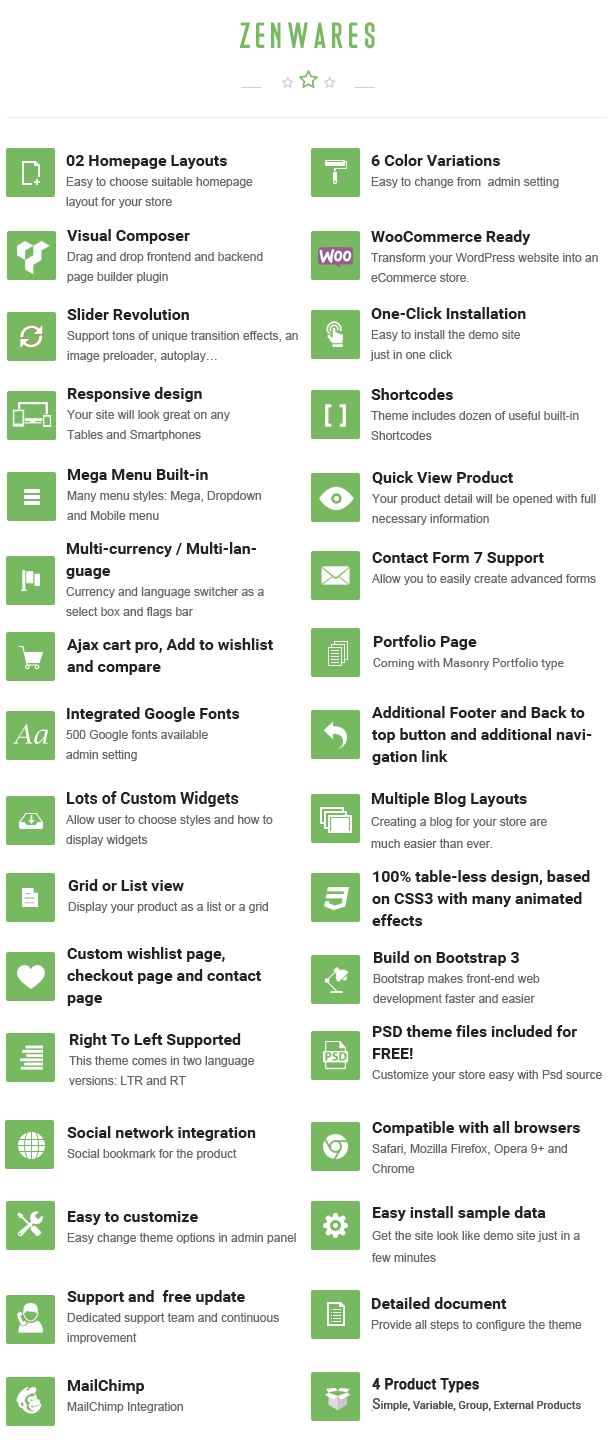
This theme is not only about a beautiful design, but also about a fully functional theme that focus on user experience and usability with huge number of awesome features: 2 Homepage Styles, 6 Color Variations, Responsive layout, product Gird & List view, product Quick view, Slider Revolution, Demo One-click Installation, Boxed layout, etc.

2 DIFFERENT HOMEPAGE LAYOUTS
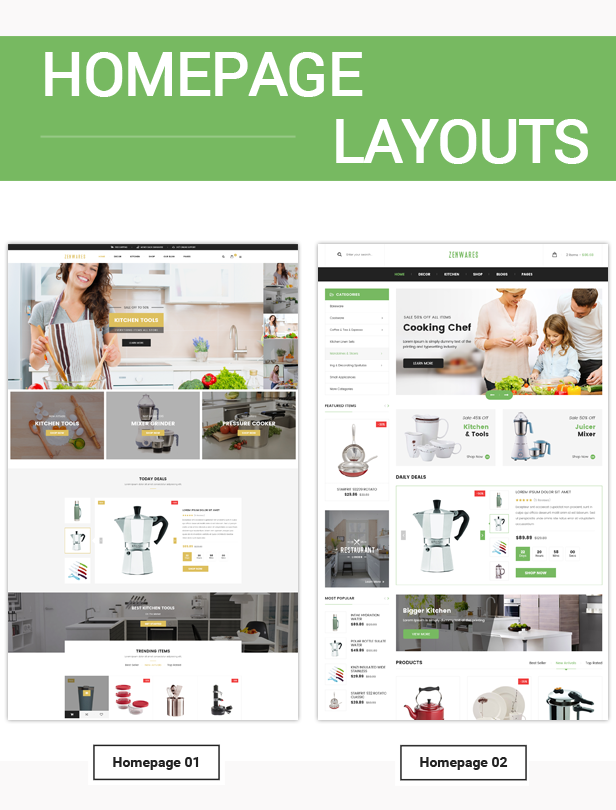
Whatever your style, build a homepage that works for you. Choose a layout and color scheme, and customize the header with different images or sliders.

COLOR STYLES
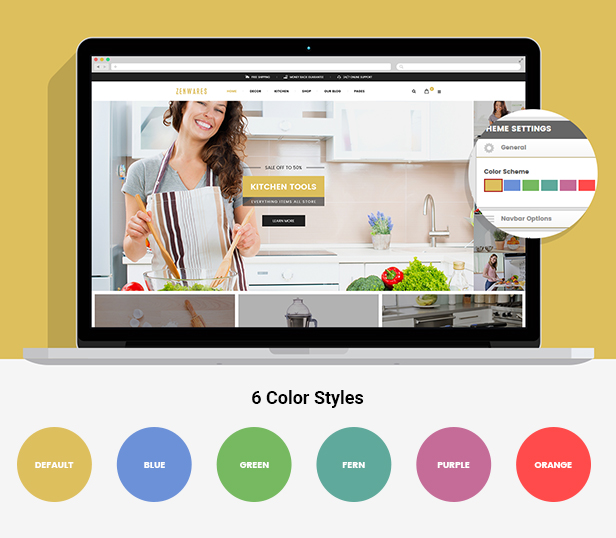
With 6 pre-made color styles, you can easily set your site with the one you love.

RESPONSIVE DESIGN

Zenwares is fully responsive and looks delightful across different devices and screen layouts as well.

MENU STYLES
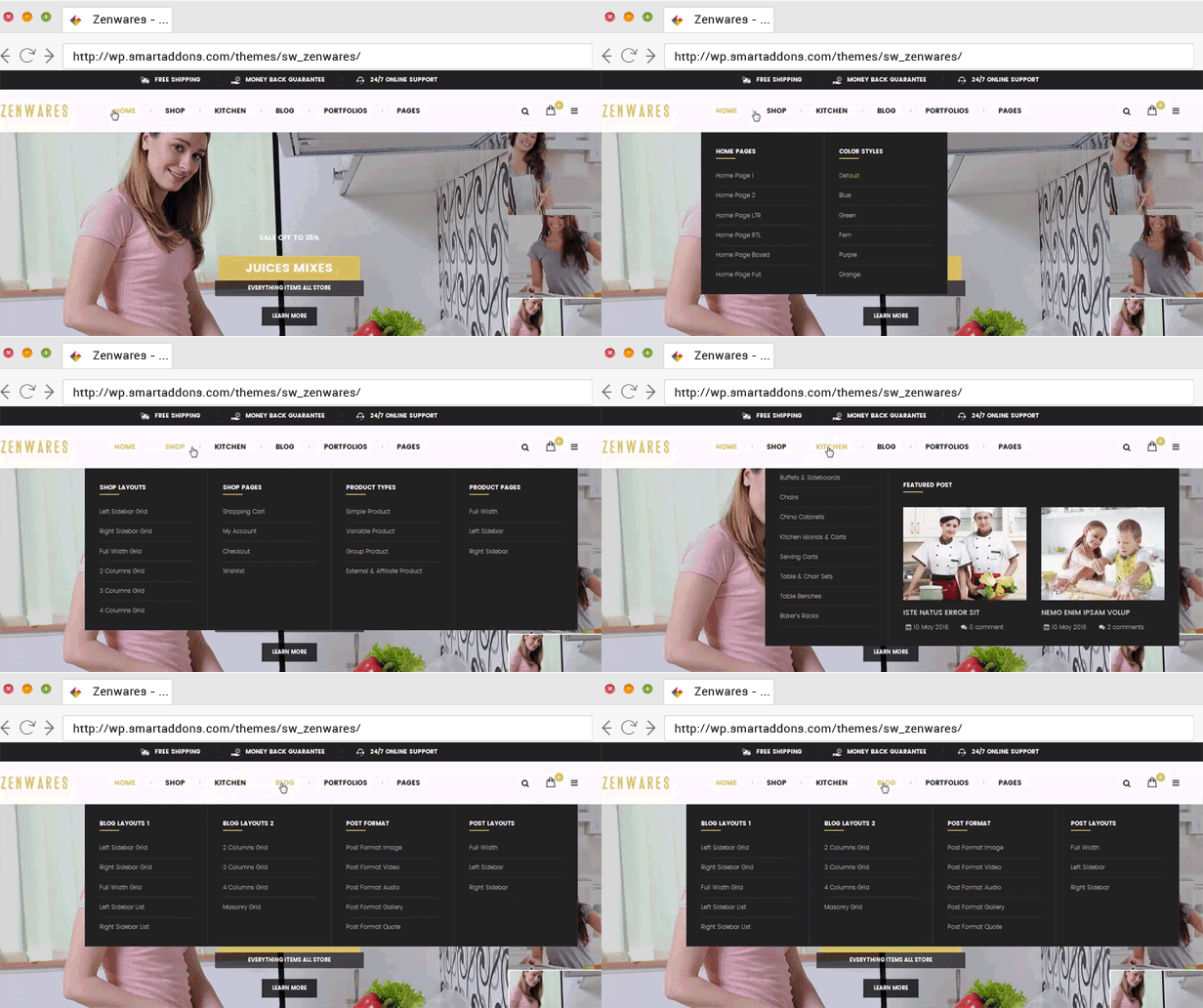
You can easy to create columns to display categories and products with description, price, image, video, effects… or even add links to any page, widgets with promotion banners and plugins.

QUICK VIEW PRODUCT
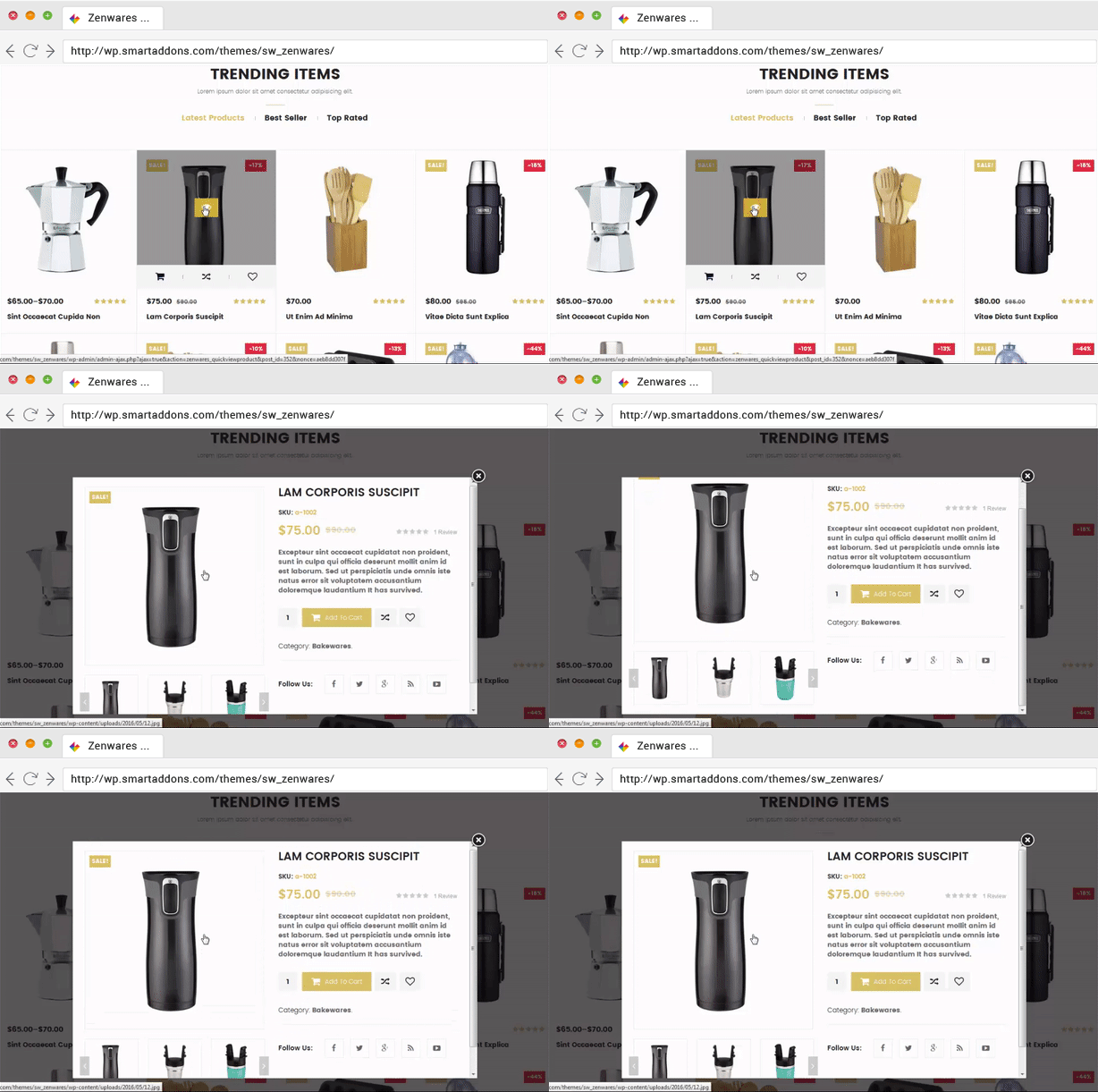
It’s so convenient for customers to view quickly detail product on the Homepage, Listing page without leaving the current page.

AJAX ADD TO CART
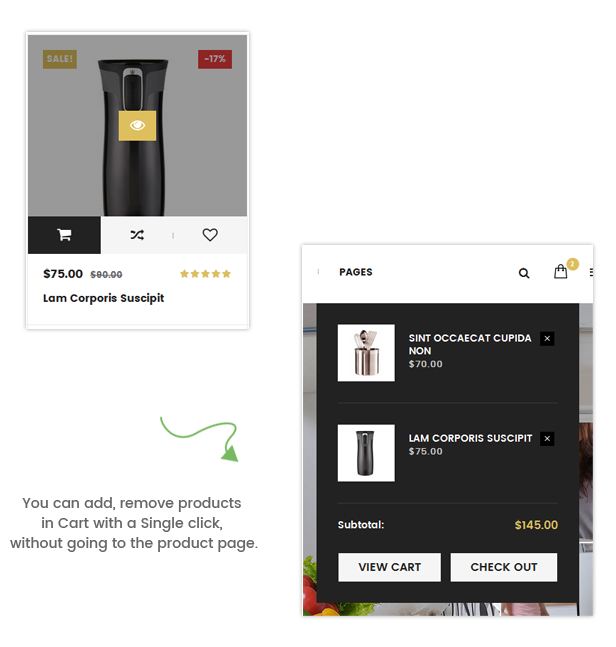
Be built-in Minicart widget, you can select product to buy without leaving current page, instantly add product to basket. Additional, you can easily add product to wishlish or compare product.

WOOCOMMERCE INTEGRATION
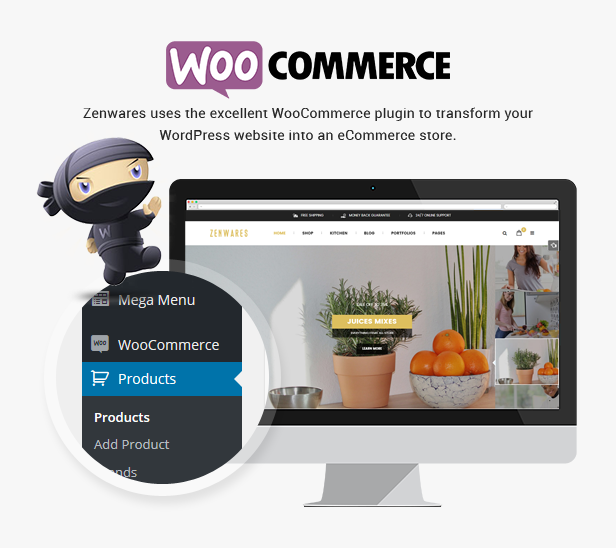
The theme uses the excellent WooCommerce plugin to transform your WordPress website into an eCommerce store.

PREMIUM ADDONS INCLUDED
The most popular WordPress plugins are included in this shopping theme. You will be saved $53 on WPBakery Page Builder and Revolution Slider plugins that will save you tons of time working on the site content.

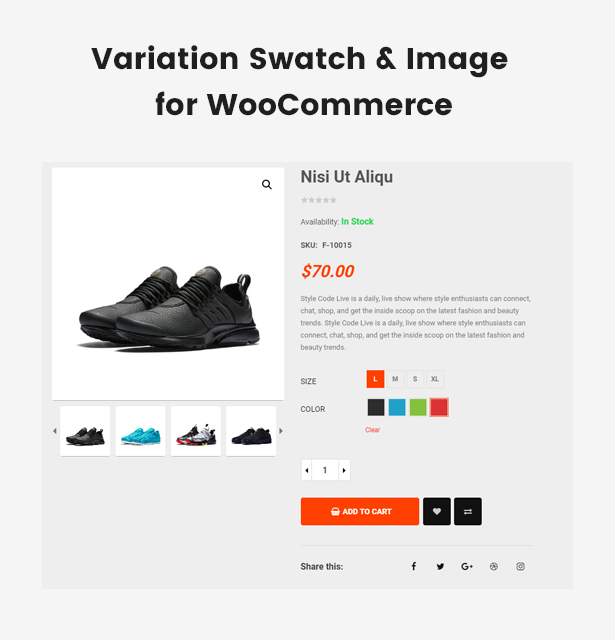
VARIATION SWATCH & IMAGE FOR WOOCOMMERCE
ONE-CLICK IMPORT SAMPLE DATA

Quickly import our sample data of page, slider, mega menu, module, theme options and other settings with a single click. Get a site look like a demo just in few minutes.

TRANSLATION SUPPORT

The online Technology theme is fully compatible with the WPML multilingual plugin, you can translate your website to any language.

HTML5, CSS3, BOOTSTRAP & LESS

The multi-purpose WordPress theme is built with new web technology: Bootstrap 3, Font Awesome 4, LESS, CSS3, HTML5 that makes the theme more powerful and flexible.

USEFUL SHORTCODES

The tons of useful built-in Shortcodes are integrated. You can create advanced content with minimal effort or even without any knowledge how to code HTML. Shortcodes can be used anywhere in pages, posts and also in menu.

RICH SNIPPETS
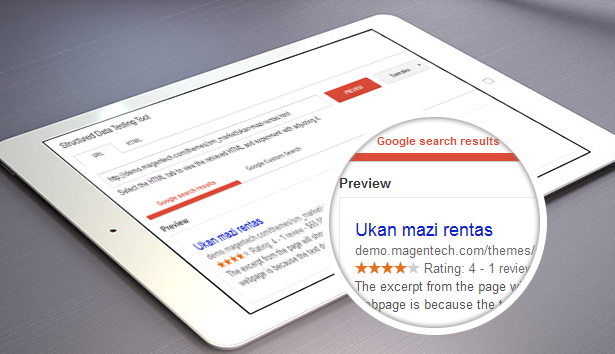
This theme supports Rich Snippets to improve your search ranking and SEO experience. Google search engine and others can parse your recipes much faster and give you much better rankings compared with other sites without this markup.
Full Feature List

  • 2 Homepage Layouts
  • Compatible with WordPress 6.1.x
  • WooCommerce 7.3.x Ready!
  • Revolution Slider (advanced page builder)
  • WPBakery Page Builder
  • MailChimp for WordPress
  • One Click Import Demo Site – Easiest and fastest way to build your website
  • Child Theme Included
  • Compare & Wishlist support
  • Various Shortcodes – Get creative with unlimited combinations of easy-to-use shortcodes and quickly create any type of page you like.
  • Responsive WordPress Theme
  • 6 Preset Color Styles
  • Google Fonts Included
  • Fully integrated with Font Awesome Icon
  • Built in with HTML5, CSS3 & LESS
  • Contact Form ready
  • Easy Customization
  • Typography – Highly customizable typography settings,
  • Support menu with Mega and dropdown style
  • Support primary menu location, widget sidebars
  • SEO Optimized
  • Blog Layout Options:
    • Left Sidebar with Grid view (2-4 columns)
    • Right Sidebar with Grid view (2-4 columns)
    • Left Sidebar with List view
    • Right Sidebar with List view
  • Post Format Types:
    • Post Format Image
    • Post Format Audio
    • Post Format Gallery
    • Post Format Video
  • Multiple portfolio pages: Portfolio Masonry, Portfolio 2-4 columns
  • Translation – WPML compatible and every line of your content can be translated
  • RTL Support
  • Support to add custom CSS/JS
  • Cross browser compatible – It works fine under modern, major browser (FireFox, Safari, Chrome, IE10+)
  • Free Lifetime Updates

WHAT ARE INCLUDED?

Zenwares Theme Package Use this package to install to your current site

PSD Sources All PSD design themes

Detailed Documentation Provide all detailed steps to configure theme
CHECK OUR POPULAR WORDPRESS THEMES:
Change Log

------------ VERSION - 1.2.11: Released on Jan-18-2023 ------------
[+] Update WordPress 6.1.1
[+] Update WooCommerce 7.2
[+] WP Bakery 6.10.0
[+] Revolution 6.6.8
[#] Bug fix: Fix bug not receiving woocommerce thumbnail config on listing page
[#] Bug fix: Fix bug out of stock error showing in search page when choosing hide out of stock option of Woocommerce

------------ VERSION - 1.2.10: Released on Apr-11-2022 ------------
[+] Update WordPress 5.9.3
[+] Update WooCommerce 6.3.1
[+] Update WP Bakery 6.8
[+] Update Slider Revolution 6.5.19
[+] Fixbug click bulk select in menu not display checkbox in menu item.
------------ VERSION - 1.2.9: Released on Oct-13-2021 ------------
[+] Update WordPress 5.8.1
[+] Update WooCommerce 5.7.1
[+] Update WPBakery Page Builder 6.7.0
[+] Update Slider Revolution 6.5.9
[#] Bug fix: Fix bug Ajax Load with SW Woo Catalog
[#] Bug fix: Fix bug Error Schema Google in single product
[#] Bug fix: Fix bug in theme translation
------------ VERSION - 1.2.8: Released on Jun-23-2021 ------------
[+] Update WooCommerce 5.4.1
[+] Update Number of item added to cart
------------ VERSION - 1.2.7: Released on May-26-2021 ------------
[+] Update WordPress 5.7.2
[+] Update WooCommerce 5.3.0
[+] Update Revolution Slider 6.4.11
[+] Update SW WooCatalog
[#] Bug fix: Fix bug with theme translation
------------ VERSION - 1.2.6: Released on Mar-27-2021 ------------
[+] Update WordPress 5.7 
[+] Update WooCommerce 5.1.0
[+] Update Revolution Slider Version 6.4.6
------------ VERSION - 1.2.5: Released on Feb-27-2021 ------------
[+] Update WordPress 5.6.2 
[+] Update WooCommerce  5.0.0
[+] Update Slider Revolution 6.4.2
[+] Update WPBakery Page Builder 6.6.0
------------ VERSION - 1.2.4: Released on Jan-30-2021 ------------
[+] Update WooCommerce 4.9.2
[+] Update Revolution Slider 6.3.6
------------ VERSION - 1.2.3: Released on Dec-18-2020 ------------
[+] Update WordPress 5.6
[+] Update WooCommerce 4.8.0
[+] Update WPBakery Page Builder 6.5.0
[+] Update Revolution Slider 6.3.3
[+] Update option option for product review
[#] Bug fix: Fix bug deprecated
------------ VERSION - 1.2.2: Released on Nov-26-2020 ------------
[+] Update WooCommerce 4.67.0
[+] Update WPBakery Page Builder 6.4.2
[+] Update Revolution Slider 6.3.0
[#] Bug fix: Fix bug in previous versions 
------------ VERSION - 1.2.1: Released on Oct-30-2020 ------------
[+] Update WooCommerce 4.6.1
[+] Update WPBakery Page Builder 6.4.1
[+] Update Revolution Slider 6.2.23
[#] Bug fix: Fix bug in previous versions 
------------ VERSION - 1.1.13: Released on Aug-24-2020 ------------
[+] Update WordPress 5.5
[+] Update WooCommerce 4.4.1
[+] Update Revolution Slider 6.2.21
[+] Update WPBakery Page Builder 6.3.0
[#] Bug fix: Fix bug LessPHP & PHP 7.4
[#] Bug fix: Fix bug in sub vertical menu
------------ VERSION - 1.1.12: Released on Jul-23-2020 ------------
[+] Update WordPress 5.4.2
[+] Update WooCommerce 4.3.1
[+] Update Revolution Slider 6.2.17
[+] Update WPBakery Page Builder 6.2.0
[+] Update Theme Activation
------------ VERSION - 1.0.11: Released on Nov-26-2019 ------------
[+] Update WordPress 5.3
[+] Update WooCommerce 3.8
[+] Update Revolution Slider 6.1.5
------------ VERSION - 1.0.10: Released on Sep-11-2019 ------------
[+] Update WordPress 5.2.3
[+] Update WooCommerce 3.7.0
[+] Update Revolution Slider 6.1.1
------------ VERSION - 1.1.9: Released on Aug-08-2019 ------------
[+] Update WordPress 5.2.2
[+] Update WooCommerece 3.6.2
[+] Update Revolution Slider 6.0.8
[+] Updated Visual Composer 6.0.5
------------ VERSION - 1.1.8: Released on May-05-2019 ------------
[+] Update WordPress 5.1.1
[+] Update WooCommerce 3.6.1
[#] Bug fix: Fix bug with Ajax Login by Email
[#] Bug fix: Fix bugs in previous version
------------ VERSION - 1.1.7: Released on Mar-05-2019 ------------
[+] Update WordPress 5.1
[+] Update WooCommerce 3.5.5
[#] Bug fix: Fix bug in previous version

------------ VERSION - 1.1.6: Released on Feb-20-2019 ------------
[+] Update WordPress 5.0.4
[+] Update WooCommerce 3.5.4
[+] Update Revolution Slider 5.4.8.2
[+] Update WPBakery Page Builder 5.7
[#] Bug fix: Fix bug in SW WooCommerce when not activating WPBakery Page Builder
------------ VERSION - 1.1.5: Released on Dec-13-2018 ------------
[+] Update WordPress 5.0.1
[+] Update WooCommerce 3.5.2
[+] Update WPBakery Page Builder /Visual Composer 5.6
[+] Update Revolution Slider 5.4.8.1
[#] Bug fix: Fix bug in previous version
------------ VERSION - 1.1.4: Released on Nov-06-2018 ------------
[+] Update WooCommerece 3.5.1
[+] Updated Visual Composer 5.5.5
[+] Updated Revolution Slider 5.4.8
[+] Updated One Click Demo Import
[#] Bug Fix: Fix bug in previous version
------------  VERSION - 1.1.3: Released on Jun-14-2018  ------------
[+] Update WordPress 4.9.6
[+] Update Visual Composer 5.4.7
[+] Update Revolution Slider 5.4.7.4
[+] Update WooCommerce 3.4.x
------------  VERSION - 1.1.1: Released on Nov-20-2017  ------------
[+] Update WordPress 4.9
[+] Update Visual Composer 5.4.4
[+] Update Revolution Slider 5.4.6.3.1
[+] Update WooCommerce 3.2.x
------------  VERSION - 1.1.0: Released on August-05-2017  ------------
[+] Updated WordPress 4.8.1
[+] Updated VisualComposer 5.2.1
[+] Updated Revolution Slider 5.4.5.1
[+] Updated function : Variation Swatches and Photos for WooCommerce
------------  VERSION - 1.0.4: Release on May-31-2017  ------------
[+] Fix bug: Products could not display on site
------------  VERSION - 1.0.4: Release on May-04-2017  ------------
[+] Updated WordPress 4.7.4
[+] Updated WooCommerce 3.0.5
[+] Updated Visual Composer 5.1.1
[+] Updated Revolution Slider 5.4.3
------------  VERSION - 1.0.2: Release on Dec-29-2016  ------------
[+] Updated to WordPress 4.7
[+] Updated to Woocommerce 2.6.11
[+] Updated to Visual Composer 5.0.1
[+] Fixed bug: Show Product image in Product detail
[+] Fixed bug: do not display portfolio meta in backend
- Change: product image popup zoom in product detail to slider instead of single image
------------  VERSION - 1.0.1: Release on Dec-10-2016  ------------
[+] Added Rich Snippet
[+] Updated to Woocommerce 2.6.7
[+] Updated to Visual Composer 4.12.1
[+] Updated to Revolution Slider 5.3.0.2
[#] Fixed bug: Add to cart in product variable's quickview
[#] Fixed bug: Sortby bug in product listing page
------------  VERSION - 1.0.0: Release on Sep-17-2016  ------------
[+] Initial Release

Tags

best premium theme, bestselling wordpress theme, best wordpress theme for ecommerce, popular trending theme, best ecommerce wordpress themes, best wordpress themes, premium wordpress themes, wordpress theme responsive, responsive wordpress theme, create wordpress theme, professional wordpress theme, bootstrap wordpress theme, template wordpress, woocommerce theme, furniture theme wordpress

External listing. code.market does not sell this product and does not process payment for it. Pricing, payment, delivery, licensing, refunds, and support are handled by the third-party merchant on its own website. We may earn an affiliate commission from a referral. Details.

WooCommerce Refund And Exchange with RMA - Warranty Management, Refund Policy, Manage User Wallet icon

WooCommerce Refund And Exchange with RMA - Warranty Management, Refund Policy, Manage User Wallet

Hot or Not
WooCommerce Refund And Exchange with RMA - Warranty Management, Refund Policy, Manage User Wallet

Description

WOOCOMMERCE REFUND AND EXCHANGE WITH RMA PLUGIN IS AN OUTSTANDING WARRANTY MANAGEMENT SYSTEM THAT EASILY PROCESSES RETURNS, REFUNDS, AND EXCHANGE REQUESTS WITH AUTO RE-STOCKING, GLOBAL SHIPPING, WALLET INTEGRATION, USER WALLET & REFUND POLICY MANAGEMENT WITH AUTOMATED EMAIL NOTIFICATIONS FEATURE.

The WooCommerce Refund and Exchange With RMA Plugin is a complete solution for your Return Merchandise Authorization (RMA) policy of your WooCommerce store. It facilitates the merchants with an easy environment to set up and manage return, refund, and exchange and other related issues.

The plugin is highly compatible with the latest WordPress and WooCommerce along with php8+ version.

The Installation process is easy. And, after the activation of the plugin, merchants have full freedom for customization. There are separate menus for refund products, exchange products, cancel orders, wallet setting, text setting, email setting, shipping setting, etc. Thus, the interface of the plugin is organised and easy to grasp and merchants can easily get familiar with the backend environment in a couple of visits.

Under the Refund Setting menu, merchants can allow their customers to request for return and refund on unconvinced products. And other respective settings options are available under this menu.

Similarly, Exchange and Cancel Order Setting menus provide the respective setting option, using which the merchants can allow the buyers to send the exchange and cancel order requests respectively.

Another aspect of the plugin is a wallet. For the users, it creates a cutting-edge wallet. With the Wallet System for WooCommerce plugin, it offers excellent compatibility. Establish a sophisticated user wallet for the customers to utilize as a payment gateway.

The plugin also has a wallet feature. It sets up an advanced wallet for the users.

Further, it facilitates the sellers and the buyers with an extraordinary communication channel through emails, which is hard to find in other relatable WooCommerce RMA plugins.

Apart from these menus, there are other setting menus such as the Text Setting menu, Shipping setting menu, common setting menu, and others. All these setting options make the plugin well customizable for the merchant according to their needs and wishes.

WooCommerce Refund and Exchange Lite

Download the free version now

Features of the WooCommerce Refund and Exchange With RMA Plugin

Let’s check each of the features of the “WooCommerce Refund and Exchange With RMA” plugin in detail.

  1. Refund
  2. The merchants can make the settings to allow customers to submit a refund request. Once the refund request is accepted then the merchants can proceed the refund procedure using this plugin. The buyers can send multiple refund requests within the allowed days even if any request is already processed. It means the user can send a refund request for an ordered product multiple times even if any of the previous refund request is processed.

  3. Exchange
  4. A new order is created for the exchanged product after the consumer submits an exchange request for one or more items. The best part is that you may include attachment functionality in your exchange request. The WooCommerce default payment method is used to pay the additional amount if the exchange amount is more than the new product amount.

    The user can send multiple exchange requests up to the available days and if any request is already processed. It means the user can send an exchange request for an ordered product multiple times, even if any of the previous return request is processed.

    For refunds, exchanges, and cancellations, you can use the manual way to display the bank details field.

  5. Add Custom Status To Mark Your Progressing Refund and Exchange Process
  6. Refund or exchange is achieved in multiple steps. The WooCommerce refund and exchange plugin allow merchants to set the custom status for each step. Some common status includes — refund-requested, refund-approved, refund-canceled, exchange-requested, exchange-approved, exchange-canceled, etc.

    When a buyer requests a refund on a product then order status becomes “Refund Requested”. And, when the refund request is approved then order status changes to “refund approved” or when the refund request is canceled then order status becomes “refund canceled”. Similarly, other status can be set accordingly by the merchants as per their convenience.

  7. Availability
  8. Refund and exchange feature is available up to a certain number of days when the order is completed. When the order status is completed then the user is able to send a refund and exchange request. If anyone of the requests is in the process then another request can’t be sent. It means both refund and exchange requests for an order are not placed simultaneously for an order.

  9. Tax Handling
  10. The merchant can include the tax in the refund amount. If the include tax setting is enabled then the user can refund or exchange products with tax included product price. If a merchant disables “include tax” setting then tax price is not calculated in a refund as well as exchange.

    Include tax setting is separate for both refund and exchange process for WooCommerce RMA.

  11. Auto Accept Refund Request
  12. If a merchant wants to auto accept the refund request then can enable it from the setting option in the plugin. With auto accept, when the user requests for any product refund, the request is automatically approved and the merchant gets a notification email regarding that refund request, to proceed the refund payment process.

  13. Refund/Exchange for Guest User
  14. Return and exchange requests can be submitted by both; guests as well as registered users. There is a page created with name Refund/Exchange Request on extension activation, where the guest user enters their order id and email address and proceeds with refund/exchange request.

  15. Handling Fee
  16. The merchant can add handling fees for both refunds as well as exchange request.This fee may be inventory management fee, shipping fee, etc., according to the admin.

  17. Minimum Order Amount
  18. Merchant can set the minimum order amount, as a threshold amount. Any order below this amount cannot request for refund and exchange.

  19. Sales Items
  20. This feature prevents sale Items from the refund and exchange request. If this feature is enabled then the customer can’t send the refund or exchange request for sale items.

  21. Email Notification

    The merchant can also customize user notification email from the backend. Notification include:

    • Refund request sent notification
    • Refund request received notification
    • Refund request approved notification
    • Refund request canceled notification
    • Exchange request sent notification
    • Exchange request received notification
    • Exchange request approved notification
    • Exchange request canceled notification
  22. Product Disable
  23. The merchant can disable refund and exchange features on any chosen product. There is an option in the Advanced Setting section on the product edit page to disable refund and exchange for that product.

  24. Category Disable
  25. The merchant can remove the option of refund and exchange request from any specific product category by disabling it in the backend setting.

  26. Multiple Request Handling
  27. The merchant can enable/disable multiple refunds or exchange requests for an order. If a merchant disables Multiple Request handling then either refund or exchange request is processed for an order at a time.

  28. Manage Stock
  29. The merchant can manage the stock of the returned or exchanged product when a request is completed. If the setting is enabled then an exchanged or refunded product is added to product stock

  30. Custom CSS
  31. The merchant can add custom CSS to modify the refund and exchange request form if required.

  32. Customer Wallet
  33. The merchant can enable this feature to send the refund amount into the customer wallet, instead to refund the amount with other gateways.

  34. Wallet Payment
  35. To make payments for any purchases, you can simply add the customer’s wallet as a payment gateway. We’ve also developed an automated solution for this—.

    We’re happy to let you know that the WooCommerce Refund And Exchange with RMA plugin and our Wallet System for WooCommerce work together flawlessly i.e they both are fully compatible with each other. As a result, you can give it a try rather than suggesting another wallet system to your store.
  36. Manage Customer Wallet
  37. You can effectively manage your customer’s wallet as well as review their past and current tractions based on it utilizing our plugin’s customer edit page.

  38. Shortcode for Customer Wallet
  39. Adding a shortcode to display the Customer Wallet on any desired page is no more a hurdle in your way. You can also specify a distinct shortcode for your customer wallet and let it be utilized by your customer’s ease

  40. Cancel Order
  41. Merchants can add cancel order features to their WooCommerce store. Using this feature of the plugin, customers can cancel the ordered products which they no longer need.

  42. Catalog Settings
  43. Catalog settings allow merchants to group products based on timely requirements such as during festive days, merchants can set catalog of products for festivals and frame a common refund and exchange based WooCommerce Return policy for that.

  44. Send Return Ship Label
  45. With this setting enabled, merchants can send return ship labels to the customer for return shipping of the product(s). Merchants can also create ship label return/exchange form templates using shortcodes.

  46. Refund Policy

    Merchant can enable this feature and set their WooCommerce Return/Refund policy in two way with this WooCommerce RMA Plugin

    • Price based policy
    • Time based policy
  47. Enable Exchange Request With Same Product or its Variations
  48. Now buyers can exchange their ordered product with the same product and it’s variations.

  49. Custom Email Template for WooCommerce Refund Plugin
  50. Now you can also send a well customized email return/exchange form templates during refund and exchange.

  51. Define Exchange Rules for Exchange Request Form
  52. The admin can effectively define your Exchange rules in the backend of their website. This would help their users understand their exchange rules while initiating their product refunds.

  53. Enhance Your Button Designs
  54. You can effectively enhance the look and feel of your alert messages and button designs utilizing the additional CSS code.

  55. Employ Validation on Guest Form Entries
  56. You can easily add validation to your guest form entries and ensure that all users enter factual data when updating their forms.

Benefits of WooCommerce Refund and Exchange With RMA Plugin

A weak refund and exchange process can be a headache for your customers!

This plugin can be an ultimate solution which would make the RMA process of your store smooth and simple, and would eventually retain your customer and avoid churning after the post-purchase.

  • This plugin is an all in one RMA solution, therefore merchants don’t have to hunt for additional plugins for varieties of different tasks.
  • This plugin automates many processes, which speed up the RMA. Thus, merchants can save a lot of their time to invest in other valuable activities. For example, auto accept feature of the plugin when set can automatically accept the request made by the customer and notify the merchants about it directly in the email inbox.
  • This text setting of the plugin allows merchants to change the text they want to see on the click buttons. Thus, merchants have high freedom of customizations.
  • If merchants don’t want to offer refund and exchange on certain products, they can disable it from that product page. Thus, this plugin gives access to individually manage each and every product.
  • Merchants can write down general refund policy rules and display it directly in the refund form. This gives a quick idea to the customers about the refund guidelines.
  • The wallet feature of the plugin makes it easy for consumers to receive their refunded amount directly in their wallet. Later, they can use it for buying other products.
  • The feature of partial order cancellation, makes it possible for the buyers to cancel selected products from the whole ordered products. This saves the time and efforts of the shoppers.
  • Buyers can write notes, send reasons for the refund or exchange request along with the image attachments. This makes it easy for the buyers to clearly express their point of view, and gives a sense that the merchants are listening to their queries, which build trust and confidence.

WooCommerce RMA Plugin Compatibility

Compatibility With Wallet System For WooCommerce

The WooCommerce Refund and Exchange with RMA plugin is compatible with the Wallet System for WooCommerce, enabling the store manager to simply manage all the wallet features through a single dedicated wallet system. This integration has several advantages, including—

  • Customers are no longer required to keep a payment method or other medium of exchange on hand in order to pay for refunds and exchanges because they can utilize the amount in their wallets.
  • Customers can track all of their exchanges and refunds in one place, which makes it much easier for them to keep track of their expenditure.
  • Since customer refund and exchange transactions will be processed by the WooCommerce security system, this integration adds an extra degree of security for customers.
  • Refund amount in coupons can also be managed effectively in the wallets and can be utilized for future purchases too.
  • Live Demo

    Visit a demo to experience the powerful features of Plugin and explore.

    • Frontend demo of WooCommerce Return Refund And Exchange: Click here

    • Backend demo of WooCommerce Return Refund And Exchange: Click here

    Frequently Asked Questions

    Q. How to make the “Refund & Exchange” button visible on store pages using this RMA plugin?

    A. Admin need to perform two different settings to enable these different refund and exchange buttons. If you want to see the Refund button then follow these steps. Go to the WooCommerce -> Settings -> RAE Setting -> Refund Products and set the following necessary settings.

    1. Enable refund request,
    2. Set the maximum number of days.
    3. Select the order status in which the order can be refunded.

    If you want to see the Exchange button then follow these steps. Go to the WooCommerce -> Settings -> RAE Setting -> Exchange Products and set the following necessary settings.

    1. Enable exchange request.
    2. Set the maximum number of days.
    3. Select the order status in which the order can be exchanged.

    Q. Can the admin put some customized refund policy according to the site on the refund & exchange form ?

    A. Yes, the admin can put a customized WooCommerce Refund Policy by going into WooCommerce -> Settings -> RAE Setting -> Refund Products -> Refund Rule Editor and put the matter in the description box given as the refund rules.

    Q. Is there any shortcode for wallet features in the RMA plugin ?

    A. Yes, RMA plugin provides a shortcode to give admin an option to use the wallet anywhere on the frontend.

    Q. Is there any shortcode for Guest User features in the RMA plugin ?

    A.Yes, the admin can use shortcode to give guest users a feature to request for refund and exchange functionality anytime.

    Q. Is there any feature which allows both customer and admin to communicate with each other while processing a refund or exchange?

    A. Yes, the admin can communicate with customers in an order through the order messages functionalities which can be enabled through WooCommerce -> Settings -> RAE Setting -> Common setting -> enable order messages and admin can enable the email for the same.

    Q. Is there any email functionality provided by the plugin for refund, exchange, cancellation?

    A. Yes, RMA plugin provides an automated streamlined Email functionality for refund, exchange, cancellation request and process, admin can enable those emails from the WooCommerce -> Settings -> RAE Setting -> Mail Configuration setting.

    This plugin is not subjected to GDPR compliant as it does not store any sensitive data of a user. It only holds information related to software which is run by WordPress & WooCommerce of the holder.

    Thank-you for your interest in WooCommerce Refund and Exchange, WP Swings.

    If our documentation doesn’t contain the solution to your problem, you can visit the WP Swings Forums Community

    Create and Revamp your eCommerce store with WooCommerce Services

    Changelog

    01-02-2023 - Ver 3.1.7
    Fix: File attachments for order message functionality
    Fix: Compatibility with latest WP and WC along with php8+ version.
    
    07-10-2022 - Ver 3.1.6
    New: Showing Bank Details field on the manual method.
    New: Adding exchange attachment field.
    New: Wallet System for WooCommerce plugin compatibility.
    Fix: Compatibility with latest WP and WC along with php8+ version.
    
    17-06-2022 - Ver 3.1.5
    Fix: Compatible with latest WP and WC
    
    15-02-2022 - Ver 3.1.4
    New: Change author from MakeWebBetter to WP Swings
    New: Notice display of current version for WP Swings
    New: Minor Bug fixes
    New: Compatible with latest WP and WC 
    
    25.11.2021 - Ver 3.1.3
    New: Add the order id shortcode for rma order message
    New: Add exchange rule for the exchange request form
    Fix: Add the validation for Guest Form When using the shortcode
    Fix: Compatible with Latest WP and WC
    Fix: Add the CSS to enhance the button and alert messages.
    
    27.08.2021 - Ver 3.1.2
    New: Add refund rule editor for refund form.
    New: Compatibility with Latest WP(5.8) and WC(5.6.0)
    Fix: Fixed the bugs and issues
    
    05.03.2021 - Ver 3.1.1
    New: Attachment limit setting on Refund Form
    New: Compatibility with Latest WP and WC
    Fix: Made some changes to settings description text.
    Fix:  Cancel Product button issue for guest user.
    Fix: Refund Policy Empty field saved issue.
    
    04.10.2019 - Ver 3.1.0
    New: Deduct WC-Coupon amount from Refund/Exchange Amount
    New: Hide the Refund/Exchange button from the front-end
    New: Disable Refund/Exchange mails to customer
    New: Hide Wallet on front-end when wallet is not enable 
    Fix: HTML tags removing from text editor (from custom template).
    Fix: Saving image in email header and footer section.
    Fix: Adding double quantity product on order cancel.
    Fix: Refund Amount added to wallet for the first time.
    Fix: Refund/Exchange Guest form session.
    Fix: Cancel Product Form cancel whole order.
    
    04.10.2019 - Ver 3.0.0
    New: Short-code for Guest user Refund/Exchange form.
    New: Pay button link in Exchange approved mail for Extra Exchange Amount.
    New: Compatibility with latest WP (5.2.3) and WC (3.7.0) 
    
    24.04.2019 - Ver 2.1.5
    New: Added remove button for refund and exchange reasons.
    Fix: Blank field validation For pre-defined refund and Exchange reasons.
    
    01.06.2018 - Ver 2.1.4 
    Fix: RAE Configuration WordPress url tweek
    
    23.05.2018 - Ver 2.1.3
    New: Order/ Order's Product Cancel Mail For Admin
    New: Confirmation From Customer Before Order/Order's Product Cancelation
    New: Wallet Settings Tab Creation in RAE Settings
    Fix: Shipping Fee Calculation Issue for Refund Approved Mail
    
    26.03.2018 - Ver 2.1.2 
    New: Auto update extention from dashboard functionality added.
    New: Purchase code varification added to use extention.
    
    16.03.2018 - Ver 2.1.1
    New: Formatted Billing Formatted Shipping Address Shortcode Added for RAE Mail Configuration.
    New: WooCommerce Refund And Exchange WC-Vendor Addon Compatibility.
    
    09.03.2018 - Ver 2.1.0
    New: Manual Refund or Exchange feature.
    New: Show Sidebar in Refund or Exchange Request Form Setting added.   
    New: Add to cart button display setting on time of exchange.
    New: Some hooks added in refund and exchange request form.
    New: Partial order(order's products cancel feature.
    New: Design Renovation.
    New: Help Section Added.
    Fix: Bug fixes.
    
    11.12.2017 - Ver 2.0.0
    New: Return Shipping Label Feature.
    New: Price based Refund Policy Listing in Product Page(Product warranty Feature).
    New: Full admin Control in Stock Management.
    New: Full admin control in Refund Money.
    New: Refund Exchange form Template Overridden through Theme.
    Fix: Tax Calculation Issue.
    Fix: Currency separator issue.
    Fix: Bug Fixes.
    
    25.10.2017 - Ver 1.1.2
    Fixed: Compatible with WooCommerce 3.2.x
    Fixed: Bug Fixed.
    
    26.08.2017 - Ver 1.1.1
    New: Email Template Modification.
    New: Order short codes for Email.
    New: Exchange With same product or its variation.
    
    06.07.2017 - Ver 1.1.0
    New: Compatible with woocommerce 3.1.0.
    New: Customer can also exchange order in less old order amount and left amount refunded to customer.
    New: Quantity will be updated on time of cancel order.
    New: Admin can also refund amount later in case of wallet disable.
    New: Customer can select refund method on time of product refund like wallet refund and manual refund.
    Fix: Quantity update issue fixed on time of exchange and refund.
    Fix: Exchange button only visible on in stock simple product in shop page.
    
    30.05.2017 - Ver 1.0.10
    Fix: Issue Fixed.
    
    20.04.2017 - Ver 1.0.9
    New: Compatible with Woocommerce v3.0.x.
    New: Add Product Catalog Feature for the different refund and exchange days per catalog.
    New: Add Refund Policy Settings according to Time and Price Based.
    Fix: Hide Add to Cart Button On Exchange.
    Fix: Product Refund and Exchanged quantity accepts maximum bought product quantity.
    
    21.02.2017 - Ver 1.0.8
    New: Add Cancel Order Feature for the customerstt
    New: Add Setting Page for changing texts on Frontend
    
    03.02.2017 - Ver 1.0.7
    New: Add Setting to provide and change Customer Wallet Amount
    New: Add Shortcode to display the customer wallet on any page
    New: Add Coupon Regenerator for changing wallet coupon of the customer
    Fix: Wallet Deduction for Pending Payment Orders
    
    28.01.2017 - Ver 1.0.6
    Fix: Wallet Deduction while Payment
    Fix: Use of Wallet Coupon on Cart Page
    Fix: Exchange button visibility on shop page
    
    03.01.2017 - Ver 1.0.5
    New: Add New Payment Gateway for using wallet amount
    New: Add Setting for Cancel order amount in user wallet
    New: Add setting to enable Request for selected order status
    New: Add setting of Custom CSS for refund and exchange request form if required
    New: Add setting of Wallet. Registered User refund amount is added to wallet
    New: Add setting to resolve theme compatibility issue
    New: Add custom CSS setting for refund and exchange form
    
    05.12.2016 - Ver 1.0.4
    New: Manage Stock of exchanged and refunded products
    New: Add Header Footer to email Content.
    Update: Make Mail Notification Design more attractive
    
    08.11.2016 - Ver 1.0.3
    New: Add minimum number of days for auto accept refund request.
    New: Multiple request handling feature
    Update: Make refund and exchange request form more user friendly
    Update: Make user interface clear
    
    27.09.2016 - Ver 1.0.2
    New: Add exchange feature for all product type
    New: Automatically accept refund request
    New: Refund product including Tax
    New: Refund and Exchange for guest User.
    Update: Update Language file
    Update: Make Mail Notification Design more attractive
    Fixed: Exchange Variable product listing
    
    17.09.2016 - Ver 1.0.1
    New: Create a setting to show/hide Reason Description for refund and exchange request form
    Update: Make Refund and exchange form compatible with all themes.
    Update: Make notification more clear and user friendly
    
    14.09.2016 - Ver 1.0.0
    Initial Release
    

External listing. code.market does not sell this product and does not process payment for it. Pricing, payment, delivery, licensing, refunds, and support are handled by the third-party merchant on its own website. We may earn an affiliate commission from a referral. Details.