
ZenFit — React Native Fitness App Template
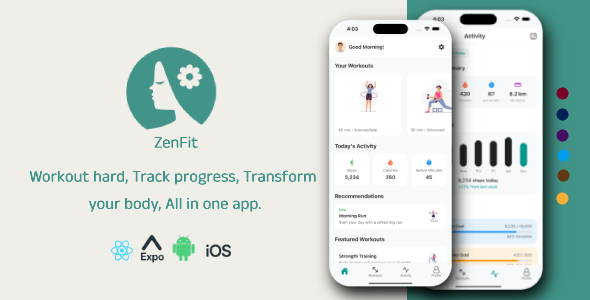
Description
ZenFit – React Native is a modern fitness mobile application built with React Native Expo. It is designed to help users track workouts, view summaries, monitor progress, and manage personal fitness data in an intuitive and user-friendly experience.
✨ Key Features
- Personalized workout plans (strength, cardio, HIIT, etc.)
- Weekly training schedules
- Progress tracking with charts
- Video and audio guidance for each workout
- Warm-up & cool-down routines
- Daily reminders & motivational tips
- Goal setting (weight loss, muscle gain, flexibility)
- Dark mode support
Technical Requirements
To run and customize this project, you need:
- Node.js >= 18.x
- npm or yarn
- Expo CLI latest version
- Expo SDK compatible version (as per project setup)
- Android Studio (for Android development)
- Xcode (for iOS development on macOS)
- Git (recommended)
Compatibility
ZenFit is fully compatible with:
- iOS (Expo)
- Android (Expo)
- Expo Go (development testing)
Project Structure
ZenFit/
├── app/
│   ├── _layout.tsx              # Root layout (Expo Router)
│   ├── navigation/              # Tab and stack navigators
│   ├── screens/                 # Screen components
│   │   ├── HomeScreen.tsx
│   │   ├── WorkoutsScreen.tsx
│   │   ├── WorkoutDetailsScreen.tsx
│   │   ├── WorkoutSummaryScreen.tsx
│   │   ├── ActivityScreen.tsx
│   │   ├── ProfileScreen.tsx
│   │   ├── EditProfileScreen.tsx
│   │   ├── SettingsScreen.tsx
│   │   ├── LoginScreen.tsx
│   │   └── RegisterScreen.tsx
│   ├── components/              # Reusable UI components
│   ├── styles/                  # Style hooks per screen/component
│   ├── ThemeContext/            # Light/Dark theme provider
│   └── utils/                  # Helper functions
├── assets/                      # Images, fonts, icons
├── app.json                     # Expo configuration
├── package.json
└── tsconfig.json
⚠️ Third-Party Services Notice
ZenFit is fully functional out of the box with mock data and does not require any paid service to preview or customize. However, to go live with real users you will need your own accounts/API keys for services such as:
- Google Maps Platform — powers the route/activity map (billed by Google above its free tier)
- A backend of your choice (e.g. Firebase or Supabase) — for real authentication and persisting workout/activity data (free tiers available; paid plans above free-tier limits)
- Cloud storage (e.g. Firebase Storage, Supabase Storage) — for profile photo uploads
These services are not included in the purchase price. You are responsible for any costs incurred through your own use of them. Full setup instructions are included in the documentation.
Run the App
# Start the Expo development server
npx expo start
After running, you will see a QR code and options in the terminal:
- Press i to open in iOS Simulator
- Press a to open in Android Emulator
- Scan the QR code with Expo Go on your physical device
# iOS
npx expo start --ios
# Android
npx expo start --android
Support
If you have any questions regarding this app, feel free to contact me via my CodeCanyon profile. I will do my best to assist you. If you enjoy this template, I would really appreciate your rating. Thank you!
Changelog
= 1.0.0 =
- Initial release
- 9+ screens
- Light/Dark mode
- Animated UI
- TypeScript support
- Expo support
| Type | Native Web App |
|---|---|
| Author | M_Alaa |
| Price | $12 |
| Sales | 0 |
| Rating | 0 (0) |
| Published | Jul 7, 2026 |
| Last Update | Jul 7, 2026 |
| Compatible Software | ReactJS |
| Mobile Files Included | JavaScript JS |
Categories
Tags
External listing. code.market does not sell this product and does not process payment for it. Pricing, payment, delivery, licensing, refunds, and support are handled by the third-party merchant on its own website. We may earn an affiliate commission from a referral. Details.
Products of the Week.
Submit🥇

STOP GUESSING WHAT TO POST
AI that learns your brand voice and builds a month of consistent, on-brand social content: carousels, posts and hooks that sound like you, not like everyone else's AI.
SaaS · 7,395 views · 67 clicksSaaS · Week 46 · 7,395 views · 67 clicks
🥈

Conversational Backlinks for Busy Founders
Place Backlink Relevant Conversation for your domain across Forums and Conversations
Website · 46,692 views · 232 clicksWebsite · Week 46 · 46,692 views · 232 clicks
🥉

upvote.club
Free Social Media Engagement that Helps Boost Your Content. Upvote Club supports 19 social networks with 100+ engagement actions in one dashboard. Add links to your posts and get free engagement from real users.
SaaS · 44,628 views · 127 clicksSaaS · Week 46 · 44,628 views · 127 clicks
#4

Substack Posting API
Onboard your Agent to Substack. Write Publish on Substack via API
SaaS · 63,514 views · 206 clicksSaaS · Week 46 · 63,514 views · 206 clicks
#5

Seenshot App
Free, Fast, MacOS Screenshot app. Make Screenshot cmd+shift+2 and send it via link
Desktop App · 32,764 views · 127 clicksDesktop App · Week 46 · 32,764 views · 127 clicks
#6

Hand-Placed Backlinks $9.99 per link. Flat rate.
Buy hand-placed forum, Q-A and directory backlinks. Flat $9.99 per link, no subscriptions — you only pay for approved listings.
Website · 8,381 views · 19 clicksWebsite · Week 46 · 8,381 views · 19 clicks
#7

Free Invoice Generator - PDF Invoices in Your Browser, No Sign-Up
A free invoice maker for freelancers and small businesses: fill in the invoice, check the live preview, and download a PDF that looks exactly like it. Any currency, tax per item, three templates, no sign-up, and nothing leaves your device.
7,010 views · 29 clicksWeek 46 · 7,010 views · 29 clicks
#8

Merge PDF Files Free - Combine PDFs in Your Browser, No Upload
A free PDF merger for office workers, students, and freelancers: combine PDFs and images into one file in the browser, reorder files and pages, pick page ranges, keep bookmarks, and open password-protected PDFs. Nothing is uploaded, no sign-up, no watermark.
6,485 views · 18 clicksWeek 46 · 6,485 views · 18 clicks