
Your Promate - Task Management Script NodeJS React
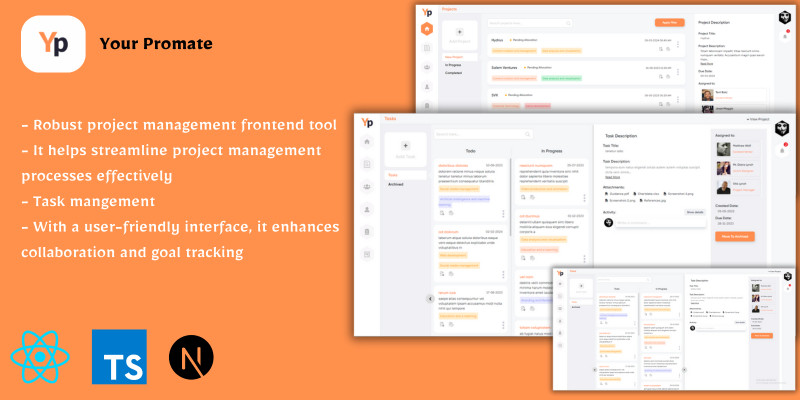
Description
Your Promate is a static robust project management app designed to help businesses and organizations manage their projects efficiently. With a user-friendly interface, it offers a range of features that help teams collaborate effectively and stay on top of their project goals.
The app offers a comprehensive user authentication system, including login, signup, and sign-out functionality. Once logged in, users can add and update projects, view project details and progress, and assign teams to projects. The app also allows users to add, update, view, and delete teams and employees.
Your Promate has a task management system that enables users to add, update, view and archive tasks, and manage their status, including "todo," "in progress," and "completed." The app also includes search and filter functionality to help users find specific projects or tasks quickly. Also offer comments functionality in task so you can leave comments on specific tasks to provide updates, ask questions, or share feedback.
The app includes a profile section where users can view and update their profile information, and a change password functionality to ensure account security. Additionally, the app offers notification functionality, ensuring that users stay up-to-date on project progress, deadlines, and other critical information.
Overall, Your Promate is a powerful project management app that provides businesses and organizations with a comprehensive suite of tools to help manage their projects effectively. Its intuitive user interface and feature-rich functionality make it an excellent choice for teams looking to improve their project management processes. Demo:
You can sign up with any email address and then sign in to experience the platform.
Features
1. User authentication system with login, signup, and sign out functionality 2. Add and update projects with project details and progress tracking 3. Manage teams with add, update, view, and delete functionality 4. Manage employees with add, update, view, and delete functionality 5. Add, update, view, and delete tasks with status management (todo, in progress, completed) 6. Search and filter functionality for projects and tasks 7. User profile management with view and update functionality 8. Password changing functionality 9. Notifications system for project and task updates 10. Category management for projects and tasks. 11. Commenting functionality in tasks 12. Assigning teams and employees to the projects and tasks Please note that all the functionalities mentioned for Your Promate project are currently based on dummy data, and require the development of a robust backend system to function optimally with real data.
Once the backend system is added, all the features of Your Promate will be fully functional and ready to use.
We are confident that with the addition of a robust backend system, Your Promate will provide a comprehensive and efficient project management solution for your needs.
Requirements
1. Node.js: Next.js is built on top of Node.js, so you'll need to have Node.js installed on your machine. You can download the latest version (LTS) of Node.js from the official website: https://nodejs.org 2. npm or Yarn: npm (Node Package Manager) is automatically installed along with Node.js. However, you can also use Yarn as an alternative package manager. Yarn can be installed by following the instructions provided on their website: https://yarnpkg.com * Once you have Node.js and npm or Yarn installed, you can proceed with setting up and running your Next.js project by following the 'Getting Started' section from your promate documentation.
Instructions
- Open the terminal or command prompt within your code editor.
- In VS Code, you can open the terminal by clicking on “Terminal” in the top bar and selecting “New Terminal” or you can use the keyboard shortcut Ctrl + ` (backtick) to open the integrated terminal.
- After opening the terminal, run the following command to install all the necessary packages: type "npm install" in the terminal and press enter.
- To run the project on your local machine, enter the command "npm run dev" in the terminal and press enter. This will start the development server. Then, open your browser and go to the given url such as http://localhost:3000.
- To build the project for deployment, type the command "npm run build" and press enter. This command generates the .next (build) folder in the root of the project, which will be used to deploy the project on the server.
- To run the built project on your local machine, type the command "npm run start" and press enter. This will start the built project on your local machine.Then, open your browser and go to the given url such as http://localhost:3000.
- Now that you have the project running on your local machine, feel free to explore its functionalities and interact with it.
| Author | codelink |
|---|---|
| Category | Scripts & Code / ReactJS |
| Price | $10 |
| Extended License | $30 |
| Likes | 6 |
| First Release | May 27, 2023 |
| Last Update | May 27, 2023 |
| Files included | .css, JavaScript .js |
Categories
Tags
External listing. code.market does not sell this product and does not process payment for it. Pricing, payment, delivery, licensing, refunds, and support are handled by the third-party merchant on its own website. We may earn an affiliate commission from a referral. Details.
Products of the Week.
Submit🥇

Perceptle
Perceptle is a daily browser-based game that challenges you to test your sensory intuition through five quick estimation and rhythm-based rounds.
Other · 1 views · 0 clicksOther · Week 47 · 1 views · 0 clicks
🥈

Free LinkedIn Likes From Real
Get free LinkedIn likes on your posts from real members who react by hand. No
SaaS · 124 views · 2 clicksSaaS · Week 47 · 124 views · 2 clicks
🥉

STOP GUESSING WHAT TO POST
AI that learns your brand voice and builds a month of consistent, on-brand social content: carousels, posts and hooks that sound like you, not like everyone else's AI.
SaaS · 7,686 views · 71 clicksSaaS · Week 47 · 7,686 views · 71 clicks
#4

aaas.market
407 reliable micro tools for solo founders, marketers and creators. They work in your browser
SaaS · 122 views · 0 clicksSaaS · Week 47 · 122 views · 0 clicks