Xpense - Finance Management App | iOs | Web | in-app Subscription | Admob Ads
Description
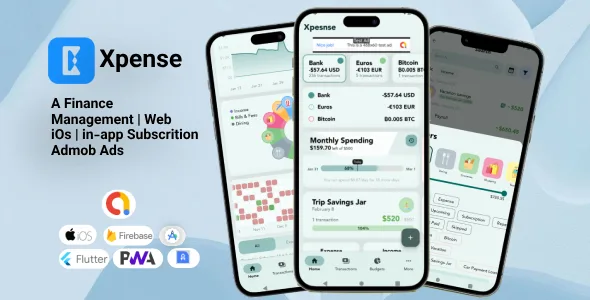
Xpense is a full-fledged, feature-rich application designed to empower users in managing their finances effectively. Built using Flutter – with Drift’s SQL package, and Firebase – this app offers a seamless and intuitive user experience across various devices.
Contact us for customization :- alvysamy@gmail.com Financial Management App Key Features


Admob Ads
- Banner ads
- Interstitial ads
Pro Feature
- In-app purchase
- Montlhy Subscritpion
Budget Management
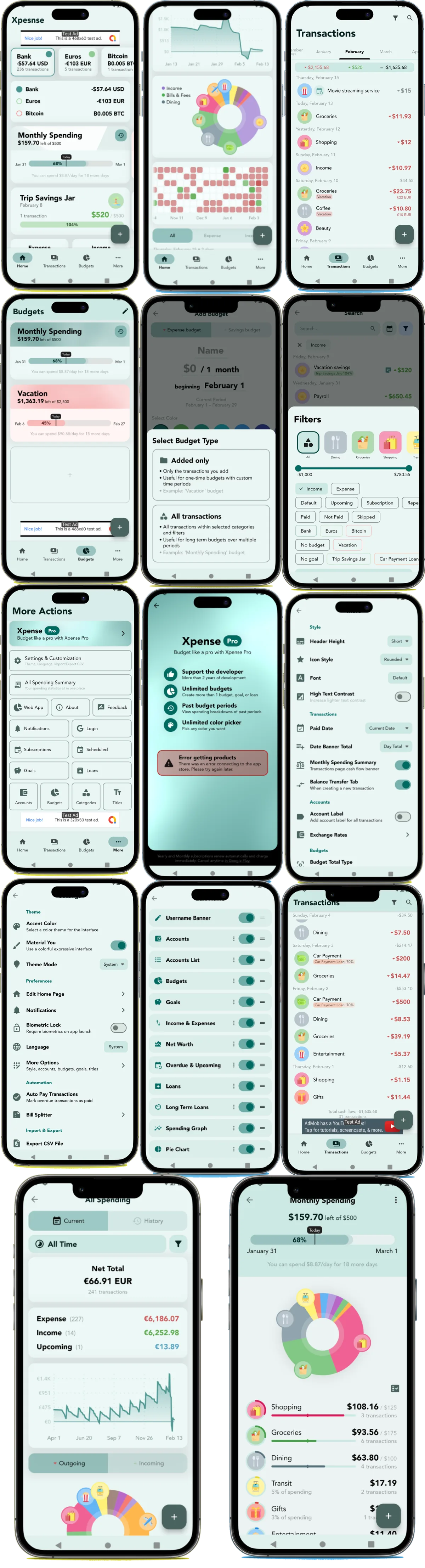
- Custom Budgets and Time Periods: Set up personalized budgets with flexible time periods, such as monthly, weekly, daily, or any custom time period that suits your financial planning needs.
- Added Budgets: Selectively add transactions to specific budgets, allowing you to focus on specific expense categories.
- Category Spending Limits per Budget: Set limits for each category within a budget, ensuring responsible spending.
- Past Budget History Viewing: Analyze your spending habits over time by accessing past budget history, enabling comparison and tracking of financial progress.
- Goals: Create spending and saving goals and put transactions towards different purchases or savings. Track your progress towards achieving your financial goals.
Transaction Management
- Support for Different Transaction Types: Categorize transactions effectively based on types such as upcoming, subscription, repeating, debts (borrowed), and credit (lent). Each type behaves in certain ways in the interface.
- Custom Categories: Create personalized categories to organize transactions according to your unique spending habits. Search through multiple icons and select the default option as expenses or income when adding transactions.
- Custom Titles: Automatically assign transactions with the same name to specific categories, saving time and ensuring consistency. These titles are stored in memory and popup when you add another transaction with a similar name.
- Search and Filters: Easily search and filter transactions based on various criteria such as date, category, amount, or custom tags, enabling quick access to information.
- Easy Editing: Long-press and swipe to select multiple budgets, edit accordingly as needed or delete multiple at once.
Financial Flexibility
- Multiple Currencies and Accounts: Manage finances across different currencies and accounts with up-to-date conversion rates for accurate calculations and effortless currency conversions. The interface shows the original amount added and the converted amount to the selected account.
- Switch Accounts and Currencies with Ease: On the homepage, easily select a different account and currency and everything will be converted automatically in an instant.
Enhanced Security and Accessibility
- Biometric Lock: Secure budget data using biometric authentication, adding an extra layer of privacy.
- Google Login: Conveniently log in to the app using your Google account, ensuring a streamlined and hassle-free authentication process.
User Experience and Design
- Material You Design: Enjoy a visually appealing and modern interface, following the principles of Material You design for a delightful user experience.
- Custom Accent Color: Personalize the app by selecting a custom accent color that suits your style, or follow that of the system.
- Light and Dark Mode: Seamlessly switch between light and dark themes to optimize visibility and reduce eye strain.
- Customizable Home Screen: Tailor the home screen layout and widgets to display the financial information that matters most to you, providing a personalized and efficient dashboard.
- Detailed Graph Visuals: Gain valuable insights into spending patterns through detailed and interactive graphs, visualizing financial data at a glance.
- Beautiful Adaptive UI: A responsive user interface that adapts flawlessly to both web and mobile platforms, providing an immersive and consistent user experience across devices.
Backup and Syncing
- Cross-Device Sync: Keep budget data synchronized across all devices, ensuring access to financial information wherever you go.
- Google Drive Backup: Safeguard budget data by utilizing Google Drive’s backup functionality, allowing easy restoration of data if needed.
- Discontinued: Budget Sharing (Alpha): Collaborate with family members, friends, or colleagues by sharing budgets, enabling collective tracking and management of shared expenses.
Smart Automation
- Notifications: Stay informed about important financial events and receive timely reminders for budget goals, transactions, and upcoming due dates.
- Import CSV Files: Seamlessly import financial data by uploading CSV files, facilitating a smooth transition from other applications or platforms.
- Import Google Sheets: Seamlessly import Google Sheets tables, quickly importing many transactions from a spreadsheet.

Changelog & Update History
Version 1.0.3 (25-2-2024)
- IOption to exclude transaction from counting towards reports and totals (in more options) Percentage decimal precision setting (in Settings > More Options > Formatting) Graph axis label supports locale and short form for > 1,000 Transfer transactions always ordered with transfer out (negative amount) listed first Improved auto complete titles Auto refocus text field on app focus loss Changed homepage add button icons and added labels Enabled merging an account from primary account, primary account is changed instead of deleted Decimal precision icon change and description Transfer button hidden if only one account If accounts all have same currency, currency label is removed in select chips Removed selectable accent colors that don’t change the app theme Fix: Biometric unavailable popup only shows if lock was once enabled Fix: time range for wallet spending summary line graph Fix: demo goal amounts Fix: confetti canvas size to fill screen
Version 1.0.2 (15-2-2024)
- Interatied Admob ads
Version 1.0.1 (9-2-2024)
- Set date time button when initially adding a transaction
- Titles auto complete with partial titles
- Widget light and dark mode and opacity
- More accurate small percentage label
- When adding an account, defaults to device currency
- All spending page filter icon pinned to app bar
- If multiple accounts with different currencies, can enable currency total summary in accounts list homepage widget
- Archived items have opacity in selection list
- Consistent popup enter text confirmation buttons and spacing
- Optimized fix reordering algorithm
- If backup loaded and device does not support biometrics, biometrics can be bypassed
- Keyboard resumes focus when returned from recent app menu
- Search page auto focuses keyboard
- Translation updates
- Difference loan testing debug feature
Categories
Tags
External listing. code.market does not sell this product and does not process payment for it. Pricing, payment, delivery, licensing, refunds, and support are handled by the third-party merchant on its own website. We may earn an affiliate commission from a referral. Details.
Products of the Week.
Submit🥇

STOP GUESSING WHAT TO POST
AI that learns your brand voice and builds a month of consistent, on-brand social content: carousels, posts and hooks that sound like you, not like everyone else's AI.
SaaS · 3,638 views · 33 clicksSaaS · Week 45 · 3,638 views · 33 clicks
🥈

Conversational Backlinks for Busy Founders
Place Backlink Relevant Conversation for your domain across Forums and Conversations
Website · 41,178 views · 222 clicksWebsite · Week 45 · 41,178 views · 222 clicks
🥉

upvote.club
Free Social Media Engagement that Helps Boost Your Content. Upvote Club supports 19 social networks with 100+ engagement actions in one dashboard. Add links to your posts and get free engagement from real users.
SaaS · 39,235 views · 113 clicksSaaS · Week 45 · 39,235 views · 113 clicks
#4

Substack Posting API
Onboard your Agent to Substack. Write Publish on Substack via API
SaaS · 58,273 views · 198 clicksSaaS · Week 45 · 58,273 views · 198 clicks
#5

Seenshot App
Free, Fast, MacOS Screenshot app. Make Screenshot cmd+shift+2 and send it via link
Desktop App · 27,660 views · 120 clicksDesktop App · Week 45 · 27,660 views · 120 clicks
#6

Hand-Placed Backlinks $9.99 per link. Flat rate.
Buy hand-placed forum, Q-A and directory backlinks. Flat $9.99 per link, no subscriptions — you only pay for approved listings.
Website · 3,542 views · 18 clicksWebsite · Week 45 · 3,542 views · 18 clicks
#7

Free Invoice Generator - PDF Invoices in Your Browser, No Sign-Up
A free invoice maker for freelancers and small businesses: fill in the invoice, check the live preview, and download a PDF that looks exactly like it. Any currency, tax per item, three templates, no sign-up, and nothing leaves your device.
2,236 views · 16 clicksWeek 45 · 2,236 views · 16 clicks
#8

Merge PDF Files Free - Combine PDFs in Your Browser, No Upload
A free PDF merger for office workers, students, and freelancers: combine PDFs and images into one file in the browser, reorder files and pages, pick page ranges, keep bookmarks, and open password-protected PDFs. Nothing is uploaded, no sign-up, no watermark.
2,072 views · 13 clicksWeek 45 · 2,072 views · 13 clicks