
Wrenfield - Point of Sale UI Kit for Flutter
Description
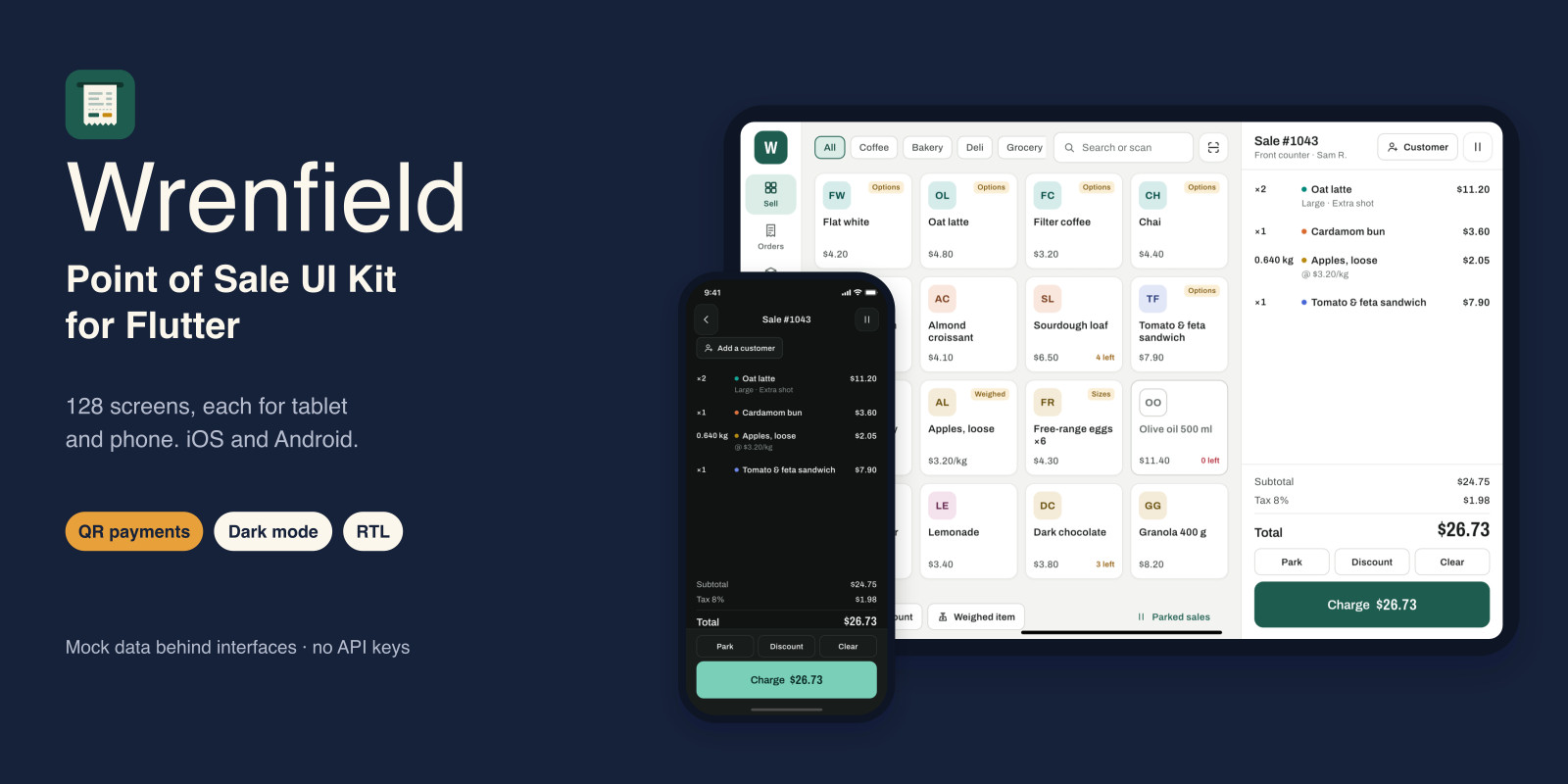
Wrenfield is a complete point-of-sale front end for small shops, cafés, and counters, built in Flutter for iOS and Android. Every one of its 128 screens has a tablet layout for the counter (landscape, side rail, the cart always visible) and a phone layout for handhelds and stalls (portrait, five tabs, a full-screen cart). It runs on mock data out of the box, so you can open it, sell, refund, and close a shift, then connect your own backend and hardware by replacing one set of classes.
It covers a whole day at the till: sign-in, choosing a register, first-run setup, staff PINs, and opening a shift with a float count; the register with categories, search, barcode scanning, options, weighed items, custom amounts, discounts with manager approval, customers and rewards, and parked sales; checkout with card on a reader, QR payments three ways (a code per sale, a printed store code, or the customer's code), cash with quick-cash buttons and change, split payments, tips, gift cards, and receipts; orders with refunds, voids, and exchanges; products, variants, options, stock counts, purchase orders, and suppliers; customers with loyalty and store credit; reports by hour, category, product, staff, payment, and tax; shifts with pay in and out, a denomination count, and the end-of-day report; and team roles, time clock, and settings. Loading, empty, error, and offline states are included, and offline sales queue for sync.
Screens read from thirteen repository interfaces through Riverpod providers, including card payments, QR payments, and hardware. Mock implementations with clearly fictional data are bound in one file; replace them with your own classes and no screen needs to change. Money is stored as integer minor units, and the cart math (inclusive or exclusive tax, rounding per line or per order, cash rounding, discounts, change) is unit-tested.
The design system has light and dark themes, four brand presets, and one palette file for your own colors. English and Arabic are included with the whole register mirrored right to left. Currency, number format, dates, times, and weight units are settings. Product tiles, receipts, QR codes, and charts are drawn in code, so there are no stock images to license. The HTML documentation covers setup, architecture, connecting your API, a reskin checklist, app icons and splash files, and step-by-step Android and iOS release instructions.
Wrenfield is a UI kit, not a payment system: it takes no real payments, drives no real hardware, and has no real security. The documentation lists what you need before going live. Not included: a backend, a payment provider or terminal SDK, printer or scanner drivers, restaurant table maps, a kitchen display, or a web back office.
Features
- 128 screens, each with a tablet layout (landscape) and a phone layout (portrait) - Register: categories, search, barcode scan (mock), options and variants, weighed items, custom amounts, discounts with manager approval, customers and rewards, parked sales - Checkout: card reader states, cash with quick-cash buttons and change, split payments, tips, gift cards, email and printed receipts - QR payments three ways: a code per sale, a printed store code, or the customer's code, with expiry, not-confirmed, and provider-offline states - Orders with refunds by item, voids with approval, and exchanges - Products, variants, option groups, stock counts, purchase orders, suppliers, and label printing - Customers with loyalty, rewards, and store credit - Reports with charts: by hour, category, product, staff, payment method, tax, and refunds - Shifts: pay in and out, denomination count, over and short, end-of-day report - Team roles and permissions, time clock, timesheets - Loading, empty, error, and offline states; offline sales queue for sync - Light and dark themes, four brand presets, one palette file for your colors - English and Arabic with full right-to-left layout - Thirteen repository interfaces with mock implementations, bound in one file (Riverpod, go_router) - Integer money and unit-tested cart math (tax inclusive or exclusive, rounding, change) - Card reader, printer, drawer, scanner, and customer display states behind a hardware interface (UI only) - Tests, including every route at tablet and phone sizes in both languages - HTML documentation with a reskin checklist and Android and iOS release instructions
Requirements
Flutter 3.44 or later (Dart 3.12). Xcode 16 or later for iOS and iPadOS (iOS 15 and later). Android Studio with an Android SDK for Android (Android 7.0 and later). Packages: flutter_riverpod, go_router, flutter_svg, qr_flutter, intl. No API keys or accounts are needed to run the demo.
Instructions
1. Unzip the download and open a terminal in WrenfieldUIKit/till_kit. 2. Run "flutter pub get", then "flutter run" with an iPad or Android tablet (tablet layout) or an iPhone or Android phone (phone layout) selected. 3. On the sign-in screen choose "Try the demo store", pick a register, skip or step through setup, choose a staff member, and enter any four-digit PIN except 0000. The register opens with a sample sale in the cart. 4. To connect your backend, implement the interfaces in lib/data/repositories/repositories.dart and bind your classes in lib/data/providers.dart. No screen changes are needed. 5. To rebrand, follow the reskin checklist in the documentation: brand colors in lib/core/design_system/palette.dart, app name and IDs, icons, and launch screens. 6. Documentation/index.html covers installation, usage, architecture, connecting your API, payments and hardware, theming, icons and splash, Android and iOS release, testing, and what to add before going live.
| Author | oncombalado |
|---|---|
| Category | App Templates / Flutter / UI Kits |
| Price | $20 |
| Extended License | $60 |
| First Release | Oct 5, 2026 |
| Last Update | Oct 19, 2026 |
| Files included | .html, .json, .dart, pubspec.yaml |
| Operating systems | Android 8.0, Android 9.0, Android 10.0, iOS 14.0, iOS 13.0, iOS 15.0, Android 11.0, Android 12.0, Android 13.0, Android 14.0, Android 15.0, Android 16.0, iOS 16.0, iOS 17.0, iOS 18.0, iOS 26.0 |
| Programming language | Dart |
| App framework / engine | Flutter |
Categories
Tags
External listing. code.market does not sell this product and does not process payment for it. Pricing, payment, delivery, licensing, refunds, and support are handled by the third-party merchant on its own website. We may earn an affiliate commission from a referral. Details.
Products of the Week.
Submit🥇

Actionbook
It works inside the user's own browser with the accounts already signed in. The user describes the result they need, and the agent reads, clicks and types through the pages, then delivers a dashboard or report where each data links back to its source.
Other · 743 views · 10 clicksOther · Week 44 · 743 views · 10 clicks
🥈

Free social media tools for creators & solofounders
295 free tools for growing your social media: write, plan, grow on local AI models, 100% free forever, No sign-up required, No trial. Write, check and measure posts on LinkedIn, Instagram, TikTok, X, YouTube, Reddit, Product Hunt and more: a free social media scheduler for 17 networks, engagement rate calculators, character counters, best time to post, hook generators and follower growth calculators. No login anywhere, no API or credit usage.
710 views · 6 clicksWeek 44 · 710 views · 6 clicks
🥉

STOP GUESSING WHAT TO POST
AI that learns your brand voice and builds a month of consistent, on-brand social content: carousels, posts and hooks that sound like you, not like everyone else's AI.
SaaS · 1,957 views · 22 clicksSaaS · Week 44 · 1,957 views · 22 clicks
#4

Hand-Placed Backlinks $9.99 per link. Flat rate.
Buy hand-placed forum, Q-A and directory backlinks. Flat $9.99 per link, no subscriptions — you only pay for approved listings.
Website · 1,908 views · 17 clicksWebsite · Week 44 · 1,908 views · 17 clicks
#5

Conversational Backlinks for Busy Founders
Place Backlink Relevant Conversation for your domain across Forums and Conversations
39,367 views · 211 clicksWeek 44 · 39,367 views · 211 clicks
#6

Free Invoice Generator - PDF Invoices in Your Browser, No Sign-Up
A free invoice maker for freelancers and small businesses: fill in the invoice, check the live preview, and download a PDF that looks exactly like it. Any currency, tax per item, three templates, no sign-up, and nothing leaves your device.
647 views · 11 clicksWeek 44 · 647 views · 11 clicks
#7

Merge PDF Files Free - Combine PDFs in Your Browser, No Upload
A free PDF merger for office workers, students, and freelancers: combine PDFs and images into one file in the browser, reorder files and pages, pick page ranges, keep bookmarks, and open password-protected PDFs. Nothing is uploaded, no sign-up, no watermark.
593 views · 4 clicksWeek 44 · 593 views · 4 clicks