
WPBakery Page Builder Add-on Image Hotspot with Tooltip and Lightbox

Description
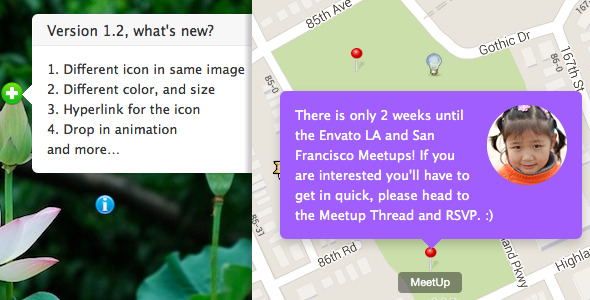
Help you to add hotspot icon with tooltip and lightbox in a image for the WPBakery Page Builder.
Note: you can get this addon from All In One Addons for WPBakery Page Builder. It’s recommended to purchase the All In One package which also contains other addons in the future update:
This plugin is the addon for WPBakery Page Builder, it requires WPBakery Page Builder to be installed and activated on your site. The Front Editor is also required enabled to drag to update the icon position.
If you wan to use this addon in Elementor Page Builder: don’t forget to take a look at the All in One widgets for Elementor, which include this Image Hotspot with Tooltip.
Quick video demo, how this add-on works (after version 1.2, you can drag the icon to update it’s position in the frontend editor):
Update log
Dec 22 2020, version 1.5.3
- Fixed: Compatible with WordPress 5.6 and jQuery on frontend editor.

July 9 2020, version 1.5.2
- Improvement: Add lightbox support, now the hotspot link support lightbox with YouTube, Vimeo video, image, google map etc.

Apr 24 2017, version 1.5.1
- Fix the compatibility with latest WPBakery Page Builder

Oct 14 2015
- Compatible with upcoming WPBakery Page Builder 4.8

Oct 5 2015 (version 1.5)
- Compatible with WPBakery Page Builder 4.7
- Add start number option for the number dot.
- Add display which hotspot by default option, and the display all by default option.

July 6 2015 (version 1.4)
- Make it compatible with WPBakery Page Builder 4.6

Dec 9 2014
- Add number and Font Awesome icon option for the hotspot.
- Update the backend icon.
- Fix tooltip content parse bug.

18.11.2014
- Now user can drag the hotspot icon to update it's position in the frontend editor, see the Youtube video demo for more information.

05.09.2014
- Add pulse animaiton for the hotspot icon, now the pulse support white, gray, red, green,
  blue, purple.
- Add the hotspot circle dot color option.
Features
- You can customize each hotspot icon’s postion easily in the WPBakery Page Builder Frontend editor.
- Hotspot support lightbox, the lightbox can be in YouTube, Vimeo video, image, google map etc.
- Responsive and retina ready.
- Hotspot icon support any kind of color.
- Tooltip support any kind of content, like a image or video.
- Optional tooltip style: shadow, light, noir, punk.
- Optional tooltip animation: grow, slide, fade, fall.
- Optional tooltip arrow position: top, right, bottom, left, top-right, top-left, bottom-right, bottom-left.
- Extend the WPBakery Page Builder, work fine with the Page Builder in a theme or Page Builder installed as a plugin.
- Compatible with latest jQuery and latest WordPress.
- Enqueue the js and css only when needed. Keep WordPress page size smaller.
- FAQ and source code are included in the package. Free update in the future.
Recommendation for you
Image Map HotSpot WordPress Plugin:
Credit
Prototype by http://codepen.io/geeves/pen/BdmEb added more options by me.
| Type | WordPress Plugin |
|---|---|
| Author | sike |
| Category | Wordpress / Add Ons |
| Price | $13 |
| Sales | 2,139 |
| Rating | 4.55 from 40 ratings |
| Published | Aug 28, 2014 |
| Last Update | Feb 16, 2022 |
| Compatible Browsers | IE9, IE10, IE11, Firefox, Safari, Opera, Chrome, Edge |
| Compatible Software | WordPress 7.0.x, WordPress 6.9.x, WordPress 6.8.x, WordPress 6.7.x, WordPress 6.6.x, WordPress 6.5.x, WordPress 6.4.x, WordPress 6.3.x, WordPress 6.2.x, WordPress 6.1.x, WordPress 6.0.x, WordPress 5.9.x, WordPress 5.8.x, WordPress 5.7.x, WordPress 5.6.x, WordPress 5.5.x, WordPress 5.4.x, WordPress 5.3.x, WordPress 5.2.x, WordPress 5.1.x, WordPress 5.0.x, WordPress 4.9.x |
| Compatible With | WPBakery Page Builder |
| Gutenberg Optimized | No |
| Source Files Included | JavaScript JS, HTML, CSS, PHP |
Categories
Tags
External listing. code.market does not sell this product and does not process payment for it. Pricing, payment, delivery, licensing, refunds, and support are handled by the third-party merchant on its own website. We may earn an affiliate commission from a referral. Details.
Products of the Week.
Submit🥇

STOP GUESSING WHAT TO POST
AI that learns your brand voice and builds a month of consistent, on-brand social content: carousels, posts and hooks that sound like you, not like everyone else's AI.
SaaS · 6,549 views · 61 clicksSaaS · Week 46 · 6,549 views · 61 clicks
🥈

Conversational Backlinks for Busy Founders
Place Backlink Relevant Conversation for your domain across Forums and Conversations
Website · 45,504 views · 229 clicksWebsite · Week 46 · 45,504 views · 229 clicks
🥉

upvote.club
Free Social Media Engagement that Helps Boost Your Content. Upvote Club supports 19 social networks with 100+ engagement actions in one dashboard. Add links to your posts and get free engagement from real users.
SaaS · 43,494 views · 124 clicksSaaS · Week 46 · 43,494 views · 124 clicks
#4

Substack Posting API
Onboard your Agent to Substack. Write Publish on Substack via API
SaaS · 62,428 views · 204 clicksSaaS · Week 46 · 62,428 views · 204 clicks
#5

Seenshot App
Free, Fast, MacOS Screenshot app. Make Screenshot cmd+shift+2 and send it via link
Desktop App · 31,680 views · 125 clicksDesktop App · Week 46 · 31,680 views · 125 clicks
#6

Hand-Placed Backlinks $9.99 per link. Flat rate.
Buy hand-placed forum, Q-A and directory backlinks. Flat $9.99 per link, no subscriptions — you only pay for approved listings.
Website · 7,380 views · 19 clicksWebsite · Week 46 · 7,380 views · 19 clicks
#7

Free Invoice Generator - PDF Invoices in Your Browser, No Sign-Up
A free invoice maker for freelancers and small businesses: fill in the invoice, check the live preview, and download a PDF that looks exactly like it. Any currency, tax per item, three templates, no sign-up, and nothing leaves your device.
5,996 views · 20 clicksWeek 46 · 5,996 views · 20 clicks
#8

Merge PDF Files Free - Combine PDFs in Your Browser, No Upload
A free PDF merger for office workers, students, and freelancers: combine PDFs and images into one file in the browser, reorder files and pages, pick page ranges, keep bookmarks, and open password-protected PDFs. Nothing is uploaded, no sign-up, no watermark.
5,546 views · 16 clicksWeek 46 · 5,546 views · 16 clicks