WP Skype Contact Button - Premium Skype Button Plugin for WordPress icon

WP Skype Contact Button - Premium Skype Button Plugin for WordPress

Hot or Not
WP Skype Contact Button - Premium Skype Button Plugin for WordPress

Description

Ultimate WordPress plugin to integrate Skype in your WordPress website

The easiest way to perfectly connect Skype with your WordPress platform.

DEMO

1. Inline Demo 2. Menu Demo 3. Position Demo 4. Live Chat Demo

Add Skype Button to your website, increase leads, increase conversion…

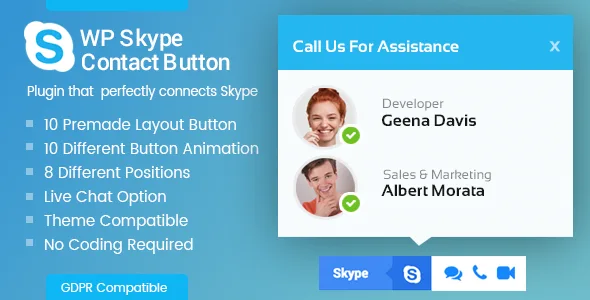
WP Skype Contact Button is an Ultimate WordPress plugin that allows you to integrate Skype in your WordPress website . The plugin is packaged with 10 pre-designed button templates, 10 hover animation effect and eight different positions for button placement – you can embed the Skype Button in any way you like. Features such as color customization, sticky buttons, and tooltips helps make the contact buttons more fun and engaging. Also, its live chat button option enables clients to connect to you without having to leave your website.

This fully responsive plugin works well with any device, any browser, and any WordPress theme. This plugin perfectly combines  Skype with the WordPress platform and help you to communicate with your clients effortlessly . It is a shortcode ready and widget ready WordPress plugin that allows you to connect to Skype via WordPress.

No coding needed! Just 5 minutes setup and configuration! Works perfectly with all ‘well coded’ themes!

Feature Lists

  • 10 beautifully designed button templates.
  • 10 different hover animation in button templates.
  • Live skype chat option.
  • Color customization option(button/text/icon/icon-background).
  • Post,page & category selection option.
  • Eight different button position.
  • Text enable/Disable Option.
  • Button text only enable option.
  • Text position left/right option.
  • Button sticky option.
  • Tooltip enable/disable option.
  • Display using shortcode/widget.
  • Add on menu option.
  • Compatible in both mobile/desktop.
  • Cross browser support.
  • Simple and user friendly.
  • Works with any theme.

Customer Feedback

Documentation

Please check our detailed documentation here

Lifetime Dedicated Support

- You can find us anytime when you have some queries, problems or with any valuable suggestions for plugin or us. This plugin is supported. All you need to do is contact the developer through following ways:

  • Forum Support From here.
  • Plugin Comment here
  • Dedicated Support Forum – You can contact us through our support forum through
  • Online Chat Support

Our Support Includes

  • Errors and Bugs

    If your website reports any error due to our plugins, let us know. Send us the problem details with necessary links and screenshots, we’ll dig into it and get it resolved.

  • Lifetime updates

    We test and keep on updating our WordPress themes and plugins. So check for the new updates and keep your site secure and up to date with new technology.

  • Customer-friendly development

    If our products’ features don’t quite fit your requirement and you have some better suggestions – we are always happy to hear from you. We are ready to equip your business with better options. For this you can request a paid customization.

Our Support Does not Include

  • Plugin installation

    Our plugin price doesn’t include installation service. But we have plenty of tutorials and extensive documentation that you can rely on. And in case of any issues detected during installation, we are there to help. If you need a professional installation done – you can ask us for paid installation and configuration.

  • Plugin customization

    Any core customization of features and function of the plugin doesn’t fall into our free support. However if you want the plugin to be customized to fit your need – ask us for the customization quotation. We work on a fixed price and hourly basis model.

  • 3rd-party issues

    We do not take care of issues that are related to 3rd party plugins and themes. Also, we do not provide support to integrate any 3rd party themes or plugins.

Constant Free Upgrades

- Not fixed on dates, but we assure you to provide you new updates and feature upgrade in the plugin at regular basis.

Some Major Change logs

1.0.6

Fixed shortcode generator clipboard not updating value as set in backend issue. 
Css refinement to fix design issues.

1.0.5

Fixed design issues
Fixed translation issues

1.0.4

Refinement in the JS script

1.0.3

General bug fixes and refinement in the code

1.0.2

Refinements : Some refining works in the CSS script

1.0.1

Refinements : Some refining works in the code

More WordPress Resources

Themes Compatible with the Plugin :

WP Skype Contact Button works best with every WordPress theme. It’s even more remarkable when used with popular themes like VMagazine and AccessPress Parallax.

AND IF THIS PLUGIN HAS IMPRESSED YOU, THEN YOU WOULD ENJOY OUR OTHER PROJECTS TOO. DO CHECK THESE OUT :

WPAll Club – A complete WordPress resources club. WordPress tutorials, blogs, curated free and premium themes and plugins, WordPress deals, offers, hosting info and more.

Premium WordPress Themes – 6 premium WordPress themes well suited for all sort of websites. Professional, well coded and highly configurable themes for you.

Premium WordPress Plugins – 45+ premium WordPress plugins of many different types. High user ratings, great quality and best sellers in CodeCanyon marketplace.

AccessPress Themes – AccessPress Themes has 50+ beautiful and elegant, fully responsive, multipurpose themes to meet your need for free and commercial basis.

8Degree Themes – 8Degree Themes offers 15+ free WordPress themes and 16+ premium WordPress themes carefully crafted with creativity.

Check out our other great plugins

  • AccessPress Anonymous Post Pro
  • AccessPress Social Icons Pro
  • AccessPress Social Pro
  • AShop Slider Pro
  • AccessPress Twitter Feed Pro
  • AccessPress Pinterest Pro
  • AccessPress Social Auto Post
  • AccessPress Social Login
  • WP Ultimate Social
  • AccessPress Instagram Feed Pro
  • Ultimate Form Builder
  • AP – Custom Testimonials for WordPress
  • WP Floating Menu Pro – One page navigator, sticky menu for WordPress
  • WP1 Slider Pro – WordPress Responsive Touch Slider for a Layman
  • WP Mega Menu Pro – Responsive Mega Menu Plugin for WordPress
  • Smart Logo Showcase – Responsive Clients Logo Gallery Plugin for WordPress
  • AP Pricing Tables – Responsive Pricing Table Builder Plugin for WordPress
  • Apex Notification Bar – Responsive Notification Bar Plugin for WordPress
  • Ultimate Author Box – Responsive Post/Article Author Section Plugin for WordPress
  • WP Popup Banners Pro – Ultimate popup plugin for WordPress
  • Everest Gallery – Responsive WordPress Gallery Plugin
  • WP Media Manager – The Easiest WordPress Media Manager Plugin
  • Everest Counter – Beautiful Stat Counter Plugin for WordPress
  • WP Blog Manager – Plugin to Manage / Design WordPress Blog
  • Everest Coming Soon – Ultimate Coming Soon, Maintenance Mode Plugin for WordPress
  • Everest Review – Post / Page / Custom post type Review plugin for WordPress by User and admin
  • Everest Google Places Reviews – Best WordPress Plugin To Showcase Google Places / Business Reviews
  • Everest Timeline – Responsive WordPress Timeline Plugin
  • WP Viber Contact Button – Premium Viber Contact Button Plugin for WordPress
  • Everest Comment Rating – Display Like/Dislike With Reaction Emojis For WordPress Comments
  • Everest FAQ Manager – Responsive Frequently Asked Questions (FAQ) Plugin for WordPress
  • Everest Tab – Responsive Tab Plugin For WordPress
  • WP FB Messenger Button – Premium FB Messenger Button Plugin for WordPress
  • Everest Admin Theme – WordPress Backend customizer
  • Total Team – Responsive Team Showcase Plugin For WordPress
  • WP WhatsApp Button – Premium WhatsApp Button Plugin for WordPress
  • WP Comment Designer- Customize And Design WordPress Comments And Comment Form
  • WP Product Gallery – Responsive Products Showcase Listing for WordPress
  • WP Cookie User Info Pro – Cookie Notification Plugin for WordPress
  • Ultimate Contact Buttons – Connect To Viber, WhatsApp, Messenger & Skype Via WordPress
  • Inline CTA Builder – Call To Action Layer For WordPress
  • Contact Form 7 Store to DB – CF7 Extension to Store Form Entries (Fully GDPR Compliance)
  • Smart Scroll to Top – Faster and Smarter scroll to top plugin for Wordpress

New Release: The Most Comprehensive FREE WordPress Theme – Punte

New Release: All in one Free WordPress theme – Bingle

External listing. code.market does not sell this product and does not process payment for it. Pricing, payment, delivery, licensing, refunds, and support are handled by the third-party merchant on its own website. We may earn an affiliate commission from a referral. Details.

FS Poster - WordPress Social Auto Poster & Scheduler icon

FS Poster - WordPress Social Auto Poster & Scheduler

Hot or Not
FS Poster - WordPress Social Auto Poster & Scheduler

Description

FS Poster is WordPress Social Media Scheduler that increases your online community and engagements by auto-sharing your WordPress posts.

Introduction

Social media auto poster and scheduler gives marketers an opportunity to auto-publish their blogs, repost old content, bulk schedule multiple posts and directly share individual posts on the most popular social networks. It allows users to share blog photos, infographics, or videos on visual sharing platforms from WordPress. Social media scheduler supports 20 social networks helping to widen your reach and improve your SEO through increased website visitors. Third-party integration tools help to create custom posts for each account. With unlimited post sharing, you will achieve consistency in online presence and reach social media marketing goals. Real-time analytics assess your social media strategy with platform-based performance comparison, post engagements, and click counts.

What are the benefits of purchasing our social media scheduler?

  1. Save your time You will be able to save your time by sharing your WordPress posts automatically
  2. Improves site SEO You will be able to increase links to your site from social networks.
  3. Keep your social media fresh You will be able to keep your social profiles fresh by posting frequently using Schedule module.
  4. Increase site visitors More shares will bring more visitors to your site.
  5. Supports flexibility You can create keyword-based messages for each platform and attach them to the relevant social media posts.
  6. Measures KPIs Social media scheduler measures the performance of each added network and accounts through scheduled posts.

Supported social networks

You will be able to publish your posts/pages/products to 20 social networks and services at the same time:
  1. Facebook ( accounts, pages, groups )
  2. Twitter ( accounts, first comment )
  3. Instagram ( accounts, stories, first comment, link in bio )
  4. TikTok ( planly.com )
  5. Linkedin ( accounts, companies )
  6. Pinterest ( account boards )
  7. Youtube (community)
  8. Reddit ( accounts, subreddits, first comment )
  9. Tumblr ( accounts )
  10. VK.com ( accounts, pages, groups, events )
  11. OK.ru ( accounts, groups )
  12. Telegram ( chats, channels, groups )
  13. Medium ( profiles, publications )
  14. Google My business ( locations )
  15. WordPress based sites
  16. Plurk
  17. Blogger
  18. Discord (channels)
  19. Webhook

Auto-post New Blog Posts:

Auto-post is a way to post your content to your social media accounts automatically. Creating a new post is not a big thing. However, sharing the new post to all your social network accounts is time-consuming and boring. Most businesses have hundreds of accounts, pages, groups, etc. to be engaged with their readers and customers. That is the reason we need automation, which will allow us to share our posts on those accounts without paying monthly fees and spending any of our valuable time. Sharing your posts using FS Poster is extremely simple. After installing and configuring social media scheduler plugin on your website and adding your accounts to the plugin, you just need to publish your WordPress post. The plugin will do the rest for you. FS Poster lets you share your first comment on Instagram, Twitter, and Reddit posts! With FS Poster, you can automatically display Facebook comments on your website post comments. You can auto post your content to your YouTube community from WordPress.

Schedule posts:

You always track your Social Network account insights, and you know that most of your audience is online for a specific time. However, for some reason, you are not online to share a WordPress post on your accounts to engage with your audience. Or, you have not prepared any post to publish it now. As a result, we lose the best time to post on Social Networks. You miss the rush hours of Social Networks and cannot engage with as many audiences as you can. You can use the FS Poster social media scheduler scheduler module to plan and schedule your posts at a specific time. Scheduling your posts only requires a few minutes of your time. It gives you the ability to optimize your posting frequency. The Calendar View lets you see your schedule plan. You can also restart your schedule campaign as many times as you want. That helps online product sellers a lot because they need to share the products many times. You will be able to share up to 10 photos on Instagram with the Instagram Carousel Scheduling feature. With FS Poster, you can automatically add a shared post link to bio! You can enable this feature on the Instagram settings part of your plugin, as shown below screenshot.

Direct share panel:

FS Poster has a Direct Share Panel, which is dedicated to sharing images, links, and custom messages. There are times that you do not want to share a blog post, but you have content that needs to be shared on Social Media. The social media scheduler allows you to share your content on Social Media without having a blog. That helps many of our customers because they do not need to have a blog, but they need to share their content on hundreds of accounts, and they do not want to log in their accounts one by one and share the content. Instead, they add their accounts to the plugin once and automate their manual work.

Supports all custom post types:

Custom Post Types are the specific type of post types that can be added to your WordPress website. FS Poster supports all custom post types, and you can share all those custom post types on your Social Network accounts. Adding custom post types to the plugin is very simple. The screenshot shows how easy it is to add a custom post type to the plugin. You will be able to add different photos to your post with a custom image feature.

Posting Interval feature:

As you know, Social Networks do not like users who share too many posts one after another. Social Networks or your followers might mark your posts as spam, which is a terrible experience for businesses. It is the worst scenario that might happen, but still, if you are posting too often, you will become a complete nuisance, and they will be bored seeing your posts overcrowding their feed. On the other hand, if you post too infrequently, your audience will forget that you exist. For those reasons, you need to balance your posting frequency. Luckily, FS Poster has a post-interval option, which allows you to control your posting frequency.

URL shortener services:

A URL shortener is a simple tool that takes a long URL and turns it into a short URL. Links sometimes are too long, complicated, or distracting that we might need to shorten or make them simpler. There are many URL shortener services out there. Sharing unpleasant URLs on Social Media might frighten your followers. That’s why the TinyURL and Bitly URL shortener services are integrated into the plugin. Also FS Poster supports self-hoster URL shorteners (Yourls, Porl, Shlink).

20 social networks and services integrated:

The social media scheduler supports auto-posting on 20 social networks and WordPress-based websites. This is not all. We develop the plugin continuously and add new Social Networks and features to the plugin. Because we provide lifetime updates, our customers will get new Social Networks and features forever without paying extra fees. Here is the list of supported Social Networks and communities:

Supports unlimited accounts:

Luckily, there is no limit. You can add unlimited accounts, pages, groups, communities, etc. on each Social Network. Here is one of our customers’ accounts tab. For privacy issues, we removed the names of accounts and pages from the screenshot.

Insights:

Dashboard Tab allows you to view your post visits, compare social networks or social accounts by link clicks, etc. The chart shows us how many posts have been shared on Social Networks for the current month. It also shows us how many clicks we have got from shared and scheduled posts. We can see daily, monthly, and annually results in the chart. You can also see Social Networks and accounts comparison by click.

Logs:

Logs are records of events that happen in your system. The social media scheduler also has the Logs Tab that allows you to view all the records of shared posts on your website. The Logs tab contains information about the hints, likes, comments, and shares about your posts on your account. The Logs tab also contains the links to the shared post on Social Networks, your Social Network profile links, and the shared WordPress post links.

Customize Post Messages:

When we share posts on Social Network accounts, we sometimes want to share some information about our posts, not the entire post. FS Poster has built-in ready keywords that allow you to share either the most important information about your post or the entire post. You can see and use the ready keywords in the settings tab of the plugin. Each Social Network has its own settings and custom messages. Every social media account has different audiences; of course, you want to share custom messages for each social account. That’s why FS Poster lets you share custom messages per social account.

Customize Your Post URL:

Let’s say we have more than 80 pages and groups on Facebook. When you share the same post on all those pages and groups, Facebook might consider posts as duplicated posts, and you might get a warning by Facebook. By enabling the “Unique post link” option, the ending of each link gets random symbols. As a result, the post becomes unique, and you can share the same post as many pages or groups as you want. The “Additional URL parameters” option allows you to add ready keywords on your URL parameters. The “Share custom URL instead of WP Post link” option allows you to define and type your custom post URL using specific keywords. You might need it if you want to share a different URL than your post URL.

Filter Publications By Post Categories:

Sometimes, we have a variety of categories that the content is different than one another on our website. For example, we have a Men clothes category and a Women clothes category. Meanwhile, we have a Men’s clothes page and a Women’s clothes page on Facebook, where we share our products on those pages. Naturally, we need to share the post of the Men’s clothes category on the Men’s clothes page and the post of the Women’s clothes category on the Women’s clothes page. By activating your account using the condition feature, you will be able to share your posts respectively. In short, the plugin will share the post automatically on the account that you have filtered. When you create a scheduled campaign to share your previously created posts using the schedule module, you can also filter posts by time, post type, category, tags, and specific post ID as well.

Bulk schedule action:

We know how important scheduling our posts to Social Network accounts is. Besides the Schedule tab in the social media scheduler, you can also use the Bulk schedule action to share your previously published posts on your Social Network accounts. There might be a few special posts that you would like to share, and you do not want to spend some time sharing the posts one by one. In this case, you can select those specific posts and share them through a click.

Calendar view:

When we use the FS Poster Schedule module and create a schedule campaign, the plugin allows us to see all Scheduled posts in the Calendar view. The calendar shows us the schedule date and time as well as how many times the schedule takes place in a day.

Hashtags:

WordPress tags and categories are a way to group posts together. Although the fact that every WordPress post needs a category, while tags are optional. If you want to share your categories and tags as social hashtags, simply add the {categories} and {tags} keywords to the custom messages. The social media scheduler will share your categories and tags as social hashtags automatically.

Proxy support:

A proxy server acts as a gateway between you and the internet. When you are using a proxy server, the query goes to the address you requested through the proxy server. The data you requested then comes back through that same proxy server, and then the proxy server forwards the data to you. There are many reasons that we might need to use a proxy for Social Networks. For example: We might have hundreds of accounts, pages, and groups. Naturally, all requests will go from the same source, and we would like to hide it. We would like to hide our IP addresses; It sometimes happens to some people that Social Networks block their servers IP addresses; As you know, in some countries like China, it is not possible to access Facebook, Instagram, and so on. Because of company rules; Luckily, the social media scheduler allows you to add a proxy to the plugin so that you can enjoy using the most popular Social Networks.

Supports Emojis:

There are many ways to get the attention of people on social networks. Emojis is one of them, and it works pretty well. When we include emojis to the title of Facebook, Instagram, Twitter, etc. posts, the chances are that posts will get more attraction. Fortunately, social media scheduler supports emojis, and it is automated as well as very easy to share emojis along with your posts. If you want to share emojis to social media, simply add them to the custom messages. FS Poster does the rest for you automatically.

Tracking Link Clicks:

After sharing your posts to Social Media, you can track them on the Dashboard Tab. You can see click counts as well as Social Networks and accounts comparison by click. The tab also shows us how many clicks we have got from shared and scheduled posts daily, monthly, and annually. The Logs tab gives extra information about the shared posts as well.

Supports WordPress Multisite Feature:

WordPress Multisite is a feature that allows you to create and run multiple WordPress websites with a single installation of WordPress. It is possible to run a network of sites under a single WordPress dashboard. Social media scheduler supports WordPress multisite features. Network Admin installs the plugin once, and the plugin becomes available on all sub-sites. After installing the plugin, you can enjoy auto-posting from your multisite to 20 Social Networks and WordPress-based websites.

FS Poster featured in popular WordPress resources:

– Kinsta ( 15 Best WordPress Social Media Plugins for Sharing and Engagement ) – FS Code ( Best Social Media Plugins For Your WordPress Website ) – Colorlib ( Best Social Sharing WordPress Plugins ) – Planly ( Top social media scheduling tools ) – FS Poster ( Best Social Media Auto-Poster Tools )

You can read the changelog here.

Our other products:

Booknetic – WordPress Appointment Booking & Scheduling pluginPlanly – Social Media SchedulerFS Code Blog – WordPress plugins, themes, tips & tutorials, resources, etc.

External listing. code.market does not sell this product and does not process payment for it. Pricing, payment, delivery, licensing, refunds, and support are handled by the third-party merchant on its own website. We may earn an affiliate commission from a referral. Details.







