
WP Plugin Manager Pro - Deactivate plugins per page

Description
WP Plugin Manager Pro gives you complete control over how WordPress plugins are loaded across your website. Instead of loading every plugin on every page, you can selectively disable plugins on specific pages, posts, custom post types, devices, admin screens, and URL conditions.
By preventing unnecessary plugins from loading, you can reduce page size, minimize HTTP requests, improve Core Web Vitals, and significantly increase overall website performance.
Whether you’re running a blog, business website, WooCommerce store, or large content platform, WP Plugin Manager Pro helps you optimize plugin usage without modifying any plugin files.
Why Use WP Plugin Manager Pro?
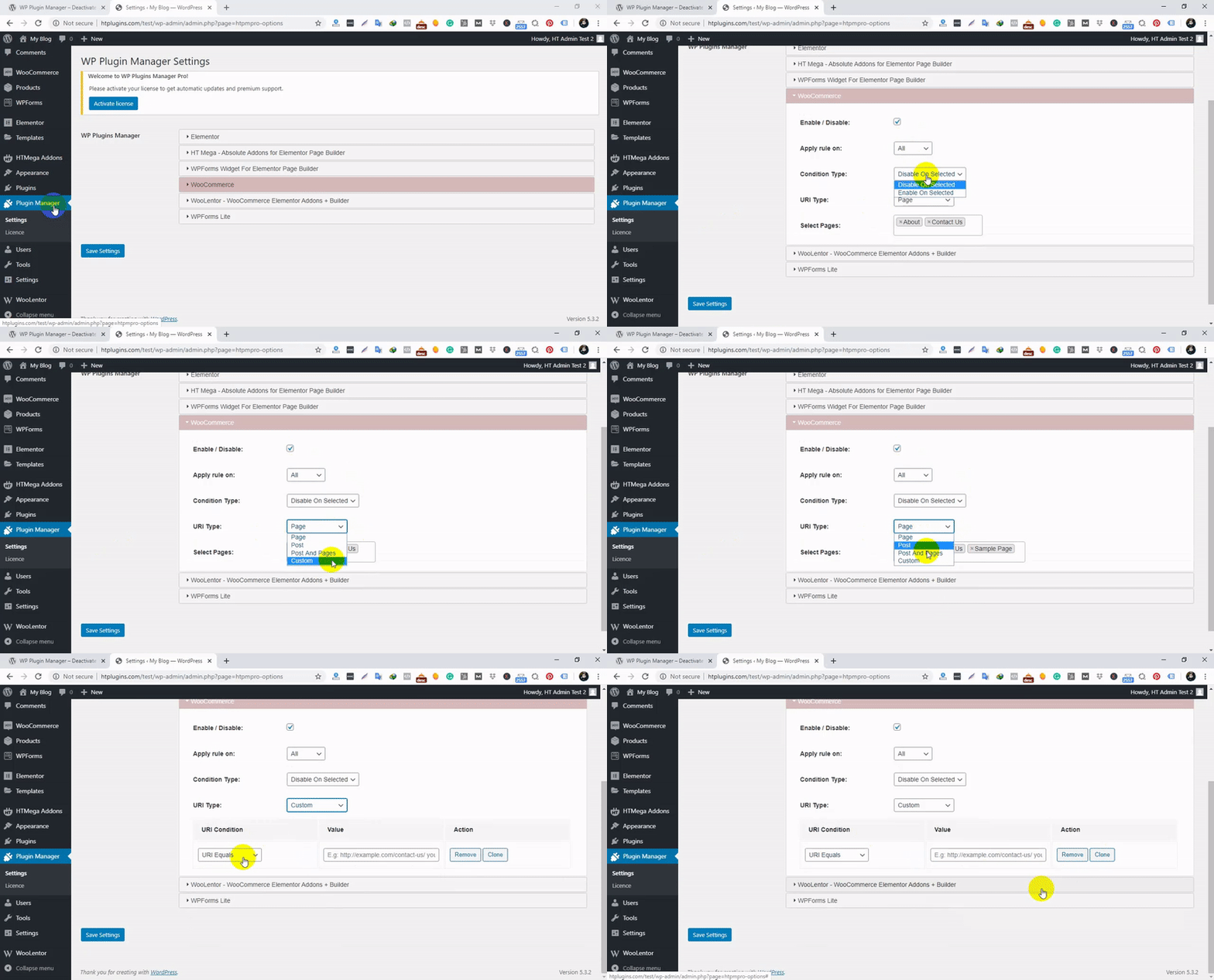
Many WordPress plugins load CSS, JavaScript, and PHP processes on every page, even when their functionality is only needed in specific areas of your site.
For example:
- Contact form plugins only need to load on contact pages.
- Slider plugins may only be required on the homepage.
- WooCommerce extensions are often unnecessary on blog pages.
- Marketing and tracking tools can be restricted to specific sections.
WP Plugin Manager Pro lets you control exactly where plugins are active, resulting in faster loading times and a better user experience.
Key Benefits
- Reduce unnecessary CSS and JavaScript loading
- Lower the number of HTTP requests
- Improve website speed and Core Web Vitals
- Optimize both frontend and backend performance
- Improve user experience and conversion rates
- No coding knowledge required
- Works with most WordPress themes and plugins
Core Features
- Enable or disable plugins on specific pages and posts
- Custom Post Type (CPT) support
- Frontend and backend plugin optimization
- Advanced URL and URI-based conditions
- Device-based plugin management
- Homepage-specific plugin control
- Individual URL targeting
- Child page support
- Plugin status filtering and management tools
- Translation ready
- Lightweight and user-friendly interface
- No plugin file modifications required
Advanced URL Conditions
Create powerful plugin-loading rules using flexible URL conditions:
- URI Equals
- URI Not Equals
- URI Contains
- URI Not Contains
- Directory-Based Matching
- Custom URL Rules
Device-Based Plugin Optimization
Control plugin loading based on visitor device types.
- Desktop Only
- Tablet Only
- Mobile Only
- Desktop + Tablet
- Desktop + Mobile
- Tablet + Mobile
- All Devices
Backend Optimization
Improve WordPress admin performance by disabling unnecessary plugins on specific backend screens.
- Backend plugin management
- Admin page targeting
- Faster dashboard performance
- Reduced server resource usage
Plugin Management Dashboard
- Optimized Plugins filter
- Not Yet Optimized filter
- Frontend Optimized filter
- Backend Optimized filter
- All Plugins overview
- Quick enable/disable controls
Perfect For
- WooCommerce Stores
- Business Websites
- Agency Websites
- Membership Sites
- Learning Management Systems (LMS)
- Blogs and News Portals
- Portfolio Websites
- High-Traffic WordPress Websites
Why Customers Love WP Plugin Manager Pro
- Improves page speed without complex configuration
- Helps achieve better Core Web Vitals scores
- Reduces unnecessary asset loading
- Safe and non-destructive plugin management
- Works alongside most popular WordPress plugins
- Regularly updated and maintained
change log
VERSION: 1.4.7 —— DATE: 09 September 2026
1. Added: Multisite support — configure plugin rules once at Network Admin level and apply them across every site, with the option to override on individual sites.
2. Fixed: Plugins activated at the network level not appearing correctly in the plugin list.
3. Fixed: Backend (admin area) rules not working for network-activated plugins.
4. Fixed: Selected page/post targeting not matching correctly across different site domains.
5. Fixed: General menu item missing on multisite installs.
6. Fixed: A few minor issues.
7. Tested: Compatibility with the latest version of WordPress.
VERSION: 1.4.6 —— DATE: 17 June 2026
1. Fixed: Post type select dropdown in Settings page now hides already-selected items from the list.
2. Tested: Compatibility with the latest version of WordPress.
VERSION: 1.4.5 —— DATE: 29 March 2026
- Fixed: Plugin incorrectly disabled on child pages when parent page was selected.
- Fixed: "All Pages" now applies to homepage and child pages.
- Fixed: "All Posts" incorrectly firing on homepage.
- Fixed: Individual post URL matching not working.
VERSION: 1.4.4—-—-DATE: 24 August 2025
1. Updated: Language translation .pot file.
2. Fixed: String translation issue.
3. Fixed: A few minor issues.
VERSION: 1.4.3—-—-DATE: 11 August 2025
1. Improved: License Activation page.
2. Improved: Manage plugin list Style.
3. Fixed: Plugin Enable/Disable Confirm popup issue in Manage Plugin List.
4. Fixed: A few minor issues.
VERSION: 1.4.2—-—-DATE: 29 Jul 2025
- Updated: Language translation .pot file.
- Fixed: Infinite loading issue when an error occurs while fetching the plugin list.
- Fixed: A few minor issues.
VERSION: 1.4.1—-—-DATE: 15 July 2025
- Improved: Disabled WP Plugin Manager plugin from Manage Plugin List.
- Fixed: A few minor issues.
- Fixed: Fixed: A few minor issues.
Version: 1.4.0 —— Date: 15 – 06 – 2025
- Added: Backend plugin enable/disable option.
- Added: Filter Option to optimized, Not Yet Optimized, Frontend Optimized, Backend Optimized, and All plugins.
- Fixed: Fixed: A few minor issue
Version: 1.1.3 —— Date: 26 – 10 – 2023
- Fixed: Ajax functions doesn't work issue
Version: 1.0.9 —— Date: 04 – 01 – 2022
- Fixed:  mu-plugin error
- Update: mu-plugin create function
Version: 1.0.8—-—-Date: 29 – 06 – 2021
- Removed duplicate menu from multisite
- Some other minor fixing
Version: 1.0.7—-—-Date: 29 – 05 – 2021
- Extended: Responsive deivice features
Version: 1.0.6—-—-Date: 18 – 05 – 2021
- Added: Posts per page limit control option
Version: 1.0.5—-—-Date: 09 – 05 – 2021
- Fixed foreach & undefined index warnings
- Fixed fopen warning
Version: 1.0.4—-—-Date: 28 – 03 – 2021
- Added: Custom Post type support
- Fixed: Conflict with free version
Version: 1.0.3—-—-Date: 09-02-2021
- Added: Custom post type support
- Fixed: Few php warning issues
- Fixed: Conditional fields
Version: 1.0.2—-—-Date: 17-12-2020
- Fixed: Spelling typo
Version: 1.0.1—-—-Date: 23-07-2020
1. Compatible with Latest PHP version
2. Add setting page link in plugin menu action
3. MU-Plugin directory remove option added
4. Free and pro Both activation broken issue solved
IMAGES ARE NOT INCLUDED WITH THE DOWNLOADABLE FILE
Do You Need More Features?

Live Chat: PreSale Question (9am-6pm; UTC +6)

Support
Feel free to contact us any time. We have a dedicated team to provide you the best support.
Create A Ticket here if you need any support for the item purchased.
Have a question? Need clarification? Feel free to Contact Us if you have a pre-sale question
| Type | WordPress Plugin |
|---|---|
| Author | codecarnival |
| Category | Wordpress / Utilities |
| Price | $19 |
| Sales | 68 |
| Rating | 5.00 from 6 ratings |
| Published | Jan 8, 2020 |
| Last Update | Sep 9, 2026 |
| Compatible Browsers | IE11, Firefox, Safari, Opera, Chrome, Edge |
| Compatible Software | WordPress 7.0.x, WordPress 6.9.x, WordPress 6.8.x, WordPress 6.7.x |
| Gutenberg Optimized | Yes |
| Source Files Included | CSS, PHP |
Categories
Tags
External listing. code.market does not sell this product and does not process payment for it. Pricing, payment, delivery, licensing, refunds, and support are handled by the third-party merchant on its own website. We may earn an affiliate commission from a referral. Details.
