
WorrkDev Freelancer Script Marketplace
Description
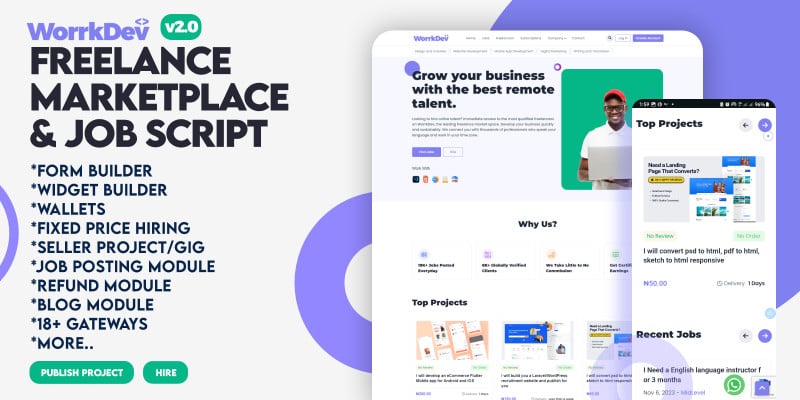
Welcome to WorrkDev v2.0 Freelancer PHP Script, Your all-in-one solution for creating a vibrant and efficient freelance marketplace. Built with the robust Laravel framework, WorrkDev is tailored to meet the needs of both freelancers and clients, offering a smooth and effective experience for everyone. Whether you're looking to develop a comprehensive freelance platform or a specialized job-posting site, WorrkDev is the ideal choice.
Features
1. User Registration and Profiles - Easy sign-up and login options - Detailed freelancer and client profiles - Profile verification and reputation system
2. Project Posting and Bidding - Simple project submission form - Option for clients to post detailed project requirements - Bid management system for freelancers - Real-time notifications for new projects and bids
3. Service Listings - Freelancers can list their services with descriptions and pricing - Categories and subcategories for easy navigation - Service rating and review system
4. Search and Filters - Advanced search functionality for projects and services - Filters based on categories, budget, location, and skills - Saved searches and recommendations
5. Messaging and Communication - In-platform messaging system for secure communication - Chat and email notifications - File sharing capabilities
6. Payment Integration - Multiple payment gateways support (e.g., PayPal, Stripe, Paystack, Flutterwave, 18 more..) - Secure payment processing - Escrow system to ensure payment security
7. Project Management Tools - Task management and milestone tracking - Time tracking and reporting tools - Document and file sharing
8. Admin Dashboard - Comprehensive admin panel for managing users, projects, and transactions - Analytics and reporting tools - Moderation and content management features
9. Responsive Design - Mobile-friendly interface - Cross-browser compatibility - Optimized for various devices
10. Customizable Settings - Theme and layout customization options - Configurable payment and commission settings - User role and permissions management
11. Security Features - SSL encryption for secure data transmission - Anti-fraud measures and user verification - Regular updates and security patches
12. Support and Help Center - Knowledge base and FAQs - Customer support ticket system - Live chat support (optional)
13. Integration Capabilities - API support for third-party integrations - Integration with social media for login and sharing - Compatibility with popular tools and plugins
14. Multilingual and Multi-currency Support - Support for multiple languages and currencies - Localization features for global reach
15. SEO Optimization - SEO-friendly URLs and metadata - Built-in tools for improving search engine visibility
16. 18+ Payment Gateways including Manual Bank Transfer.
18. Chat Messager between Clients and Freelancer
19. Freelancer Badges
And more.
Requirements
SERVER REQUIREMENT
- Backend Framework: Laravel 9x
- Frontend Framework: 4x
SYSTEM REQUIREMENT
- Requires PHP Version: 8.1
- Minimum Required MySQL Version: 5.7
- Database Support MySQL, Mysqli.
- BCMath PHP Extension
- Ctype PHP Extension
- Fileinfo PHP Extension
- Mbstring PHP Extension
- OpenSSL PHP Extension
- PDO PHP Extension
- Tokenizer PHP Extension
- XML PHP Extension
- GD PHP Extension
Instructions
Prerequisites
1. Web Server: Apache, Nginx, or another compatible server 2. PHP: Version compatible with WorrkDev (check documentation for exact version) 3. Database: MySQL or MariaDB 4. FTP Client: For file uploads (e.g., FileZilla) 5. Domain Name: Configured and pointing to your server 6. Email Server: For sending notifications (optional but recommended)
Step-by-Step Installation
1. Download and Extract Files - Download the WorrkDev PHP Script package from the official source. - Extract the contents of the ZIP file to a local directory.
2. Upload Files to Server - Use an FTP client to upload the extracted files to your web server’s root directory (e.g., `/public_html/` or `/www/`).
3. Create a Database - Log in to your web hosting control panel (e.g., cPanel). - Navigate to the MySQL Databases section. - Create a new database and note down the database name. - Create a new database user and assign it to the database with all privileges. Note down the username and password.
4. Configure the Script - Open your web browser and navigate to your domain (e.g., `http://yourdomain.com`). - You should see the WorrkDev installation wizard. - Enter the database details: - Database Host: Usually `localhost` or a specific host provided by your hosting provider. - Database Name: The name you created earlier. - Database User: The username you created. - Database Password: The password for the user. - Follow the on-screen instructions to complete the database connection setup.
5. Set Up Admin Credentials - During the installation process, you will be prompted to create an admin account. - Enter the required details for the admin account, such as username, password, and email address.
6. Configure Site Settings - After installation, you may need to configure site settings. - Access the admin dashboard using the credentials you created. - Go to Settings and configure the site name, email settings, payment gateways, and other preferences.
7. Test the Installation - Verify that the platform is functioning correctly by testing various features, such as: - Creating and managing projects - Posting and bidding on jobs - Service listings - User registration and profiles - Ensure that all notifications and emails are working.
8. Secure Your Installation - Delete the installation directory if not automatically removed. - Ensure file permissions are correctly set to avoid security issues. - Regularly back up your database and files.
9. Update and Maintain - Check for updates and apply patches as needed. - Regularly review and maintain the security of your platform.
| Author | multicoms |
|---|---|
| Category | Scripts & Code / PHP Scripts / Marketplace / Services |
| Price | $80 |
| Extended License | $240 |
| Likes | 1 |
| First Release | Aug 31, 2024 |
| Last Update | Aug 31, 2024 |
| Database | MySQL 5.x |
| Files included | .php, .css, .html, .sql, .db, .dll, .xml, JavaScript .js |
| Software version | PHP 8.1 |
| Html/css framework | Bootstrap |
| Software framework | CodeIgniter, Laravel |
| Javascript framework | jQuery |
Categories
Tags
External listing. code.market does not sell this product and does not process payment for it. Pricing, payment, delivery, licensing, refunds, and support are handled by the third-party merchant on its own website. We may earn an affiliate commission from a referral. Details.