
WordPress & WooCommerce Scraper Plugin, Import Data from Any Site

Description
Import Data from Any Site in a Single Click with WooCommerce Scraper Plugin!
You can import products and categories from any WooCommerce-based online store by providing its URL with product scraper for WooCommerce. In the backend, WooCommerce scraper plugin handles all the necessary details, including product names, descriptions, images, and prices.
WooCommerce product scraper allows you to import products in bulk rather than importing individually, making management easier.
- Import Product from any website to your WooCommerce store
- Scrap entire Shop or category from any WooCommerce website
- Scrap Single Post from any WordPress website
- Import Products from Custom Websites
- Displays the Scrapped Data at the backend
Note: The plugin does not import the data from JS based websites.
Scrap Single Product from WooCommerce Website
With the WooCommerce scraper, you can scrape a single product from any WooCommerce website by using the URL of a product. It imports the product name, price, description, and image.
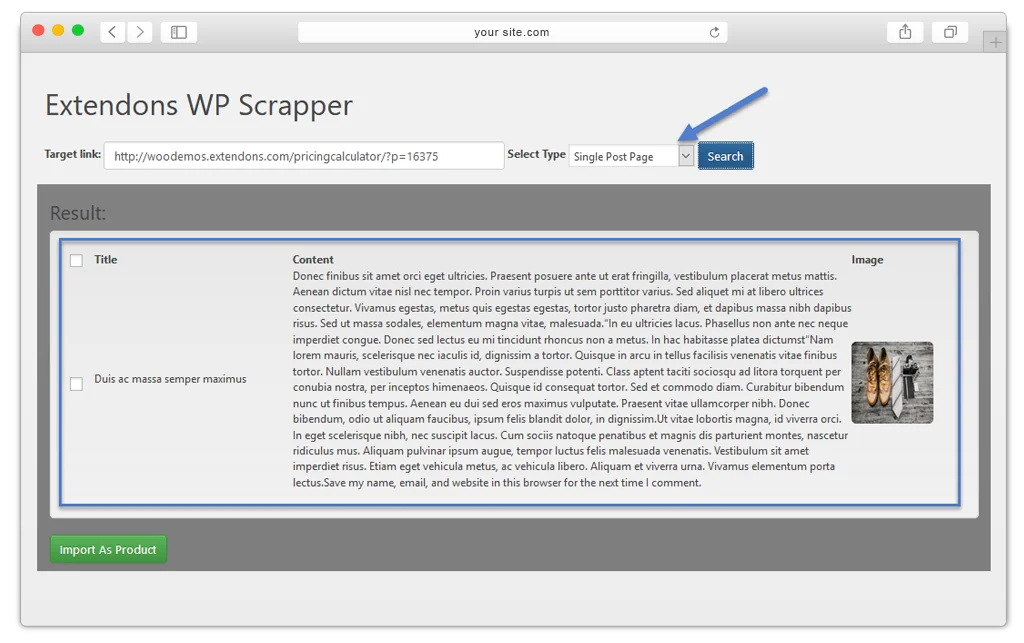
Import Entire Shop or Category
Import the entire WooCommerce shop or category directly to your website by inserting the link. WooCommerce scraper plugin displays all the products in the category, where you can choose all or specific products to import.
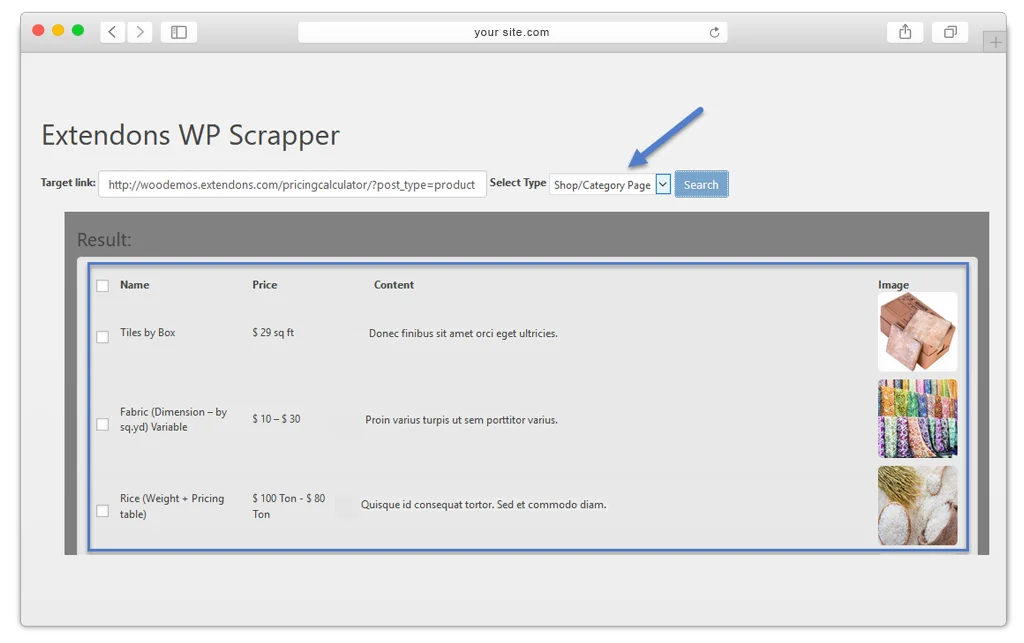
Copy Single Post from WordPress Website
WordPress & WooCommerce scraper plugin allows you to copy a single post from the WordPress website. It captures the title, content, and image of the post.
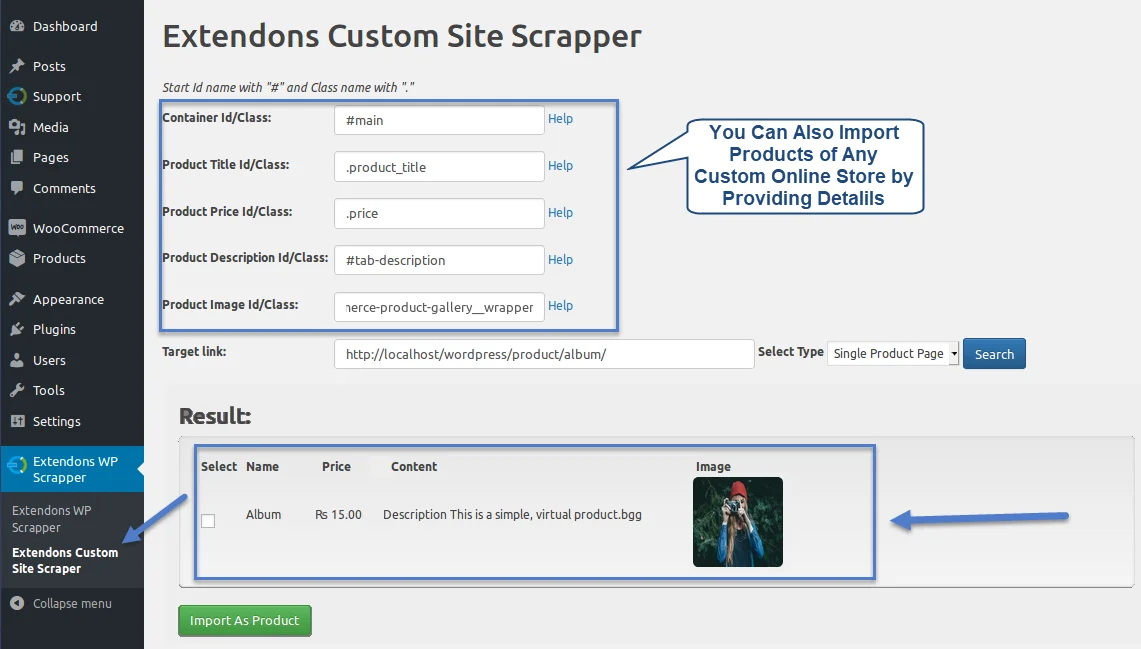
Import Products from Custom Websites
While primarily intended for WooCommerce stores, the WooCommerce product scraper extends its reach to encompass custom websites as well. Importing involves supplying the website link and specifying product IDs or element class selectors for each target item.
FAQs
1. What type of data can be imported using the WordPress scraper?
Ans.WooCommerce scraper supports the import of a variety of data, including product name, images, prices, and other relevant information from external sources.
2. Is there a limit to the number of products I can import?
Ans.WooCommerce product scraper provides flexibility in terms of the number of products you can import, and it’s capable of handling large data.
3. Can I import product from custom sites?
Ans.Yes, you can import product from the custom sites with product scraper for WooCommerce by including product details ID you want to scrape.
4. Can I import WordPress Post?
Ans.Yes, with WooCommerce scrapper plugin you can import WordPress post.
Description in Dutch
Met de Scraper-plug-in voor WordPress en WooCommerce kunt u met één klik producten en categorieën van elke e-commercewebsite importeren. De plug-in maakt automatisch het product op de back-end met alle gegevens zoals productnaam, beschrijving, afbeeldingen en prijs.
Bovendien kunt u met de Scrapper-plug-in ook een blog van elke WordPress-website importeren. Het maakt het voor eigenaren van e-winkels gemakkelijk om de producten in bulk te importeren in plaats van ze één voor één toe te voegen.
- Importeer producten van elke website naar uw WooCommerce-winkel
- Haal de hele winkel of categorie op vanaf elke WooCommerce-website
- Schrap één bericht van alle WordPress-websites
- Importeer producten van aangepaste websites
- Toont de geschrapte gegevens in de backoffice
Description in French
Le plug-in Scraper pour WordPress et WooCommerce vous permet d’importer des produits et des catégories à partir de n’importe quel site Web de commerce électronique en un seul clic. Le plugin créera automatiquement le produit sur le back-end avec toutes ses données comme le nom du produit, la description, les images et le prix.
De plus, vous pouvez également importer un blog depuis n’importe quel site Web WordPress avec le plugin Scrapper. Il permet aux propriétaires de boutiques en ligne d’importer facilement les produits en vrac plutôt que de les ajouter un par un.
- Importer des produits de n’importe quel site Web vers votre boutique WooCommerce
- Apportez une boutique ou une catégorie entière à partir de n’importe quel site Web WooCommerce
- Supprimez la publication unique de tous les sites Web WordPress
- Importer des produits à partir de sites Web personnalisés
- Affiche les données mises au rebut au Back office
Description in Italian
Il plug-in Scraper per WordPress e WooCommerce ti consente di importare prodotti e categorie da qualsiasi sito di e-commerce con un solo clic. Il plug-in creerà automaticamente il prodotto sul back-end con tutti i suoi dati come nome del prodotto, descrizione, immagini e prezzo.
Inoltre, puoi anche importare un blog da qualsiasi sito Web WordPress con il plug-in Scrapper. Rende facile per i proprietari di e-store importare i prodotti in blocco piuttosto che aggiungerli uno per uno.
- Importa prodotti da qualsiasi sito Web nel tuo negozio WooCommerce
- Porta l’intero negozio o categoria da qualsiasi sito Web WooCommerce
- Elimina un singolo post da qualsiasi sito Web WordPress
- Importa prodotti da siti Web personalizzati
- Visualizza i dati raschiati nel back office
Description in Spanish
El complemento Scraper para WordPress y WooCommerce le permite importar productos y categorías desde cualquier sitio web de comercio electrónico con un solo clic. El complemento creará automáticamente el producto en el back-end con todos sus datos, como el nombre del producto, la descripción, las imágenes y el precio.
Además, también puede importar un blog desde cualquier sitio web de WordPress con el complemento Scrapper. Facilita a los propietarios de tiendas electrónicas la importación de productos a granel en lugar de agregarlos uno por uno.
- Importe productos desde cualquier sitio web a su tienda WooCommerce
- Traiga toda la tienda o categoría desde cualquier sitio web de WooCommerce
- Eliminar publicación única de cualquier sitio web de WordPress
- Importar productos de sitios web personalizados
- Muestra los datos descartados en la oficina administrativa
Description in German
Mit dem Scraper-Plugin für WordPress & WooCommerce können Sie Produkte und Kategorien von jeder E-Commerce-Website mit einem einzigen Klick importieren. Das Plugin erstellt automatisch das Produkt im Backend mit allen Daten wie Produktname, Beschreibung, Bildern und Preis.
Darüber hinaus können Sie mit dem Scrapper-Plugin auch einen Blog von jeder WordPress-Website importieren. Es macht es E-Shop-Besitzern einfach, die Produkte in großen Mengen zu importieren, anstatt sie einzeln hinzuzufügen.
- Importieren Sie Produkte von jeder Website in Ihren WooCommerce-Shop
- Bringen Sie den gesamten Shop oder die gesamte Kategorie von einer beliebigen WooCommerce-Website ein
- Verschrotten Sie einzelne Posts von allen WordPress-Websites
- Importieren Sie Produkte von benutzerdefinierten Websites
- Zeigt die verschrotteten Daten im Backoffice an
Version 1.0.7
Fixed the multiple scraping issues.
Added the new feature 'Scrape custom shop'.
Added multi-language support.
Fixed the multiple importing issues.
Version 1.0.6
Added functionality of scraping and importing posts.
Fix CSS issues
Version 1.0.5
Minor Issue resolved
Version 1.0.4
compatible with HPOS
Version 1.0.3
Fixed image Import Issue
Version 1.0.2
Fixed the Issue of Scrapping from Shop page.
Version 1.0.1
Fixed Some Bugs
Version 1.0.0
Initial Release
| Type | WooCommerce Plugin |
|---|---|
| Author | extendons |
| Category | Wordpress / Ecommerce / Woocommerce |
| Price | $35 |
| Sales | 849 |
| Rating | 3.77 from 26 ratings |
| Published | Jan 19, 2019 |
| Last Update | May 5, 2026 |
| Compatible Browsers | IE10, IE11, Firefox, Safari, Opera, Chrome, Edge |
| Compatible Software | WordPress 6.9.x, WordPress 6.8.x, WordPress 6.7.x, WordPress 6.6.x, WordPress 6.5.x, WordPress 6.4.x, WordPress 6.3.x, WordPress 6.2.x, WordPress 6.1.x, WordPress 6.0.x, WordPress 5.9.x, WordPress 5.8.x, WordPress 5.7.x, WordPress 5.6.x, WordPress 5.5.x, WordPress 5.4.x, WordPress 5.3.x, WordPress 5.2.x, WordPress 5.1.x, WordPress 5.0.x, WordPress 4.9.x |
| Compatible With | WooCommerce 9.x.x, WooCommerce 8.x.x, WooCommerce 7.x.x, WooCommerce 6.x.x, WooCommerce 5.x.x |
| Source Files Included | JavaScript JS, HTML, CSS, PHP |
| Video Preview Resolution | 1050x650 |
External listing. code.market does not sell this product and does not process payment for it. Pricing, payment, delivery, licensing, refunds, and support are handled by the third-party merchant on its own website. We may earn an affiliate commission from a referral. Details.
Products of the Week.
Submit🥇

STOP GUESSING WHAT TO POST
AI that learns your brand voice and builds a month of consistent, on-brand social content: carousels, posts and hooks that sound like you, not like everyone else's AI.
SaaS · 4,282 views · 38 clicksSaaS · Week 45 · 4,282 views · 38 clicks
🥈

Conversational Backlinks for Busy Founders
Place Backlink Relevant Conversation for your domain across Forums and Conversations
Website · 41,992 views · 223 clicksWebsite · Week 45 · 41,992 views · 223 clicks
🥉

upvote.club
Free Social Media Engagement that Helps Boost Your Content. Upvote Club supports 19 social networks with 100+ engagement actions in one dashboard. Add links to your posts and get free engagement from real users.
SaaS · 40,034 views · 117 clicksSaaS · Week 45 · 40,034 views · 117 clicks
#4

Substack Posting API
Onboard your Agent to Substack. Write Publish on Substack via API
SaaS · 59,044 views · 198 clicksSaaS · Week 45 · 59,044 views · 198 clicks
#5

Seenshot App
Free, Fast, MacOS Screenshot app. Make Screenshot cmd+shift+2 and send it via link
Desktop App · 28,416 views · 122 clicksDesktop App · Week 45 · 28,416 views · 122 clicks
#6

Hand-Placed Backlinks $9.99 per link. Flat rate.
Buy hand-placed forum, Q-A and directory backlinks. Flat $9.99 per link, no subscriptions — you only pay for approved listings.
Website · 4,252 views · 19 clicksWebsite · Week 45 · 4,252 views · 19 clicks
#7

Free Invoice Generator - PDF Invoices in Your Browser, No Sign-Up
A free invoice maker for freelancers and small businesses: fill in the invoice, check the live preview, and download a PDF that looks exactly like it. Any currency, tax per item, three templates, no sign-up, and nothing leaves your device.
2,930 views · 17 clicksWeek 45 · 2,930 views · 17 clicks
#8

Merge PDF Files Free - Combine PDFs in Your Browser, No Upload
A free PDF merger for office workers, students, and freelancers: combine PDFs and images into one file in the browser, reorder files and pages, pick page ranges, keep bookmarks, and open password-protected PDFs. Nothing is uploaded, no sign-up, no watermark.
2,706 views · 13 clicksWeek 45 · 2,706 views · 13 clicks