
WordPress WooCommerce Multi Seller Marketplace Plugin
Description
Woocommerce Multivendor Marketplace is a powerful plugin which convert your woocommerce website into a multivendor e-commerce website. Where multiple sellers can sell their products on the same platform and their selling activities can be tracked from a centralized backend.



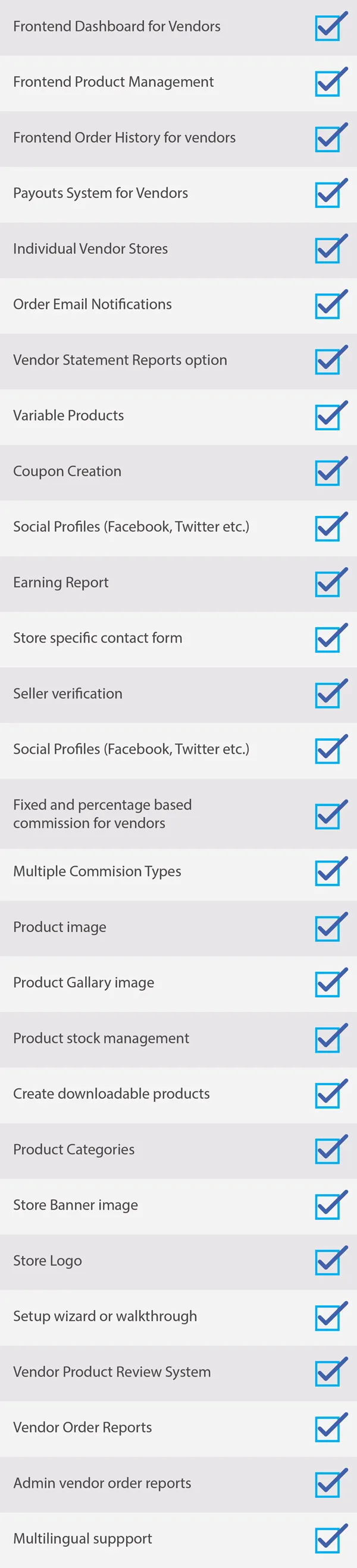

- Separate vendor profile and dashboard.
- Product selling counter on single product page.
- Product seller name with product.
- Vendor can edit profile information.
- Seller can add product in store and add product gallery image from vendor dashboard.
- Feedback and review with star rating for every vendor’s product.
- Vendor can edit, delete,change image of product, add simple, grouped, external and variable type product from front-end.
- Vendor can set product in sales.
- Seller can add variation for a product.
- Vendor can see list of their own products.
- Seller can see list of their own orders.
- Vendor only can see their order items.
- Seller can add coupon, see coupon list.
- Seller can ask for withdrawal.
- Vendor can add multiple payment option for withdrawal.
- Seller can add banner and shop logo.
- Vendor can see own sales report.
- vendor can upload and crop avatar image on profile page.
- vendor can upload and reposition cover image

- Admin can enable or disable sales for vendors.
- Administrator can set different commission for sellers.
- Admin can set maximum and minimum amount withdrawals.
- Administrator can see all vendors list, orders list, product list and withdrawal list of vendor.
- Admin can see separate vendor’s product list.
- Administrator can see sold-items, sold amount, commission amount of all vendors.
- Admin can set showing records per page in front-end.
- Administrator can delete vendor and assign all products to other vendor.
- If vendor disable then its product automatically disable.
- Admin can set marketplace menu and sub-menu background color.
- Administrator can enable or disable vendor’s name showing on product details page.
- Admin can set to display fake product quantity with time duration and text color of selling count in admin setting page.
FAQs
1. Can vendor add product?
Ans. Yes, vendor can add product if vendor is allowed to publish the product than it can be publish other wise once admin review the product after admin can approve.
2. Can Vendor add downloadable?
Ans. Yes, vendor can add simple,downloadable and virtual product.
3. Can vendor upload product and product gallery image?
Ans. Yes, vendor can add 1 image as product thumbnail as well as multiple gallery images
4. Can vendor add categories from front end?
Ans. No, Vendor can not add categories from frontend, only allowed categories can be used.
5. How vendor would know about their store orders?
Ans. Once vendor product is purchased vendor will be notified via email with their purchased item.
6. is There option for Crop avatar and cover?
Ans. Option for crop avatar image and set and reposition option for cover image
Support
Dear Buyer, if you have any query, please raise a ticket at We will resolve your query as soon as possible. Please Don’t give us a low rating without contacting our support on the issue you have faced with. We are always here for your support and always happy to help you.
Change Log
Version 2.3.0 Updated:
New Feature Added:
1)Crop Option for seller profile avatar.
2) Cover page reposition option.
Version 2.2.1 Updated:
New Feature Added:
1) Vendor Statement reports.
2) coupon creations.
3) selling report.
4) setup wizard and walk through for vendor registration.
Version 2.1.0 Updated:
New Feature Added:
1) now vendor can add Virtual and downloadable product.
2) vendor set multiple payouts option.
Version 2.0.0 Updated:
New Feature Added:
1) Vendor order notification to Vendor.
2) vendor earnings.
3) withdrwals by vendor.
4) buyer can contact admin via email option.
Bug Fixed:
1) product publishing issue fixed.
Version 1.2.0 Updated:
New Feature Added:
1) New type of commission added as fixed and prcentage type.
Version 1.0.1 Updated:
Bug Fixed:
1) Bug fix for product images and product gallery.
Version 1.0.0:
Initial Release
Categories
Tags
External listing. code.market does not sell this product and does not process payment for it. Pricing, payment, delivery, licensing, refunds, and support are handled by the third-party merchant on its own website. We may earn an affiliate commission from a referral. Details.
Products of the Week.
Submit🥇

STOP GUESSING WHAT TO POST
AI that learns your brand voice and builds a month of consistent, on-brand social content: carousels, posts and hooks that sound like you, not like everyone else's AI.
SaaS · 3,991 views · 35 clicksSaaS · Week 45 · 3,991 views · 35 clicks
🥈

Conversational Backlinks for Busy Founders
Place Backlink Relevant Conversation for your domain across Forums and Conversations
Website · 41,638 views · 222 clicksWebsite · Week 45 · 41,638 views · 222 clicks
🥉

upvote.club
Free Social Media Engagement that Helps Boost Your Content. Upvote Club supports 19 social networks with 100+ engagement actions in one dashboard. Add links to your posts and get free engagement from real users.
SaaS · 39,664 views · 114 clicksSaaS · Week 45 · 39,664 views · 114 clicks
#4

Substack Posting API
Onboard your Agent to Substack. Write Publish on Substack via API
SaaS · 58,693 views · 198 clicksSaaS · Week 45 · 58,693 views · 198 clicks
#5

Seenshot App
Free, Fast, MacOS Screenshot app. Make Screenshot cmd+shift+2 and send it via link
Desktop App · 28,075 views · 122 clicksDesktop App · Week 45 · 28,075 views · 122 clicks
#6

Hand-Placed Backlinks $9.99 per link. Flat rate.
Buy hand-placed forum, Q-A and directory backlinks. Flat $9.99 per link, no subscriptions — you only pay for approved listings.
Website · 3,934 views · 19 clicksWebsite · Week 45 · 3,934 views · 19 clicks
#7

Free Invoice Generator - PDF Invoices in Your Browser, No Sign-Up
A free invoice maker for freelancers and small businesses: fill in the invoice, check the live preview, and download a PDF that looks exactly like it. Any currency, tax per item, three templates, no sign-up, and nothing leaves your device.
2,611 views · 17 clicksWeek 45 · 2,611 views · 17 clicks
#8

Merge PDF Files Free - Combine PDFs in Your Browser, No Upload
A free PDF merger for office workers, students, and freelancers: combine PDFs and images into one file in the browser, reorder files and pages, pick page ranges, keep bookmarks, and open password-protected PDFs. Nothing is uploaded, no sign-up, no watermark.
2,430 views · 13 clicksWeek 45 · 2,430 views · 13 clicks