
WordPress eCommerce Notification

Description



What is the eCommerce Notification?
eCommerce Notification displays all post types (posts, pages, etc) as a popup on your storefront. It’s the online equivalent of a crowded store, and it shows prospective customers that other people are accessing your pages/posts, or they are being viewed by someone.
- Increase conversion rate by highlighting other customers that have viewed/accessed posts.
- Compatible with all post types
- Create a sense of urgency for visitors and expose new articles!
* IMPORTANT NOTE:
Our plugin supports assigning the coupon box popup on certain pages using WP’s Conditional tags. To handle WP’s Conditional Tags, this plugin uses eval() which is very dangerous because it allows the execution of arbitrary PHP code. Therefore, please only fill this field with proper conditional tags that are validated and/or provided by trusted developers.

FEATURES
ORDER POP-UP
WordPress eCommerce Notification automatically generates the order from the given information. Then display the order notification pop-up on the front end.
- Customer name: Allows you to add a list of customer names.
- Customer address: Allows you to add to a list of customer addresses.
- WordPress post type: The plugin can take any WordPress post type to display as a “product”.
- Select posts: Select posts to display. You can select different posts from different post types to display.
- Message: Enter the message to display on pop-ups. You can use shortcodes to display the necessary information.
- Order time: select a period. The purchased time will be picked randomly within this period.
- Auto-Detect address: The plugin will detect visitor addresses based on their country. And then display someone in their location who just purchased recently.
MULTIPLE WOOCOMMERCE NOTIFICATION MESSAGES
You can add and configure as many eCommerce Notification messages as you want. Each message will be displayed on a different single pop-up.
- Shortcodes: Use the shortcodes to configure your messages. The system will get this information
from your orders or create it automatically on WooCommerce Notification
{first_name} – Displays the customer’s first name.<br />
            {city} – Shows the customer’s city.<br />
            {country} – Displays the customer’s country.<br />
            {post} – Inserts the post title.<br />
            {post_with_link} – Inserts the post title with a clickable link.<br />
            {time_ago} – Generates a random time within the threshold set under the "Virtual Time" option.<br />
            {custom} – Allows you to use a custom shortcode for additional personalization.
- States for addresses in the USA: With the shortcode for states, now you can display addresses in the USA correctly. Example: Someone in Chicago, Illinois, USA just purchased a Woo Ninja.
- Compatible with WPML and Polylang: This feature allows to display of notifications in multiple languages.
DESIGN
- Text color: Change the text color, and post title color.
- Background color: Change the pop-up background color.
- Post image: The plugin will take the post-featured image to display as a post main image on pop-ups.
- Image position: Select to display the post main image on the left side or the right side of the pop-up.
- Image size: Select the image size to display on the pop-up.
- Pop-up position: Select to display the sale notification pop-up on the top left, top right, bottom left, and bottom right positions.
- Pop-up appears/disappear effect: There are 32 appear/disappear effects for you to select.
- Custom CSS: This allows you to add your own CSS code to change the pop-up front-end design.
- Close button: Allow your visitor to hide the sale pop-up temporarily.
- Sound: Play a sound when pop-up to attract the user’s attention.
- Condition tags: Use WordPress conditional tags to configure which page the sale pop-ups appear on.
TIME OPTIONS
- Loop: The loop option will help to display multiple pop-ups on a page load.
- Notification per page: Select how many sale notifications you want to display on a page load.
- Next time display: Select the delay time between two sale notification pop-ups.
- Delay time: Select the time for the pop-up to appear after the page completes loading.
- Display time: Select the pop-up display time before it disappears.
REPORT
- Save Logs: This helps the system store information when visitors click on the notification. Then the admin site could statistic the number of clicks and analyze fluctuating sales. The reporting system allows statistics number of clicks by date and by-post.
AUTOMATICAL UPDATE
Authenticate purchase and auto-update the plugin from your Dashboard.
COMPATIBILITY
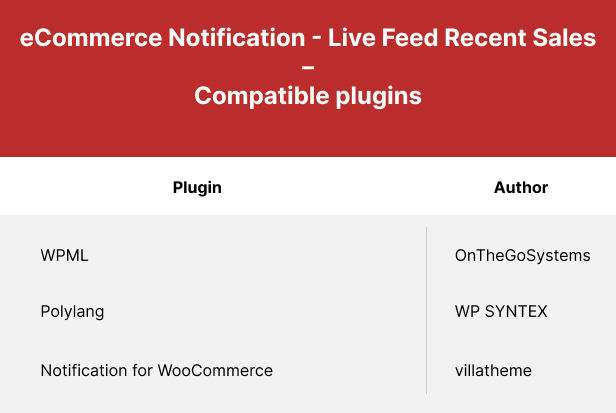
Let’s follow this video guide to use the eCommerce Notification plugin.
CHANGELOG
| Type | WordPress Plugin |
|---|---|
| Author | villatheme |
| Category | Wordpress / Ecommerce / Miscellaneous |
| Price | $49 |
| Sales | 256 |
| Rating | 4.91 from 11 ratings |
| Published | Jul 6, 2017 |
| Last Update | Aug 20, 2026 |
| Compatible Browsers | Firefox, Safari, Opera, Chrome, Edge |
| Compatible Software | WordPress 7.0.x, WordPress 6.9.x, WordPress 6.8.x, WordPress 6.7.x, WordPress 6.6.x, WordPress 6.5.x, WordPress 6.4.x, WordPress 6.3.x, WordPress 6.2.x, WordPress 6.1.x |
| Gutenberg Optimized | Yes |
| Source Files Included | JavaScript JS, CSS, PHP |
Categories
Tags
External listing. code.market does not sell this product and does not process payment for it. Pricing, payment, delivery, licensing, refunds, and support are handled by the third-party merchant on its own website. We may earn an affiliate commission from a referral. Details.
Products of the Week.
Submit🥇

Poople
Poople is the ultimate daily word ladder challenge that tasks you with transforming a 4-letter word into POOP, one letter at a time. Designed for quick, satisfying brain-teasers, this free browser-based game requires no sign-ups or downloads. Simply navigate through real-word steps to reach the target, test your vocabulary against a global daily puzzle, and track your streaks effortlessly. Whether you're a fan of Wordle or Weaver, Poople offers a fast, polished, and addictive way to train your brain.
Other · 23 views · 2 clicksOther · Week 44 · 23 views · 2 clicks
🥈

Actionbook
It works inside the user's own browser with the accounts already signed in. The user describes the result they need, and the agent reads, clicks and types through the pages, then delivers a dashboard or report where each data links back to its source.
Other · 970 views · 22 clicksOther · Week 44 · 970 views · 22 clicks
🥉

Free social media tools for creators & solofounders
295 free tools for growing your social media: write, plan, grow on local AI models, 100% free forever, No sign-up required, No trial. Write, check and measure posts on LinkedIn, Instagram, TikTok, X, YouTube, Reddit, Product Hunt and more: a free social media scheduler for 17 networks, engagement rate calculators, character counters, best time to post, hook generators and follower growth calculators. No login anywhere, no API or credit usage.
940 views · 7 clicksWeek 44 · 940 views · 7 clicks
#4

STOP GUESSING WHAT TO POST
AI that learns your brand voice and builds a month of consistent, on-brand social content: carousels, posts and hooks that sound like you, not like everyone else's AI.
SaaS · 2,181 views · 22 clicksSaaS · Week 44 · 2,181 views · 22 clicks
#5

Hand-Placed Backlinks $9.99 per link. Flat rate.
Buy hand-placed forum, Q-A and directory backlinks. Flat $9.99 per link, no subscriptions — you only pay for approved listings.
Website · 2,122 views · 17 clicksWebsite · Week 44 · 2,122 views · 17 clicks
#6

Conversational Backlinks for Busy Founders
Place Backlink Relevant Conversation for your domain across Forums and Conversations
39,572 views · 211 clicksWeek 44 · 39,572 views · 211 clicks
#7

Free Invoice Generator - PDF Invoices in Your Browser, No Sign-Up
A free invoice maker for freelancers and small businesses: fill in the invoice, check the live preview, and download a PDF that looks exactly like it. Any currency, tax per item, three templates, no sign-up, and nothing leaves your device.
838 views · 12 clicksWeek 44 · 838 views · 12 clicks
#8

Merge PDF Files Free - Combine PDFs in Your Browser, No Upload
A free PDF merger for office workers, students, and freelancers: combine PDFs and images into one file in the browser, reorder files and pages, pick page ranges, keep bookmarks, and open password-protected PDFs. Nothing is uploaded, no sign-up, no watermark.
793 views · 8 clicksWeek 44 · 793 views · 8 clicks