
WordPress Content Extractor - Professional Desktop Application
Description
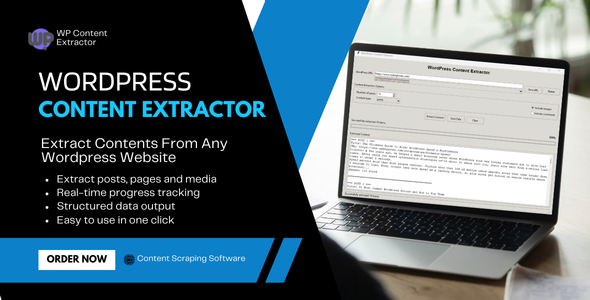
Transform Any WordPress Website into Structured Data WordPress Content Extractor is a powerful, professional-grade desktop application that allows you to extract, analyze, and export content from any WordPress website with ease. Whether you’re a content researcher, digital marketer, SEO specialist, or data analyst, this tool provides everything you need to gather comprehensive content data from WordPress sites.
Key Features & Benefits Comprehensive Content Extraction Extract Posts & Pages: Get complete content from blog posts, articles, and static pages Full Text Content: Extract complete article text, not just excerpts Metadata Extraction: Capture titles, dates, authors, categories, and tags Image URLs: Extract all image links with full URLs Comments Support: Optional extraction of user comments Smart Content Detection: Automatically identifies and extracts relevant content
Advanced Technical Features WordPress REST API Integration: Uses official WordPress API for clean, structured data Intelligent Fallback: Automatically switches to web scraping when API is unavailable Progress Tracking: Real-time progress bar with percentage completion Multi-threaded Processing: Non-blocking extraction for smooth user experience Error Handling: Robust error recovery and user-friendly error messages URL Management: Save and manage frequently used WordPress URLs
Multiple Export Formats JSON Export: Perfect for developers and data analysis CSV Export: Ideal for spreadsheet applications and reporting TXT Export: Human-readable format for documentation Structured Data: Clean, organized output with all metadata
Professional User Interface Modern GUI: Clean, intuitive interface Real-time Updates: Live progress tracking and status updates Responsive Design: Adapts to different screen sizes User-friendly: No technical knowledge required
Perfect For Content Marketers & SEO Specialists Analyze competitor content strategies Extract content ideas and topics Research trending topics in your niche Gather content for inspiration and analysis Data Analysts & Researchers Collect structured data from WordPress sites Analyze content patterns and trends Export data for further analysis Create comprehensive content databases Digital Agencies Client content audits Competitor analysis reports Content gap analysis Market research and insights Bloggers & Content Creators Research popular content topics Analyze successful posts Gather inspiration for new content Study content structure and formatting
Performance Extraction Speed: 50-500 posts per minute (depending on site) Memory Usage: Low memory footprint Concurrent Processing: Multi-threaded for optimal performance Error Recovery: Automatic retry and fallback mechanisms
How It Works Step 1: Enter WordPress URL Simply enter any WordPress website URL (e.g., https://toolspy.net or toolspy.net) Step 2: Configure Extraction Settings Number of Items: Set how many posts/pages to extract (1-1000) Content Type: Choose posts, pages, or both Include Images: Option to extract image URLs Include Comments: Option to extract user comments Step 3: Start Extraction Click “Extract Content” and watch the real-time progress bar Step 4: Export Data Save your extracted content in JSON, CSV, or TXT format
| Type | Windows App |
|---|---|
| Author | Ram-raaj |
| Price | $31 |
| Sales | 0 |
| Rating | 0 (0) |
| Published | Sep 8, 2025 |
| Last Update | Sep 8, 2025 |
| Application Runtime | Native |
| High Resolution | Yes |
| Operating System Versions | Windows 11, Windows 10, Windows 8 Desktop, Windows 7 |
Categories
Tags
External listing. code.market does not sell this product and does not process payment for it. Pricing, payment, delivery, licensing, refunds, and support are handled by the third-party merchant on its own website. We may earn an affiliate commission from a referral. Details.
Products of the Week.
Submit🥇

STOP GUESSING WHAT TO POST
AI that learns your brand voice and builds a month of consistent, on-brand social content: carousels, posts and hooks that sound like you, not like everyone else's AI.
SaaS · 7,363 views · 67 clicksSaaS · Week 46 · 7,363 views · 67 clicks
🥈

Conversational Backlinks for Busy Founders
Place Backlink Relevant Conversation for your domain across Forums and Conversations
Website · 46,646 views · 232 clicksWebsite · Week 46 · 46,646 views · 232 clicks
🥉

upvote.club
Free Social Media Engagement that Helps Boost Your Content. Upvote Club supports 19 social networks with 100+ engagement actions in one dashboard. Add links to your posts and get free engagement from real users.
SaaS · 44,586 views · 127 clicksSaaS · Week 46 · 44,586 views · 127 clicks
#4

Substack Posting API
Onboard your Agent to Substack. Write Publish on Substack via API
SaaS · 63,474 views · 206 clicksSaaS · Week 46 · 63,474 views · 206 clicks
#5

Seenshot App
Free, Fast, MacOS Screenshot app. Make Screenshot cmd+shift+2 and send it via link
Desktop App · 32,723 views · 127 clicksDesktop App · Week 46 · 32,723 views · 127 clicks
#6

Hand-Placed Backlinks $9.99 per link. Flat rate.
Buy hand-placed forum, Q-A and directory backlinks. Flat $9.99 per link, no subscriptions — you only pay for approved listings.
Website · 8,343 views · 19 clicksWebsite · Week 46 · 8,343 views · 19 clicks
#7

Free Invoice Generator - PDF Invoices in Your Browser, No Sign-Up
A free invoice maker for freelancers and small businesses: fill in the invoice, check the live preview, and download a PDF that looks exactly like it. Any currency, tax per item, three templates, no sign-up, and nothing leaves your device.
6,970 views · 29 clicksWeek 46 · 6,970 views · 29 clicks
#8

Merge PDF Files Free - Combine PDFs in Your Browser, No Upload
A free PDF merger for office workers, students, and freelancers: combine PDFs and images into one file in the browser, reorder files and pages, pick page ranges, keep bookmarks, and open password-protected PDFs. Nothing is uploaded, no sign-up, no watermark.
6,451 views · 18 clicksWeek 46 · 6,451 views · 18 clicks