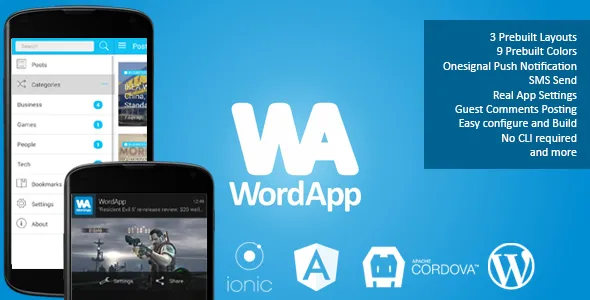
WordApp — PhoneGap/Cordova Wordpress Hybrid App
Description
WordApp is high quality mobile app template built with Ionic Framework, which does not require any programming knowledge. It does not require any additional software installations. It is only necessary to edit a single config file, to add to the archive and build using a completely free service build.phonegap.com.
NOTE!
From version Wordpress 4.7 API included in core. In this regard, there are several problems for users who have updated your blog to the new version 4.7. Solving these problems will occur as soon as they detect.
Known issues are resolved. It applies only to users who have updated to WordPress version 4.7 and above:
- 1. Install the plugin WordPress REST API V2 is not required, it is already in the kernel
- 2. The problem with the display of posts by categories. Solved
- 3. The problem with adding anonymous comments. Solved


FAQ
- WordApp support Windows or iOS platforms? Yes, all WordApp plugins and Ionic support Windows, iOS and Andriod platforms. But I test WordApp only with Android platform and can’t guaranteed perfect work on other platforms.
- How to change splash screen and app icon
- How to change app name, app version, id and description
- Is required to install OneSignal plugins?
Look all FAQ’s
Features
- Cordova/PhoneGap
- Ionic Framework – easy to build beautiful and interactive mobile apps using HTML5 and AngularJS
- AngularJS
- 9 pre-build Color Schemes – a set of colors to start with Ionic
- 4 pre-build Homepage Layouts – Card, Card2, List and Mixed (Card, Card2, List)
- Easy Configure App – just edit one file config.js and build app
- Guest Comments – all user can post comments, no authentification required
- Accordion Category List – collapse/expand Categories list in menu
- Real Working Settings – on/off Push notifications, on/off images load
- Search posts
- Font adjust – decrease/increase text size on post page
- Image view and pinch zooming
- Lazy Load – is delays loading of images in pages. Images outside of viewport are not loaded until user scrolls to them
- Pull to refresh
- Infinite scroll
- Bookmarks
- Send SMS – send SMS directly from app to preset number
- Email sender – send Feedback or Bugreport to email
- App Rate – provide the rate this app
- AdMob
- Full integrated Onesignal Push Notification
- WordPress as a Cloud CMS
- WordPress WP API V2
Native Plugins
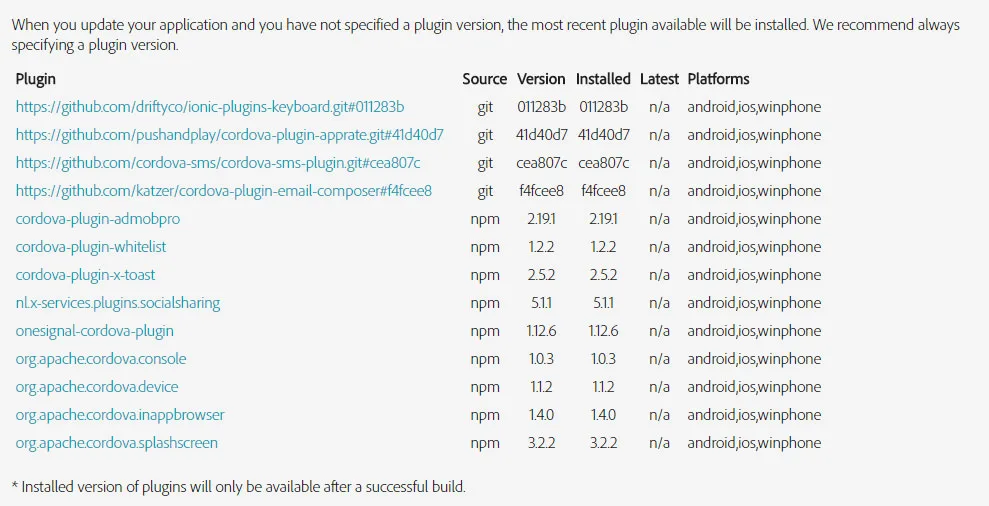
- Onesignal Push Notifications
- InAppBrowser
- Native Social Sharing
- Email Composer
- Cordova SMS
- Status Bar
- Local Storage
- Toast PhoneGap Plugin
- App Rate Plugin
- AdMob – cordova-admob-pro plugin
Wordpress Plugins
- WordPress REST API V2
- WP REST API – Pure Taxonomies
- Better REST API Featured Images
- OneSignal – Free Web Push Notifications
- Onesignal Filter (in Wordpress Plugin folder) – unique plugin to send notifications with additional features like featured image and action buttons
What In Archive
- WordApp Source Code
- Onesignal Filter Plugin – unique plugin to send notifications with additional features like featured image and action buttons
- Quick start documentation
Changelog
Version 1.0.3
- Fix BUG with category filter (WP 4.7.x)
- Add Tablet View support
- Add Interstitial AdMob support
- New version "Push notify OneSignal Filter" plugin v 0.0.2 (Add support custom Title and Content for notification directly from post editor)
- Move Search bar from menu to additional page and add Search icon to header
- Added translate.js for easy translate WordApp to any language
Version 1.0.2
- Fix problem with plugins what will be removed on November 15th, 2016 from public PhoneGap repository
- New page template 'Mixed'
- Move documentation from ZIP to online server
Version 1.0.1
- AdMob plugin
- Solution choose specific categories to include in the APP
Version 1.0.0
- First Release
Categories
Tags
External listing. code.market does not sell this product and does not process payment for it. Pricing, payment, delivery, licensing, refunds, and support are handled by the third-party merchant on its own website. We may earn an affiliate commission from a referral. Details.
Products of the Week.
Submit🥇

STOP GUESSING WHAT TO POST
AI that learns your brand voice and builds a month of consistent, on-brand social content: carousels, posts and hooks that sound like you, not like everyone else's AI.
SaaS · 6,190 views · 54 clicksSaaS · Week 46 · 6,190 views · 54 clicks
🥈

Conversational Backlinks for Busy Founders
Place Backlink Relevant Conversation for your domain across Forums and Conversations
Website · 44,829 views · 228 clicksWebsite · Week 46 · 44,829 views · 228 clicks
🥉

upvote.club
Free Social Media Engagement that Helps Boost Your Content. Upvote Club supports 19 social networks with 100+ engagement actions in one dashboard. Add links to your posts and get free engagement from real users.
SaaS · 42,840 views · 124 clicksSaaS · Week 46 · 42,840 views · 124 clicks
#4

Substack Posting API
Onboard your Agent to Substack. Write Publish on Substack via API
SaaS · 61,787 views · 204 clicksSaaS · Week 46 · 61,787 views · 204 clicks
#5

Seenshot App
Free, Fast, MacOS Screenshot app. Make Screenshot cmd+shift+2 and send it via link
Desktop App · 31,055 views · 124 clicksDesktop App · Week 46 · 31,055 views · 124 clicks
#6

Hand-Placed Backlinks $9.99 per link. Flat rate.
Buy hand-placed forum, Q-A and directory backlinks. Flat $9.99 per link, no subscriptions — you only pay for approved listings.
Website · 6,795 views · 19 clicksWebsite · Week 46 · 6,795 views · 19 clicks
#7

Free Invoice Generator - PDF Invoices in Your Browser, No Sign-Up
A free invoice maker for freelancers and small businesses: fill in the invoice, check the live preview, and download a PDF that looks exactly like it. Any currency, tax per item, three templates, no sign-up, and nothing leaves your device.
5,424 views · 19 clicksWeek 46 · 5,424 views · 19 clicks
#8

Merge PDF Files Free - Combine PDFs in Your Browser, No Upload
A free PDF merger for office workers, students, and freelancers: combine PDFs and images into one file in the browser, reorder files and pages, pick page ranges, keep bookmarks, and open password-protected PDFs. Nothing is uploaded, no sign-up, no watermark.
4,998 views · 15 clicksWeek 46 · 4,998 views · 15 clicks