
woopy | iOS Universal Listings + Chat App Template (Swift)

Description









iOS, Android and Web versions can share the same Parse database




10 Jun 2024
• Resolved crashes to support iOS 17+ versions
• Added new design and screen shots
• Updated source code
4 Jan 2024
• Updated the app and new design
• It supports  Xcode 15+ and iOS 17.2 version
20 Nov 2022
• Updated the design and source code to resolve the new permissions of iOS 16+ version
• Resolved the crash on Edit profile screen
28 Jan 2022
• Stripe bug fixed
• Added support to iOS 15+ versions
• Tested all the code and update permissions of new OS
8 Mar 2021
• Updated the issue of facebook login and apple login
• Updated code to iOS 14.0 + version and xcode 12.0+ version
9 Nov 2020
• Updated code to resolve the issue of Facebook login
• Updated design with card view of home and ads listing screen
• Add new feature of 'More Ads by Owner' on AD details screen to show other ads of particular store owner/individual
• Fix crash on likes and activities screen
• Updated app to latest iOS 14 and its dark mode new changes
• Updated new screenshots and screen recording
1 July 2020
• Registered new merchant Id to create an Apple Pay certificate.
• Integrated  “Apple Pay”
• Integrated "Stripe" payment gateway to deduct payment from Apple Pay
14 May 2020
• Introduced a Price Filter ranges e.g $10 - $1000 as a new feature. Ads listing is sorting according to price ranges selected by users.
• Updated code to iOS 13.4.1
• Fixed the issue of "Apple sign-in" in iPad running on 13.4.1
• Resolved the issue of hiding email addresses when using the Apple signin.
• Resolved the issue on the account screen for getting data against unique email addresses when users hide their email addresses.
• Updated webview and fix crash on listing screen with title label
• Fixed the crash on map location.
• Fixed query for a subcategory for multiple entries.
24 Apr 2020
• Added Sub Category Fields in “Create Ad” and “Ad Details” Screens.
• Updated code to fetch and create data from Back4App backend.
• Added pagination feature on the listing screen.
• Subcategory issue on “Create Ad” and “Ad Details” screens has resolved.
• Fixed the issue of icons of categories on “Home screen”.
•  Fixed the crash on “Ad Details screen”.
17 April 2020
• Updated the code to integrate “Apple Sign in” feature.
• Updated the code to support apple's new dark mode feature and support iOS 13+ with Xcode 11+ versions support.
• Fixed the crash when users log out open pop up screen of login.
22 August 2019
• Updated Woopy server settings on parse.com by adding Facebook auth ID provided by Facebook
• Updated Woopy Facebook login code using Parse API to authenticate the user from Facebook
• Fixed crash on getting user’s data from the Facebook
• Removed cocoa pods from project to fix the issue of third party libraries
19 August 2019
• Fixed the bug of images fluctuation in a list by adding a third party library of image downloading.
• Improved crash logs while downloading images due to the old version of swift.
• Handle null pointer exceptions, if image path from backend is null.
5 August 2019
• Integrated Firebase and Facebook logins
• Resolved crash issues regarding social media login from the app
• Added Firebase user authentication for social media login
• Integrated pagination in the ads list screen
• Fixed ads crash issues while scrolling when pagination applied
3 July 2019
• Image upload optimizations
14 April 2019
• Locations bug fixed
21 March 2019
• Product filters fixes & improvements
29 January 2019
• Sell item description scroll to be visible above keyboard
12 December 2018
• Ads ordering fix.
4 September 2018
• Chat Screen Bug fix & improvements.
13 August 2018
• Full app reskin
• Code refactoring / improved quality
• Fixed user permissions handling for location, storage, camera
• New dialog for image/video taking/picking.
• Removed unnecessary permissions asking.
20 June 2018
• Made main app color configurable from the .config file
25 May 2018
• Added a Query in the 'sendFeedbackButt()' method in AdDetails.swift, in order to check if you already sent a Feedback to a seller
• Added an AlertController into the 'sendFeedbackButt()' method in SendFeedback.swift, in order to dismiss the screen after sending a feedback
• Accordingly to the new EU GDPR terms, I've updated the 'tou.html' file and Documentation.
IMPORTANT: This means that if a User asks for his/her Account deletion, you must do it within 24 hours, as the GDPR's "Right to be forgotten" Article states (LINK: https://gdpr-info.eu/art-17-gdpr/)
21 May 2018
• Fixed a small bug in the 'submitAdButt()' method in SellEditItem.swift by wrapping this code into an IF statement:
   // In case this is a new Ad
   if adObj.objectId == nil {
            adObj = 0
            adObj = 0
            adObj = false
   }
26 April 2018
• Changed the line of code in the 'didFinishPickingMediaWithInfo' delegate method (in SignUp.swift), into this:
    avatarImg.image = resizeImage(image: image, newWidth: 300)

• Added this line into Configs.swift (so now you can set your own currency symbol from this file):
   let CURRENCY = "$"

and edited the 'submitAdButt()' method into SellEditItem.swift by chnging this line:
    adObj = CURRENCY

• Added a couple of checkbox images into Assets.xcassets
• Edited the SignUp controller in Storyboard by adding a checkbox Button, and its relative SignUp.swift file accordingly (now you have to accept the Terms of Use to sign up)
• Edited the 'facebookButt()' in Wizard.swift in order to show an Alert to accept the Terms of Service before proceeding to sign up with Facebook
• Updated the Documentation
3 April 2018
• Updated to recommended settings with Xcode 9.3
• Updated the 3 Facebook SDKs (because of Swift 4.1 release):
FBSDKCoreKit.framework
FBSDKLoginKit.framework
FBSDKShareKit.framework
20 March 2018
• Added an AlertController in the 'didSelectRowAt indexPath()' method in ReportAdOrUser.swift, in order to show the success Alert (it was hiding too soon before)
• Edited the 'textFieldShouldReturn()' delegate method in AdsList.swift and Home.swift  in order to prevent a search in case of no text in the search TextField.
woopy is a Universal App template where you can browse and post listings on the go, new or used stuff you want to sell. You can search for keywords or category, chat with the seller by his item’s page, log in with Facebook or email, like and share ads, and a lot more. Besides uploading up to 3 images while posting an ad, This app allows you to also upload a 10-second video, this is a great feature that other listings classifieds apps do not have! Users will be able to report ads or users and block/unblock inappropriate users to prevent getting chat messages from blocked people. They will also able to send Feedbacks to other sellers woopy has also a verification email system, once a user signs up by email (not by Facebook), back4app sends a verification email based on the email address the user typed in the signup screen. People will be able to see if a user is Verified or not by entering his/her Profile screen. The Categories names and images are stored into the Parse Dashboard, so you’ll be able to add new categories remotely without having to update the app. Check its video preview to see it in action!
Since its backend is by Parse Server you don’t have to buy any domain/hosting, there are NO PHP files to upload to a web server so you’ll save some money for server side, also because back4app offers a generous free plan.
woopy is a native XCode project, Swift language, Storyboard, Universal, super easy to customize, backend with Parse Server hosted on https://back4app.com


About Parse SDK and back4app
Read this article for more info about back4app and Parse SDK: https://hubpages.com/technology/Parse-SDK-will-not-shutdown-in-thanks-to-back4app
Can I host Parse Server on my own server?
Yes, although I don’t provide support for the setup process, you can read the official Guide here: http://parseplatform.org
I get a Code signing error in Xcode 8.x
That’s a bug of Xcode 8 with macOS Sierra, check this sample video to see how to fix it: https://youtu.be/z2LemT1_LqA
How to remove AdMob banner ads
Check this video out to see how to remove the code that shows AdMob banners: https://youtu.be/e-HQYnta2Jg Keep in mind that you must repeat the shown steps for every .swift file that contains this line on the top:import GoogleMobileAds
What about free support for this template?
I can offer free support for bugs encountered in the original code. Instead, if you’ve edited the code and messed something up with it, I may apply some fee to fix it either via TeamViewer or by checking your app project files directly on my computer.
Should I use the latest version of Xcode to edit this template?
Yes, I always update my apps to the latest version of the IDE.
How to change images in the Categories class of my Parse Dashboard?
After importing the Categories.json file into your own Parse Dashboard, you have to double-click in the empty space between the edge of a cell and the blue image button to replace the existing images, check the screenshot below:
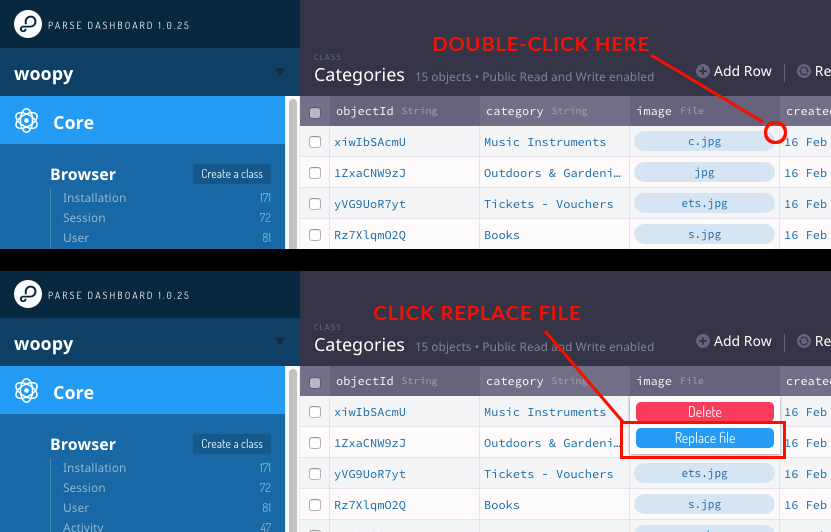
After importing Categories.json in my Parse Dashboard, I see no data
That may happen sometimes, it’s a bug in the Parse Dashboard, so in this case you must manually add rows and columns on your own. 1. Click Edit -> Add a column, choose String as type of data and type exactly category, then click ‘Add column’ 2. Click Edit -> Add a column, choose File as type of data and type exactly image, then click ‘Add column’ 3. Now you can enter the empty cells and insert the name of your first Category, doublie click in the empty cell of the image column and upload your first image. 4. Repeat the steps above for each category you want to insert in your Parse database.
How do I change the order of Categories?
The only way to do that is to remove all rows from the Categories class and add then again based on the order you want categories to be shown in the Home screen of the app since they get ordered by their ‘createdAt’ date.
Why do I need to have login from Apple Account in the app?
Yes, because from 30th April 2020, APPLE authorities restricted the apps using 3rd party login from FACEBOOK, GOOGLE etc should also integrate “APPLE SIGN IN” method in the app. For reference: APPLE SIGN IN GUIDELINES
Screenshots


- XCode 11.4+ Project – Swift 4.5+
- Universal – Storyboard – iOS 14.0+
- AdMob banners
- Backend with Parse Server hosted on back4app
- Browse ads by Category or search by Keywords
- Sort ads by Recent, Price, Most liked and Condition
- Map with radius distance circle and slider to change the nearby distance
- Post/edit ads, with 3 pics and an optional 10-second video
- Send/read Feedbacks and Comments
- Report/block inappropriate users or ads
- Chat with sellers within the app, with the possibility to attach pictures to the chat messages
- Push Notifications for chat messages, likes, feedbacks and comments
- Check your liked ads in the My Likes screen
- Activity screen
- List of active chats
- Easy to Customize
- Well commented code
- User Guide and PSD icon graphics included

- Apple Mac PC with the latest OS version installed
- The latest version of XCode and some knowledge about its UI interface
- Photoshop or any other image editor software
- A valid iOS Developer account to submit apps to the App Store
- A valid AdMob account to create a banner UNIT ID
- iTunes Connect account
- A free account on back4app.com


| Type | iOS App |
|---|---|
| Author | cubycode |
| Category | Mobile / Ios / Full Applications |
| Price | $34 |
| Sales | 233 |
| Rating | 4.48 from 33 ratings |
| Published | Feb 20, 2017 |
| Last Update | Jun 10, 2024 |
| Compatible Software | iOS 15, iOS 14, iOS 13, iOS 12 |
| Compatible With | Swift |
| Mobile Files Included | Layered PSD, HTML |
Categories
Tags
External listing. code.market does not sell this product and does not process payment for it. Pricing, payment, delivery, licensing, refunds, and support are handled by the third-party merchant on its own website. We may earn an affiliate commission from a referral. Details.
Products of the Week.
Submit🥇

STOP GUESSING WHAT TO POST
AI that learns your brand voice and builds a month of consistent, on-brand social content: carousels, posts and hooks that sound like you, not like everyone else's AI.
SaaS · 3,582 views · 33 clicksSaaS · Week 45 · 3,582 views · 33 clicks
🥈

Conversational Backlinks for Busy Founders
Place Backlink Relevant Conversation for your domain across Forums and Conversations
Website · 41,105 views · 222 clicksWebsite · Week 45 · 41,105 views · 222 clicks
🥉

upvote.club
Free Social Media Engagement that Helps Boost Your Content. Upvote Club supports 19 social networks with 100+ engagement actions in one dashboard. Add links to your posts and get free engagement from real users.
SaaS · 39,164 views · 113 clicksSaaS · Week 45 · 39,164 views · 113 clicks
#4

Substack Posting API
Onboard your Agent to Substack. Write Publish on Substack via API
SaaS · 58,199 views · 198 clicksSaaS · Week 45 · 58,199 views · 198 clicks
#5

Seenshot App
Free, Fast, MacOS Screenshot app. Make Screenshot cmd+shift+2 and send it via link
Desktop App · 27,590 views · 120 clicksDesktop App · Week 45 · 27,590 views · 120 clicks
#6

Hand-Placed Backlinks $9.99 per link. Flat rate.
Buy hand-placed forum, Q-A and directory backlinks. Flat $9.99 per link, no subscriptions — you only pay for approved listings.
Website · 3,475 views · 18 clicksWebsite · Week 45 · 3,475 views · 18 clicks
#7

Free Invoice Generator - PDF Invoices in Your Browser, No Sign-Up
A free invoice maker for freelancers and small businesses: fill in the invoice, check the live preview, and download a PDF that looks exactly like it. Any currency, tax per item, three templates, no sign-up, and nothing leaves your device.
2,167 views · 16 clicksWeek 45 · 2,167 views · 16 clicks
#8

Merge PDF Files Free - Combine PDFs in Your Browser, No Upload
A free PDF merger for office workers, students, and freelancers: combine PDFs and images into one file in the browser, reorder files and pages, pick page ranges, keep bookmarks, and open password-protected PDFs. Nothing is uploaded, no sign-up, no watermark.
2,008 views · 13 clicksWeek 45 · 2,008 views · 13 clicks