
WooCommerce Warranty Returns
Description
Complete After-Sales Management for WooCommerce
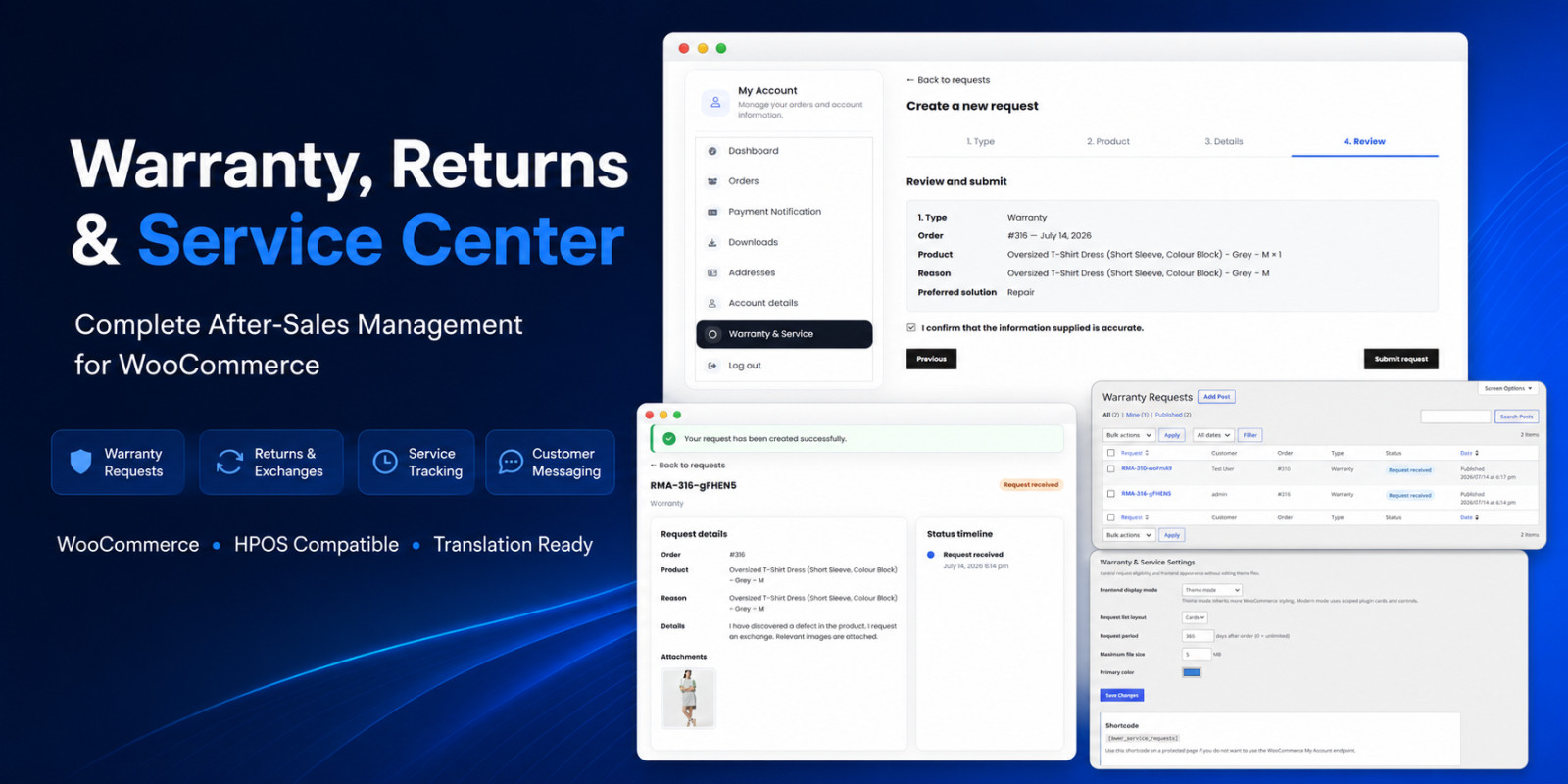
WooCommerce Warranty Returns & Service Center helps online stores manage warranty, return, exchange and technical service requests through a structured customer and administrator workflow.
Customers can create requests directly from the WooCommerce My Account area, select an eligible order and product, describe the issue, upload supporting images or PDF documents and follow every status update from a clear timeline.
Store administrators receive a centralized request management area where they can review customer and order information, inspect attachments, update request statuses, communicate with customers and add private internal notes.
Simple Customer Request Workflow
The guided four-step request form makes the process easy for customers:
- Choose Warranty, Return, Exchange or Technical Service
- Select an eligible WooCommerce order and product
- Add request details, preferred solution and supporting evidence
- Review and submit the completed request
Customer Request Tracking
Every request receives a unique RMA reference number. Customers can view their request details, related order and product, uploaded evidence, current status, status timeline and complete conversation history from My Account.
Built-In Customer Messaging
Customers and store teams can communicate directly inside each request. Conversations remain connected to the related RMA record, helping prevent scattered emails and lost support context.
Organized Admin Workflow
The dedicated WordPress admin area displays request numbers, customers, orders, request types and current statuses in one place. New requests and customer messages can generate unread notification badges in the WooCommerce menu.
Theme-Friendly Frontend
The plugin includes Theme Mode and Modern Mode. Scoped CSS classes help reduce theme conflicts without modifying active theme files. Store owners can also choose between card and table layouts and configure the primary interface color.
Responsive Design
Request forms, request cards, status timelines, uploaded evidence and customer messages are designed for desktop, tablet and mobile screens.
No External Service Required
The plugin works inside WordPress and WooCommerce without requiring an external API key, monthly subscription or third-party SaaS account.
Important Information
- WooCommerce must be installed and active.
- Only logged-in customers can create and view their own requests.
- Uploaded files use the standard WordPress Media Library.
- Email delivery uses the standard WordPress wp_mail system.
- Full English documentation is included in the download package.
- English source language and Turkish translation files are included.
Features
- Warranty, return, exchange and technical service request types
- WooCommerce My Account integration
- Guided four-step customer request form
- Eligible order and product selection
- Server-side customer and order ownership validation
- Unique RMA request numbers
- Customer request cards or table layout
- Detailed request tracking page
- Real-time request status timeline
- Customer and store-team messaging
- Private administrator notes
- Image evidence previews
- JPG, JPEG, PNG and WebP upload support
- PDF document upload support
- Configurable upload size limit
- Configurable request eligibility period
- Warranty and service button on WooCommerce order details
- Unread request and customer-message notification badge
- Central WordPress administrator request list
- Customer, order, product, type and status information
- Automatic customer emails after status updates
- Theme Mode and Modern Mode
- Custom primary interface color
- Responsive desktop, tablet and mobile design
- Shortcode:
- WooCommerce HPOS compatibility declaration
- Nonce, capability, sanitization and escaping controls
- English source language
- Turkish PO and MO translation files included
- Translation-ready POT file included
- No external API or monthly subscription required
- Complete English HTML documentation included
Requirements
- WordPress 6.2 or newer
- WooCommerce 7.8 or newer
- PHP 7.4 or newer
- Recommended PHP 8.0 or newer
- A standard WordPress permalink structure
- JavaScript enabled in the customer browser
- WordPress Media Library upload permissions
- A working WordPress email configuration for notifications
WooCommerce must be installed and active before using the plugin.
Instructions
Installation
- Download and extract the main Codester package on your computer.
- Open the Plugin folder.
- Locate bwwr-warranty-service-center-1.0.0.zip.
- Log in to the WordPress administration panel.
- Go to Plugins > Add New > Upload Plugin.
- Select bwwr-warranty-service-center-1.0.0.zip.
- Click Install Now and then Activate.
- Make sure WooCommerce is installed and active.
Initial Configuration
- Go to WooCommerce > Warranty Settings.
- Select Theme Mode or Modern Mode.
- Select Cards or Table for the customer request list.
- Configure the request eligibility period.
- Configure the maximum file upload size.
- Select the primary interface color.
- Click Save Changes.
Customer Usage
- The customer logs in and opens My Account.
- The customer opens Warranty & Service.
- The customer clicks Create New Request.
- The customer chooses a request type.
- The customer selects an eligible order and product.
- The customer enters request details and uploads optional evidence.
- The customer reviews and submits the request.
- The request can then be tracked from My Account.
Administrator Usage
- Go to WooCommerce > Warranty & Service.
- Open a customer request.
- Review the order, product, request details and attachments.
- Change the request status when required.
- Send a customer-visible response or add a private internal note.
- Save the request.
Shortcode
Use on a protected page when you do not want to use the default WooCommerce My Account endpoint.
Troubleshooting
If the Warranty & Service endpoint returns a 404 error, go to Settings > Permalinks and click Save Changes once.
Complete documentation is included inside the Documentation folder of the main download package.
| Author | bahadircetin0 |
|---|---|
| Category | Plugins / WooCommerce |
| Price | $9 |
| Extended License | $27 |
| Likes | 8 |
| First Release | Jul 14, 2026 |
| Last Update | Jul 14, 2026 |
| Supported cms | WooCommerce 7.x, WooCommerce 8.x, WordPress 6.2, WordPress 6.3, WordPress 6.4, WordPress 6.5, WooCommerce 9.x, WordPress 6.6, WordPress 6.7, WordPress 6.8 |
| Files included | .php, .css, .html, JavaScript .js |
Categories
Tags
External listing. code.market does not sell this product and does not process payment for it. Pricing, payment, delivery, licensing, refunds, and support are handled by the third-party merchant on its own website. We may earn an affiliate commission from a referral. Details.
Products of the Week.
Submit🥇

Actionbook
It works inside the user's own browser with the accounts already signed in. The user describes the result they need, and the agent reads, clicks and types through the pages, then delivers a dashboard or report where each data links back to its source.
Other · 709 views · 9 clicksOther · Week 44 · 709 views · 9 clicks
🥈

Free social media tools for creators & solofounders
295 free tools for growing your social media: write, plan, grow on local AI models, 100% free forever, No sign-up required, No trial. Write, check and measure posts on LinkedIn, Instagram, TikTok, X, YouTube, Reddit, Product Hunt and more: a free social media scheduler for 17 networks, engagement rate calculators, character counters, best time to post, hook generators and follower growth calculators. No login anywhere, no API or credit usage.
679 views · 6 clicksWeek 44 · 679 views · 6 clicks
🥉

STOP GUESSING WHAT TO POST
AI that learns your brand voice and builds a month of consistent, on-brand social content: carousels, posts and hooks that sound like you, not like everyone else's AI.
SaaS · 1,925 views · 21 clicksSaaS · Week 44 · 1,925 views · 21 clicks
#4

Hand-Placed Backlinks $9.99 per link. Flat rate.
Buy hand-placed forum, Q-A and directory backlinks. Flat $9.99 per link, no subscriptions — you only pay for approved listings.
Website · 1,878 views · 17 clicksWebsite · Week 44 · 1,878 views · 17 clicks
#5

Conversational Backlinks for Busy Founders
Place Backlink Relevant Conversation for your domain across Forums and Conversations
39,334 views · 211 clicksWeek 44 · 39,334 views · 211 clicks
#6

Free Invoice Generator - PDF Invoices in Your Browser, No Sign-Up
A free invoice maker for freelancers and small businesses: fill in the invoice, check the live preview, and download a PDF that looks exactly like it. Any currency, tax per item, three templates, no sign-up, and nothing leaves your device.
616 views · 11 clicksWeek 44 · 616 views · 11 clicks
#7

Merge PDF Files Free - Combine PDFs in Your Browser, No Upload
A free PDF merger for office workers, students, and freelancers: combine PDFs and images into one file in the browser, reorder files and pages, pick page ranges, keep bookmarks, and open password-protected PDFs. Nothing is uploaded, no sign-up, no watermark.
559 views · 4 clicksWeek 44 · 559 views · 4 clicks