
WooCommerce Variation Swatches Master

Description
The WooCommerce Variation Swatches Master is an advanced module for WP-powered online stores. It helps you to customize the variations on your product pages in a few clicks to display them into outstanding swatches.


Enhance the visual aesthetics of your products and the attributes of a variation to bestow an appealing look on your product page. It is a feature-packed extension to get a neat, polished, and sophisticated look for all variations on your WooCommerce store pages.
This user-friendly plugin allows you to select different attributes and styles to display the variations of all variable products. There are endless options and flexibility to customize the look and feel you want to achieve for the swatches- round or square shape, convert dropdown menus into images, and so much more.
Select a preferred style for the variations from several options grouped under different categories- color, images, buttons, and radio. It also allows the buyers on your website to add products to the shopping cart from the store gallery/Archive pages directly using the ‘Add to Cart’ button.



Key Features of WooCommerce Variation Swatches Master
Key Feature
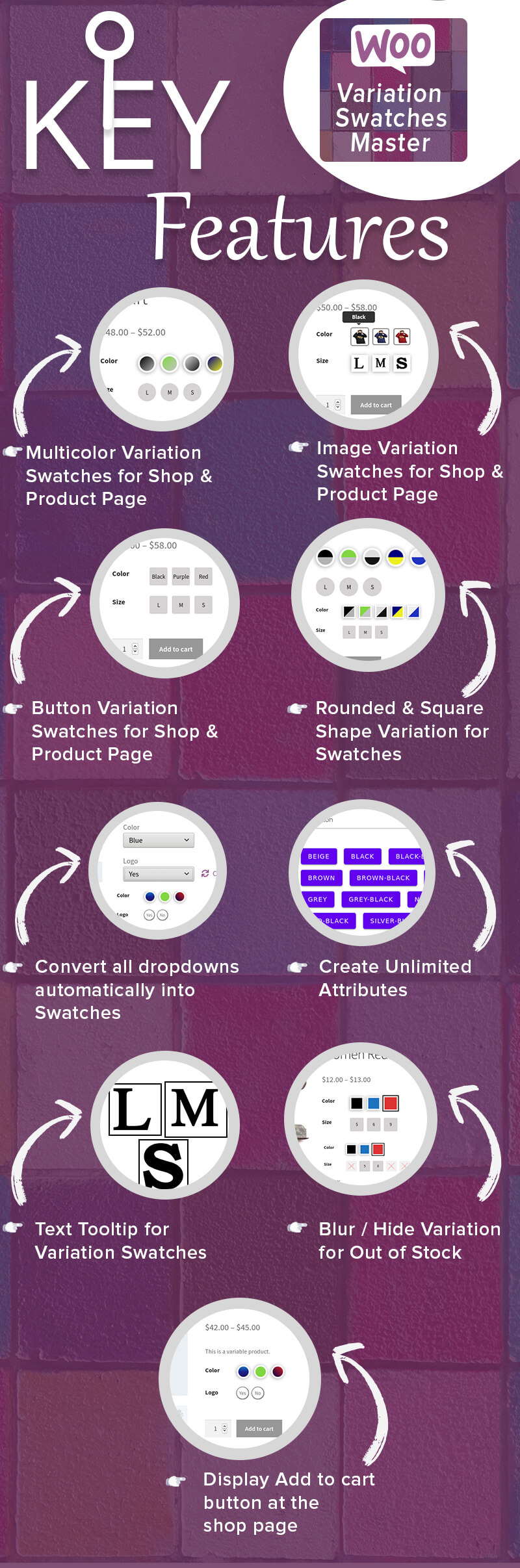
Convert all Dropdowns into Swatches Automatically
The configuration in this plugin allows you to convert all items in the dropdown lists into swatches just in a few clicks. The action automatically changes the dropdown items to swatches that look beautiful, clutter-free, and well-organized.
Create Different Types of Swatches for Products
There are several options to create swatches for variations of a product. You can get the desired look for the swatches from the settings. The store admin can access this plugin to get a fully customized appearance for the swatches by adjusting the settings to get multicolor/color, images, texts, buttons, etc.
Create Unlimited Attributes
You can create unlimited attributes for a single product variation as supported on WooCommerce. This plugin allows you to create attributes for as many products as needed.
Swatches for Single Product Page
You can also customize the swatches the settings for a single product at a time as per requirement. Swatches will be displayed on Single Page as you customized in settings.
Create Unlimited Swatches
You can create unlimited swatches for as many products as you want to display at your Shop/ Product Page.
Image Variation Swatches for Single & Shop Page
You can create image swatches for a variation for a single & shop page.
Color / Multicolor Variation Swatches for Shop & Single Page
The visitors to your store page sees the color swatches for available color options for a product (ex. clothes) on Shop & Single Page. You (store admin) can create single as well as multicolor swatches depending on the color/combination color options for the specific product. .
Button Variation Swatches for Shop & Single Page
Button variation swatches are available on the settings page. The admin may change the appearance of the button variations to make them more appealing for the users. You can place the ‘Add to Cart’ button on the shop and single page using this plugin.
Text Tooltip for Variation Swatches
The text tooltip offers an improved user experience for the buyer when he/she hovers the cursor over a specific swatch. With this module, you can customize the text that appears on the tooltip for each and every swatch. You can enter custom tooltip text for the swatches from the settings.
Display Swatches for Shop / Archive Page
You can display the swatches on the store or archive page that give some extra information to the visitor. This piece of information is important for influencing the decision of the buyer to click on the product link to visit the product description page.
Rounded & Square Shape Variation for Swatches
You can customize the settings to display the swatches in a rounded or square shape on the Shop & Single Page.
Blur / Hide Variation for Out of Stock
You can adjust the settings from the plugin’s admin panel to blur or hide the products that are currently ‘Out of Stock’ or ‘Unavailable’.
Multiple Display Options for Swatches Types
Admin can choose how the swatches for a variation appear. You can adjust this feature on the settings page. Select the preferred one from the options available for different swatches types like radio, color, image & button.
Custom Attribute Settings
You can add attributes with custom name, slug, description, and type with an unlimited number of terms. This depends on how you want an attribute text to appear on the store or single page.
Styling Tooltip and Other Custom Sections
You can customize the style for tooltips with any desired text or visual element depending on the variation
Display ‘Add to Cart’ Button at the Shop Page
You can display ‘add to cart’ button for each product on the shop page. It allows the buyers to add the variable product directly to the shopping cart/checkout page from the shop page. The customer can skip visiting the product page to view the details or purchase an item. It saves time and allows the customer to place an order quickly.
Minimum Requirements
- WooCommerce 3.5.0 or greater.
- WordPress 4.0 or greater.
- PHP version 5.5.5 or greater.
- MySQL version 5.0 or greater.
Translation Ready
.pot file included, for easy translation
Thank-you for your interest in WooCommerce Variation Swatches Master, RedefiningTheWeb.

Changelog
03-04-2024 - ver 1.2.2
- Fixed: Custom variation issue on shop page
- Fixed: Tooltip issue on shop page according admin setting
- Fixed: Custom variation issue on product page
- Compatibility: With the latest versions of WordPress & WooCommerce
- Other minor bug fixes

11-03-2022 - ver 1.2.1
- Fixed: Tooltip/Display text of variation
- Fixed: Display only enabled attributes on shop and single product page
- Fixed: Variable product price on shop page if all variations have same price

20.10.2021 - ver 1.2.0
- Added: Panel for Custom Attributes
- Other minor bug fixes

25.05.2021 - ver 1.1.0
- Fixed: Various bugs

20.04.2021 - ver 1.0.0
- Initial Release
| Type | WooCommerce Plugin |
|---|---|
| Author | RedefiningTheWeb |
| Category | Wordpress / Ecommerce / Woocommerce / Products |
| Price | $29 |
| Sales | 142 |
| Rating | 2.67 from 3 ratings |
| Published | Apr 20, 2021 |
| Last Update | Apr 3, 2024 |
| Compatible Browsers | IE9, IE10, IE11, Firefox, Safari, Opera, Chrome, Edge |
| Compatible Software | WordPress 6.8.x, WordPress 6.7.x, WordPress 6.6.x, WordPress 6.5.x, WordPress 6.4.x, WordPress 6.3.x, WordPress 6.2.x, WordPress 6.1.x, WordPress 6.0.x, WordPress 5.9.x, WordPress 5.8.x, WordPress 5.7.x, WordPress 5.6.x, WordPress 5.5.x, WordPress 5.4.x, WordPress 5.3.x, WordPress 5.2.x, WordPress 5.1.x, WordPress 5.0.x, WordPress 4.9.x |
| Compatible With | Elementor, Elementor Pro, Visual Composer, WooCommerce 9.x.x, WooCommerce 8.x.x, WooCommerce 7.x.x, WooCommerce 6.x.x, WooCommerce 5.x.x, WPBakery Page Builder |
| Gutenberg Optimized | Yes |
| Source Files Included | JavaScript JS, HTML, CSS, PHP |
Categories
Tags
External listing. code.market does not sell this product and does not process payment for it. Pricing, payment, delivery, licensing, refunds, and support are handled by the third-party merchant on its own website. We may earn an affiliate commission from a referral. Details.
Products of the Week.
Submit🥇

STOP GUESSING WHAT TO POST
AI that learns your brand voice and builds a month of consistent, on-brand social content: carousels, posts and hooks that sound like you, not like everyone else's AI.
SaaS · 3,992 views · 35 clicksSaaS · Week 45 · 3,992 views · 35 clicks
🥈

Conversational Backlinks for Busy Founders
Place Backlink Relevant Conversation for your domain across Forums and Conversations
Website · 41,640 views · 222 clicksWebsite · Week 45 · 41,640 views · 222 clicks
🥉

upvote.club
Free Social Media Engagement that Helps Boost Your Content. Upvote Club supports 19 social networks with 100+ engagement actions in one dashboard. Add links to your posts and get free engagement from real users.
SaaS · 39,666 views · 114 clicksSaaS · Week 45 · 39,666 views · 114 clicks
#4

Substack Posting API
Onboard your Agent to Substack. Write Publish on Substack via API
SaaS · 58,695 views · 198 clicksSaaS · Week 45 · 58,695 views · 198 clicks
#5

Seenshot App
Free, Fast, MacOS Screenshot app. Make Screenshot cmd+shift+2 and send it via link
Desktop App · 28,077 views · 122 clicksDesktop App · Week 45 · 28,077 views · 122 clicks
#6

Hand-Placed Backlinks $9.99 per link. Flat rate.
Buy hand-placed forum, Q-A and directory backlinks. Flat $9.99 per link, no subscriptions — you only pay for approved listings.
Website · 3,936 views · 19 clicksWebsite · Week 45 · 3,936 views · 19 clicks
#7

Free Invoice Generator - PDF Invoices in Your Browser, No Sign-Up
A free invoice maker for freelancers and small businesses: fill in the invoice, check the live preview, and download a PDF that looks exactly like it. Any currency, tax per item, three templates, no sign-up, and nothing leaves your device.
2,614 views · 17 clicksWeek 45 · 2,614 views · 17 clicks
#8

Merge PDF Files Free - Combine PDFs in Your Browser, No Upload
A free PDF merger for office workers, students, and freelancers: combine PDFs and images into one file in the browser, reorder files and pages, pick page ranges, keep bookmarks, and open password-protected PDFs. Nothing is uploaded, no sign-up, no watermark.
2,433 views · 13 clicksWeek 45 · 2,433 views · 13 clicks