
WooCommerce Ultimate Points And Rewards - Product Purchase Points, Referral Point, Coupon Generation

Description





INCREASE YOUR BRAND LOYALTY, CUSTOMER RETENTION, AND ECOMMERCE CONVERSION RATE WITH THE FEATURE-RICH WOOCOMMERCE LOYALTY REWARDS PLUGIN FOR WOOCOMMERCE. GET FEATURES LIKE DAILY LOGIN POINTS FOR YOUR CUSTOMERS WHICH WILL DRIVE TO REPEATED SALES!
The WooCommerce Ultimate Points and Rewards is an all-in one point-based loyalty rewards program for WooCommerce that increases your customer retention and skyrockets your conversion rates. If you have been struggling with low sales, you have got to try the ultimate WooCommerce loyalty points and rewards solution.This points and rewards plugin for WooCommerce lets you loyalize your customers by rewarding them with loyalty points. With WooCommerce Points and Rewards, you can efficiently implement a reward system on your eCommerce store. The loyalty points received as rewards by customers are redeemable as offering coupons, discounts on purchases, or other loyalty rewards. Not only that, the points are redeemable to attain the loyalty membership too and become a part of the brand’s loyal members community.

Features Of WooCommerce Ultimate Points and Reward
This is a fully-feature-loaded plugin. Here are the essential features of the WoCommerce Ultimate Points And Rewards plugin:
- Export Points Table
The WooCommerce points and rewards come with a convenient export feature, allowing customers to easily download their points table with just a click. By simply selecting the export button, users can generate a CSV file containing their accumulated reward points, transaction history, and relevant details.
- Per Currency Points
Allow your customers to earn loyalty reward points for every dollar spent. Just enable the Per Currency Points setting, set the point conversion rate, and specify the minimum order total (after which your customers can start earning the points). You can choose to show a custom notice and exclude specific categories from earning points.
- Globally Add/Remove User Points
Marketers can utilize this functionality to add or remove user points globally with just one click. But wait! There is more – the admins can also add a description (mentioning the reason for adding or removing the user points). This can become an excellent marketing technique for rewarding customers on different occasions.
- API Settings
API settings for integrating the points and rewards plugin with other applications have been provided for the admin. The current APIs’ details include the endpoints, the parameters for the endpoints, and the responses for the parameters. We have ensured that the set-up process is easy for the users.
- User Badges & Levels
Admins can motivate customers to earn reward points through various activities by awarding unique user badges. These badges represent different levels of achievement. The admins have full control over their position and level names and show the accumulated points.
- Option To Bulk Reset Points Log
Marketers can utilize this option to reset the user points in bulk, this eliminates the problem of resetting the user points one user at a time. The admins just have to select the “reset points log” bulk actions filter, and the job is done!
- Social Media Share (via Social Media Referral)
The user can also share their Referral link on social media i.e., Facebook, Twitter, WhatsApp, Twitter and Email.
- Dynamic Point Adjustments
This is an advanced feature of the WooCommerce points and rewards plugin designed to enhance flexibility and control over your points and rewards system. It allows admins to add, subtract, and override points directly during the CSV import process, ensuring accurate and efficient point management.
- Purchase Products through Points and Rewards
If you want loyal customers, you have to offer reward points for product purchases. Additionally, you also have to let the user redeem their points and rewards for purchasing products. This points-based reward system also displays the number of points required to purchase the products.
- Coupon Generation
The merchants can now send the notification to the users after setting up the number of days prior to the date of expiration for the notification. Also, the merchant can customize the whole message of the Email Template. The user can generate the coupon by converting its total points to coupons and use coupons like WooCommerce coupons.
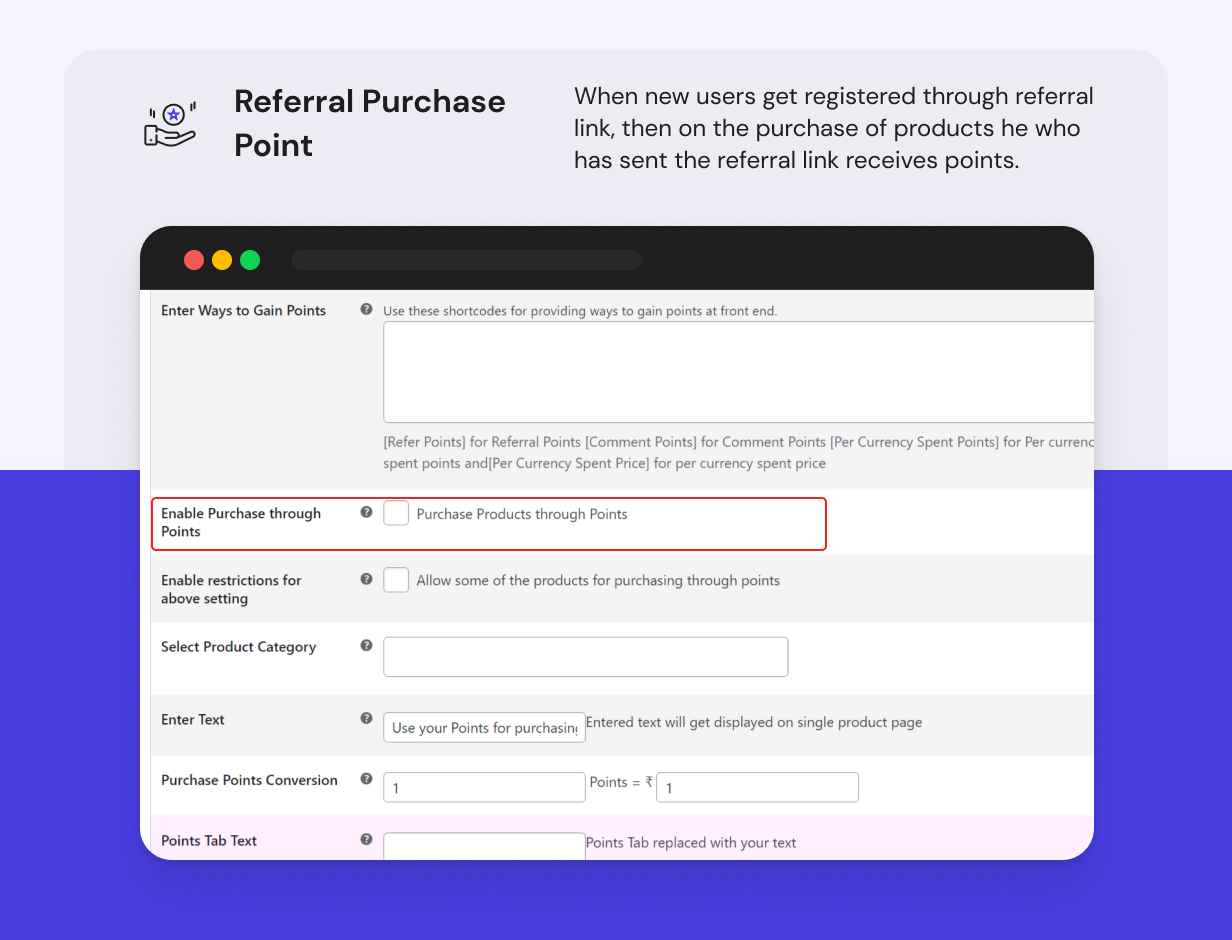
- Referral Purchase Point Feature
When any new user gets registered through a referral link, then on the purchase of products by a registered user at every order the user who has sent the referral link will receive the referral purchase points. Admin can reward customer purchases and give them referral rewards.

- Membership Feature
- Admin End:Admin can create different levels of Membership, for example, Premium, Silver, Gold, etc. He can assign some loyalty points that will be given as loyalty points and rewards to each membership level. Each level can have some categories and products of the selected categories (if no products are selected then all products of selected categories are assigned to that level), some discount (in %).
- Front End:When customers will have earned reward points sufficient to reach any level, only that level will be displayed with a select box, with other levels listed in a table. When Customer becomes a member, they will get some offers on selected categories as well as products.
- Purchase Product By Redeeming Points and Rewards
Customers can now redeem points and rewards to purchase products by making a partial payment with the amount and partially redeeming points. Points can also be redeemed for discounts.
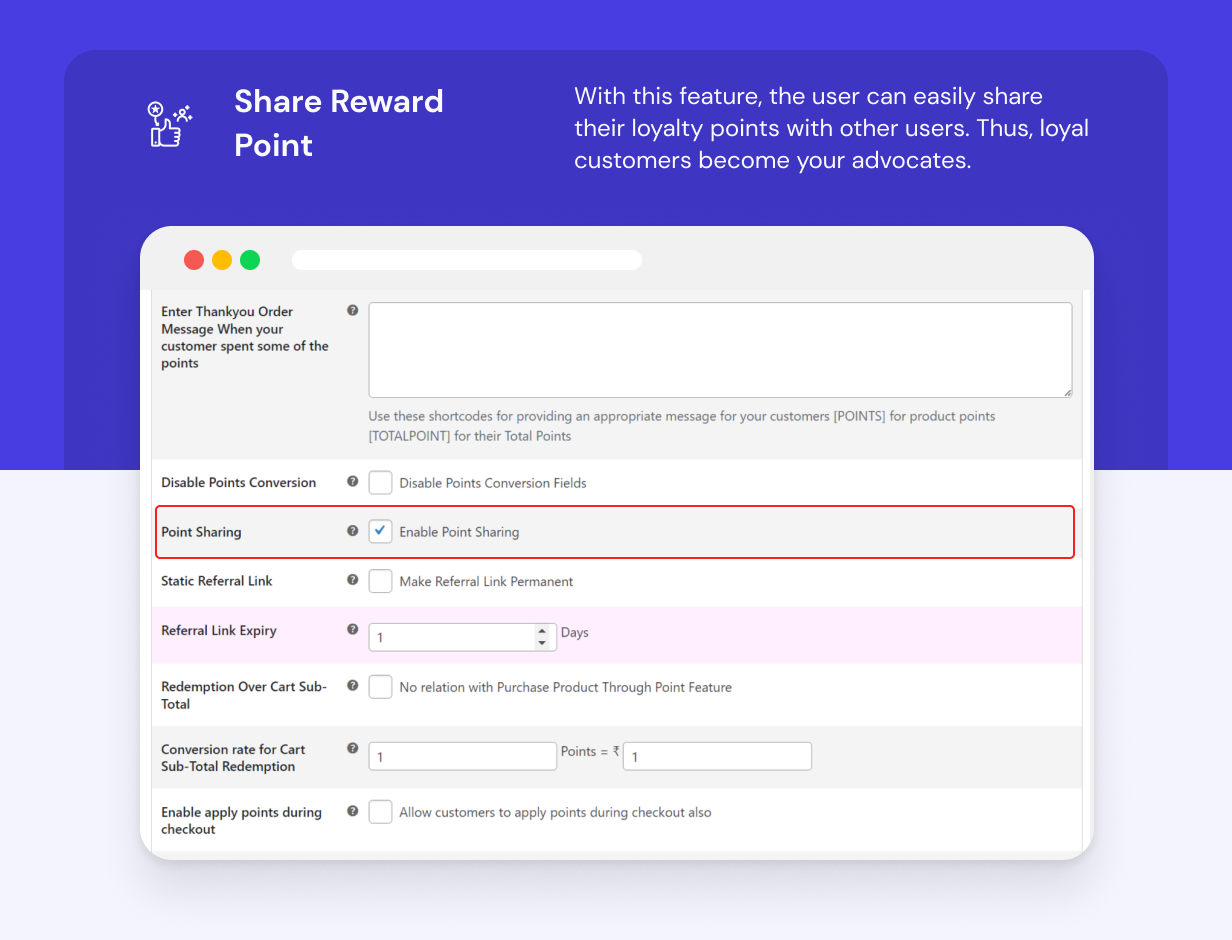
- Share Reward Point Feature
With this feature of the WooCommerce Points and Rewards plugin, the user can easily share their loyalty points with other users. Thus, loyal customers become your advocates.
- Points Log Feature
The customer can view the earned reward points, coupons on their dashboard, and reward points earned and redeemed by enabling the points-log settings in the membership features section of the WooCommerce Points and Rewards plugin.
- Assign Product Points
With this WooCommerce loyalty rewards plugin, the admin can assign product rewards to customers. This feature enables easy assignment of product points and assigning points per product category. Assign desired reward points for product purchase.
- Social Media Share
The user can also share their Referral link on social media i.e, Facebook, Twitter, and Email.
- Return/Deduct Points
Dynamically manage the rewarded points based on the return and refund request. In the Return and Deduct Points section, the admin can deduct assigned points to the loyal customer.
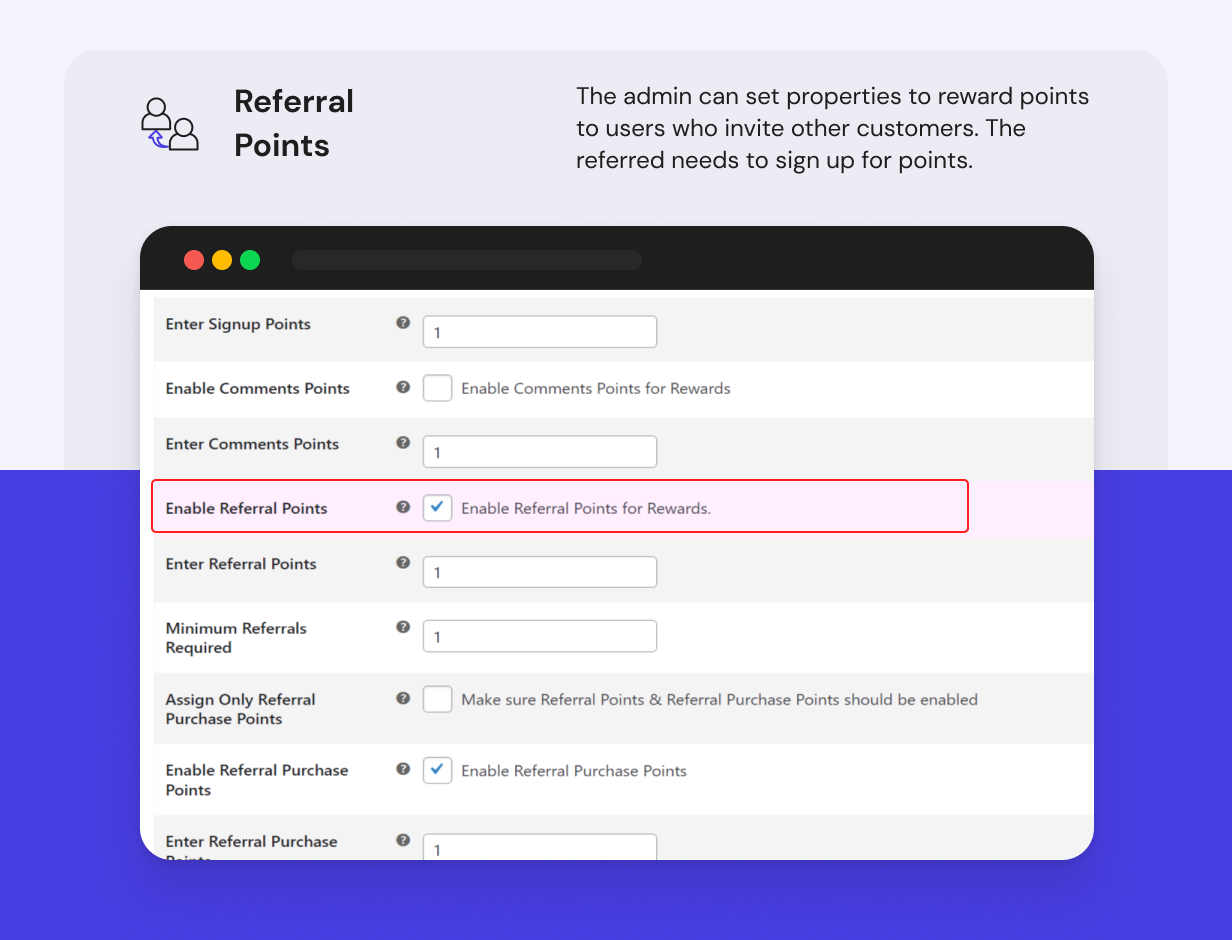
- Referral Points
The Referral system for WooCommerce goes hand in hand with the rewards system. The merchant can set properties to reward points to users who invite other customers. The referred customer needs to sign up for the assignment of a successful point. Customers also avail WooCommerce signup discounts.
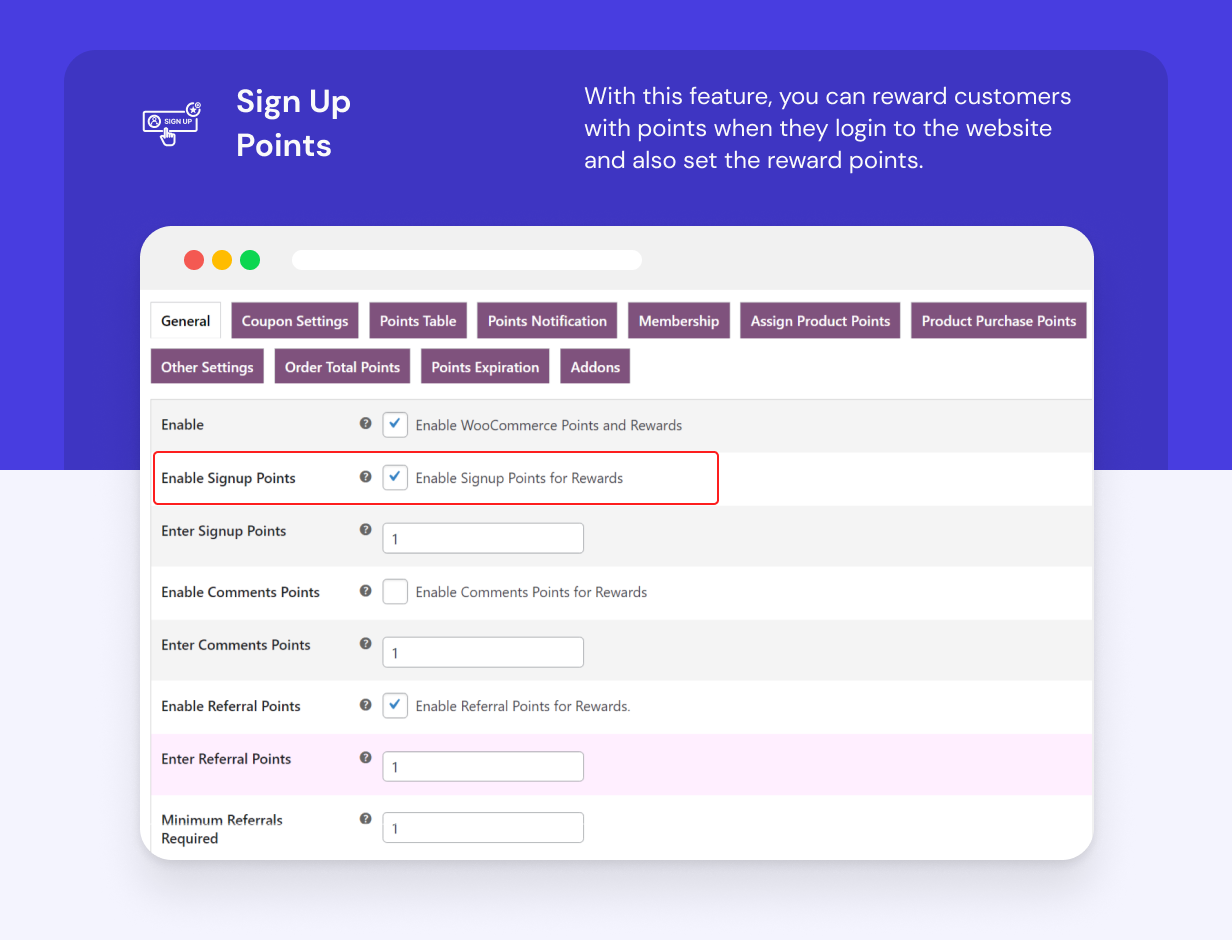
- Sign Up Points
The WooCommerce Ultimate Points and Rewards plugin is capable of rewarding your customers with points as soon as they register on your website. You can set how many points you want to provide them for registration.
- Comments Points (Rewards for Reviews)
Reward points to loyal customers for writing a product review. Assign rewards for review with our WooCommerce customer loyalty plugin. The customers post comments on products or posts and are rewarded with points set by the admin.
- Redeem Points-based Reward System Conversion
The admin is required to set the points-based reward system, their corresponding price, and the coupon amount received by the customer on converting each point to the coupon price..
- User Notification Addon
WooCommerce Ultimate Points and Rewards supports the user notification feature. The registered and guest users receive notifications about their points balance. At the same time, it guides them on ways to earn more points and redeem them.
-
1. Real-Time Notifications: The customers stay updated regarding their transaction history and point balance after every purchase and redemption. It gives real-time notification to users for:
a. Total points collected
b. Points balance after points
c. Ways to redeem and manage points and rewards on store
2. Guide Customers to Earn More Points & Greater Sign-Ups: The admin can share quick tips guiding guest users and registered customers to earn more points for more significant benefits. For example, asking customers to write a review, place an order of a particular value, a referral’s purchase, or refer a friend. Via pop-up notification, the admin can urge guest users to sign-up too.
3. Point Redemption Options: The user can apply points on cart subtotal or convert points to coupons that customers can use later for other purchases.
Benefits of WooCommerce Ultimate Points And Rewards
- The WooCommerce points and rewards WordPress plugin lets you add features to your store like store credit redemption..
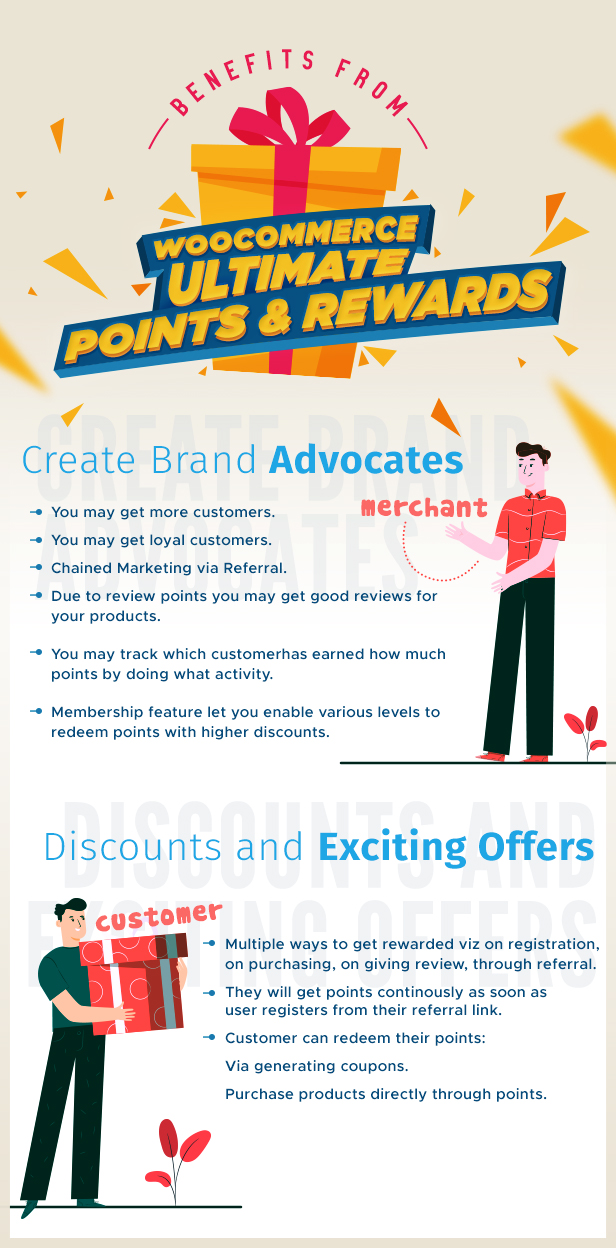
- You can distribute loyalty points and discounts for customer engagement.
- Increases your loyal customers by offering reward points on writing a product review, referrals, purchases, and sign-ups.
- Your customers can earn points on the basis of their on-store activities. More purchases and engagements mean more credit points to reward customers’ loyalty.
- The reward plugin WooCommerce lets you build your own community of loyal customers.
- Increase the WooCommerce customer lifetime value with loyalty programs.
- Merchants can also use shortcodes to enable the “apply points” sections on different pages, making it easy for the customers.
- Allow customers to earn Ultimate reward points on their in-store activities.
- Reward your customers with ultimate points in exchange for their brand loyalty.
- Generate Loyalty discount coupons. For example, offer points that can be redeemed for WooCommerce Sign-up discounts. Similarly, redeem rewards for WooCommerce member discounts.
- Build your own loyal member’s community and distributor WooCommerce membership points
- Allow the admin to enable order reward points i.e. the customers will earn extra points on ordering a certain number of orders.
- WooCommerce Ultimate Points and Rewards Offer hemp of Benefits to both merchants and customers, be it for product rewards or other activities.
Compatibilities for WooCommerce Ultimate Points and Rewards
- Allow the users to redeem the earned points and rewards by transferring them to their wallet with the new compatibility with Wallet System for WooCommerce
- Currency Switcher for WooCommerce plugin allows your customers to select the currency unit for their purchase. They can choose from currencies for the Points Rewards for the WooCommerce system. All transactions will happen in the currency they select.
- HPOS Compatibility, WooCommerce Ultimate Points, and Rewards work smoothly with the WooCommerce HPOS feature, improving your store’s capacity to handle high order volume during peak shopping periods. Our WooCommerce loyalty plugin typically leads to a substantial increase in order volume, and this amplifies during high-sales seasons, such as Christmas, BFCM, Labor Day, etc. To efficiently handle these orders, HPOS creates a dedicated custom table for orders, thereby accelerating the order processing.
- The WooCommerce Loyalty points and rewards is compatible with Subscriptions For WooCommerce Free and Subscriptions For WooCommerce Pro allows users to get points on subscription products.
- WooCommerce loyalty rewards plugin is compatible with MultiVendorX Marketplace and MultiVendorX, enabling the vendors to earn points and rewards on purchases made in their stores.
Live Demo
Visit a demo to experience the powerful features of the WordPress Points and Rewards Plugin and explore.-
Frontend demo of Points and Rewards Click here
- Backend demo of Points and Rewards Click here
What do Our Clients Say About Us?
DPSONLINE2 ⭐⭐⭐⭐⭐Great plugin with mani options to create points and reward system on woocommerce
JCW_05 ⭐⭐⭐⭐⭐
To be begin with this is a great plugin with great customer support. I purchased this because it’s the rewards plugin that is compatible with a multisite network and supports user points synchronization when the user database is synchronized. I’ve encountered some minor issues and support was quick enough to respond to my inquiries. I also had some minor customization requests which they accomodated free of charge. Other plugin developers charge you an arm and a leg even with minor custom works. Thanks for the wonderful support and plugin!
MSTRATEGIJE ⭐⭐⭐⭐⭐
Customer support is great and fast.
MATTIESK ⭐⭐⭐⭐⭐
Plugin is great for loyalty program. Its compatible with many other plugins.
I had problem with my difficult theme with WPML, but customer support help me very fast and answer on my ticket very fast all day. Problem wasnt in plugin, but in my theme settings.
Sure i will use this plugin for more online shops!
Frequently Asked Questions
Q. Can I preview the data which we are importing in our points table?
A. Yes, you can preview the data before importing it into the points table. For this: Go to Points Table > Choose file > then click on the preview. You can preview and verify the data which you are going to import.
Q. I have installed WooCommerce Ultimate Points And Rewards plugin and all I get on the points page is a 404 error?
A. After activating WooCommerce Ultimate Points & Rewards extension, please save the permalinks.
Q. What is the difference between “Redeem Points Conversion” and “Per $ Points Conversion” and also what’s the use of “Enter Product Points”?
A.1) About Redeem Points Conversion – In this setting Merchant can set the amount required for converting reward points to generate the coupon. For example, if you have set the value 1, the point will be equivalent to 1$ (for your site) and if any user has 50 points then he or she will get the coupon amount of 50$ after converting it from My Account section.
2) About Per $ Points Conversion – Let’s take an example if a Merchant has set the $1 = 1 point (for their site) and any customer purchases any product with 50$ then he or she will be rewarded with 50 points.
3) About entering Product Points – From here, merchants can select some products. They can set the Points for a particular product, and if any user purchases that product chosen he or she will be rewarded with those Points.
Q. What happens when an old order is completed but gets refunded and How does the plugin handle the points received from the refunded order?
A. There are total two ways for handling the refund request.
1) Earn Points
Product Assigned Points: When a user makes a refund request for that product which has some of the assigned points then after refunding the amount, the earned points will be deducted from his/her account.
Per $ Spent Point: When a user makes a refund request for an order from which he/she earned points, then after refunding the amount, earned points will be deducted from his/her account.
2) Deduct Points:
Product Purchase through Points: When a customer makes any refund request for that product which has been purchased free of cost(by using his/her points) then after refund request, deducted points will be refunded to his/her account.
This plugin is not subjected to GDPR compliant as it does not store any sensitive data of a user. It only holds information related to software which is run by WordPress & WooCommerce of the holder.
Thank-you for your interest in WooCommerce Ultimate Points And Rewards, WP Swings.
If our documentation doesn’t contain the solution to your problem, you can visit the WP Swings Forums Community
Create and Revamp your eCommerce store with WooCommerce Services
Changelog
23.06.2026 Ver 2.10.4
New: Compatibility with latest WP(7.0) & WC(10.8.1)

09.10.2025 Ver 2.10.2
New: Export Point Table
New: Compatibility with latest WP(6.8.3) & WC(10.2.2)

19.08.2025 Ver 2.10.1
New: Limit point earning per currency to specific product categories wise
New: Compatibility with latest WP(6.8.2) & WC(10.1.0)
Fix: Validation Errors

05.05.2025 Ver 2.10.0
New: Add or remove user points in bulk with a single click.
New: API features include fetching user points, retrieving user logs, and updating points.
New: Compatibility with latest WP(6.8.1) & WC(9.8.3

07.02.2025 Ver 2.9.0
New: User Badges Feature
New: Option to reset user points log in bulk
New: Option to share referral link on Whatsapp & Pinterest
New: Compatible with latest WP(6.7.1) & WC(9.6.1)

26.09.2024 Ver 2.8.1
New: Option to add / remove / override points while importing CSV files
New: Compatibility with latest WP( 6.6.2 ) and WC( 9.3.2 )

07.05.2024 Ver 2.8.0
New: Compatibility with Multivendor X plugin
New: Compatible with latest WP(6.5.2) & WC( 8.8.3)

08.03.2024: Ver 2.7.2
New : Option to reset user points on single click
New : Compatible with latest WP( 6.4.3 ) & WC( 8.6.1 )
Fix : Membership discount issues

18.12.2023: Ver 2.7.1
New: Compatible with Cart & Checkout Block
New: Compatible with latest WP(6.4.2) & WC(8.4.0)

07.11.2023: Ver 2.7.0
New: Compatible with Subscription For WooCommerce plugin
New: Compatible with latest WP(6.3.2) & WC(8.2.1)

18.09.2023: Ver 2.6.0
New: Compatible with HPOS
New: Compatible with latest WP( 6.3.1 ) & WP( 8.1.1 )
Fix: Purchase through points issues
Fix: Cart page discount issues

20.07.2023: Ver 2.5.0
New: Compatible with Fox - Currency Switcher For WooCommerce
New: Compatible with latest WC( 7.9.0 ) & WP( 6.2.2 )
Fix: Points Redeem Issues

05.05.2023 : Ver 2.4.0
New: Compatible with Wallet System For WooCommerce plugin
New: Compatible with latest WP( 6.2 ) & WC( 7.6.1 )
Fix: Points Log Issues

3.4.2023 : Ver 2.3.0
New : Preview CSV data
New : Compatible with latest WP(6.2) & WC(7.5.1)
Fix : Notice on Single page
Fix : Import Issues

3.3.2023 : Ver 2.2.6
New: Shortcode to show Points Log
New: Shortcode to show Referral Link
New: Compatible with latest WP[6.1.1] & WC[7.4.1]
Fix: Membership Deletion Issues
Fix: Minor Issues

03.2.2023 : Ver 2.2.5
New: Option to Show Points in WP User Table
New: Compatible with WP & WC
Fix: Minor issues

24.11.2022 : Ver 2.2.4
New: Order Rewards Points
Upgrade: Enhance Account page layout
Upgrade: Enhance Cart page notice layout
Fix: Warning in Membership table
New: Compatible with latest WC & WP

30.09.2022 : Ver 2.2.3
New: Daily login Points.
New: Shortcode to show Apply Points section on Cart Page.
New: Shortcode to show Apply Points section on Checkout Page
New: Compatible with latest WC & WP
New: Minor Bug Fixes

14.02.2022: Ver 2.2.2
New: Compatible with latest WP and WC.
New: Compatibility with latest WPML.

14.02.2022: Ver 2.2.1
New: Notice display of current version for WP Swings
New: Change author from MakeWebBetter to WP Swings
New: Compatibility with WC 6.0.0  and WP 5.8.3
New: Compatibility with latest WPML.

29.09.2021: Ver 2.2.0
New: Compatibility with WC 5.7.1  and WP 5.8.1
New: Compatibility with latest WPML.

24.02.2021: Ver 2.0.13
New: Compatibility with WC 5.0 and WP 5.6

21.02.2020: Ver 2.0.11
Fix: Apply Points on Cart/Checkout Page

01.02.2020: Ver 2.0.10
New: Compatible with woocommerce 3.9.0

05.11.2019: Ver 2.0.9
Fix: Points Table User Listing

11.10.2010: Ver 2.0.8
New: Bulk update user points using CSV

28.06.2019: Ver 2.0.7
Fix: Session Issue

19.06.2019: Ver 2.0.6
New: Refund on purchase through the coupon.
Tweak: Refund on purchase through points.

02.05.2019: Ver 2.0.5
New: Points on order total range
New: Compatibility with Woo 3.6.x

05.01.2019: Ver 2.0.4
New: Exclude Sale Products for Membership Discount
New: Add USERNAME Shortcode for email notifications
Tweak: Membership Discount for any category whether the parent or sub-category has been selected

30.11.2018: Ver 2.0.3
New: Purchase product through points only
New: Color Picker for Notification
New: Apply points during checkout

04.10.2018: Ver 2.0.2
Fixed: Apply Points issue
Fixed: Membership Upgrade issue on IOS
Fixed: Points update on Cart
Fixed: Membership Price for Variable product
Fixed: Global Product Points

16.07.2018: Ver 2.0.1
Fix: Purchase Product through points
Fix: Points Discount
New: Modified Points Table

03.07.2018: Ver 2.0.0
Fix: Assigned Product Point for Second Product on cart Issue
Fix: Points Calculation Issue
Fix: Remove Point from Checkout Page
Fix: Auto Dashboard Changelog
New: Date Format same as in WordPress format
New: Notification for Points on Order Total
New: A New User Notification Addon Tab
New: About US and Help Us Section
New: Cancellation Feature Added
Tweak: Layout in Product Page

14.05.2018: Ver 1.3.7
Fix: Referral Point Feature
Fix: Stripcslashes on notification
Fix: Purchase Product through Point Feature
New: Points can be applied on Cart
New: Referral Link expiration can be set on days
New: Referral Link is no longer connected with my-account page
New: Ajax nonce support
Tweak: View Point Log

29.03.2018: Ver 1.3.6
Tweak: In Licensing Panel

27.03.2018: Ver 1.3.5
New: Compatible with Woocommerce Ultimate Gift Card with version 2.4.4
New: Dashboard Auto-updation
New: Add Licensing Panel
New: Referral Link can be static/dynamic
New: Changes in +/- sign before the Manual Updating Points by Admin
New: Email Id restriction while Coupon Generation
Fix: Expiry date reflection for both Admin End as well as User End
Fix: Coupon Generation on Internet Explorer Browser
Fix: Referral Copy Button for WoodMart Theme

14.02.2018: Ver 1.3.4
New: Points Expiration Feature
New: Variable product Support for Membership Product
New: Variable product Support for Purchase through Points
New: Wpml Compatibility
Fix: Removing Points on blank fields submission for Assign Product Points

11.01.2018: Ver 1.3.3
New: Variable Product Support for Assigned Product Points Feature
New: Products can now be purchased through some entered points
New: +/- sign before the View Log for User's Point table
Fix: Sorting issue in User Table
Fix: Set Preferences for those products who do not have assigned points

19.12.2017: Ver 1.3.2
Add: User can share his/her Point to other User.
Add: Membership Log Feature.
Tweak: Changes in position for Social Sharing Icons.
Fix: Ajax request for Coupon Generation.

25.10.2017: Ver 1.3.1
New: Add Disable Feature for Points Conversion.
Fixed: Compatible with WooCommerce 3.2.x

15.09.2017: Ver 1.3.0
New: Backend Setting For Product Point Text.
New: Added Membership Expiration.
New: Users can see the Benefits of each Membership level.
New: Notification for Earning Points on ThankYou Page.
New: Widget for showing "Current Points", "Current Membership Level","Membership Expiration".
New: Search Tab For Finding Customer.
New: Restriction on some product for "Product Purchase Through Point" Feature.
New: Shortcode For Point and Membership Level.
New: Points column added in order edit page.

19.08.2017: Ver 1.2.0
New: Assigning Product Point Global Setting / Category wise Setting.
New: Return/Deduct Points when customer makes a refund request.
New: Points tab text can be editable.

29.06.2017: Ver 1.1.0
New: Only referral points are assigned.
New: Purchase Products through points.
New: Membership Feature.

02.06.2017: Ver 1.0.3
New: Shortcodes are added for notify the user about how to gain more points.
New: Linkedin and Email has been added for sharing the referral link.
New: Enable/Disable Each Social Media Link.
New: "My Points" at Front end can be replaced by "Custom Text"
New: Added Referral Purchase Points Feature
New: User can set the "ways of gain point section" at Points Page.

20.05.2017: Ver 1.0.2
New: User and Admin both can see the Points Log.
New: Now user can share his/her reference link to social media.

30.04.2017: Ver 1.0.1
New: Per dollar spent points.
New: Bulk product points.
New: Added different email message settings.
Fixed: Bulk delete issue in the points table.
Fixed: Minimum points required for generating coupon issue.

22.04.2017: Ver 1.0.0
Initial Release
-


| Type | WooCommerce Plugin |
|---|---|
| Author | WPSwings |
| Category | Wordpress / Ecommerce / Woocommerce |
| Price | $54 |
| Sales | 1,297 |
| Rating | 4.19 from 62 ratings |
| Published | Apr 25, 2017 |
| Last Update | Jun 23, 2026 |
| Compatible Browsers | IE8, IE9, IE10, IE11, Firefox, Safari, Opera, Chrome, Edge |
| Compatible Software | WordPress 7.0.x, WordPress 6.9.x, WordPress 6.8.x, WordPress 6.7.x, WordPress 6.6.x, WordPress 6.5.x, WordPress 6.4.x, WordPress 6.3.x, WordPress 6.2.x, WordPress 6.1.x, WordPress 6.0.x, WordPress 5.9.x, WordPress 5.8.x, WordPress 5.7.x, WordPress 5.6.x, WordPress 5.5.x, WordPress 5.4.x, WordPress 5.3.x, WordPress 5.2.x, WordPress 5.1.x |
| Compatible With | WooCommerce 10.x.x, WooCommerce 9.x.x, WooCommerce 8.x.x, WooCommerce 7.x.x, WooCommerce 6.x.x |
| Gutenberg Optimized | Yes |
| Source Files Included | JavaScript JS, HTML, CSS, PHP |
| Video Preview Resolution | 1280x706 |
Categories
Tags
External listing. code.market does not sell this product and does not process payment for it. Pricing, payment, delivery, licensing, refunds, and support are handled by the third-party merchant on its own website. We may earn an affiliate commission from a referral. Details.
Products of the Week.
Submit🥇

STOP GUESSING WHAT TO POST
AI that learns your brand voice and builds a month of consistent, on-brand social content: carousels, posts and hooks that sound like you, not like everyone else's AI.
SaaS · 4,285 views · 38 clicksSaaS · Week 45 · 4,285 views · 38 clicks
🥈

Conversational Backlinks for Busy Founders
Place Backlink Relevant Conversation for your domain across Forums and Conversations
Website · 41,995 views · 223 clicksWebsite · Week 45 · 41,995 views · 223 clicks
🥉

upvote.club
Free Social Media Engagement that Helps Boost Your Content. Upvote Club supports 19 social networks with 100+ engagement actions in one dashboard. Add links to your posts and get free engagement from real users.
SaaS · 40,037 views · 117 clicksSaaS · Week 45 · 40,037 views · 117 clicks
#4

Substack Posting API
Onboard your Agent to Substack. Write Publish on Substack via API
SaaS · 59,047 views · 198 clicksSaaS · Week 45 · 59,047 views · 198 clicks
#5

Seenshot App
Free, Fast, MacOS Screenshot app. Make Screenshot cmd+shift+2 and send it via link
Desktop App · 28,419 views · 122 clicksDesktop App · Week 45 · 28,419 views · 122 clicks
#6

Hand-Placed Backlinks $9.99 per link. Flat rate.
Buy hand-placed forum, Q-A and directory backlinks. Flat $9.99 per link, no subscriptions — you only pay for approved listings.
Website · 4,255 views · 19 clicksWebsite · Week 45 · 4,255 views · 19 clicks
#7

Free Invoice Generator - PDF Invoices in Your Browser, No Sign-Up
A free invoice maker for freelancers and small businesses: fill in the invoice, check the live preview, and download a PDF that looks exactly like it. Any currency, tax per item, three templates, no sign-up, and nothing leaves your device.
2,933 views · 17 clicksWeek 45 · 2,933 views · 17 clicks
#8

Merge PDF Files Free - Combine PDFs in Your Browser, No Upload
A free PDF merger for office workers, students, and freelancers: combine PDFs and images into one file in the browser, reorder files and pages, pick page ranges, keep bookmarks, and open password-protected PDFs. Nothing is uploaded, no sign-up, no watermark.
2,709 views · 13 clicksWeek 45 · 2,709 views · 13 clicks