
WooCommerce Membership Plugin

Description
WooCommerce membership plugin allows store owners to create unlimited membership plan & restrict posts or taxonomy terms with specific membership plan. The membership plans can be purchased with WooCommerce products. The membership plan is assigned a product on the purchase of that product the membership plan is assigned to user. The user can then access the posts or taxonomy terms containing the membership or other rule. The posts & taxonomy terms can be restricted with specific membership plan, with any membership plan, without specific membership plan, without any membership plan etc.
Unlimited users can added to each membership manually or automatically on the related product purchase. The users can be notified via email about the membership plan assignment or expiry. On the restricted post or page the users are redirect to the redirect link set in the backend settings.
Key Features Of WooCommerce Membership plugin
- Create unlimited membership plans.
- Sell membership plan with WooCommerce products.
- Membership plans can be auto assigned to users on related product purchase.
- Add unlimited users manually to each membership plan.
- Set expiry date for the membership plan.
- Restrict access to users with multiple conditions.
- Assign plan to any post or taxonomy term to apply restrictions.
- Restrict access to users with specific plan.
- Restrict access to users without specific plan.
- Restrict access to users with any membership plan.
- Restrict access to users without any membership plan.
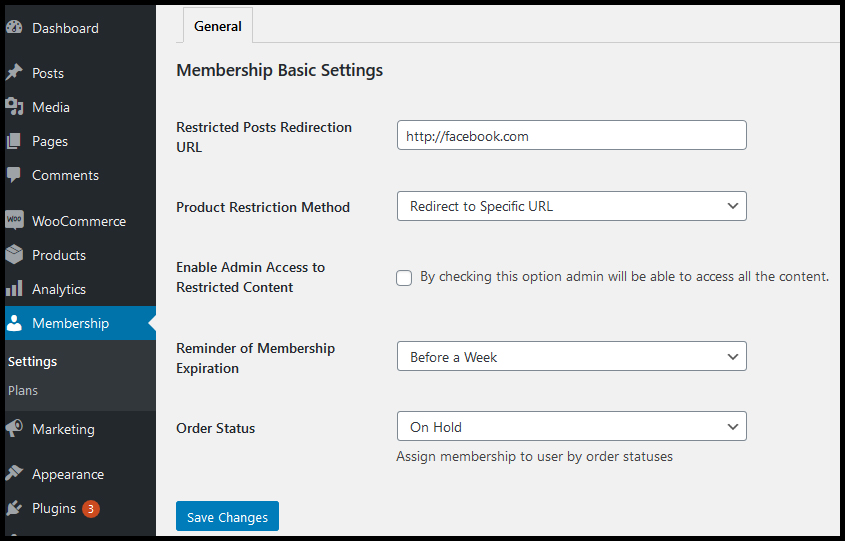
- Redirect users to specific URL for restricted content.
- Make products unpurchasable for restricted users.
- Sends notification to users automatically when plan is assigned.
- Sends membership expiry notification to users.
Detailed Features of WooCommerce Member Pricing
Unlimited membership plans:This plugin allows you to easily create unlimited membership plans within WooCommerce Memberships. Each plan specifies how content should be restricted and member benefits such as discounts are applied.
Sell membership plan with WooCommerce products:WooCommerce Subscriptions integrates tightly with this plugin, enabling you to sell recurring products with Stripe or PayPal and generate reports showing sales over various time periods and overall recurring revenue.
Auto assign membership plan:Use this plugin to automatically grant memberships based on product purchases, making it especially helpful for subscription-selling sites.
Set expiry date:You can add an expiry date for the membership plans for the users. If a fixed date membership ends within 12 months or so, sending emails reminding the user it’s about to expire so they can renew it may be beneficial.
Restrict access to users with specific plan:WooCommerce Memberships is a comprehensive subscription solution designed to enable you to restrict website content access only for members. It integrates seamlessly with WooCommerce shopping cart and Subscriptions plugin for seamless recurring payments.
Assign Plan to Any Post or Taxonomy Term:Easily assign membership plans to any post, page, or taxonomy term within WooCommerce. This feature allows site owners to control access based on user memberships, ensuring only specific members can view or interact with the restricted content.
Restrict Access to Users with Specific Plan:Control user access by assigning content to membership plans. Only users with the correct membership plan can access protected areas, ensuring that premium content is only available to paying members, creating a streamlined membership experience.
Redirect Users to Specific URL for Restricted Content:After signing up, redirect non-members directly to internal pages or custom URLs for an enhanced onboarding experience.
Make Products Unpurchasable for Restricted Users:Create a restriction rule in the Product tab that applies only to users with certain Membership Plans, and easily restrict purchase of products for these plans.

How To Get Started With WooCommerce Membership
After installing & activating the plugin, please create a membership plan with your personalized settings.
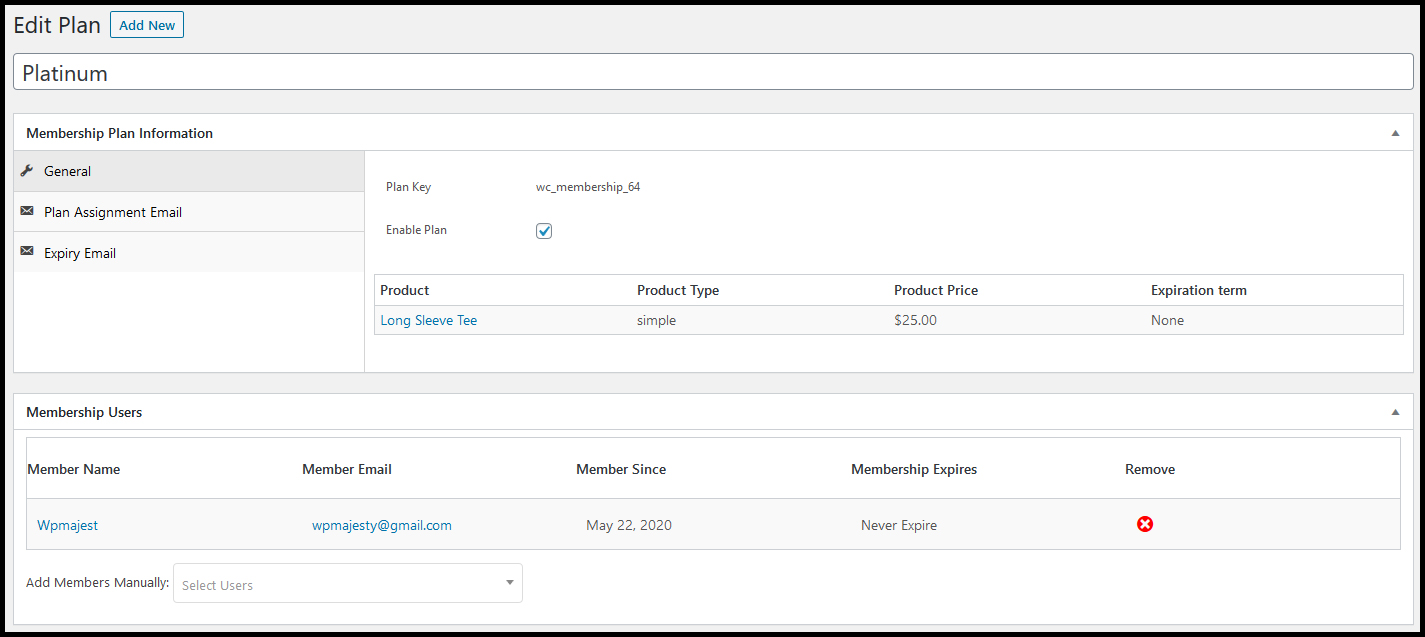
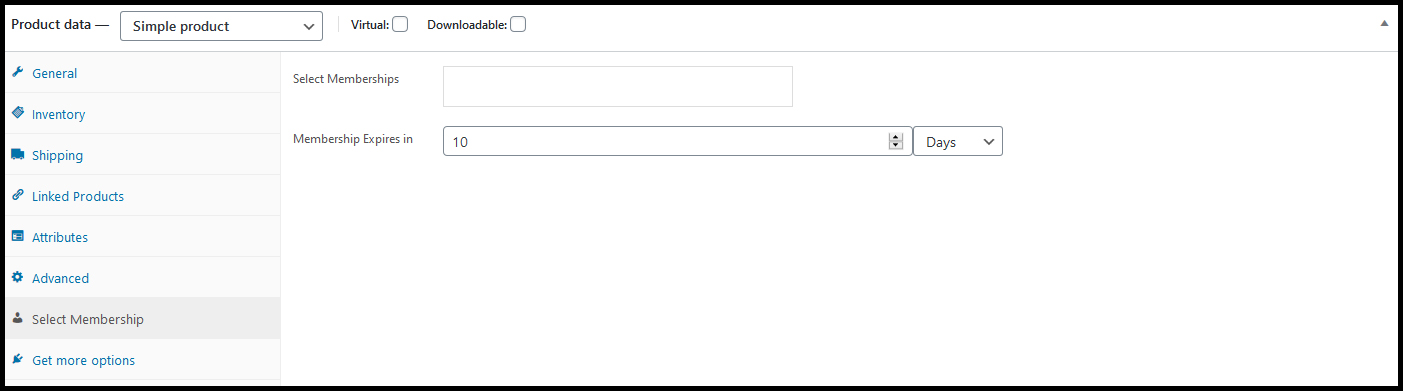
After creating a membership plan, assign WooCommerce product to the membership plan, so that on the purchase of the WooCommerce product the membership plan is assigned to the user automatically.
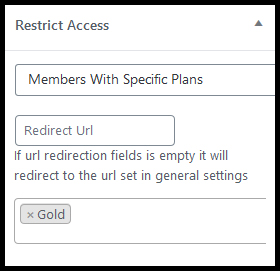
Manage Posts’ & Taxonomy Terms’ Access With Membership Plan
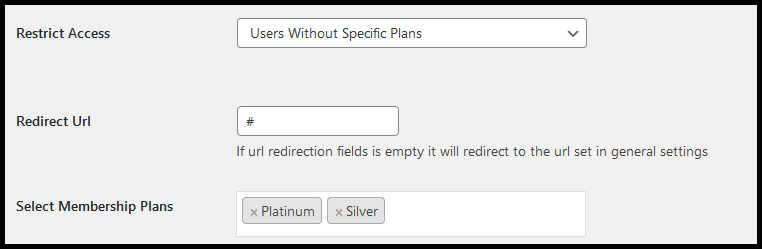
Each post type supports membership plans to apply restriction, there are multiple ways to apply membership plan restrictions on the posts or taxonomy terms.
Assign membership plan to specific taxonomy terms to apply restrictions based on the membership plan.
General Settings
Contact
2026-02-25- version 1.0.5
Fixed some issues.
2025-01-05- version 1.0.4
Fixed some warning issues.
Fixed some critical issues.
2024-03-06- version 1.0.3
Fixed some code issues.
Improved code quality.
2023-02-25- version 1.0.2
Fixed some code issues.
2022-05-05- version 1.0.1
Fixed some code issues.
2020-06-08- version 1.0.0
Initial Release
| Type | WooCommerce Plugin |
|---|---|
| Author | WPMajesty |
| Category | Wordpress / Ecommerce / Woocommerce |
| Price | $29 |
| Sales | 85 |
| Rating | 0.00 from 1 rating |
| Published | Jun 8, 2020 |
| Last Update | Feb 24, 2026 |
| Compatible Browsers | IE9, IE10, IE11, Firefox, Safari, Opera, Chrome, Edge |
| Compatible Software | WordPress 6.9.x, WordPress 6.8.x, WordPress 6.7.x, WordPress 6.6.x, WordPress 6.5.x, WordPress 6.4.x, WordPress 6.3.x, WordPress 6.2.x, WordPress 6.1.x, WordPress 6.0.x, WordPress 5.9.x, WordPress 5.8.x, WordPress 5.7.x, WordPress 5.6.x, WordPress 5.5.x, WordPress 5.4.x, WordPress 5.3.x, WordPress 5.2.x, WordPress 5.1.x, WordPress 5.0.x |
| Compatible With | WooCommerce 9.x.x, WooCommerce 8.x.x, WooCommerce 7.x.x, WooCommerce 6.x.x, WooCommerce 5.x.x |
| Source Files Included | JavaScript JS, HTML, CSS, PHP |
Categories
Tags
External listing. code.market does not sell this product and does not process payment for it. Pricing, payment, delivery, licensing, refunds, and support are handled by the third-party merchant on its own website. We may earn an affiliate commission from a referral. Details.
Products of the Week.
Submit🥇

STOP GUESSING WHAT TO POST
AI that learns your brand voice and builds a month of consistent, on-brand social content: carousels, posts and hooks that sound like you, not like everyone else's AI.
SaaS · 4,299 views · 38 clicksSaaS · Week 45 · 4,299 views · 38 clicks
🥈

Conversational Backlinks for Busy Founders
Place Backlink Relevant Conversation for your domain across Forums and Conversations
Website · 42,021 views · 223 clicksWebsite · Week 45 · 42,021 views · 223 clicks
🥉

upvote.club
Free Social Media Engagement that Helps Boost Your Content. Upvote Club supports 19 social networks with 100+ engagement actions in one dashboard. Add links to your posts and get free engagement from real users.
SaaS · 40,065 views · 117 clicksSaaS · Week 45 · 40,065 views · 117 clicks
#4

Substack Posting API
Onboard your Agent to Substack. Write Publish on Substack via API
SaaS · 59,074 views · 198 clicksSaaS · Week 45 · 59,074 views · 198 clicks
#5

Seenshot App
Free, Fast, MacOS Screenshot app. Make Screenshot cmd+shift+2 and send it via link
Desktop App · 28,449 views · 122 clicksDesktop App · Week 45 · 28,449 views · 122 clicks
#6

Hand-Placed Backlinks $9.99 per link. Flat rate.
Buy hand-placed forum, Q-A and directory backlinks. Flat $9.99 per link, no subscriptions — you only pay for approved listings.
Website · 4,282 views · 19 clicksWebsite · Week 45 · 4,282 views · 19 clicks
#7

Free Invoice Generator - PDF Invoices in Your Browser, No Sign-Up
A free invoice maker for freelancers and small businesses: fill in the invoice, check the live preview, and download a PDF that looks exactly like it. Any currency, tax per item, three templates, no sign-up, and nothing leaves your device.
2,957 views · 17 clicksWeek 45 · 2,957 views · 17 clicks
#8

Merge PDF Files Free - Combine PDFs in Your Browser, No Upload
A free PDF merger for office workers, students, and freelancers: combine PDFs and images into one file in the browser, reorder files and pages, pick page ranges, keep bookmarks, and open password-protected PDFs. Nothing is uploaded, no sign-up, no watermark.
2,730 views · 13 clicksWeek 45 · 2,730 views · 13 clicks