
WooCommerce Dynamic Pricing Calculator – Area, Length & Addons for Simple Products

Description


WooCommerce Variable Pricing Calculator (Addons Simple Product) can set a simple product working as a Pricing Calculator. This addon will help you to make Simple products work with every measurement.
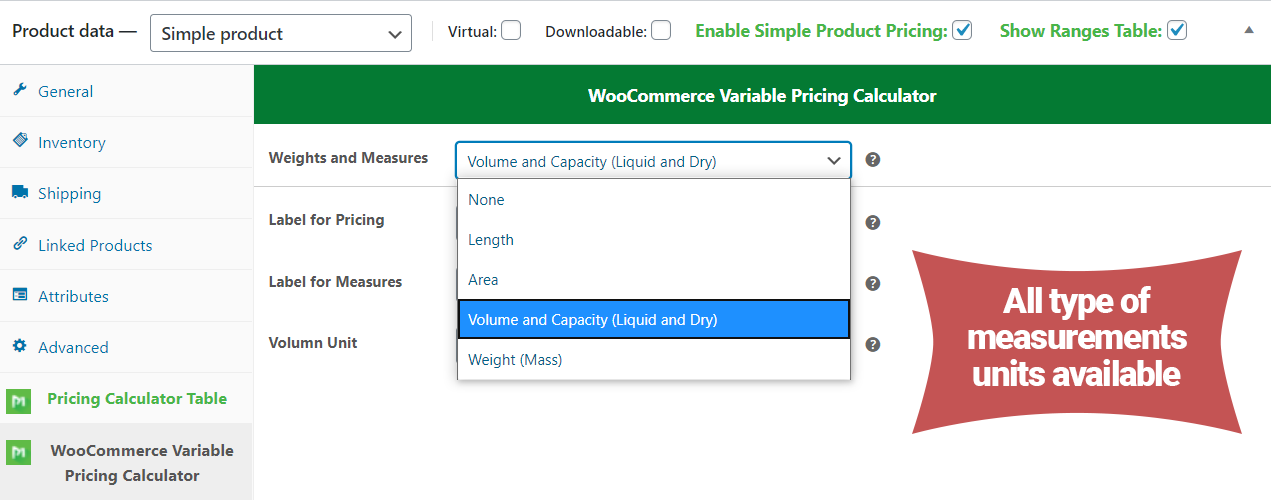
WooCommerce Variable Pricing Calculator (Addons Simple Product) can support all Measurements of Units (Weight Units, Length Units, Area Units, Volume Units), etc.
Lots of Demo with WooCommerce Variable Pricing Calculator (Addons Simple Product) Plugin, so with this, you can quickly see how it works.






Features of WooCommerce Variable Pricing Calculator (Addons Simple Product)
- Easy to configure with Same Variable Pricing Data Tabs
- Pricing based on Measurement units (how much you require)
- Length, Width, Area, Height, and their measurement units cover
- Easily set dynamic pricing tables with no limits
- Stock Management for Simple product
- Display option of Ranges Table in Single Product Page
- Each product have its pricing and ranges
- Full of Measurement Units available
- Length, Width, Area, Volume
- Minimum & Maximum validation
- Very easy to use and understand how it works
How to Set up Add-ons ?
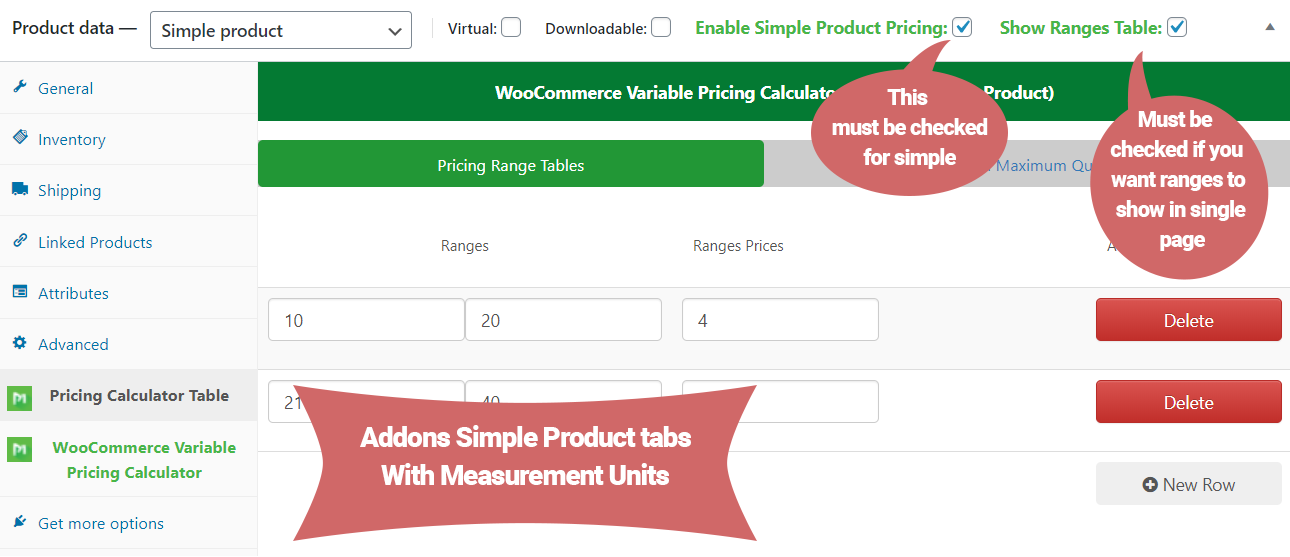
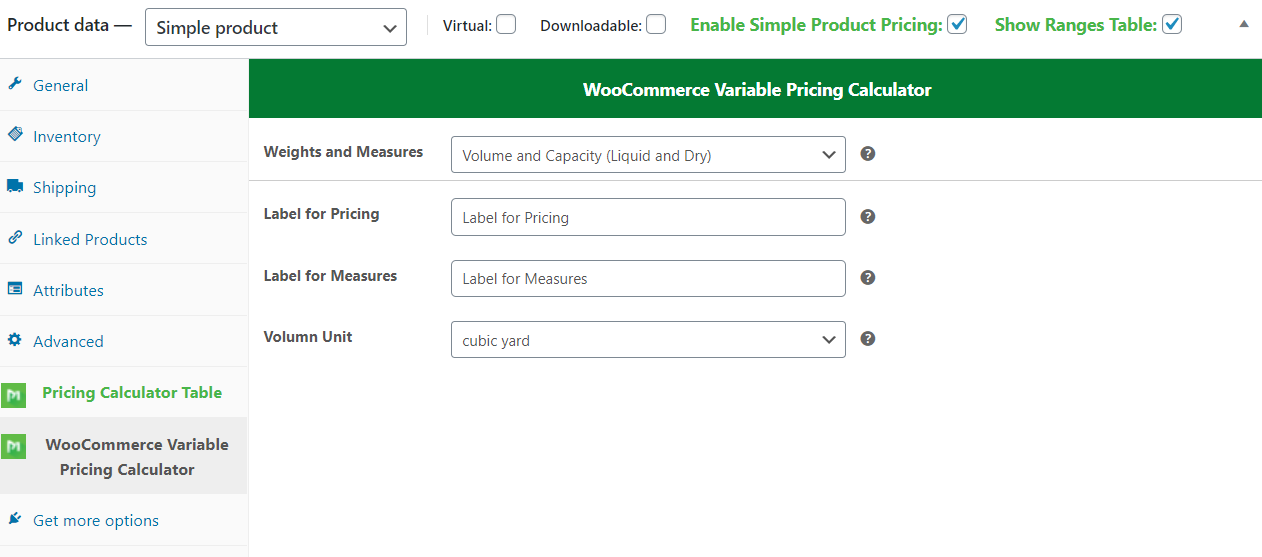
After installation WooCommerce Variable Pricing Calculator (Addons Simple Product), go to the Product page to see Addons Tabs like below in images. So, the critical part is to check the Enable Simple Product Pricing Option Checkbox to let the product work as a Simple Measurement Product. If you want to Display Ranges on the product page, enable Second Checkbox called Show Ranges Table. Select Measurement set Fields Labels, enter ranges table once saved Simple Product is work like Measurement Calculator.
What Measurement Units Addons Support ?
WooCommerce Variable Pricing Calculator (Addons Simple Product) support all most all. But if you want any others, let us know. We have Area, Width, Length, Volume, and their all units.
Minimum & Maximum Validation
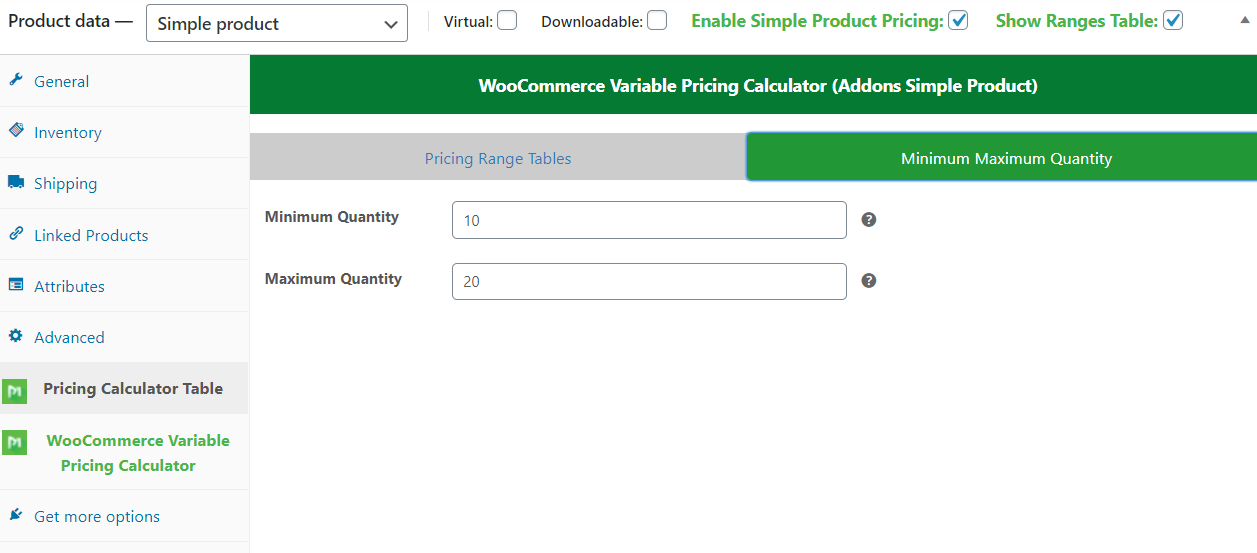
WooCommerce Variable Pricing Calculator (Addons Simple Product) can have a minimum & maximum quantity validation to restrict user order quantity.
What kind of Measurement Units do we sell?
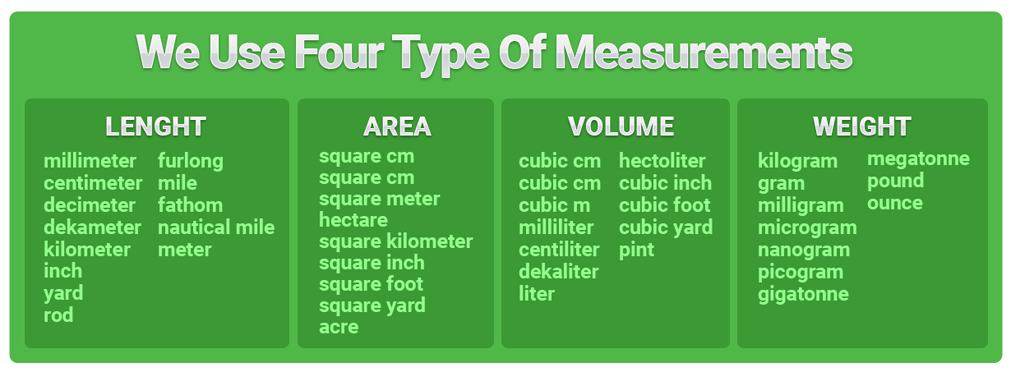
Visit Products by Measurement Unit Categories
- Weight & Mass Base Measurement Products Demo
- Length Base Measurement Products Demo
- Volume Base Measurement Products Demo
- Area Base Measurement Products Demo
Frontend View of Simple Product
On Frontend, a single Product page view is simple and easy to understand. We have a range table below button to see how it works, pricing label on top with product.
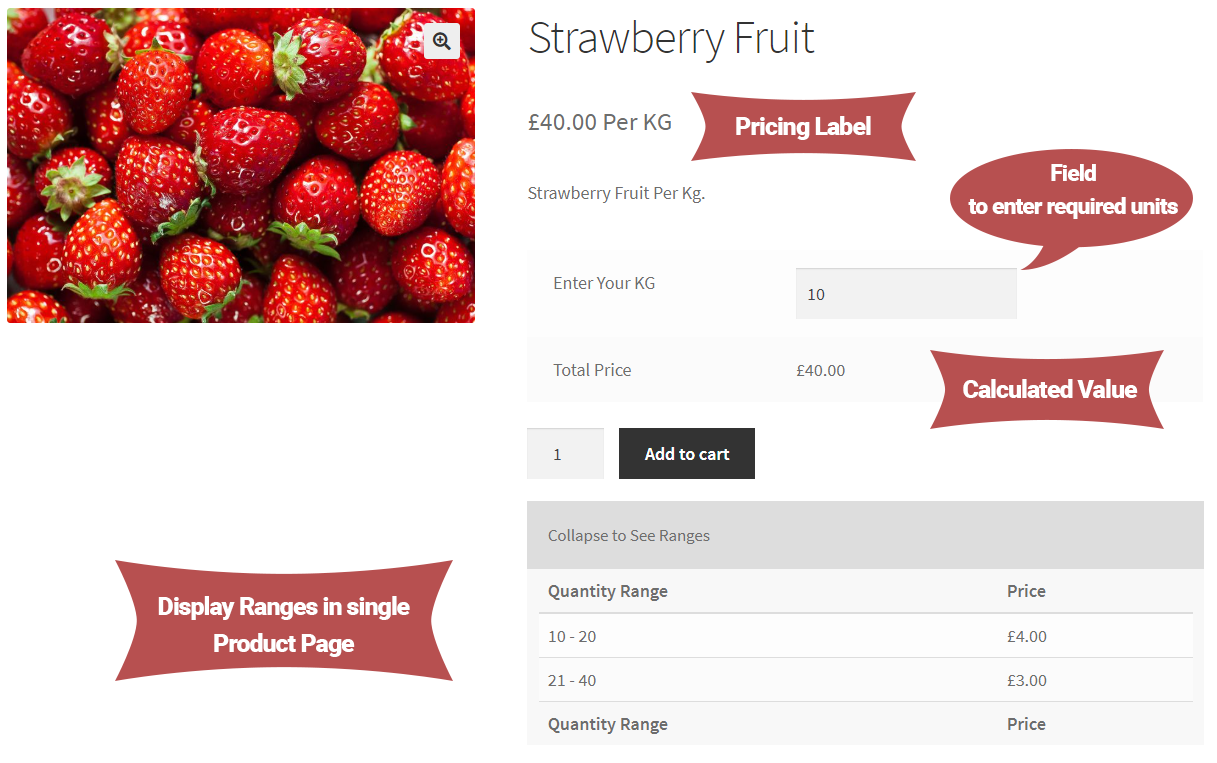
2D Measurement Product Calculation Example

Validation Error for Minimum & Maximum with Notification


Pre-Translated Languages

Changelog:
Version 2.0.6
Compatibility checks & fixes with the latest woo and wp
Version 2.0.5
Compatibility checks & fixes with the latest woo and wp
Version 2.0.4
Compatibility checks & fixes with the latest woo and wp
Version 2.0.3
Compatibility checks & fixes with the latest woo and wp
Version 2.0.2
Compatibility checks & fixes with the latest woo and wp
High-Performance Order Storage Compatibility
Version 2.0.1
WooCommerce & WordPress Latest version check
Version Update
Version 1.0.10
WooCommerce & WordPress Latest version check
Some Js fixes
Version 1.0.9
New Measurement units added
New formula added
WooCommerce & WordPress Latest version check
Some Js fixes
Version 1.0.8
WooCommerce & WordPress Latest version check
Some Js fixes
Version 1.0.7
New Measurement units added and compatibility check with the parent product
WooCommerce & WordPress Latest version check
Some Js fixes
Version 1.0.6
New Measurement units added
New formula added
WooCommerce & WordPress Latest version check
Some Js fixes
Version 1.0.4
WooCommerce & WordPress Latest version updates
Some Js fixes
Version 1.0.3
Version Updates
Version 1.0.2
Simple product data tab style fixes
Version updated
Version 1.0.0
Initial release
| Type | WooCommerce Plugin |
|---|---|
| Author | MotifCreatives |
| Category | Wordpress / Ecommerce / Woocommerce |
| Price | $21 |
| Sales | 111 |
| Rating | 5.00 from 17 ratings |
| Published | Jun 11, 2020 |
| Last Update | Aug 21, 2026 |
| Compatible Browsers | Firefox, Safari, Opera, Chrome, Edge |
| Compatible Software | WordPress 7.0.x, WordPress 6.9.x, WordPress 6.8.x, WordPress 6.7.x, WordPress 6.6.x, WordPress 6.5.x, WordPress 6.4.x, WordPress 6.3.x, WordPress 6.2.x, WordPress 6.1.x, WordPress 6.0.x, WordPress 5.9.x, WordPress 5.8.x, WordPress 5.7.x, WordPress 5.6.x, WordPress 5.5.x, WordPress 5.4.x, WordPress 5.3.x, WordPress 5.2.x, WordPress 5.1.x, WordPress 5.0.x, WordPress 4.9.x |
| Compatible With | WooCommerce 10.x.x, WooCommerce 9.x.x, WooCommerce 8.x.x, WooCommerce 7.x.x, WooCommerce 6.x.x |
| Gutenberg Optimized | Yes |
| Source Files Included | JavaScript JS, JavaScript JSON, HTML, CSS, Stylus, PHP, SQL, Layered PNG |
Categories
Tags
External listing. code.market does not sell this product and does not process payment for it. Pricing, payment, delivery, licensing, refunds, and support are handled by the third-party merchant on its own website. We may earn an affiliate commission from a referral. Details.
Products of the Week.
Submit🥇

STOP GUESSING WHAT TO POST
AI that learns your brand voice and builds a month of consistent, on-brand social content: carousels, posts and hooks that sound like you, not like everyone else's AI.
SaaS · 3,108 views · 28 clicksSaaS · Week 45 · 3,108 views · 28 clicks
🥈

Conversational Backlinks for Busy Founders
Place Backlink Relevant Conversation for your domain across Forums and Conversations
Website · 40,504 views · 216 clicksWebsite · Week 45 · 40,504 views · 216 clicks
🥉

upvote.club
Free Social Media Engagement that Helps Boost Your Content. Upvote Club supports 19 social networks with 100+ engagement actions in one dashboard. Add links to your posts and get free engagement from real users.
SaaS · 38,597 views · 110 clicksSaaS · Week 45 · 38,597 views · 110 clicks
#4

Substack Posting API
Onboard your Agent to Substack. Write Publish on Substack via API
SaaS · 57,634 views · 197 clicksSaaS · Week 45 · 57,634 views · 197 clicks
#5

Seenshot App
Free, Fast, MacOS Screenshot app. Make Screenshot cmd+shift+2 and send it via link
Desktop App · 27,065 views · 119 clicksDesktop App · Week 45 · 27,065 views · 119 clicks
#6

Hand-Placed Backlinks $9.99 per link. Flat rate.
Buy hand-placed forum, Q-A and directory backlinks. Flat $9.99 per link, no subscriptions — you only pay for approved listings.
Website · 3,000 views · 18 clicksWebsite · Week 45 · 3,000 views · 18 clicks
#7

Free Invoice Generator - PDF Invoices in Your Browser, No Sign-Up
A free invoice maker for freelancers and small businesses: fill in the invoice, check the live preview, and download a PDF that looks exactly like it. Any currency, tax per item, three templates, no sign-up, and nothing leaves your device.
1,695 views · 16 clicksWeek 45 · 1,695 views · 16 clicks
#8

Merge PDF Files Free - Combine PDFs in Your Browser, No Upload
A free PDF merger for office workers, students, and freelancers: combine PDFs and images into one file in the browser, reorder files and pages, pick page ranges, keep bookmarks, and open password-protected PDFs. Nothing is uploaded, no sign-up, no watermark.
1,587 views · 13 clicksWeek 45 · 1,587 views · 13 clicks