
WooCommerce Delivery —Delivery Date & Time Slots

Description


WooCommerce Delivery Made Easy
No matter what you want to deliver, our plugin will support you. May it be food, installation required products or special delivery cases, our WooCommerce delivery plugin will help you.
- Add a delivery date or times during checkout
- Only allow orders during your business hours
- Use Radius Shipping within km or miles
- Add today or next day delivery fees
- Allow local pickup
- Limit amount of oders per date / time slot
Plugin Features
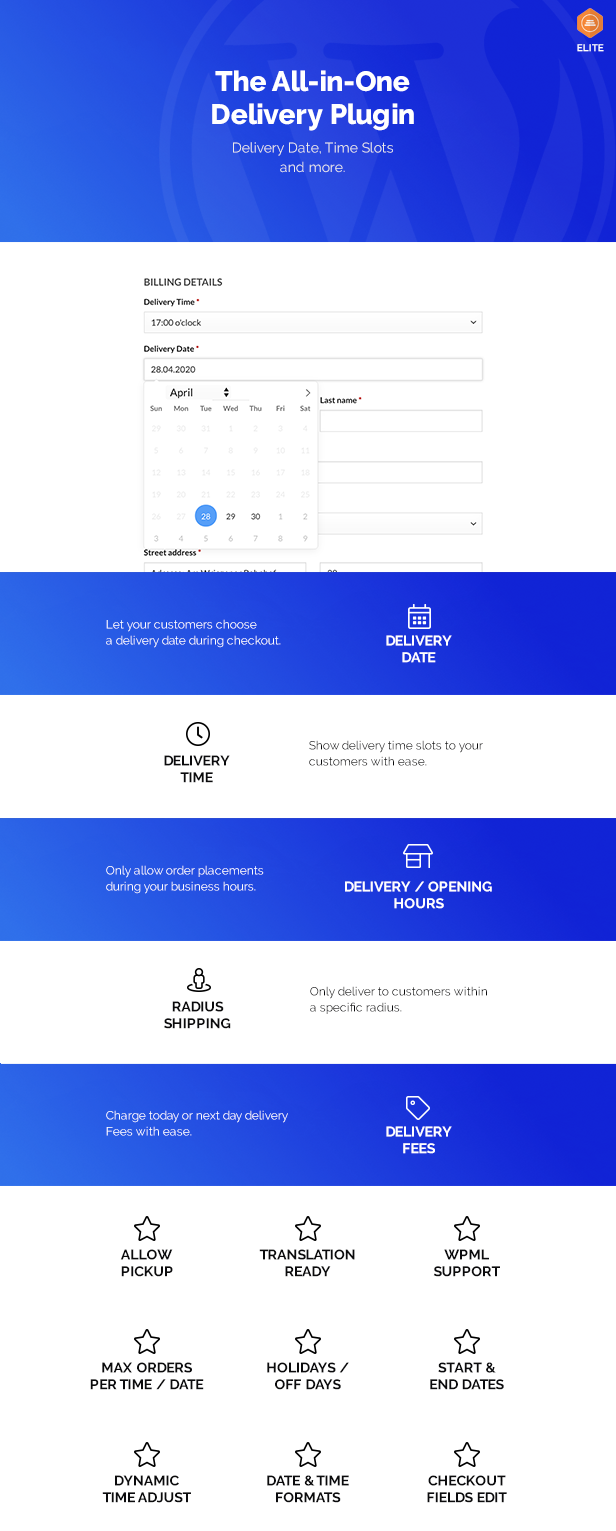
Detailed Features
- Set delivery times per Weekday
- Set a start / end date
- Exclude holidays / off days
- Custom notifications for all types
- Custom Date & Time Format
- Set opening hours per day with 2 time frames
- Remove checkout fields & disable mandatory
- Show delivery options only on specific shipping methods
- Disable delivery dates on weekdays
- Create today and next day delivery fees
- Disable delivery on specific weekdays
- Only deliver within a specific radius (km or miles)
Requirements
- WordPress
- WooCommerce
Changelog
======
1.2.1
======
- NEW:    Set dates and time ranges when you can not deliver.
        https://imgur.com/a/SC3555O
- NEW:    Triggering update_checkout when Fees by Weekday enabled
- FIX:    Calculating distance via Geoposition was not working
- FIX:    Advanced settings HTML Check not working
- FIX:    Minimum order value caused not able to create pages or posts
- FIX:    New Geocoding feature not working
- FIX:    Using delivery_date_locale now for admin mails
- FIX:    Admin panel crashed in delivery time settings

======
1.2.0
======
- NEW:    Delivery Location based on Radius
        This will calculate the distance between the user and the
        selected delivery location and disables them when out of radius
        https://imgur.com/a/dE4a2ML
- NEW:    Use Geocoding instead of Distance Matrix
        https://imgur.com/a/o70tQsr
- NEW:    Performance optimizations due to code refactoring
- NEW:    Moved filter woocommerce_delivery_date_form_options to support picker select
- NEW:    Introduced new filter:
        woocommerce_delivery_time_options
        woocommerce_delivery_date_options
        woocommerce_delivery_location_options
        woocommerce_delivery_time_max_order_options
        woocommerce_delivery_time_slots_ajax_options
- FIX:    Delivery time max orders enabled issue
- FIX:    Using users shipping address instead of billing when guest checkout
- FIX:    Delivery dates used when disabled

======
1.1.24
======
- NEW:    Added backend max delivery orders per time check
- NEW:    Updated the min order value to 999999
- FIX:    Delivery fees per weekday not showing

======
1.1.23
======
- FIX:    Inifinite Loop in delivery date + time

======
1.1.22
======
- NEW:    Added Spanish & French translations
- FIX:    Updated DE & IT translations
- NEW:    Delivery Time Range text saved in custom order meta fields:
        https://imgur.com/a/BS0NAft
- FIX:    Delivery times not updateing when date not used
- FIX:    Delivery date inline style not working
- FIX:    Radius shipping postcode issue
- FIX:    Added placeholder key names to WPML
- FIX:    PHP notice in admin

======
1.1.21
======
- NEW:    Add delivery fees for radius shipping (e.g. $5 fee for delivery within 20 miles)
        https://imgur.com/a/BSC1TXd
- NEW:    Placeholder & error text option for delivery date
- NEW:    Added shipping zone suport for radius shipping
- FIX:    Range text not showing in mails when times per delivery method chosen
- FIX:    Range shows in single order backend

======
1.1.20
======
- NEW:    Added support for flexible shipping plugin
- NEW:    Search in backend support localized date format search
        https://imgur.com/a/pCJIZaJ
- FIX:    Using wp_timezone_string function now
- FIX:    Issue when processing time went into next day

======
1.1.19
======
- NEW:    Delivery Dates per delivery location
        https://imgur.com/a/bWx3hRy
- NEW:    Added shipping zone instance ID to select fields in backend
- FIX:    Performance (JS &CSS only executed on checkout page)

======
1.1.18
======
- NEW:     Support for shipping zones
        https://imgur.com/a/5vck63i
- NEW:    Time examples are now BOLD as many users
        oversaw this easily
        https://imgur.com/a/8gwBswH

======
1.1.17
======
- FIX:    Moved updater into weLaunch framework

======
1.1.16
======
- NEW:    Dropped Redux Framework support and added our own framework
        Read more here: https://www.welaunch.io/en/2021/01/switching-from-redux-to-our-own-framework
        This ensure auto updates & removes all gutenberg stuff
        You can delete Redux (if not used somewhere else) afterwards
        https://www.welaunch.io/updates/welaunch-framework.zip
        https://imgur.com/a/BIBz6kz

======
1.1.15
======
- FIX:    Delivery time options per shipping method caused issue with delivery zones

======
1.1.14
======
- NEW:    Delivery processing time next day
- NEW:    Added a new Delivery date locale meta field, that you can use in our
        invoice PDF plugin for example
        https://imgur.com/a/58CQD99
- FIX:    Made optional Reloading checkout when HTML has changed as it causes infinite
        with multiple shipping zones + shipping dependent options, that was introduced
        in version 1.1.11
        https://imgur.com/a/Izqvxzr

======
1.1.13
======
- NEW:    Current & Next Day delivery times
        These will override other times except times per shipping method
        https://imgur.com/a/tpKuGZx
- NEW:    Set a custom "choose another date" text message
- NEW:    By default date is now before time
- FIX:    Holidays used as disabled when holidays settings disabled

======
1.1.12
======
- FIX:    Important JS issues

======
1.1.11
======
- NEW:    Processing & Reverse Processing times per shipping method
        Examples:
        Shipping needs 60 minutes to prepare
        Pickup need 30 minutes to prepare
        https://postimg.cc/k2krr9DR
- FIX:    Moved time debug to advanced settings
- FIX:    Reloading checkout when HTML of shipping method has changed

======
1.1.10
======
- NEW:    Added Italian translations thanks to Corrado Lucherini
        If you have translations for us, send them to support@welaunch.io
- FIX:    Added strip tags for placeholder field
- FIX:    Molly payment issue
- FIX:    Rolled back to old distance matrix API

======
1.1.9
======
- NEW:    Delivery Date & Time Labels per Shipping method
        https://imgur.com/a/rfyYEG7
- FIX:    In some themes selected shipping method was not set correctly
- FIX:    Updated distance matrix vendor pacakge (Distance matrix now requires PHP7.2)

======
1.1.8
======
- FIX:    Delivery time per shipping always taken monday times
- FIX:    Session PHP issue

======
1.1.7
======
- NEW:    Delivery location by user + distance matrix now work together
        so it calculates distance from user + customer
        https://imgur.com/a/FOqYsCN

======
1.1.6
======
- NEW:    Delivery Times per Shipping Method
        https://imgur.com/a/9eXKvC9

======
1.1.5.1
======
- FIX:    Time debug caused issue with times display

======
1.1.5
======
- NEW:    Minimum Order Value function
        https://imgur.com/a/2smc6Gk

======
1.1.4
======
- NEW:    Time debug mode:
        https://imgur.com/a/ZqpHfAa
- FIX:    Additional recipient not found

======
1.1.3.1
======
- FIX:    Hotfix for translated date format (month names)

======
1.1.3
======
- NEW:    Fees can now also contain decimals
- FIX:    Added appending recipients to Woo new order email when locaiton by user is used
        New Orders get sent to both (configured email + user email)
- FIX:    WooCommerce email settings no longer accessiable
- FIX:    Time range not showing in admin, frontend or email
- FIX:    Custom Delivery date, time & location label not showing in email

======
1.1.2
======
- NEW:    Delivery fees based on weekdays
        For example if you want to charge a fee only on weekdays (sat or sun)

======
1.1.1
======
- NEW:    Delivery Locations based on Users
        Select users, that should show as delivery locations including
        a custom text template + all new order emails will be sent to that user
        https://imgur.com/a/r24tyGQ

======
1.1.0
======
- NEW:    Delivery Time Ranges:
        https://imgur.com/a/QZhtaSK
        Just separate time value and name with a |

======
1.0.21
======
- NEW:    Delivery date & time sortable in order backend

======
1.0.20
======
- FIX:    Time slot Value to check changed from 0 to 9999

======
1.0.19
======
- FIX:    Days after tommorrow delivery fee

======
1.0.18
======
- NEW:    Overrite wp time zone with user time settings
- FIX:    Delivery details missing in email

======
1.0.17.1
======
- FIX:    Min date caused JS error

======
1.0.17
======
- NEW:    Min Date only get applied on selected shipping methods
        e.g. free shipping only available on next day (+1 day)
        https://imgur.com/a/FIIYfTS
- FIX:    Apply filter for disabled dates not working

======
1.0.16
======
- FIX:    Max orders / products per time checked even if not enabled

======
1.0.15
======
- FIX:    Max orders / products index casted to int now
        10 / 20 or all 0 ending settings were not interpreted right

======
1.0.14
======
- FIX:    Delivery time max products adds also products in cart now

======
1.0.13
======
- NEW:    Set a maximum products per delivery time
        This was a customization request for a pizza company,
        who only can produce e.g. 6 pizzas per delivery time
        https://imgur.com/a/2QpANjW
- FIX:    Delivery time placeholder not showing after AJAX load

======
1.0.12
======
- NEW:    Added day after tomorrow delivery fee
        Next day fee now only applies on next day

======
1.0.11
======
- NEW:    Radius shipping debug mode:
        https://imgur.com/a/xBlXfNO
- NEW:    Added support for delivery location on shipping method change
- FIX:    Changed reverse processing time description

======
1.0.10
======
- NEW:    Added an option for a placeholder for delivery time & location
        Auto select needs to be disabled: https://imgur.com/a/aBsSq8q
- FIX:    Widget translations broke opening hours widget
- FIX:    GMT - issue

======
1.0.9
======
- FIX:    More than 10 orders per day possible

======
1.0.8
======
- NEW:    Use WP timezone instead of user time zone (performance)
        Demo: https://imgur.com/a/QjpuMAn
- NEW:    Added delivery location in backend & Emails
- FIX:    Initial timepicker not showing when options empty

======
1.0.7
======
- NEW:    Delivery Location
        Demo: https://imgur.com/a/LK5DLiG
- NEW:     "Please choose another date" text appears now when todays times exceeded
- NEW:    Reverse Processing Time
        Demo: https://imgur.com/a/dzlcBR6
- NEW:    Added DE Translations
- FIX:    UTC--X Time issue

======
1.0.6
======
- FIX:     Order could be processed when time was set to "select time"
         and auto select first enabled

======
1.0.5
======
- FIX:    Warning: strlen() expects parameter 1 to be string, array given
- FIX:    New enabled field broke Flatpickr

======
1.0.4
======
- NEW:    Order Processing Time
        https://imgur.com/a/cLyRsvW
- NEW:    Only available order days
        https://imgur.com/a/cLyRsvW
- FIX:    if you set the Default Date to +1 the hour picket treats it as being
        the same day rather than a future date (so it restricts the hours
        being picked based on the current time).
- FIX:    Added checks for default, min and max dates

======
1.0.3
======
- NEW:    Date will now be saved in internal MySQL Format
        Please check your excluded / holiday settings
- NEW:    Support for written / translated month & day names
- NEW:    Locale support
- FIX:    Time slot check not working
- FIX:    Time & Date not showing on first checkout (no shipping option set)

======
1.0.2
======
- NEW:    Delivery time & date shows in emails
- FIX:    Delivery times do not adjust on future date selects,
        so customers can set a future date without time adjustments
- FIX:    Visitor Day fallback if session empty

======
1.0.1
======
- FIX:    Empty delivery times filter

======
1.0.0
======
- Inital release
| Type | WooCommerce Plugin |
|---|---|
| Author | welaunch |
| Category | Wordpress / Ecommerce / Woocommerce |
| Price | $79 |
| Sales | 1,183 |
| Rating | 4.93 from 27 ratings |
| Published | May 1, 2020 |
| Last Update | Apr 8, 2026 |
| Compatible Browsers | IE9, IE10, IE11, Firefox, Safari, Opera, Chrome, Edge |
| Compatible Software | WordPress 6.8.x, WordPress 6.7.x, WordPress 6.6.x, WordPress 6.5.x, WordPress 6.4.x, WordPress 6.3.x, WordPress 6.2.x, WordPress 6.1.x, WordPress 6.0.x, WordPress 5.9.x, WordPress 5.8.x, WordPress 5.7.x, WordPress 5.6.x, WordPress 5.5.x, WordPress 5.4.x, WordPress 5.3.x, WordPress 5.2.x, WordPress 5.1.x, WordPress 5.0.x, WordPress 4.9.x |
| Compatible With | WooCommerce 9.x.x, WooCommerce 8.x.x, WooCommerce 7.x.x, WooCommerce 6.x.x |
| Gutenberg Optimized | Yes |
| Source Files Included | JavaScript JS, HTML, XML, CSS, PHP |
| Video Preview Resolution | 2560x1237 |
Categories
Tags
External listing. code.market does not sell this product and does not process payment for it. Pricing, payment, delivery, licensing, refunds, and support are handled by the third-party merchant on its own website. We may earn an affiliate commission from a referral. Details.
Products of the Week.
Submit🥇

STOP GUESSING WHAT TO POST
AI that learns your brand voice and builds a month of consistent, on-brand social content: carousels, posts and hooks that sound like you, not like everyone else's AI.
SaaS · 5,851 views · 52 clicksSaaS · Week 46 · 5,851 views · 52 clicks
🥈

Conversational Backlinks for Busy Founders
Place Backlink Relevant Conversation for your domain across Forums and Conversations
Website · 44,307 views · 227 clicksWebsite · Week 46 · 44,307 views · 227 clicks
🥉

upvote.club
Free Social Media Engagement that Helps Boost Your Content. Upvote Club supports 19 social networks with 100+ engagement actions in one dashboard. Add links to your posts and get free engagement from real users.
SaaS · 42,325 views · 123 clicksSaaS · Week 46 · 42,325 views · 123 clicks
#4

Substack Posting API
Onboard your Agent to Substack. Write Publish on Substack via API
SaaS · 61,283 views · 203 clicksSaaS · Week 46 · 61,283 views · 203 clicks
#5

Seenshot App
Free, Fast, MacOS Screenshot app. Make Screenshot cmd+shift+2 and send it via link
Desktop App · 30,573 views · 124 clicksDesktop App · Week 46 · 30,573 views · 124 clicks
#6

Hand-Placed Backlinks $9.99 per link. Flat rate.
Buy hand-placed forum, Q-A and directory backlinks. Flat $9.99 per link, no subscriptions — you only pay for approved listings.
Website · 6,296 views · 19 clicksWebsite · Week 46 · 6,296 views · 19 clicks
#7

Free Invoice Generator - PDF Invoices in Your Browser, No Sign-Up
A free invoice maker for freelancers and small businesses: fill in the invoice, check the live preview, and download a PDF that looks exactly like it. Any currency, tax per item, three templates, no sign-up, and nothing leaves your device.
4,956 views · 17 clicksWeek 46 · 4,956 views · 17 clicks
#8

Merge PDF Files Free - Combine PDFs in Your Browser, No Upload
A free PDF merger for office workers, students, and freelancers: combine PDFs and images into one file in the browser, reorder files and pages, pick page ranges, keep bookmarks, and open password-protected PDFs. Nothing is uploaded, no sign-up, no watermark.
4,574 views · 15 clicksWeek 46 · 4,574 views · 15 clicks