
WooCommerce Countdown Sales & Price Discount Plugin
Description

With WooCommerce Countdown Sales & Price Discount Plugin, you can add a sales countdown to any WooCommerce product. A simple but powerful plugin to increase sales. This allows you to create a helpful sale countdown in a matter of minutes. The clock notifies customers of the end of the sale.
Use this plugin timer to increase sales by creating an urgency that encourages customers to place orders immediately. You can display discounted products on the home page and product pages and set a timeline. Choose the location (set your time zone) of the timer in product lists, and customize the text timer with backgrounds and bright colours!
This is one of the most common expressions when it comes to marketing strategies that boost conversion. If users find that they have a limited time to make a purchase decision or that the product they like is only available in limited quantities, they will choose to buy more and faster. This is exactly what the countdown timer WP plugin does.



Features of WooCommerce Countdown Sales & Price Discount Plugin
- Option to enable countdown in single product page
- Option to enable/disable countdown time in shop, category pages
- Choose countdown layout templates
- Option to set countdown text font size and sales text font sizes
- Setting option to set countdown place (pages hooks) timer on single, shop and category pages
- Working for both simple and variable product types
- Freedom to display top and bottom sales bar with countdown timer
- Customizable font text, color of countdown and bars
- Option to display total product and sales product count under progress bar
- Progress bar show the total percentage of sold products
- Customizable content for both shop and single product pages
- Choose what to do when the countdown sale was expired
- Bulk adding option of countdown sales via product & category wise
- Option to set sale or discounted price when countdown is on
How it works for Specific Product
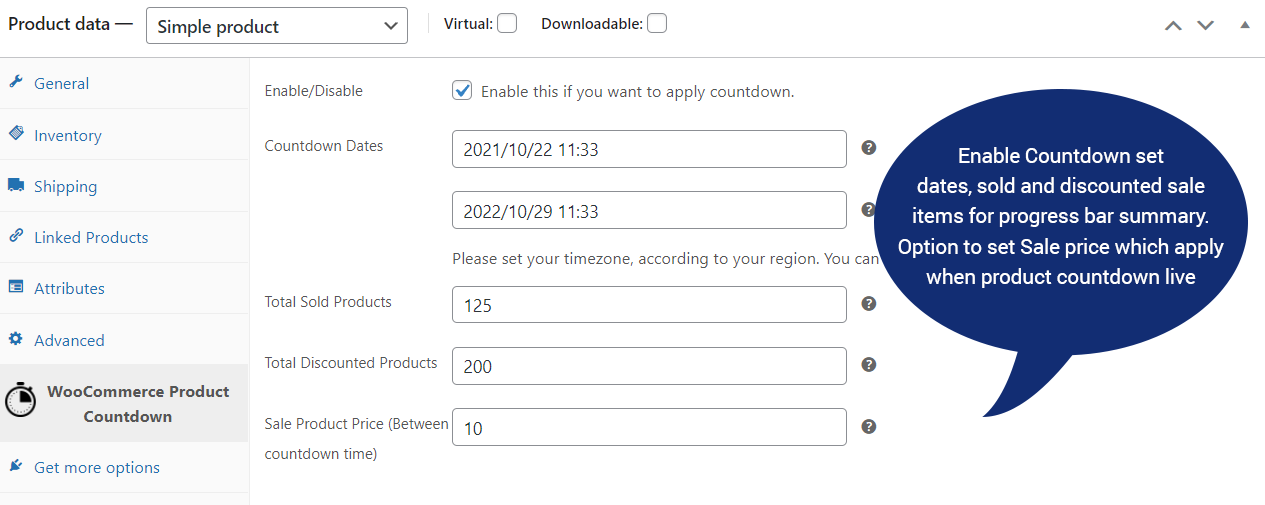
To set countdown timer for sale for any specific product you need to go to the edit product page, under product data type a tab called WooCommerce Product Countdown. All the settings are available to set start countdown and end countdown with a sale price or discounted price. We also add fields for progress bar percentage which shows customers the total sold items on both the product page and shop.
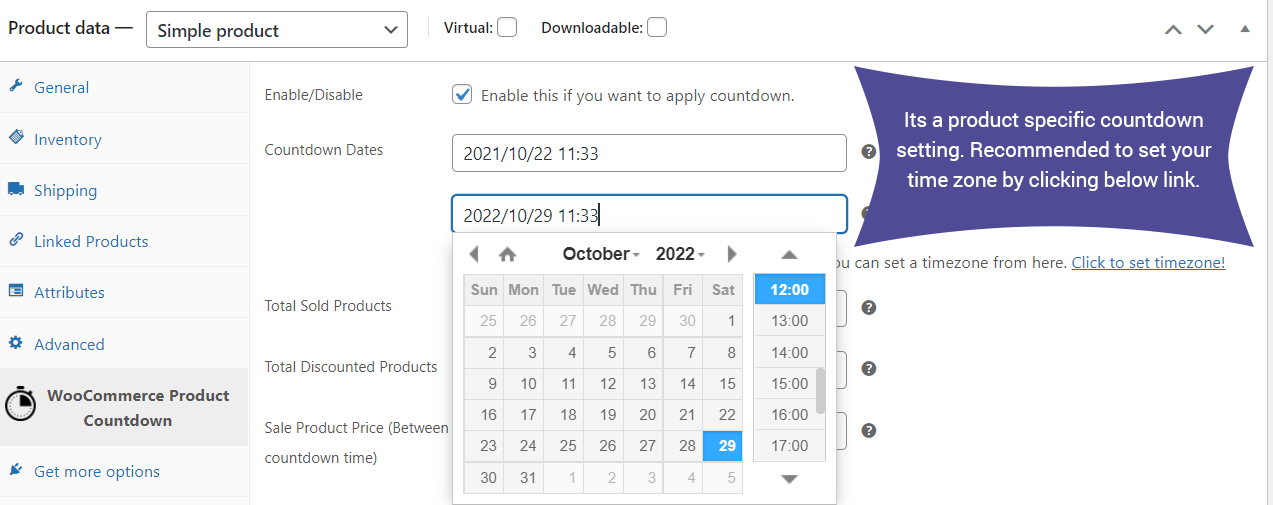
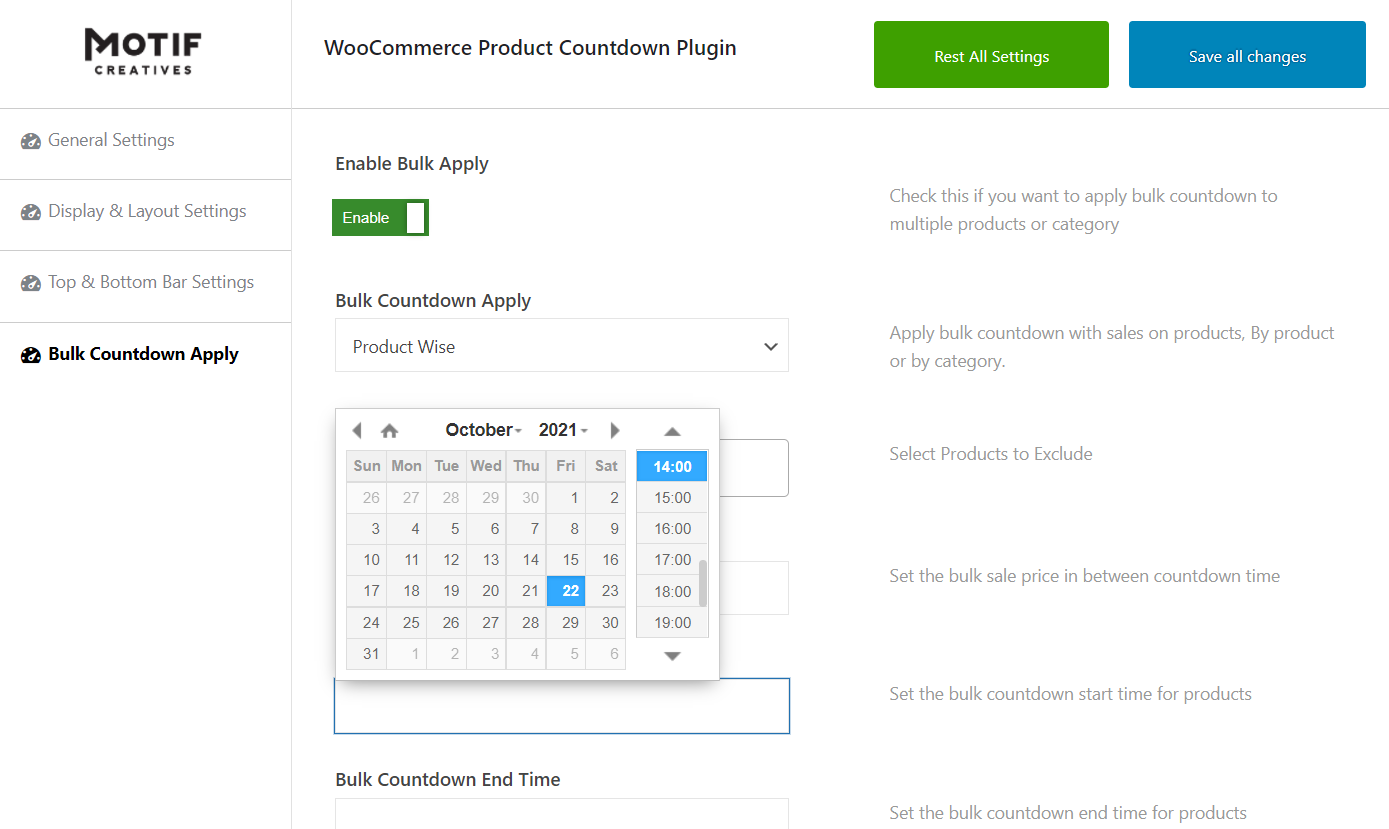
Date and Time Picker.
Its recommended to set your time zone first, so it will show the correct time as per your current location. Click on the link which says set time zone.
What if we need to set Countdown sales to Multiple Product ?
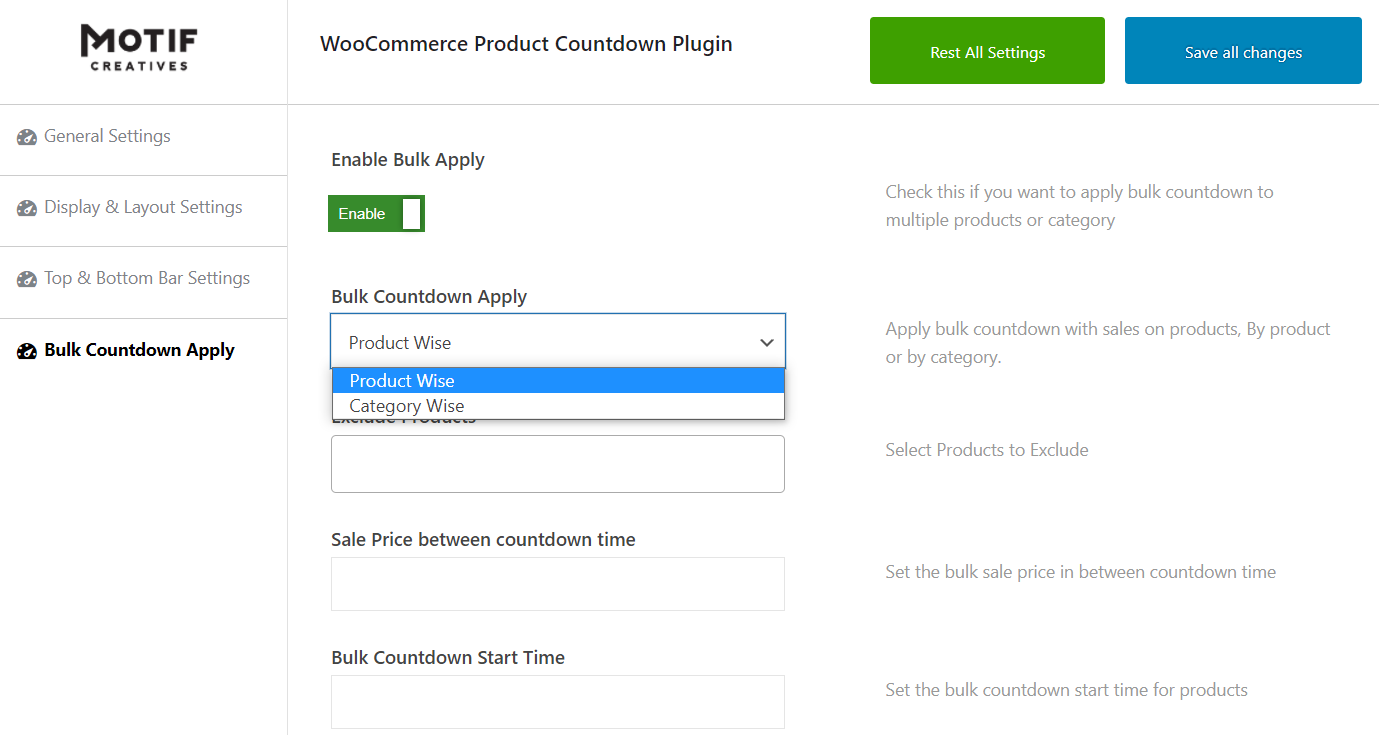
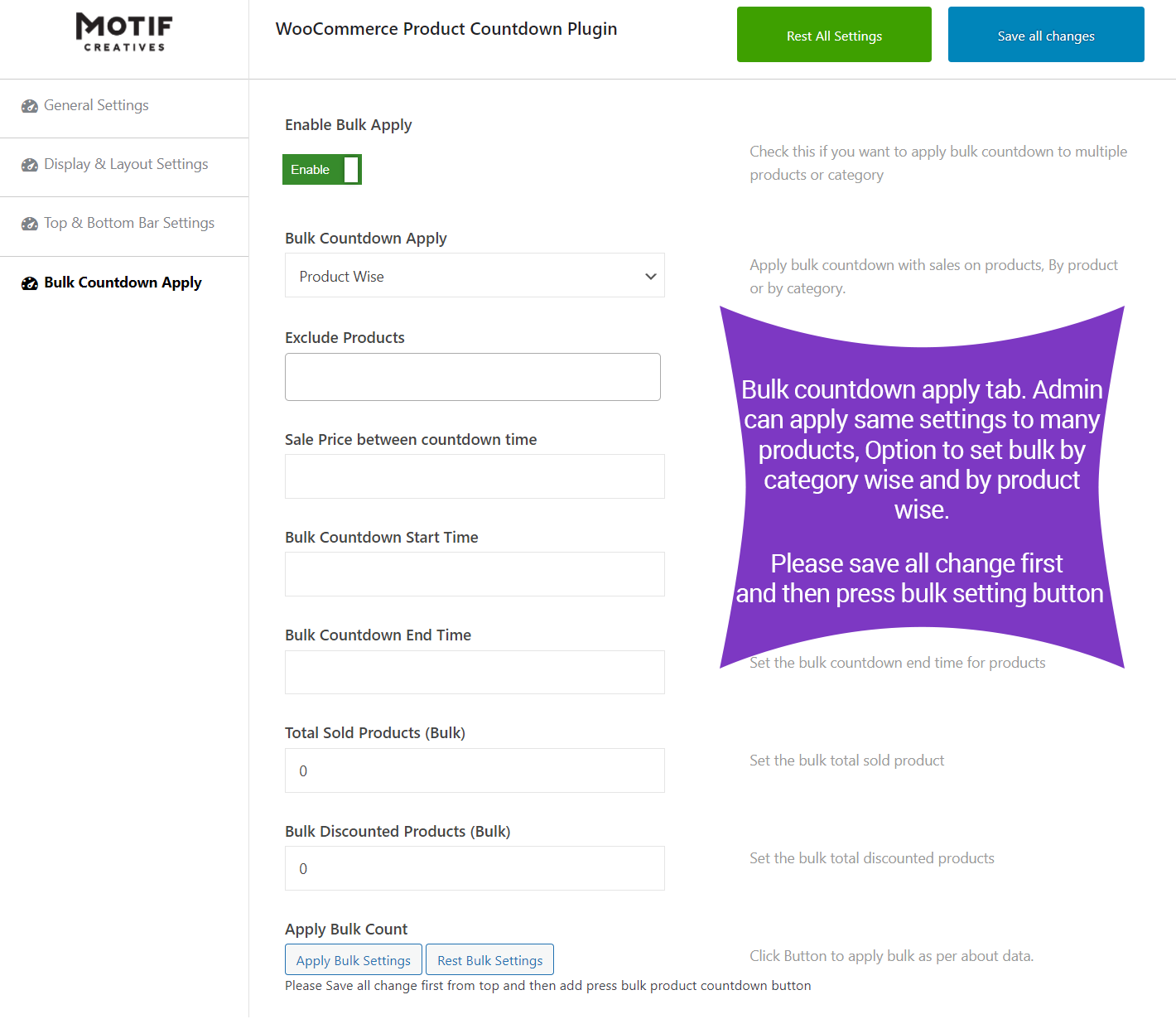
Yes, possible to add/set countdown sales to multiple products based on Category or by Product. In the dashboard setting options, we have a tab called Bulk Countdown Apply. It will have all options to set countdown based on category and products.
Can we apply discount price and reset this bulk settings ?
Yes, we have the option to add sold products and total products on sales. Also, we have the option to set the countdown date with time and you can also rest the setting options of the countdown.
Bulk Countdown Apply tab full Screenshot.
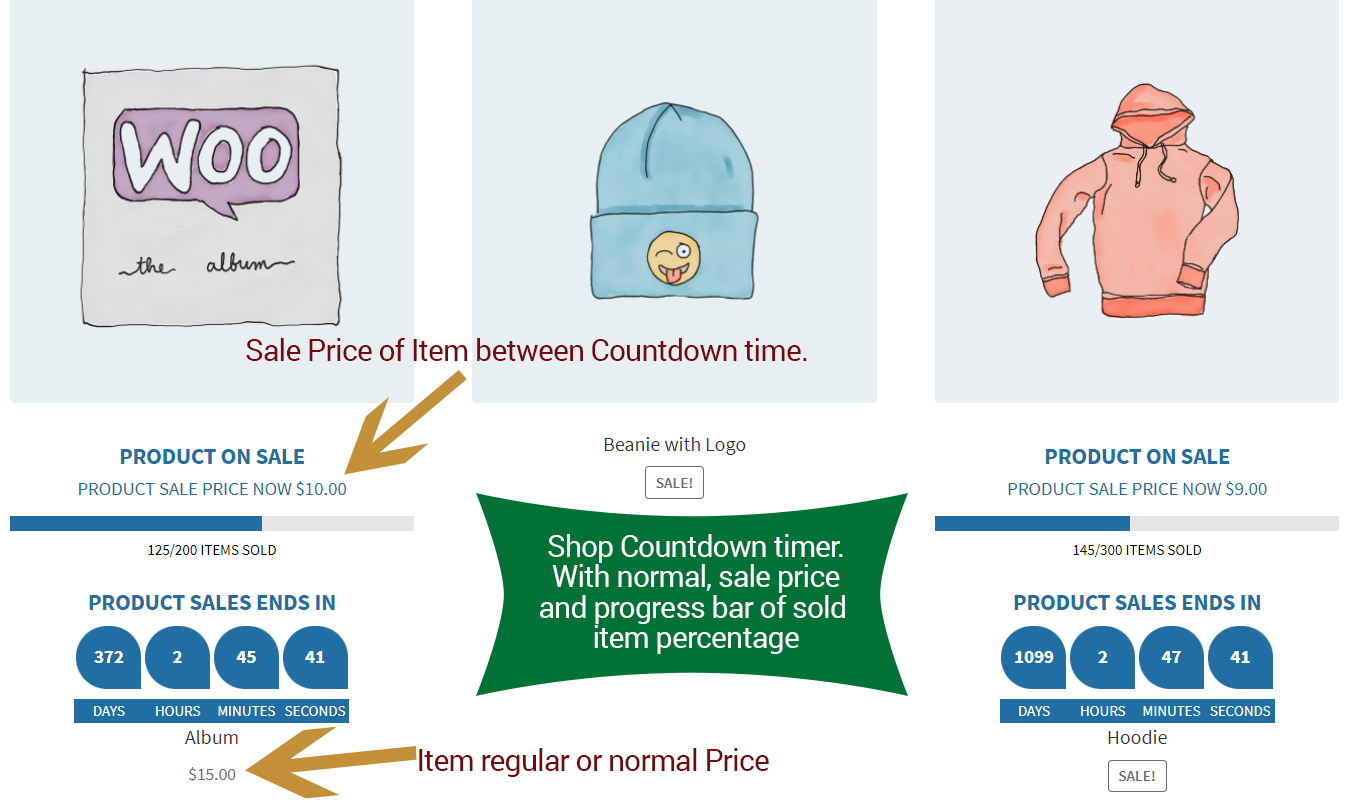
WooCommerce Shop Page.
On the shop page, it looks like a perfect countdown display with each product its countdown timer. With sales percentage progress bar and sale price in countdown time.
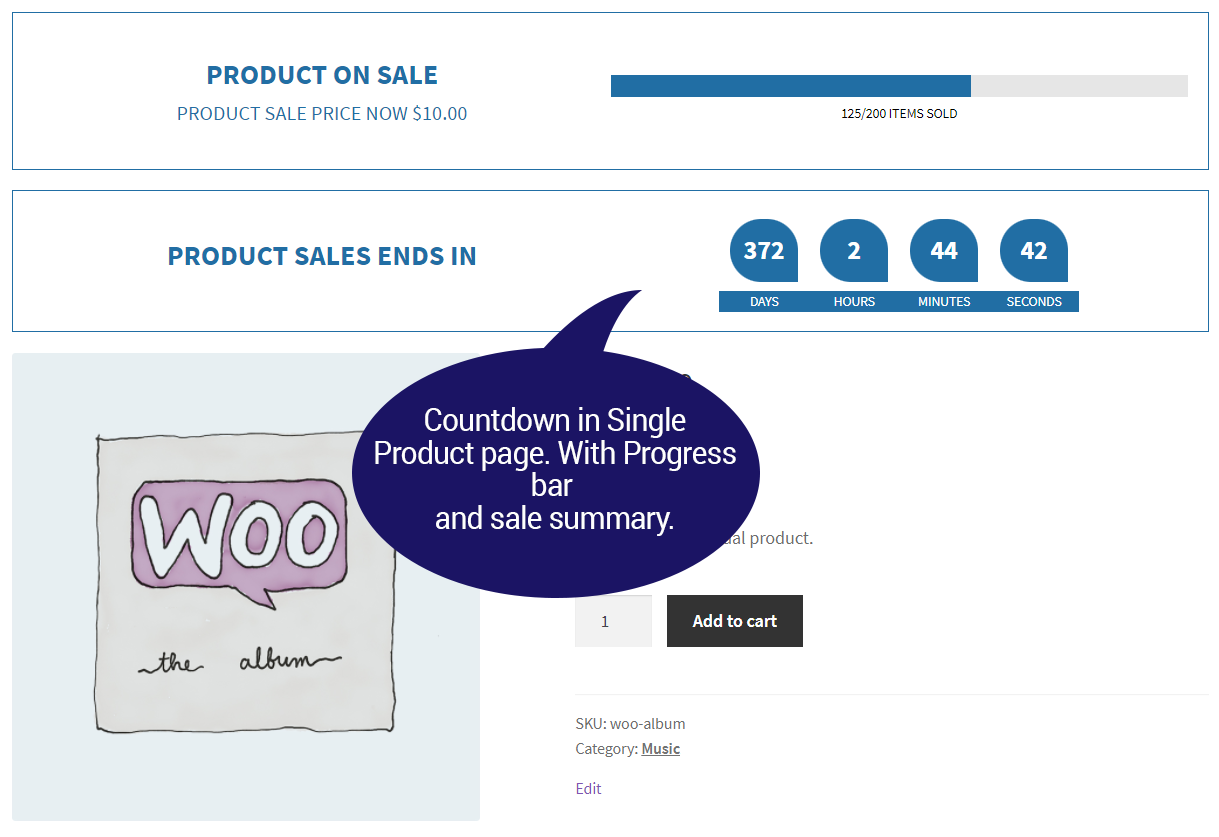
Single Product Page.
Single product page view with countdown sales, product sale summary in the progress bar, and sale price.
Top & Bottom bar on Single Product Page.
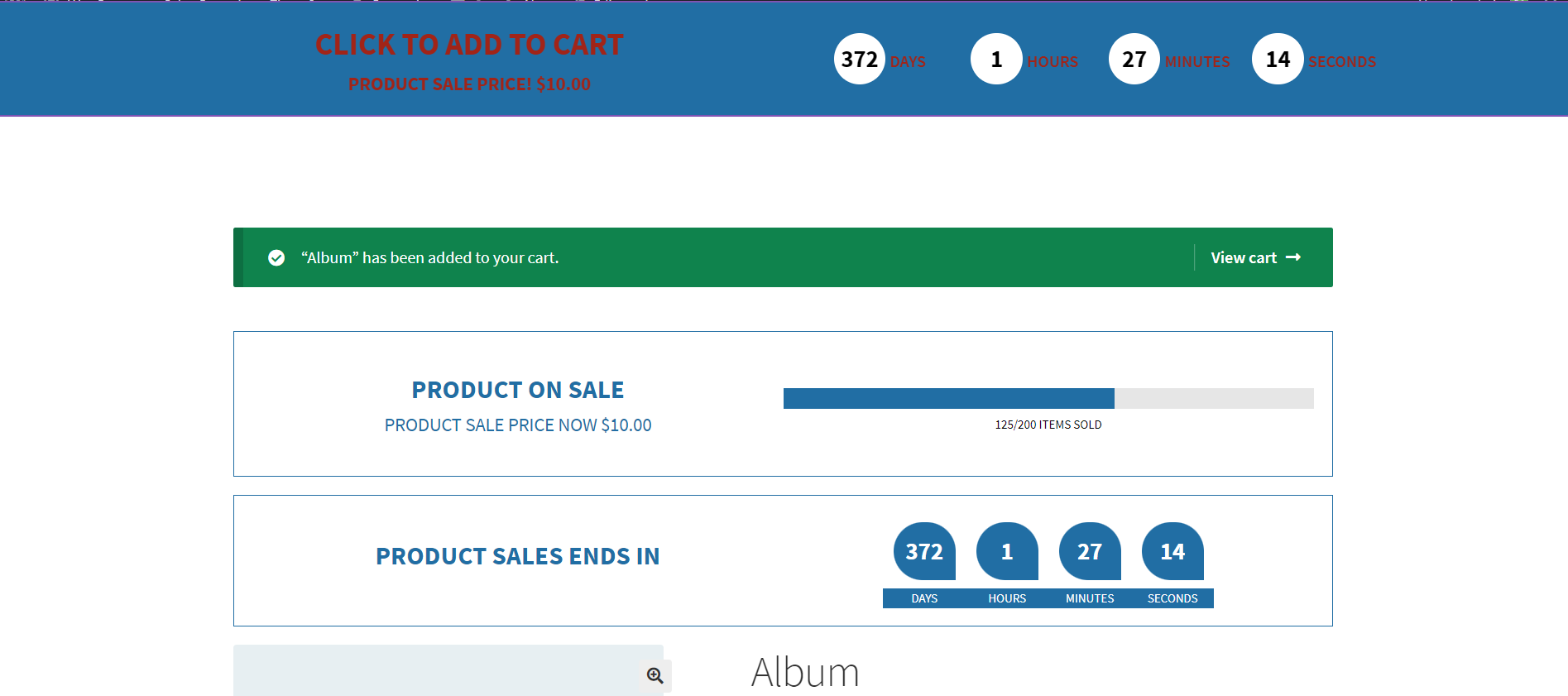
On the single product page, we also have the top and bottom bar which shows the sale and countdown time. And upon click, it will add the product to the cart with the sale price.
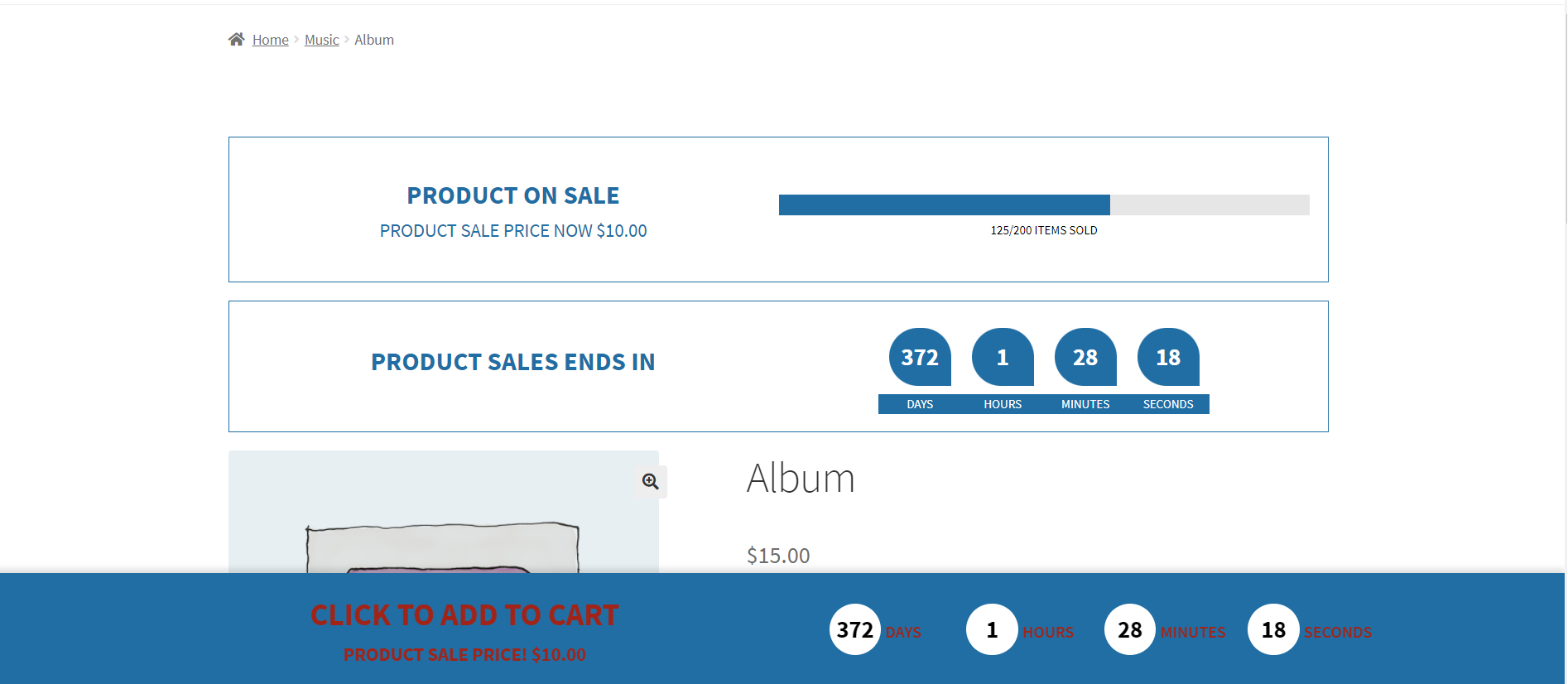
Top bar view on Single Product Page.
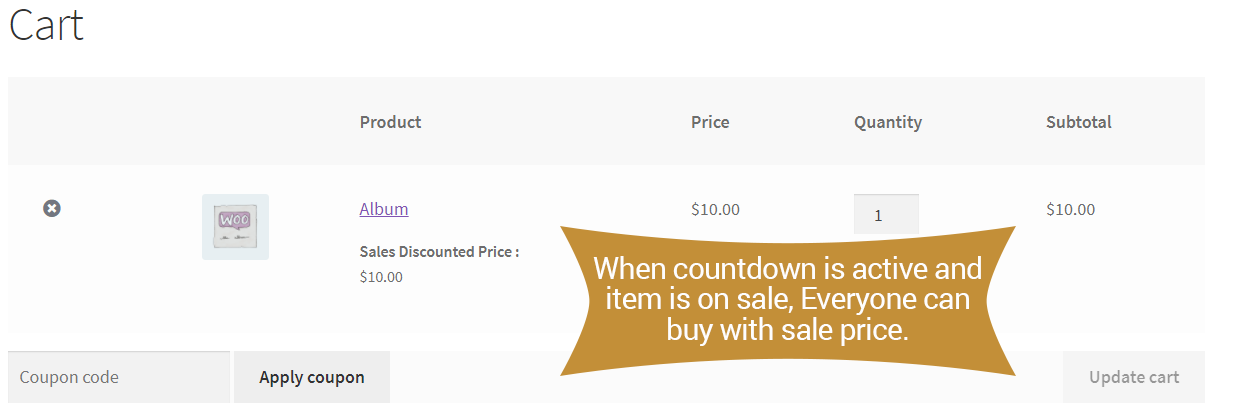
Sale price of Countdown Product in Cart.
Users can buy every countdown sale product with its sale price. So we also display the price and countdown date at cart level for better understanding.
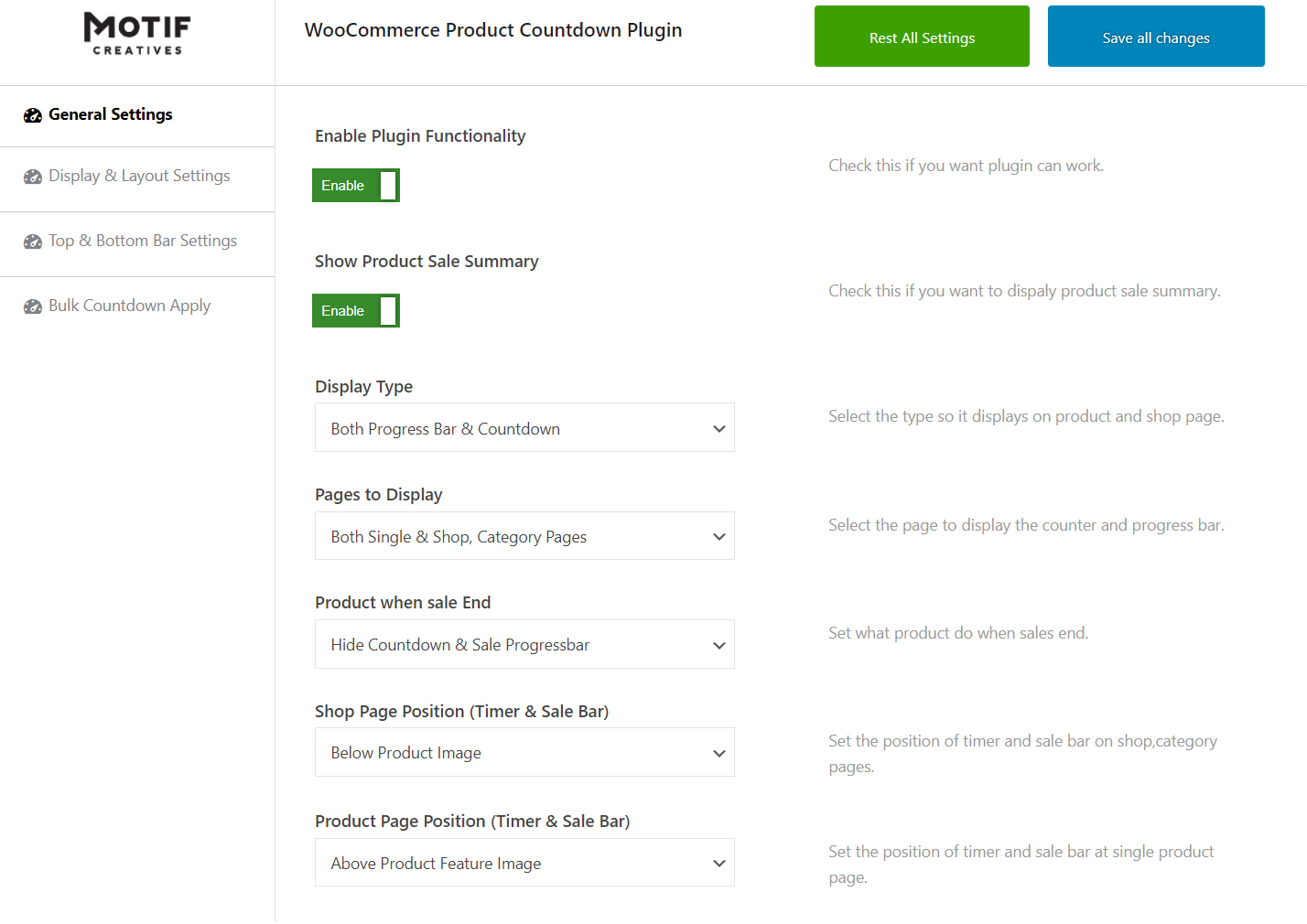
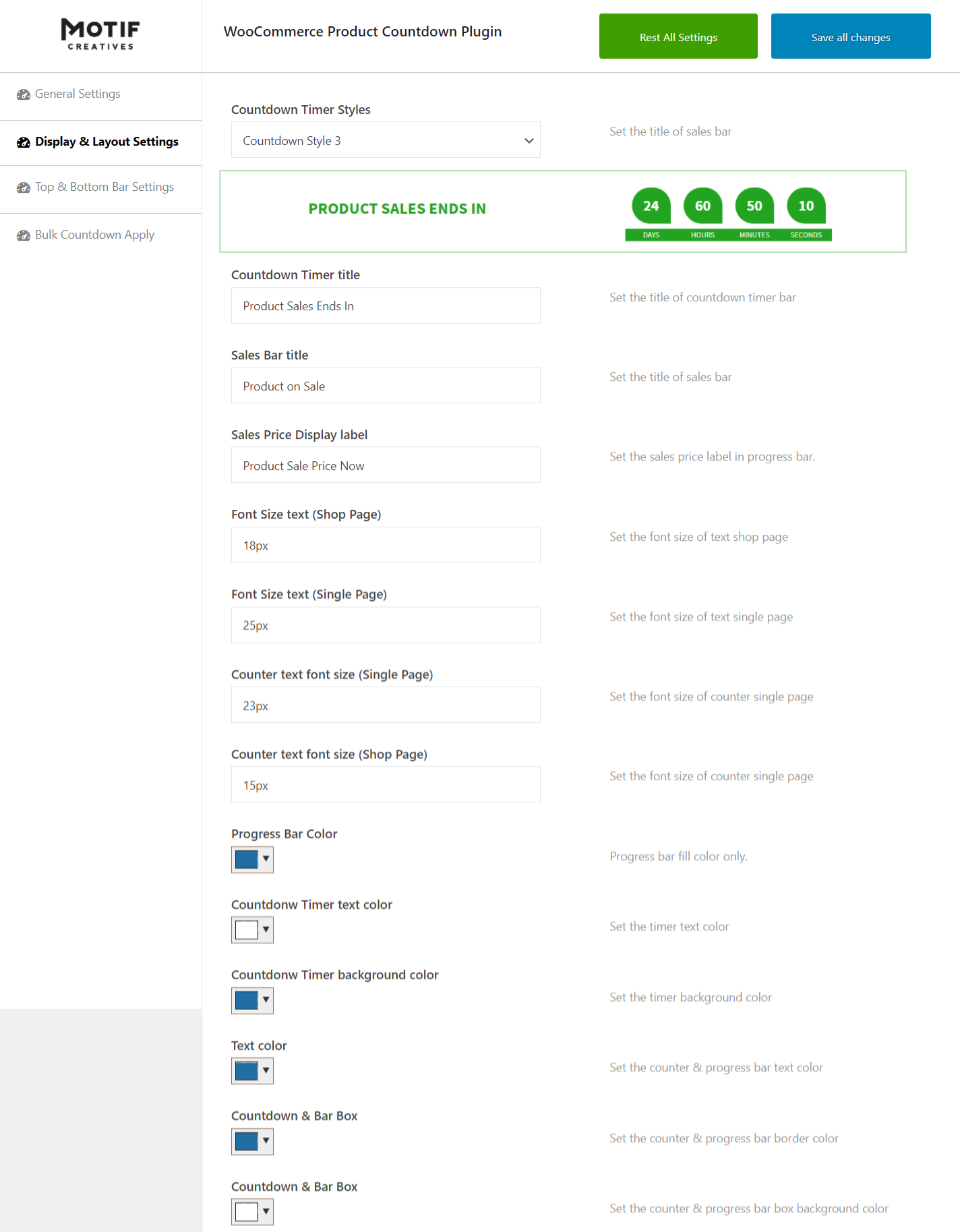
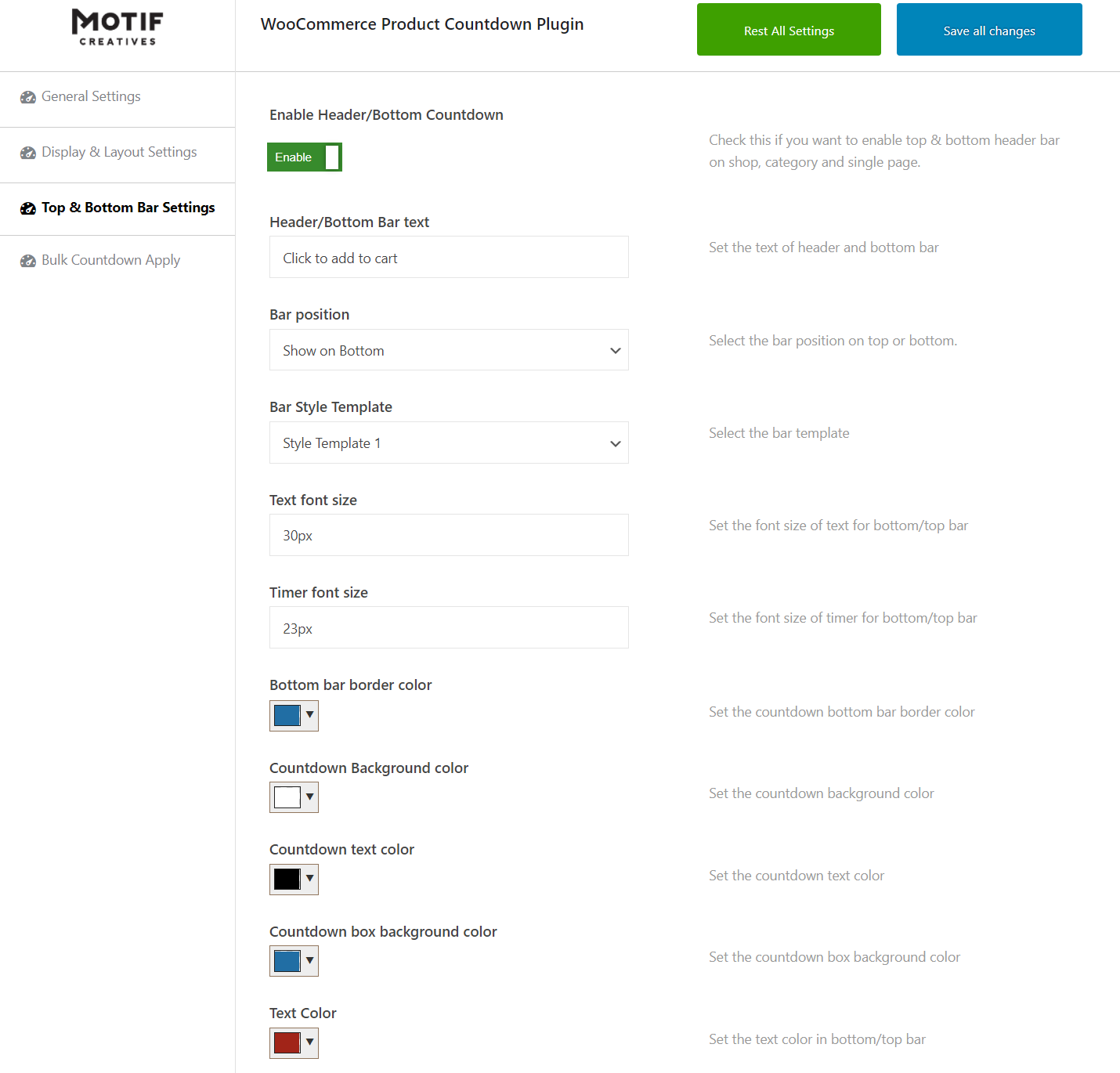
WooCommerce Countdown Sales & Price Discount Plugin Setting Options.
We have many setting options to control plugin functionality.
- General settings options
- Display & Layout settings
- Top, Bottom bar settings
- Bulk Countdown settings
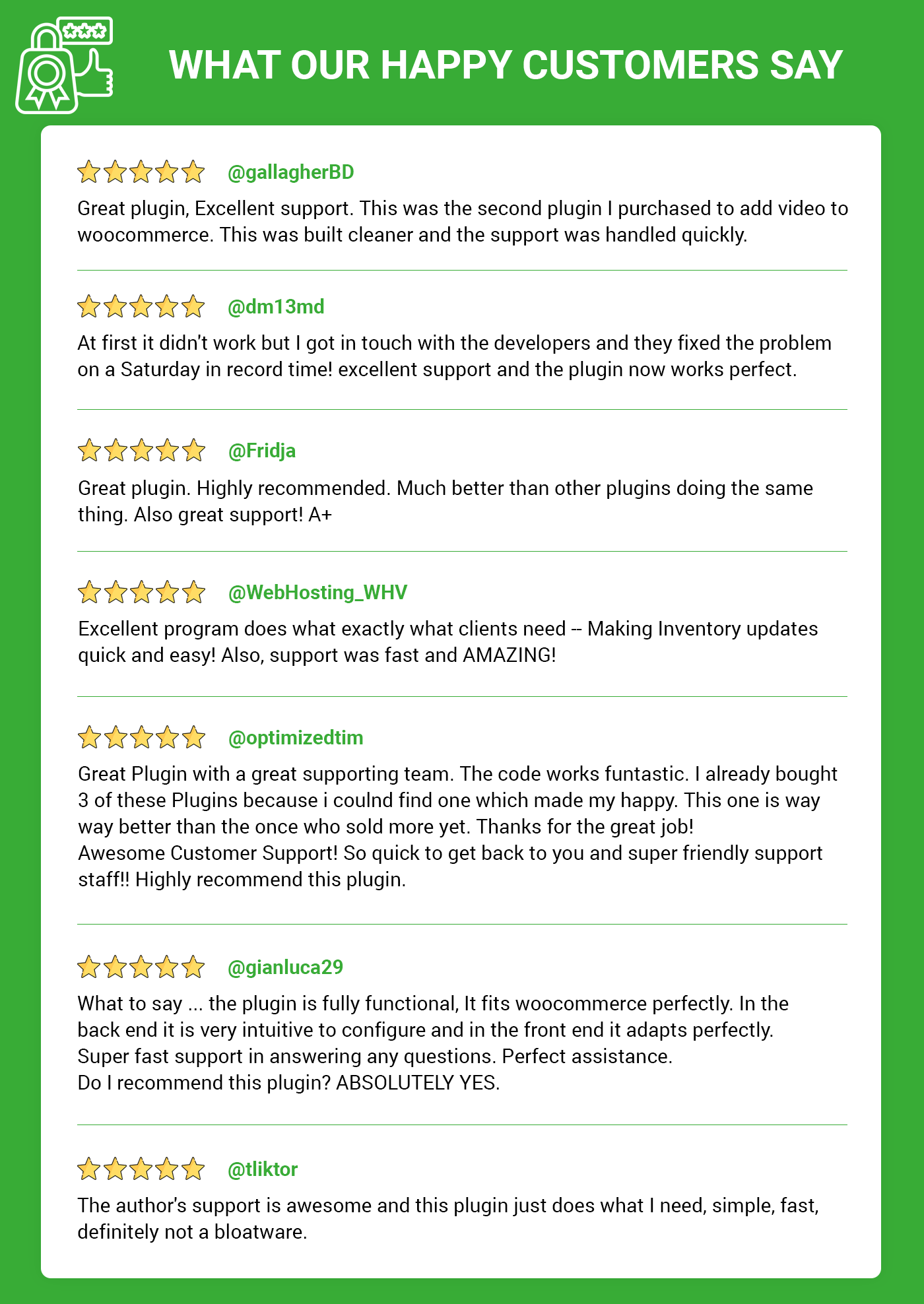
What happy customers say’s about us..!
Pre-Translated Languages

Change log:
Version 1.0.8
Compatibility checks & fixes with the latest woo and wp
Version 1.0.7
Compatibility checks & fixes with the latest woo and wp
Version 1.0.6
Compatibility checks & fixes with the latest woo and wp
Version 1.0.5
Compatibility checks & fixes with the latest woo and wp
Version 1.0.4
Compatibility checks & fixes with the latest woo and wp
High-Performance Order Storage Compatibility
Version 1.0.3
Compatibility check with latest WooCommerce & WordPress
Version updated
Version 1.0.2
Compatibility check with latest WooCommerce & WordPress
Add additional settings
Version updated
Version 1.0.1
Compatibility check with latest WooCommerce & WordPress
Fix issues on setting options
Add additional settings
Version 1.0.0
Initial release
| Type | WooCommerce Plugin |
|---|---|
| Author | MotifCreatives |
| Category | Wordpress / Ecommerce / Woocommerce |
| Price | $35 |
| Sales | 11 |
| Rating | 0.00 from 2 ratings |
| Published | Oct 25, 2021 |
| Last Update | Aug 21, 2026 |
| Compatible Browsers | Firefox, Safari, Opera, Chrome, Edge |
| Compatible Software | WordPress 7.0.x, WordPress 6.9.x, WordPress 6.8.x, WordPress 6.7.x, WordPress 6.6.x, WordPress 6.5.x, WordPress 6.4.x, WordPress 6.3.x, WordPress 6.2.x, WordPress 6.1.x, WordPress 6.0.x, WordPress 5.9.x, WordPress 5.8.x, WordPress 5.7.x, WordPress 5.6.x, WordPress 5.5.x, WordPress 5.4.x, WordPress 5.3.x, WordPress 5.2.x, WordPress 5.1.x, WordPress 5.0.x, WordPress 4.9.x |
| Compatible With | WooCommerce 10.x.x, WooCommerce 9.x.x, WooCommerce 8.x.x, WooCommerce 7.x.x, WooCommerce 6.x.x |
| Gutenberg Optimized | Yes |
| Source Files Included | JavaScript JSON, HTML, CSS, PHP, SQL, Layered PSD, Layered PNG |
External listing. code.market does not sell this product and does not process payment for it. Pricing, payment, delivery, licensing, refunds, and support are handled by the third-party merchant on its own website. We may earn an affiliate commission from a referral. Details.
Products of the Week.
Submit🥇

STOP GUESSING WHAT TO POST
AI that learns your brand voice and builds a month of consistent, on-brand social content: carousels, posts and hooks that sound like you, not like everyone else's AI.
SaaS · 4,310 views · 38 clicksSaaS · Week 45 · 4,310 views · 38 clicks
🥈

Conversational Backlinks for Busy Founders
Place Backlink Relevant Conversation for your domain across Forums and Conversations
Website · 42,043 views · 223 clicksWebsite · Week 45 · 42,043 views · 223 clicks
🥉

upvote.club
Free Social Media Engagement that Helps Boost Your Content. Upvote Club supports 19 social networks with 100+ engagement actions in one dashboard. Add links to your posts and get free engagement from real users.
SaaS · 40,088 views · 117 clicksSaaS · Week 45 · 40,088 views · 117 clicks
#4

Substack Posting API
Onboard your Agent to Substack. Write Publish on Substack via API
SaaS · 59,094 views · 198 clicksSaaS · Week 45 · 59,094 views · 198 clicks
#5

Seenshot App
Free, Fast, MacOS Screenshot app. Make Screenshot cmd+shift+2 and send it via link
Desktop App · 28,467 views · 122 clicksDesktop App · Week 45 · 28,467 views · 122 clicks
#6

Hand-Placed Backlinks $9.99 per link. Flat rate.
Buy hand-placed forum, Q-A and directory backlinks. Flat $9.99 per link, no subscriptions — you only pay for approved listings.
Website · 4,299 views · 19 clicksWebsite · Week 45 · 4,299 views · 19 clicks
#7

Free Invoice Generator - PDF Invoices in Your Browser, No Sign-Up
A free invoice maker for freelancers and small businesses: fill in the invoice, check the live preview, and download a PDF that looks exactly like it. Any currency, tax per item, three templates, no sign-up, and nothing leaves your device.
2,976 views · 17 clicksWeek 45 · 2,976 views · 17 clicks
#8

Merge PDF Files Free - Combine PDFs in Your Browser, No Upload
A free PDF merger for office workers, students, and freelancers: combine PDFs and images into one file in the browser, reorder files and pages, pick page ranges, keep bookmarks, and open password-protected PDFs. Nothing is uploaded, no sign-up, no watermark.
2,747 views · 13 clicksWeek 45 · 2,747 views · 13 clicks