
WooCommerce Bookings Exporter | Download CSV, PDF or Email Reports

Description

WooCommerce is the most customizable e-commerce platform for building online stores. Many online stores are working on a business type that requires frequent bookings from online customers. WooCommerce Bookings plugin (Premium) let your customers book reservations, appointments, items, or rentals on their own. It saves your time and effort, and you are not required to make any calls to them. But sometimes, you need to export that data in different file formats for further utilization. WooCommerce Bookings Exporter is a plugin that easily exports your WooCommerce Bookings data to the CSV and PDF formats. Also, you can set to get an export report by email daily, weekly, or monthly. It wasn’t possible before to export your WooCommerce Bookings so quickly, now it’s so convenient and just click away.

For your information:
- CSV stands for ‘comma-separated values.’ CSV is a simple file format used to store tabular data, such as a spreadsheet or database. Files in the CSV format can be imported to and exported from programs that store data in tables, such as Microsoft Excel or OpenOffice Calc.
- PDF is a ‘Portable Document Format’ file. PDFs are typically used to distribute read-only documents that preserve the layout of a page. It is commonly used for documents like user manuals, eBooks, application forms, and scanned documents.
WooCommerce Bookings Exporter Features:
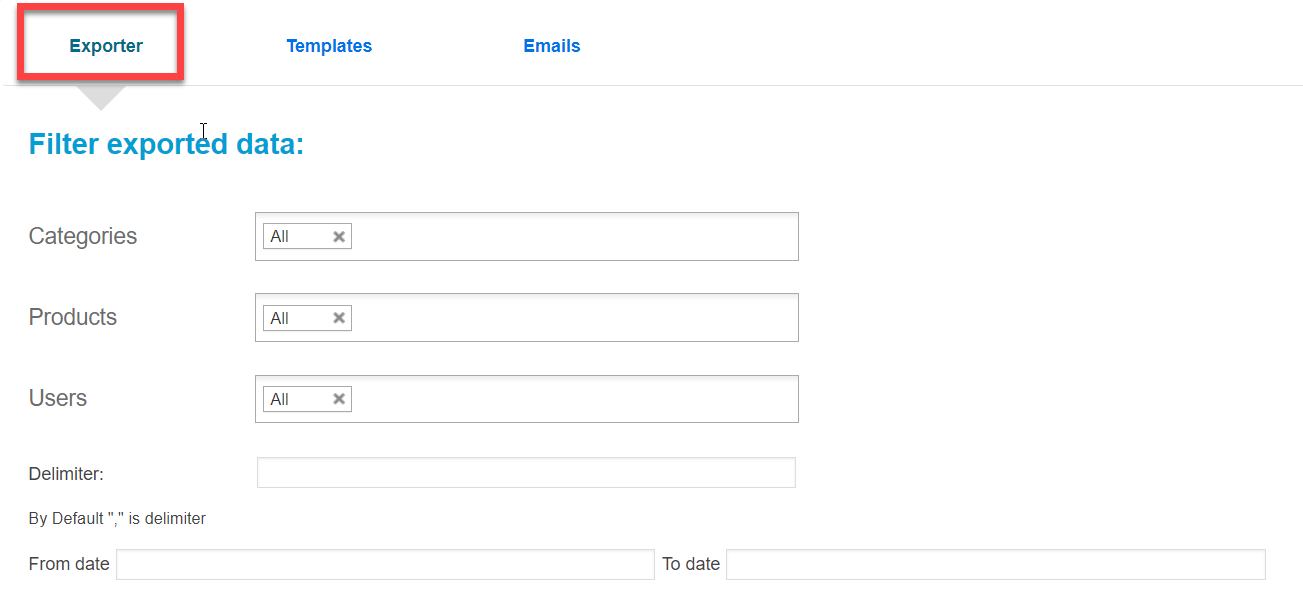
- WooCommerce Bookings Exporter plugin facilitates you to export Woocommerce Booking data in CSV format. You can filter your data in terms of categories, products, users, and also you can apply the date ranges for the data to be exported in CSV format.
- WooCommerce Bookings Exporter plugin also exports data in PDF format. You can filter your data as per your requirements.
- WooCommerce Bookings Exporter provides you an edge to view exported CSV data in an Excel sheet.
- WooCommerce Bookings Exporter allows you to apply filter options before exporting your data in a CSV or PDF format to get only desired information. The filters can be applied to categories, products, users, dates, orders, etc.
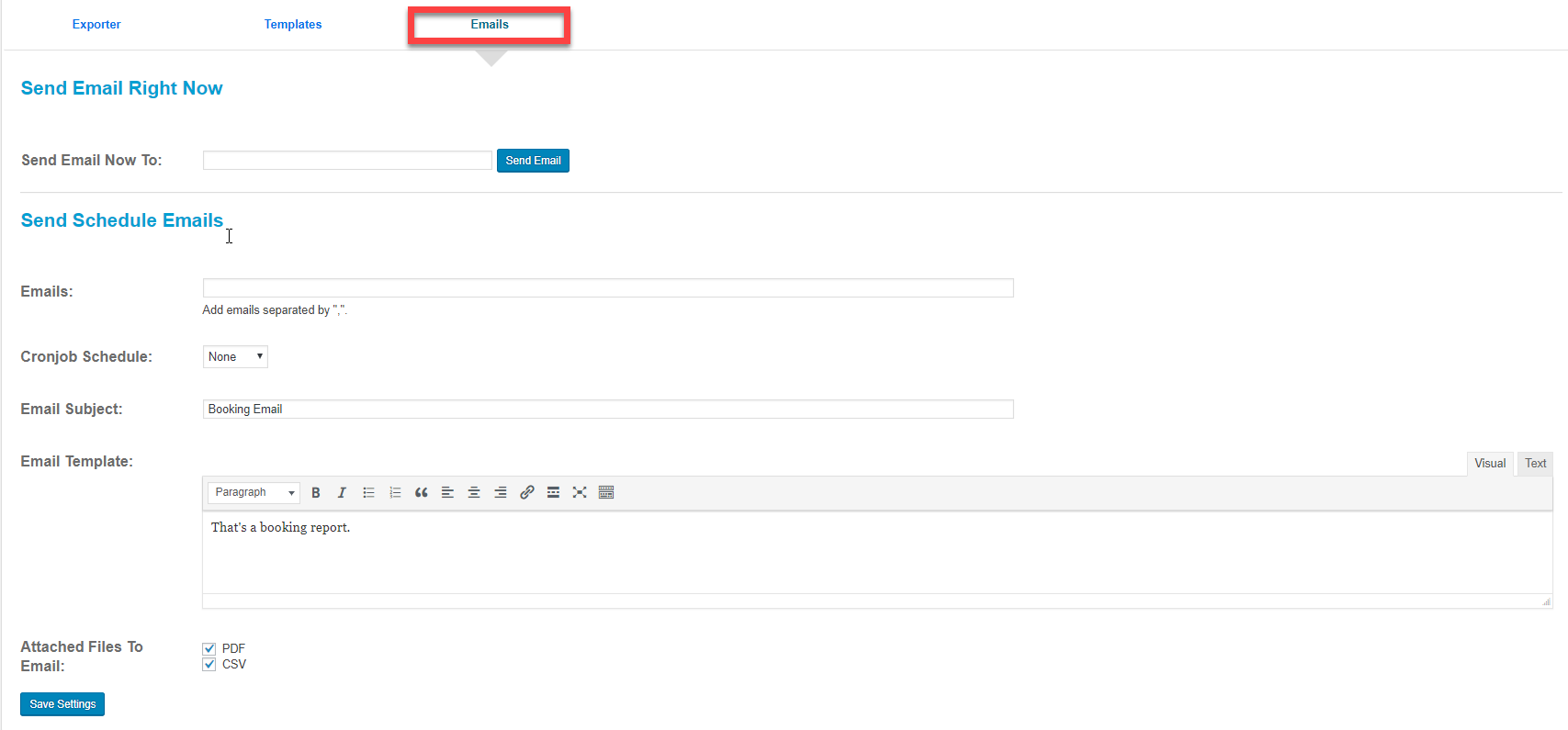
- WooCommerce Bookings Exporter has a feature to provide you email report on a daily, weekly, and monthly basis.
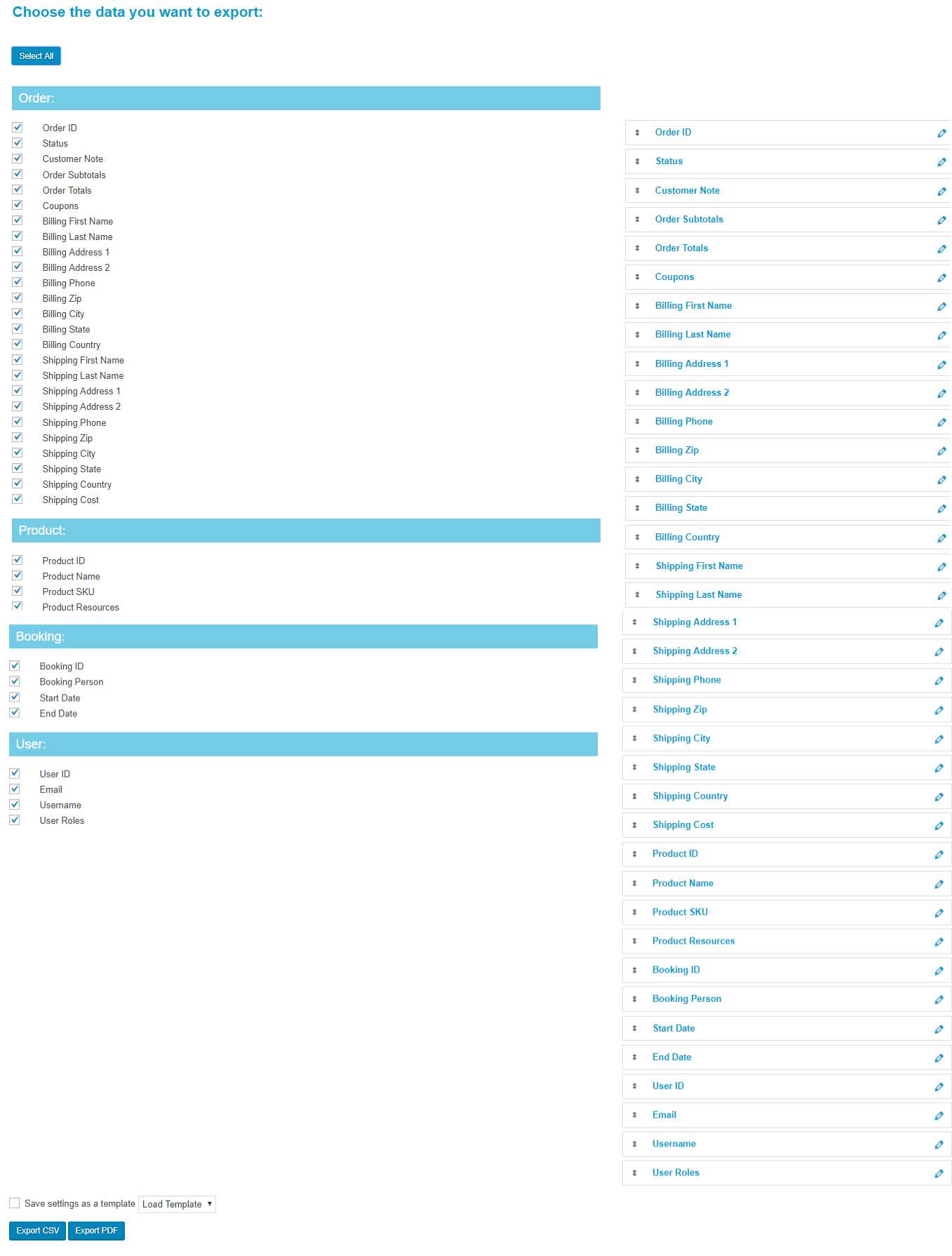
- WooCommerce Bookings Exporter plugin gives an edge to reorder data columns according to your sorting needs; also, you can rename columns too before exporting them.
- WooCommerce Bookings Exporter plugin has a facility to create and save the export template. Yes, you can make a template of your save column data and can export it too. Also, it is quite easy to download saved export templates.
- WooCommerce Bookings Exporter provides you a possible scenario to set your custom separator for CSV file.
Latest Features of WooCommerce Bookings Exporter:
- Bookings Filter: WooCommerce Bookings Exporter is featuring advance filtration for exported data. You can apply it to your booking information like categories, products, users, and date range. By default, a \ comma seprator “,” is your delimiter.
- Booking Data Columns Name and Template Saving: WooCommerce Bookings Exporter is offering you a tremendous feature to select your booking data columns with custom names, and also you can save the developed template for future use as well.
- Set Reporting Email Schedules: WooCommerce Bookings Exporter plugin provides you the facility to set an email schedule for exported data reports on a daily, weekly, and monthly basis.
WooCommerce Bookings Exporter Compatibility:
WooCommerce Bookings Exporter is compatible with following WooCommerce Extensions.
- WooCommerce - WooCommerce Bookings - WooCommerce Product Vendors - WooCommerce Product AddonsDemo
Demo video : How to Export WooCommerce Bookings in CSV Live Demo : Booking CSV Exporter
Click below to see WooCommerce Booking CSV Exported file
Sample CSV DownloadLooking For More WooCommerce Bookings Addons?
Now you can Sync your WooCommerce Products with Google Calendar with our New WooCommerce Extension and Also set local timezone managements with your Bookings.
- WooCommerce Bookings 2 Way Google Calendar Sync
– WooCommerce Bookings TimeZone Conversion Management

Changelogs
 Version 1.6.9
Date: 21/08/2023
* Added -  Compatible with PHP Version 8.0
Version: 1.6.8
Date: 21/06/2021
* JQuery Conflict issue fixed.
* Fix Error On sending an email
* Added option to delete saved templates.
* Compatibility with WooCommerce Admin Custom Order Fields.
* Template option in email scheduling.
* Date Filter option in email scheduling.
* Added support for exporting more than 1000+ records in PDF.
* Added support for exporting additional fields
* Added json_encode in booking exporter tab.
* Cron job email daily fix.
Version: 1.6.7
Date: 9/12/2020
* Added - Compatibility with 'WooCommerce Checkout Field Editor' plugin
* Added - Ajaxified CSV export option for large number of records
* Fixed - Notices and Warnings
Version: 1.6.2
Date: 19/12/2019
* Added - Added 3 extra fields Customer Provided Note, Billing Company Name,
  Shipping Company Name
* Fixed - Export with saved template not showing correct field labels.
Version: 1.6
Date: 15/07/2019
* Added - Order total field.
* Added - Order subtotal field.
* Added - Coupons field.
* Added - User role field.
* Added - Billing phone & shipping phone fields.
* Fixed - Same date export.
* Fixed - Spelling Correction
Version: 1.5
Date: 26/10/2017
Added - Easy to change the order of columns.
Added - Allows you to modify the title of columns.
Added - Export data to Excel and PDF file as well.
Added - Ability to set separator for CSV file.
Added - Possibility to save profile (template).
Added - Easily Download Profiles by 1 click.
Added - Send report by email.
Added - Feature to setup a daily or weekly, monthly email report.
Version: 1.4.1
Date: 08/09/2017
Fixed - Avada confliction is resolved this way.
Fixed - CSS and JS confliction resolved.
Version : 1.4
Date: 30/08/2017
Optimised - Code reusability improvement.
Optimised - booking query improvement.
Fixed - extracting person info.
Added - Compatibility with woocommerce 3.1.2x.
Version : 1.3.1
Date: 16/06/2017
Added - support for resources of the bookable product.
Added - Back Compatibility with woocommerce 2.6.14x .
Version : 1.3
Date: 09/06/2017
Added - Compatibility with woocommerce 3.0x.
Added - Added if customer email does not exist so get the guest one else no available.
Version : 1.2.1
Date :  9/9/2016
Tested with latest WooCommerce and WooCommerce Bookings.
Fix - the issue of tab not appearing for some versions of WooCommerce Bookings.
Version: 1.2
Date: 23/02/2016
* Feature - add compatibility with Woocommerce Product Vendors.
* Feature - add compatibility with Woocommerce Product Addons.
* Feature - exports persons in bookings.
* Feature - exports customer note.
* Tweak - add time to date in booking time slot (booking start and end).
Version : 1.1
Date : 10/04/2015
enhancement - filter only booking type products in drop down admin setting screen.
enhancement - some UI enhancements.
Version : 1
Date : 03/04/2015
Initial Release.
| Type | WooCommerce Plugin |
|---|---|
| Author | wpexpertsio |
| Category | Wordpress / Ecommerce / Woocommerce |
| Price | $99 |
| Sales | 652 |
| Rating | 3.65 from 17 ratings |
| Published | Apr 3, 2015 |
| Last Update | Nov 18, 2025 |
| Compatible Browsers | IE8, IE9, IE10, IE11, Firefox, Safari, Opera, Chrome |
| Compatible Software | WordPress 5.8.x, WordPress 5.7.x, WordPress 5.6.x, WordPress 5.5.x, WordPress 5.4.x, WordPress 5.3.x, WordPress 5.2.x, WordPress 5.1.x, WordPress 5.0.x, WordPress 4.9.x |
| Gutenberg Optimized | Yes |
| Source Files Included | JavaScript JS, HTML, CSS, PHP |
Categories
Tags
External listing. code.market does not sell this product and does not process payment for it. Pricing, payment, delivery, licensing, refunds, and support are handled by the third-party merchant on its own website. We may earn an affiliate commission from a referral. Details.
Products of the Week.
Submit🥇

STOP GUESSING WHAT TO POST
AI that learns your brand voice and builds a month of consistent, on-brand social content: carousels, posts and hooks that sound like you, not like everyone else's AI.
SaaS · 4,307 views · 38 clicksSaaS · Week 45 · 4,307 views · 38 clicks
🥈

Conversational Backlinks for Busy Founders
Place Backlink Relevant Conversation for your domain across Forums and Conversations
Website · 42,039 views · 223 clicksWebsite · Week 45 · 42,039 views · 223 clicks
🥉

upvote.club
Free Social Media Engagement that Helps Boost Your Content. Upvote Club supports 19 social networks with 100+ engagement actions in one dashboard. Add links to your posts and get free engagement from real users.
SaaS · 40,084 views · 117 clicksSaaS · Week 45 · 40,084 views · 117 clicks
#4

Substack Posting API
Onboard your Agent to Substack. Write Publish on Substack via API
SaaS · 59,090 views · 198 clicksSaaS · Week 45 · 59,090 views · 198 clicks
#5

Seenshot App
Free, Fast, MacOS Screenshot app. Make Screenshot cmd+shift+2 and send it via link
Desktop App · 28,465 views · 122 clicksDesktop App · Week 45 · 28,465 views · 122 clicks
#6

Hand-Placed Backlinks $9.99 per link. Flat rate.
Buy hand-placed forum, Q-A and directory backlinks. Flat $9.99 per link, no subscriptions — you only pay for approved listings.
Website · 4,297 views · 19 clicksWebsite · Week 45 · 4,297 views · 19 clicks
#7

Free Invoice Generator - PDF Invoices in Your Browser, No Sign-Up
A free invoice maker for freelancers and small businesses: fill in the invoice, check the live preview, and download a PDF that looks exactly like it. Any currency, tax per item, three templates, no sign-up, and nothing leaves your device.
2,974 views · 17 clicksWeek 45 · 2,974 views · 17 clicks
#8

Merge PDF Files Free - Combine PDFs in Your Browser, No Upload
A free PDF merger for office workers, students, and freelancers: combine PDFs and images into one file in the browser, reorder files and pages, pick page ranges, keep bookmarks, and open password-protected PDFs. Nothing is uploaded, no sign-up, no watermark.
2,745 views · 13 clicksWeek 45 · 2,745 views · 13 clicks