
Wolfs Burger - Restaurant And Food CMS
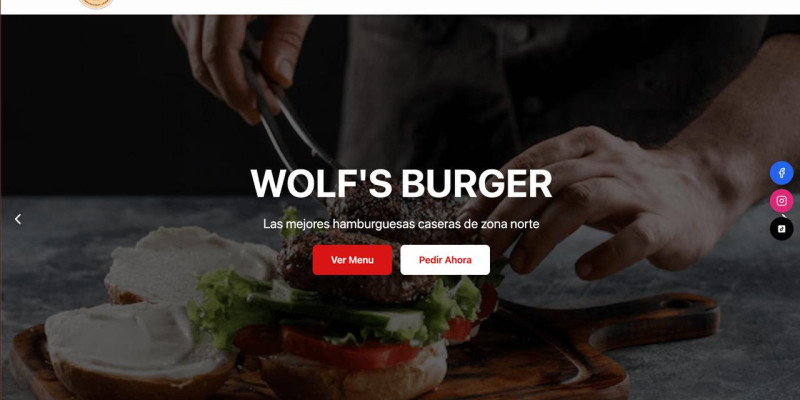
Description
This is a complete and self-manageable website solution, perfect for restaurants, cafes, and any food business. It features a modern frontend built with React (Vite + TailwindCSS) and a powerful backend powered by PHP and MySQL, allowing you to manage your entire content from a secure admin panel. Give your clients a professional and easy-to-use tool to manage their online presence without technical knowledge. The admin panel allows full control over products, categories, homepage content, site colors, and general settings.
Features
Full Admin DashboardComplete Product Management (Create, Edit, Delete)Multiple Image Uploads per ProductCategory Management with Drag & Drop ReorderingFeatured Products SystemFull Homepage Customization (Slider Images & Hero Text)Site-wide Color Scheme Customization from Admin PanelGeneral Settings Management (Logo, Contact, Social Media, Google Maps)Admin User Management (for Superadmin role)Built with modern technologies: React, Vite, and TailwindCSSSecure PHP & MySQL backend with a RESTful API
Requirements
PHP Version: 8.0 or higherDatabase: MySQL or MariaDBPHP Extensions: mysqli, jsonWeb Server: Apache or Nginx with mod_rewrite enabled
Instructions
Wolf's Burger - Website Template1. Introduction
Thank you for purchasing the Wolf's Burger website template! This is a complete and self-manageable website solution, perfect for restaurants, cafes, and food businesses. It features a modern frontend built with React (Vite + TailwindCSS) and a powerful backend powered by PHP and MySQL.
2. Requirements
Server Requirements:
- PHP Version: 8.0 or higher
- Database: MySQL or MariaDB
- Web Server: Apache or Nginx
Local Machine Requirements (for setup):
- Node.js and npm: Required to compile the project after changing the API URL.
3. Installation Guide
Important: This template requires familiarity with command-line tools (npm) to configure and build the project.
Step 1: Upload Backend Files
Unzip the main package. Upload the contents of the /api folder to your server (e.g., inside public_html).
Step 2: Create and Import Database
Create a new database and user in your hosting panel. Then, using phpMyAdmin, import the database.sql file into your new database.
Step 3: Configure Database Connection
On your server, open the api/db_connection.php file and fill in your database details.
define('DB_USER', 'your_database_user');     // <-- CHANGE THIS
define('DB_PASS', 'your_database_password');  // <-- CHANGE THIS
define('DB_NAME', 'your_database_name');      // <-- CHANGE THIS
Step 4: Configure API URL in Source Code
This is the most important step. You must edit the source code to point to your API URL.
- Unzip the
/source-codefolder on your local computer. - Open the folder in a code editor like VS Code.
- You must change the hardcoded API URL in the following ###strong/strong###:
src/contexts/AuthContext.jsxsrc/contexts/DataContext.jsxsrc/pages/admin/AdminLogin.jsx
- In each file, find the URL
<a href="https://alejandrosabater.com.ar/api">https://alejandrosabater.com.a...</a>and replace it with the URL to your own API folder (e.g.,<a href="https://yourdomain.com/api">https://yourdomain.com/api</a>).
Step 5: Build The Project
After saving your changes, you need to build the project.
- Open a terminal in the
/source-codedirectory. - Run the command to install dependencies:
npm install
- Now, run the command to build the files for production:
npm run build
###listrong###
Step 6: Upload Frontend Files
Upload the contents of the newly generated /dist folder to your server, in the same location as your /api folder.
Step 7: Access Your Site
Your website should now be live and connected to your API.
Default admin login: <a href="https://yourdomain.com/admin/login">https://yourdomain.com/admin/l...</a>
- Email:
admin@wolfs.com - Password:
admin123
4. Admin Panel Usage
The admin panel allows you to manage all aspects of your site, including products, categories, homepage content, colors, and general settings.
5. Credits & Support
If you have any issues, please contact me through the support section on the Codester item page.
| Author | Alejandro36 |
|---|---|
| Category | Scripts & Code / PHP Scripts / Management / Restaurant |
| Price | $30 |
| Extended License | $90 |
| Likes | 9 |
| First Release | Aug 5, 2025 |
| Last Update | Aug 5, 2025 |
| Files included | .php, .css, .html, .sql, JavaScript .js |
Categories
Tags
External listing. code.market does not sell this product and does not process payment for it. Pricing, payment, delivery, licensing, refunds, and support are handled by the third-party merchant on its own website. We may earn an affiliate commission from a referral. Details.
Products of the Week.
Submit🥇

STOP GUESSING WHAT TO POST
AI that learns your brand voice and builds a month of consistent, on-brand social content: carousels, posts and hooks that sound like you, not like everyone else's AI.
SaaS · 3,097 views · 28 clicksSaaS · Week 45 · 3,097 views · 28 clicks
🥈

Conversational Backlinks for Busy Founders
Place Backlink Relevant Conversation for your domain across Forums and Conversations
Website · 40,488 views · 216 clicksWebsite · Week 45 · 40,488 views · 216 clicks
🥉

upvote.club
Free Social Media Engagement that Helps Boost Your Content. Upvote Club supports 19 social networks with 100+ engagement actions in one dashboard. Add links to your posts and get free engagement from real users.
SaaS · 38,578 views · 110 clicksSaaS · Week 45 · 38,578 views · 110 clicks
#4

Substack Posting API
Onboard your Agent to Substack. Write Publish on Substack via API
SaaS · 57,618 views · 197 clicksSaaS · Week 45 · 57,618 views · 197 clicks
#5

Seenshot App
Free, Fast, MacOS Screenshot app. Make Screenshot cmd+shift+2 and send it via link
Desktop App · 27,051 views · 119 clicksDesktop App · Week 45 · 27,051 views · 119 clicks
#6

Hand-Placed Backlinks $9.99 per link. Flat rate.
Buy hand-placed forum, Q-A and directory backlinks. Flat $9.99 per link, no subscriptions — you only pay for approved listings.
Website · 2,988 views · 18 clicksWebsite · Week 45 · 2,988 views · 18 clicks
#7

Free Invoice Generator - PDF Invoices in Your Browser, No Sign-Up
A free invoice maker for freelancers and small businesses: fill in the invoice, check the live preview, and download a PDF that looks exactly like it. Any currency, tax per item, three templates, no sign-up, and nothing leaves your device.
1,683 views · 16 clicksWeek 45 · 1,683 views · 16 clicks
#8

Merge PDF Files Free - Combine PDFs in Your Browser, No Upload
A free PDF merger for office workers, students, and freelancers: combine PDFs and images into one file in the browser, reorder files and pages, pick page ranges, keep bookmarks, and open password-protected PDFs. Nothing is uploaded, no sign-up, no watermark.
1,576 views · 13 clicksWeek 45 · 1,576 views · 13 clicks