
WiFi Analyzer - IP Tools - Network Analyzer - Network Tools - Network Scanner - WiFi Scanner

Description








WiFi Analyzer – IP Tools – Network Analyzer – Network Tools – Network Scanner – WiFi Scanner
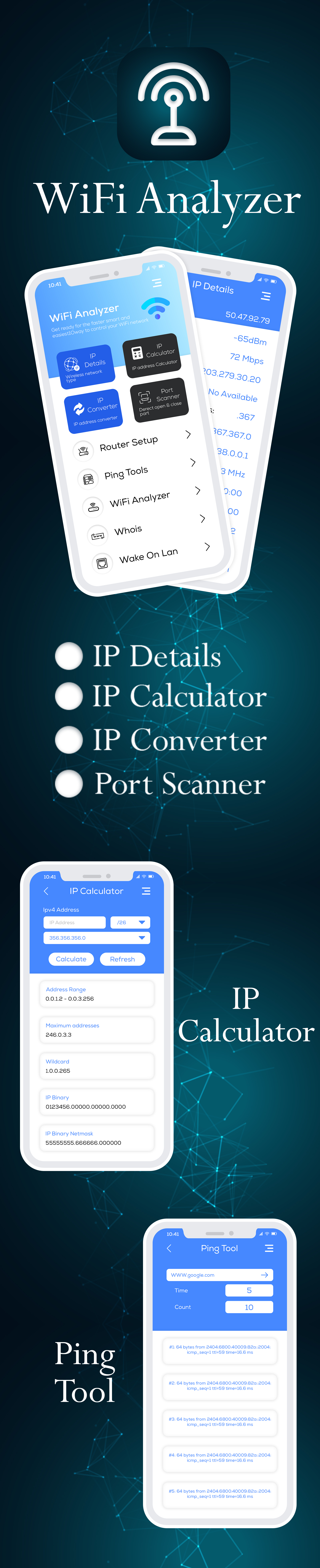
Network Analyzer can help you diagnose various problems in your wifi network setup, Internet connectivity, and also detect various issues on remote servers thanks to the wide range of tools it provides.
It is equipped with a fast wifi device discovery tool, including all the LAN device’s addresses, manufacturers and names. Further, Network Analyzer contains standard net diagnostic tools such as ping, traceroute, port scanner, DNS lookup, and whois. Finally, it shows all neighbouring wi-fi networks together with additional details such as signal strength, encryption and router manufacturer to help discovering the best channel for a wireless router. Everything works with both IPv4 and IPv6.
Wifi signal meter: - Both graphical and textual representation showing network channels and signal strengths - Wifi network type (WEP, WPA, WPA2) - Wifi encryption (AES, TKIP) - BSSID (router MAC address), manufacturer, WPS support - Bandwidth (Android 6 and newer only)
LAN scanner: - Fast and reliable detection of all network devices - Vendor name, IP, and MAC addresses of all discovered devices - NetBIOS, mDNS (bonjour), LLMNR, and DNS name where available - Pingability test of discovered devices - Detection of IPv6 availability
Ping & traceroute: - Round trip delay including IP address and hostname for every network node - Support of both for IPv4 and IPv6 (selectable)
Port scanner: - Fast, adaptive algorithm for scanning the most common ports or user specified port ranges - Detection of closed, firewalled, and open ports - Description of the known open port services
Whois: - Whois of domains, IP addresses and AS numbers - Support of both for IPv4 and IPv6 (selectable)
DNS lookup: - Functionality similar to nslookup or dig - Support for A, AAAA, SOA, PTR, MX, CNAME, NS, TXT, SPF, SRV records - Support of both for IPv4 and IPv6 (selectable)
Network information: - Default gateway, external IP (v4 and v6), DNS server - Wifi network information such as SSID, BSSID, IP address, HTTP proxy, subnet mask , signal strength, etc. - Cell (3G, LTE) network information such as IP address, signal strength, network provider, MCC, MNC, etc.
| Type | Android App |
|---|---|
| Author | Elveeinfotech |
| Category | Mobile / Android / Full Applications |
| Price | $29 |
| Sales | 11 |
| Published | Mar 7, 2023 |
| Last Update | Mar 9, 2024 |
| Compatible Software | Android 12.0, Android 11.0, Android 10.0, Android 9.0, Other |
| Mobile Files Included | .apk, .dex, .so, .dat, .db, .java, .xml, Layered PSD, Layered PNG |
Categories
Tags
External listing. code.market does not sell this product and does not process payment for it. Pricing, payment, delivery, licensing, refunds, and support are handled by the third-party merchant on its own website. We may earn an affiliate commission from a referral. Details.
Products of the Week.
Submit🥇

STOP GUESSING WHAT TO POST
AI that learns your brand voice and builds a month of consistent, on-brand social content: carousels, posts and hooks that sound like you, not like everyone else's AI.
SaaS · 4,306 views · 38 clicksSaaS · Week 45 · 4,306 views · 38 clicks
🥈

Conversational Backlinks for Busy Founders
Place Backlink Relevant Conversation for your domain across Forums and Conversations
Website · 42,032 views · 223 clicksWebsite · Week 45 · 42,032 views · 223 clicks
🥉

upvote.club
Free Social Media Engagement that Helps Boost Your Content. Upvote Club supports 19 social networks with 100+ engagement actions in one dashboard. Add links to your posts and get free engagement from real users.
SaaS · 40,076 views · 117 clicksSaaS · Week 45 · 40,076 views · 117 clicks
#4

Substack Posting API
Onboard your Agent to Substack. Write Publish on Substack via API
SaaS · 59,084 views · 198 clicksSaaS · Week 45 · 59,084 views · 198 clicks
#5

Seenshot App
Free, Fast, MacOS Screenshot app. Make Screenshot cmd+shift+2 and send it via link
Desktop App · 28,458 views · 122 clicksDesktop App · Week 45 · 28,458 views · 122 clicks
#6

Hand-Placed Backlinks $9.99 per link. Flat rate.
Buy hand-placed forum, Q-A and directory backlinks. Flat $9.99 per link, no subscriptions — you only pay for approved listings.
Website · 4,291 views · 19 clicksWebsite · Week 45 · 4,291 views · 19 clicks
#7

Free Invoice Generator - PDF Invoices in Your Browser, No Sign-Up
A free invoice maker for freelancers and small businesses: fill in the invoice, check the live preview, and download a PDF that looks exactly like it. Any currency, tax per item, three templates, no sign-up, and nothing leaves your device.
2,966 views · 17 clicksWeek 45 · 2,966 views · 17 clicks
#8

Merge PDF Files Free - Combine PDFs in Your Browser, No Upload
A free PDF merger for office workers, students, and freelancers: combine PDFs and images into one file in the browser, reorder files and pages, pick page ranges, keep bookmarks, and open password-protected PDFs. Nothing is uploaded, no sign-up, no watermark.
2,739 views · 13 clicksWeek 45 · 2,739 views · 13 clicks