
Who Use My WiFi - WiFi Scanner - Network Tools - WiFi Man - Net ScannerWiFi Detector - On My WIFI

Description

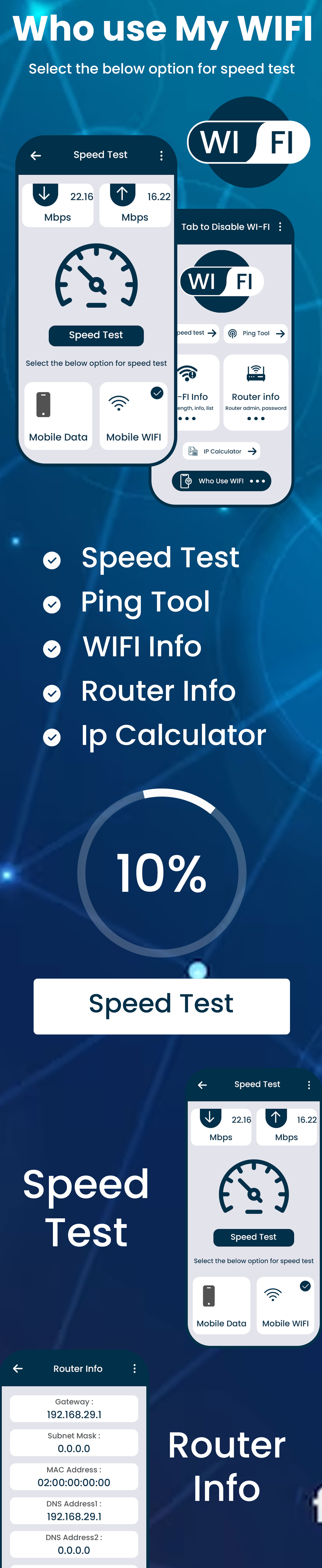







Who Use My WiFi – WiFi Scanner – Network Tools – WiFi Man – Net ScannerWiFi Detector – On My WIFI
If your wireless network is slow and you believe someone is connected to your Wi-Fi and using the internet without your knowledge.
Who is on my WiFi? Network Scanner & WiFi Scanner is super WiFi Protector and Network Scanner to Detect who is using your WiFi and Protect your WiFi security. WiFi Network Scanner & Network Tool is the simplest network scanner, IP scanner and WiFi scanner that allows you to detect who is on your WiFi and you can block the thief device in router settings from your WiFi.
WiFi Scanner & Network Tool app help you find who is stealing your WiFi network speed, Who is on your WiFi and wireless network without your permission and app can easily scan WiFi and see how many devices connected to your WiFi network router.
FEATURE OF NETWORK TOOL :- • Tap to Enable/Disable WiFi • Speed Test • Router Admin: 192.168.1.0 or 192.168.0.1 or 192.168.1.1 , etc • Router Password List • Router Info • Ping Test • WiFi User List(Who Use WiFi) • WiFi Info • WiFi Strength Meter • Nearest WiFi List • IP Info
Get the all new Who Use My WiFi? WiFi Scanner & Network Tool for FREE and never worry about WiFi Thief. WiFi Thief Detector allows you to manage your WiFi to the fullest
| Type | Android App |
|---|---|
| Author | Elveeinfotech |
| Category | Mobile / Android / Full Applications |
| Price | $26 |
| Sales | 6 |
| Rating | 0.00 from 1 rating |
| Published | Aug 23, 2023 |
| Last Update | Mar 12, 2024 |
| Compatible Software | Android 12.0, Android 11.0, Android 10.0, Android 9.0, Other |
| Mobile Files Included | .apk, .dex, .so, .dat, .db, .java, .xml, Layered PSD, Layered PNG |
Categories
Tags
External listing. code.market does not sell this product and does not process payment for it. Pricing, payment, delivery, licensing, refunds, and support are handled by the third-party merchant on its own website. We may earn an affiliate commission from a referral. Details.
Products of the Week.
Submit🥇

STOP GUESSING WHAT TO POST
AI that learns your brand voice and builds a month of consistent, on-brand social content: carousels, posts and hooks that sound like you, not like everyone else's AI.
SaaS · 4,294 views · 38 clicksSaaS · Week 45 · 4,294 views · 38 clicks
🥈

Conversational Backlinks for Busy Founders
Place Backlink Relevant Conversation for your domain across Forums and Conversations
Website · 42,008 views · 223 clicksWebsite · Week 45 · 42,008 views · 223 clicks
🥉

upvote.club
Free Social Media Engagement that Helps Boost Your Content. Upvote Club supports 19 social networks with 100+ engagement actions in one dashboard. Add links to your posts and get free engagement from real users.
SaaS · 40,051 views · 117 clicksSaaS · Week 45 · 40,051 views · 117 clicks
#4

Substack Posting API
Onboard your Agent to Substack. Write Publish on Substack via API
SaaS · 59,060 views · 198 clicksSaaS · Week 45 · 59,060 views · 198 clicks
#5

Seenshot App
Free, Fast, MacOS Screenshot app. Make Screenshot cmd+shift+2 and send it via link
Desktop App · 28,437 views · 122 clicksDesktop App · Week 45 · 28,437 views · 122 clicks
#6

Hand-Placed Backlinks $9.99 per link. Flat rate.
Buy hand-placed forum, Q-A and directory backlinks. Flat $9.99 per link, no subscriptions — you only pay for approved listings.
Website · 4,269 views · 19 clicksWebsite · Week 45 · 4,269 views · 19 clicks
#7

Free Invoice Generator - PDF Invoices in Your Browser, No Sign-Up
A free invoice maker for freelancers and small businesses: fill in the invoice, check the live preview, and download a PDF that looks exactly like it. Any currency, tax per item, three templates, no sign-up, and nothing leaves your device.
2,944 views · 17 clicksWeek 45 · 2,944 views · 17 clicks
#8

Merge PDF Files Free - Combine PDFs in Your Browser, No Upload
A free PDF merger for office workers, students, and freelancers: combine PDFs and images into one file in the browser, reorder files and pages, pick page ranges, keep bookmarks, and open password-protected PDFs. Nothing is uploaded, no sign-up, no watermark.
2,719 views · 13 clicksWeek 45 · 2,719 views · 13 clicks