
White Label Wordpress Plugin - WpAlter

Description
Alter the White Label WordPress plugin lets you customize most of the elements of WordPress admin dashboard or panel. Alter completely change the style of the WordPress admin panel to your desired color theme and alter most the WordPress elements.



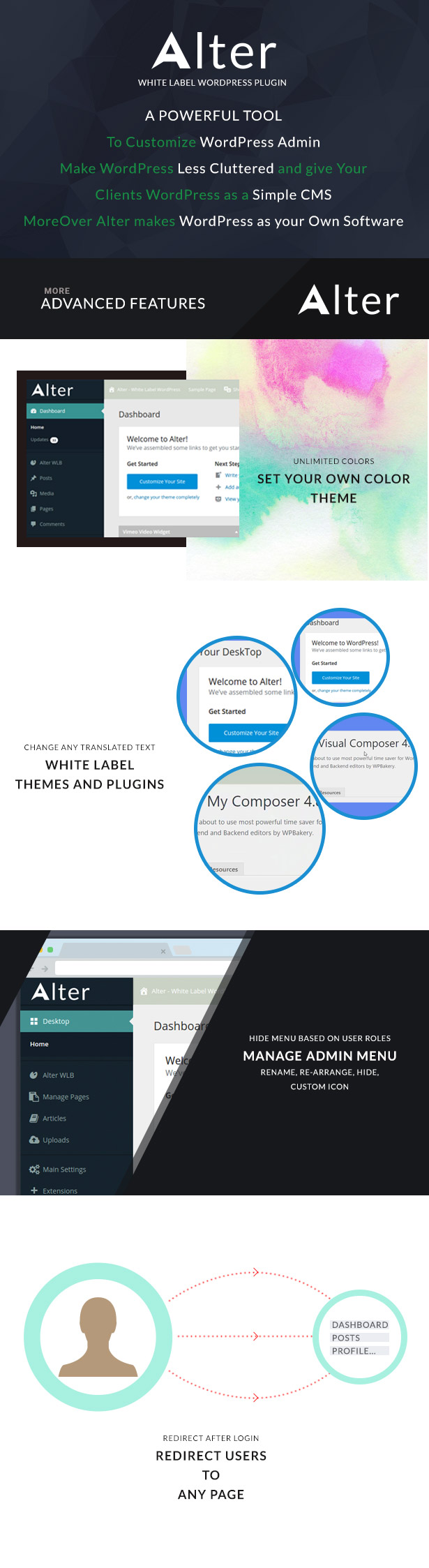
KEY FEATURES
- Unlimited color options. Set your own color theme.
- Flat/Default design(Shadow style).
- White Label Branding – Remove WordPress texts and logo and much more as explained below.
- Your Custom logo for login and WordPress admin pages.
- Hide, rename and re-arrange admin menu items.
- Hide admin menu items based on user roles.
- Set custom Icons for admin menu items: Dashicons and FontAwesome icons.
- Custom login Theme.
- Add unlimited custom widgets to WordPress dashboard.
- Delete any dashboard widgets even it is created by 3rd party plugins and themes.
- Remove any Admin Bar menu items even it is created by 3rd party plugins and themes.
- Add any number of custom links to the admin bar.
- Disable automatic background updates.
- White Label Emails.
- Export and Import of settings feature.
- Powerful and simple to use Options panel.
- Add custom css styles for login and WordPress admin pages.
- RTL Support.
- Multi-site Compatibility.
- Tested for Compatibility with popular plugins: WPBakery page builder, WP Super cache, WP Total cache, Contact form 7, WooCommerce, etc.
- Detailed documentation.
DOCUMENTATION AND SUPPORT
- Detailed and easy to understand Documentation.
- Dedicated Support System
In-compatible plugins: Admin menu editor and Admin menu editor pro: as this plugins and WpAlter has same menu customization feature each will take control over other. Actually, we cannot call it in-compatible because our plugin will work with these plugins but users will be confused sometimes due to identical actions between these two plugins. Say for example, if user did customized a menu text with WpAlter and it won’t reflect because Admin menu editor plugin code will rewrite the menu again with default menu text.
Updates
Changelog 2.5.0 - Jul 27, 2025
-------------------------------
* Fixed: Repeater change texts JS.
* Fixed: New widgets creation JS.
* update: Updated to new knowledge base link.
* update: Updated license activation method using Envato Api v3.

Changelog 2.4.9 - June 19, 2025
-------------------------------
* Fixed: CSRF vulnerability issue addressed in the custom css field.

Changelog 2.4.8 - Oct 20, 2023
-------------------------------
 * Fixed: Error on deleting all change text entries.
 * Fixed: Gutenberg pattern previews not shown.

Changelog 2.4.7 - July 31, 2023
-------------------------------
 * Fixed: CSS errors on plugin activation.
 * Improved CSS.

Changelog 2.4.6 - Jan 15, 2023
-------------------------------
 * Fixed: Admin email verification css error on login page.

Changelog 2.4.5 - Feb 12, 2022
-------------------------------
 * Fixed: Improved css for Gutenberg editor logo customisation.

Changelog 2.4.4 - Jan 07, 2021
-------------------------------
 * Added feature check the license code activated for a site.

Changelog 2.4.3 - Jun 09, 2021
-------------------------------
 * Fixed: Admin email verification css issue with WordPress version 5.7.2.

Changelog 2.4.2 - Mar 03, 2021
-------------------------------
 * New: Option to add custom logo to collapsed menu.
 * Collapsed menu logo will be used to replace WordPress logo in Gutenberg editor.

Changelog 2.4.1 - Jan 08, 2021
-------------------------------
 * Fixed: Icon picker icons display error.
 * New: Option added to set Login form height.
 * New: Option added to hide Woocommerce layout header.

Changelog 2.4.0 - Nov 22, 2019
-------------------------------
 * Fixed: Email confirmation page design issues.
 * Fixed: PHP error notice when saving empty value.
 * Fixed: PHP error notice on Login page.

Changelog 2.3.9 - Mar 18, 2019
-------------------------------
 * New: Added option for reloading admin users list under Privilege users.

Changelog 2.3.8 - Feb 27, 2019
-------------------------------
 * New: Added option for fallback to default admin bar height.
 * New: Option for reducing admin menu width up to 160px.

Changelog 2.3.7 - Jan 31, 2019
-------------------------------
 * Fixed: Wordfence options control hidden under admin bar.
 * Fixed: Add few codes for fixing bbpress menu items hidden.

Changelog 2.3.6 - Jan 8, 2019
-------------------------------
 * New: Added select all/select none option for user role selection in Admin menu
    customization.
 * New: Added option to hide separators from Admin menu.
 * Fixed: Positioning error of Grammarly chrome extension in the classic editor.

Changelog 2.3.5 - Dec 11, 2018
-------------------------------
 * Fixed: Gutenberg header position due to class name change in WordPress 5.0.

Changelog 2.3.4 - Nov 28, 2018
-------------------------------
 * Fixed: Gutenberg header position.
 * Fixed: Hide issue for customize admin menu.
 * Improved import/export function.

Changelog 2.3.3 - July 18, 2018
-------------------------------
 * Fixed: Hidden image icons only for admin menu items with custom icon set.
 * Fixed: Style issues in manage admin menu section for RTL style.

Changelog 2.3.2 - July 11, 2018
-------------------------------
 * Fixed: Admin menu management not working when disabling Admin custom styles.
 * New: Added option to include Login background image from external source.

Changelog 2.3.1 - Dec 21, 2017
-------------------------------
 * Fixed: Logo from external source not displayed on front end Admin bar.
 * Fixed: Form background color not displayed for default login style.
 * Fixed: Logo background color not displayed for default login style.
 * Fixed: Admin sub menu text color not displayed properly.
 * Fixed: Borders added for color picker box.

Changelog 2.3 - Nov 06, 2017
-------------------------------
 * New: Added option to switch between WpAlter wide and WordPress default short login form styles.
 * New: Added option to include Logo from external source.
 * New: Added new color options for 3 different message boxes in WordPress dashboard.
 * Fixed: Email from name and email address overriding on Contact Form 7 emails.
 * Fixed: Added email icon for email field in forgot password page.

Changelog 2.2 - June 20, 2017
-------------------------------
 * New: Added option to enable admin bar and logo shadows.
 * New: Added option to resize logo in admin bar.
 * Fixed: Issue in listing admin users for Privilege users in some servers.

Changelog 2.1 - May 12, 2017
-------------------------------
 * New: Improved admin bar menu items removal.
 * Fixed: Issue in hiding profile page for subscribers.
 * Fixed: Bug in hiding sub menu items from admin menu.
 * Fixed: Improved css for admin menu.

Changelog 2.0 - Mar 30, 2017
-------------------------------
 * New: 25 in-built themes added.
 * New: Newly styled login page implemented.
 * New: Option to disable Alter menu customization.
 * Fixed: Conflict with bbpress plugin.
 * Fixed: Issue in hiding WPBakery page builder menu for non-admin roles.

Changelog 1.4 - Mar 3, 2017
-------------------------------
 * Fixed: Part of Settings not saved.
 * Fixed: Conflict with wp-cli.

Changelog 1.3 - Jan 22, 2017
-------------------------------
 * Fixed: Error notice and blank login page.

Changelog 1.2 - Jan 19, 2017
-------------------------------
 * Fixed: Plugin translation issue.
 * Added option to set Active sub menu color in admin menu items.

Changelog 1.1 - Nov 01, 2016
-------------------------------
 * Added feature: Multi-site support.
 * Added feature: Privilege Users.
 * Added feature: Option to disable admin pages styles.
 * Fixed: Moving separator to top of customise admin menu list, removes it from the list.
 * Improved CSS for admin pages.
| Type | WordPress Plugin |
|---|---|
| Author | acmee |
| Category | Wordpress / Interface Elements |
| Price | $24 |
| Sales | 1,729 |
| Rating | 4.85 from 60 ratings |
| Published | Aug 26, 2016 |
| Last Update | Oct 8, 2025 |
| Compatible Browsers | Firefox, Safari, Chrome, Edge |
| Compatible Software | WordPress 6.8.x, WordPress 6.7.x |
| Compatible With | bbPress 2.6.x, BuddyPress 10.x.x, Elementor, Visual Composer, WooCommerce 7.x.x, WPBakery Page Builder |
| Source Files Included | JavaScript JS, JavaScript JSON, HTML, CSS, PHP |
| Video Preview Resolution | 1280x700 |
Categories
Tags
External listing. code.market does not sell this product and does not process payment for it. Pricing, payment, delivery, licensing, refunds, and support are handled by the third-party merchant on its own website. We may earn an affiliate commission from a referral. Details.
Products of the Week.
Submit🥇

STOP GUESSING WHAT TO POST
AI that learns your brand voice and builds a month of consistent, on-brand social content: carousels, posts and hooks that sound like you, not like everyone else's AI.
SaaS · 3,993 views · 35 clicksSaaS · Week 45 · 3,993 views · 35 clicks
🥈

Conversational Backlinks for Busy Founders
Place Backlink Relevant Conversation for your domain across Forums and Conversations
Website · 41,644 views · 222 clicksWebsite · Week 45 · 41,644 views · 222 clicks
🥉

upvote.club
Free Social Media Engagement that Helps Boost Your Content. Upvote Club supports 19 social networks with 100+ engagement actions in one dashboard. Add links to your posts and get free engagement from real users.
SaaS · 39,670 views · 114 clicksSaaS · Week 45 · 39,670 views · 114 clicks
#4

Substack Posting API
Onboard your Agent to Substack. Write Publish on Substack via API
SaaS · 58,698 views · 198 clicksSaaS · Week 45 · 58,698 views · 198 clicks
#5

Seenshot App
Free, Fast, MacOS Screenshot app. Make Screenshot cmd+shift+2 and send it via link
Desktop App · 28,081 views · 122 clicksDesktop App · Week 45 · 28,081 views · 122 clicks
#6

Hand-Placed Backlinks $9.99 per link. Flat rate.
Buy hand-placed forum, Q-A and directory backlinks. Flat $9.99 per link, no subscriptions — you only pay for approved listings.
Website · 3,940 views · 19 clicksWebsite · Week 45 · 3,940 views · 19 clicks
#7

Free Invoice Generator - PDF Invoices in Your Browser, No Sign-Up
A free invoice maker for freelancers and small businesses: fill in the invoice, check the live preview, and download a PDF that looks exactly like it. Any currency, tax per item, three templates, no sign-up, and nothing leaves your device.
2,617 views · 17 clicksWeek 45 · 2,617 views · 17 clicks
#8

Merge PDF Files Free - Combine PDFs in Your Browser, No Upload
A free PDF merger for office workers, students, and freelancers: combine PDFs and images into one file in the browser, reorder files and pages, pick page ranges, keep bookmarks, and open password-protected PDFs. Nothing is uploaded, no sign-up, no watermark.
2,436 views · 13 clicksWeek 45 · 2,436 views · 13 clicks