
Whatsapp Stickers and Emoji And full Admob Integration
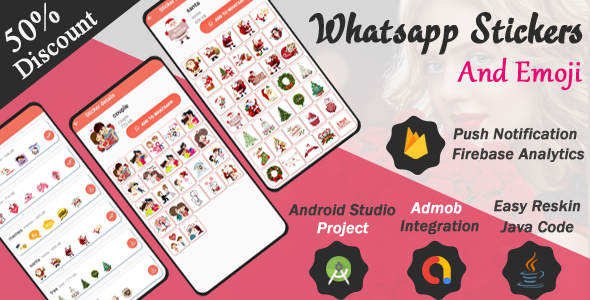
Description



WhatsApp Sticker Maker App
WAStickerApps • Sticker Store • Sticker Creator • Android 16 Ready
App Overview
The ultimate WhatsApp Sticker app that lets users download, create, and share amazing sticker packs for WhatsApp chats. Fully supported WAStickerApps standard.
Features
- Huge Sticker Collection for WhatsApp
- One Click Add to WhatsApp
- Built-in Sticker Maker Tool
- Create Custom Stickers from Photos
- ✂️ Image Crop & Background Removal Support
- Add Emojis, Text & Decorations
- Create Multiple Sticker Packs
- Share Sticker Packs with Friends
- Search Sticker Packs Easily
- Organized Sticker Categories
- ⚡ Fast Loading & Lightweight UI
- AdMob Ready Monetization
- Firebase Push Notifications
- Firebase Analytics Integration
- Android 16 + SDK 36 Support
How It Works
- Open the app and browse sticker packs
- Select any sticker pack
- Tap “Add to WhatsApp”
- Open WhatsApp → Use stickers instantly
Sticker Maker Steps
- Create new sticker pack
- Choose images from gallery
- Crop & design stickers
- Add emojis/text
- Publish & use in WhatsApp
Download Demo App
Compatibility
- Android 16 Supported
- Target SDK 36
- Compile SDK 36
- All Android Devices Supported
Support 
⭐ Fun • Creative • Viral WhatsApp Sticker App
-> Target sdk & compile sdk both are 36 Support in also android 16
-> Firebase Push notification & firebase crystal analytics
Click Here for download demo app
https://drive.google.com/file/d/1gGuCuEDlWRyzLW1PJOaC652wiS7pGHKY/view?usp=sharing
The best stickers for WhatsApp. WAStickerApps supported.
Stickify Sticker Store for WhatsApp hosts the best collection of WhatsApp stickers. Download just one app and get all stickers for WhatsApp.
Create your own stickers for WhatsApp with Stickify Sticker Maker app. You can also share sticker packs with your friends directly.
Using Stickify for free WhatsApp stickers
1. Open Stickify and click on any WhatsApp stickers for chat. You can also search for any WhatsApp sticker
2. After the sticker is downloaded, you’ll see a full preview. Click on Add to WhatsApp button if you like the sticker pack
3. Open WhatsApp, go to stickers and click on the new icon of the WhatsApp sticker pack that you added
4. Click on any of the WhatsApp stickers to send it in the chat
Using Stickify Maker – the best Sticker Maker app for WhatsApp
1. Open Stickify and go to the Create page to create your own personal stickers for WhatsApp
2. Click New Sticker Pack and choose a name for the sticker pack
3. Touch the + plus button and select a photo from your phone to use in the sticker
4. Crop the image and add decorations, emojis, text etc. as you wish
5. Add as many stickers as you like and click Continue. Your custom sticker pack for WhatsApp is ready
6. You can add it to WhatsApp or share the pack with friends using the share button
| Type | Android App |
|---|---|
| Author | photoskyApp |
| Price | $19 |
| Sales | 10 |
| Rating | 0 (1) |
| Published | Mar 30, 2020 |
| Last Update | Jun 14, 2026 |
| Compatible Software | Kotlin 1.x, Android 15.0, Android 12.0, Android 11.0, Android 10.0, Android 9.0, Other |
| Demo Url | https://drive.google.com/file/d/1hgY1ESYPAajvUhPeSmtYwJo6F6bRUlHX/view?usp=drive_link |
| Mobile Files Included | .apk, .java, .xml, Layered PSD |
Categories
Tags
External listing. code.market does not sell this product and does not process payment for it. Pricing, payment, delivery, licensing, refunds, and support are handled by the third-party merchant on its own website. We may earn an affiliate commission from a referral. Details.