Web2App for IOS - Quickest Feature-Rich IOS Webview icon

Web2App for IOS - Quickest Feature-Rich IOS Webview
Hot or Not
Web2App for IOS - Quickest Feature-Rich IOS Webview

Description

Why Web2App?

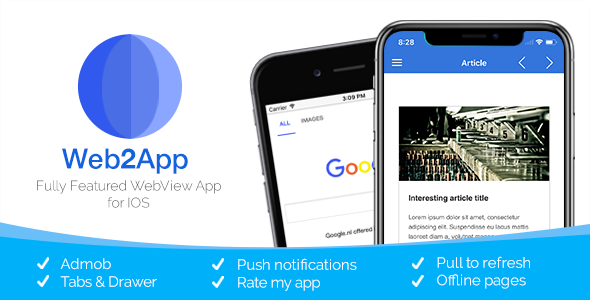
Web2App is simply the easiest way to convert your Website into a real IOS app. In addition, we offer great features like tabs, the drawer, build-in Advertisements, notifications and easy customization and styling options.
  • Just easier First app? No problem. We offer a great documentation to get your started!
  • Completely customizeable In addition to our default customization options. WebToApp’s has a complete open source code, this way you can customize and add everything you want.
  • Premium support If you can not find your answer in the Documentation or our Community FAQ, we will be there for personal support.
  • Features
  • Great customization Choose your favorite theme color and combine it it with one of our many layout options. It’s our most customizable template ever.
  • Tab bar & Darwer Optionally use tabs or the drawer to add all your webpages to your WebView App.
  • Hide-able Navigation bar More screen space with the hide-able bars. This familiar navigation pattern can also be seen in Safari. Scroll down to hide the toolbar and scroll up to show it!
  • Pull-to-refresh Choose to refresh your pages with just a swipe gesture. You can also use this stylish layout to indicate page loading.
  • Push notifications with OneSignal Notify your users about new content with push notifications from OneSignal, you will get unlimited notifications!
  • Admob Monetize your app in seconds. Show banner ads throughout your app. Also supports interstitials shown during navigation on a configurable interval.
  • In-app purchases Let your users unlock additional web pages and remove ads (requires Extended license).
  • Offline WebPagesLoad offline webpages from assets, great for apps based on Ionic, Cordova or other native web frameworks.
  • HTML5 We use the same web engine as Safari.
  • Integrated social features Optionally enable sharing from within the toolbar.
  • iPad & iPhone support for all orientations Supporting all IOS devices in all orientations
  • No internet connection dialog Show a screen that will inform the user in case there is no internet connection available.
  • Design kept in mind We made this template according to the default IOS styles, resulting in a familiar and modern UI.
  • Compatibility

    This template supports IOS11 and up. The latest version of XCode is needed for setup. Features of Web2App for IOS may differ from Web2App for Android. A mobile optimized website or webpage is required.

    Questions & Support

    If you have any questions regarding this template, you can always ask your question in the comments section. Can I run this on Windows? Compiling the template requires the latest version of XCode, which can only run on MacOS. However, you can install MacOS on your machine as a dual boot or in a virtual machine. Alternative, you can use a service like like MacInCloud to run MacOS and Xcode from the cloud. And finally, you can consider hiring to compile the template for you, you can hire us or hire someone elsewhere. Need support? Go to our Support Center. Will my app be accepted by Apple? Please see this article

    Changelog

    V4.0
    - Hiding NAvigationbar fixes
    - IOS 14 IDFA support
    - Inline media playback
    - GDPR support (privacy screen)
    
    V3.0.1
    - TabBar will match theme colour unless in light theme is enabled
    - Option to disable navigation in navigationbar
    - Bugfixes and library updates
    
    V3.0
    - Rewritten in Swift
    - Interstitials when browsing webpages
    - Swipe to go back / forward
    - More options to define which urls should open in browser.
    - XCode 11 and IOS 13 support. Improved iPhone X series Support
    - Bugfixes and performance optimisations
    
    V2.0.1
    - Performance and stability improvements
    
    V2.0
    - Added drawer and replaced sliding pager for bottom tabs.
    - In-app purchases
    - Iphone X support
    - Support for icons for drawer & tabs
    - Added interstitial ads
    - Dynamic configurations (load configuration from url)
    - Migrated navigation elements (share, previous, next) to top bar
    - Bugfixes and performance improvements
    - Removed mixpanel and iAd libraries.
    
    V1.1
    - WKWebView
    - Added OneSignal support
    - App urls are loaded outside the webview
    - Option to open 'target blank' urls in safari
    - Option to disable pull to refresh
    - Cookies are stored between launches
    
    V1.0
    Initial version
    
    Icons used in the Demo and Promotional Images are retrieved from icons8.com and are not distributed with the template.

External listing. code.market does not sell this product and does not process payment for it. Pricing, payment, delivery, licensing, refunds, and support are handled by the third-party merchant on its own website. We may earn an affiliate commission from a referral. Details.

SuperView - WebView App for iOS with Push Notification, AdMob, In-app Purchase icon

SuperView - WebView App for iOS with Push Notification, AdMob, In-app Purchase

Hot or Not
SuperView - WebView App for iOS with Push Notification, AdMob, In-app Purchase

Description

Description

SuperView is an iOS project that allows you to wrap your website in a super simple iOS app. It is ideal for single page web app with on-screen/no navigation. For example, a game, interactive page, web-based slideshow, etc. There is just one config file to setup everything, simply edit the included config file. The product consists of several third party dependencies in a compiled state that you cannot modify but are very easy to use. If you don’t need one of them, like Facebook or OneSignal. You simply delete it when you open the project using Xcode.

Features

  • Latest Xcode – Xcode includes everything you need to create amazing apps for iPhone, iPad, Mac, Apple Watch, and Apple TV. This radically faster version of the IDE features new editor extensions that you can use to completely customize your coding experience. New runtime issues alert you to hidden bugs by pointing out memory leaks, and a new Memory Debugger dives deep into your object graph. Swift 4 includes more natural and consistent API naming, which you can experiment with in the new Swift Playgrounds app for iPad.
  • Swift 5 – Swift is a general-purpose programming language built using a modern approach to safety, performance, and software design patterns. The goal of the Swift project is to create the best available language for uses ranging from systems programming, to mobile and desktop apps, scaling up to cloud services.
  • Support latest iOS – Everything you love is now even better with latest iOS version, Apple’s biggest release yet.
  • Awesome Code Quality – Code is clean, consistent, easily configurable and customizable. We provide excellent support.
  • In-app purchase – In-app purchases are extra content or subscriptions that you can buy in apps on your iOS device or computer. Our webview app supports in-app purchase for for removing AdMob ads from the app. Everything you need to do is to create an in-app purchase item and copy and paste the item id in the “SuperView.plist” file in the project folder. If you don’t want In App Purchase in your app, simply remove key and string tags. Because you are planning to make money using our app, don’t forget to purchase the Extended Licence of our app.
  • AdMob – Monetize your App with AdMob interstital and banner ads. AdMob is used and trusted by more app developers than any other ad platform worldwide. Use in-app advertising to show ads from millions of Google advertisers and access programmatic demand, or use AdMob Mediation to earn from 40+ networks.
  • Interstitial ads – Our app is configurable, there is just one config file in the app that you need to modify.
  • OneSignal – OneSignal is a high volume and reliable push notification system for mobile and web applications. OneSignal provides a single UI and API to deliver messages across iOS and Android.
  • Deep Linking – A deep link is a URL that opens and directs a user to a specific location within an app. This app has deep linking integrated in the project. Directs the user to any web site you want.
  • Social Login – Our webview app has ability to login and signup with social networks like Facebook, Google, LinkedIn and similar.
  • HTML5 videos – Our app supports HTML5 videos. In modern browsers, adding a video to your page is as easy as adding an image. No longer do you need to deal with special plug-ins or require crazy markup, you can do it with a single element. Our webview app will recognize the video and play it in full screen
  • Loading indicator when loading the page – Good loading indicators always give some type of immediate feedback. They notify users that the app needs more time to process the user action.
  • Progress indicator when loading the page – Good progress indicators always give some type of immediate feedback. They notify users that the app needs more time to process the user action, and tell (approximately) how much time it will take.
  • Splash Screen visible until website is loaded – Our webview app will wait until your website is loaded and then it will show the website and remove the splash screen. There is no lagging and blinking visible.
  • Easy to use – Our app is super simple and easy to customise, you just need to replace the existing URL with you own and your webview app is ready.
  • No coding skills required – You don’t have to be a developer to know how to use our app, it is supper simple. There is also a quick guide video below that will show you how to setup your awesome webview app.
  • Toolbar – We created a nice toolbar with few buttons your customers can use. We implemented back, forward and refresh buttons for working with your website. There is also a button for removing ads if your app has ads. Don’t worry, if your app doesn’t have in-app purchase, the button is not visible. Also if you don’t need the toolbar, just set “Toolbar” to “NO” in the config file we created for easy setup of the app.
  • Local Site Content – If you have a local website, add your webisete in www folder located in the app and make sure that you have index.html file for website to work. This is perfect for web based mobile aplications like Ionic.
  • WKWebView – WKWebView is used in our app. It is the centerpiece of the modern WebKit API introduced in iOS 8 & OS X Yosemite. It replaces UIWebView in UIKit and WebView in AppKit, offering a consistent API across the two platforms.
  • Geolocation – Geolocation is the identification of the real-world geographic location of an object, such as a radar source, mobile phone or Internet-connected computer terminal. To use geolocation in our app, make sure your website supports https or this feature will not work. Our app has granted permission for location services.
  • LTR – A short form for ‘left-to-right’. Our app supports LTR languages.
  • RTL – A short form for ‘right-to-left’. Our app supports RTL languages like Arabic, Hebrew and other.
  • Orientation change – Our app supports orientation change handling.
  • Responsive Design – When a website is responsive, the layout and/or content responds or adapts based on the size of screen they are presented on. A responsive website automatically changes to fit the device you’re reading it on.
  • JS Bridge – create local notification, rate my app, hide native loader, show native loader, check if user purchased the item and removed the ads, get OneSignal Player ID, make in-app purchase to remove ads

Are you interested? Check this:

iOS Video manual on YouTube

Check out more on superview.app

We will handle the complete configuration of your app, you will receive a working project.

Need Android version of the app:

Latest version on GitHub

Why our customers love us:

for Code Quality – by bicefalo
Excellent code and very much impressed. for Code Quality – bybharadwaj874
Well written code, broad features and great support; recommended as the best WebView for iOS. for Design Quality – by winalot
Awesome support! Thanks guys! for Design Quality – by kadir123
for Flexibility – by dollarslism
Fast customer support reliable vendor..great code. for Customer Support – by kv42112
This thing is amazing – best I have used and seen for Flexibility – by oceadesign
The best webview app for iOS by far. Tried many, this one, so simple and yet brilliant, thank you. for Other – by si0077
Great product, first class support. for Customer Support – by chrisbalicki
for Design Quality – by justinlindsay
Extremely happy with this web view app and I highly recommend it. I’m working with the Author to have openingooglemaps pod added and so far I can’t make it work on my end, but I know with his support I will have it working soon or he will release a revised version with it. This is the best web viewer you will find for IOS. BUY IT!! for Customer Support – by nonamer66
I have tried to buy many webview apps from this website but really! this the best app webview ever! with Best support! i promise you BIG THANX Brommkollc and GOOD JOB (Y) for Customer Support – by taher1508
Great customer support! for Customer Support – by phwac
recomended seller, quick respon… for Customer Support – by creat015
I had so many problems in practice very nice 1 week, but customer support is excellent. for Customer Support – by scrite
Excellent Design & Great Support. for Code Quality – by bharadwaj874
High quality customer service and detailed instructions..great job. for Documentation Quality – by kv42112
Excellent app. Solid 5! for Code Quality – by bratarti
for Code Quality – by Andras79
This App is the exact thing that I was looking for. Also Great Support and compatibility. Thank you for Customizability – by nachostein
I like this app.. its Amazing for Code Quality – by mouaadamrani

FAQ

  • Is it possible to add HTML and JS directly in the app Yes it is, just remove the URL from plist file.
  • Xcode cannot find a team matching ‘56XX2LQCB2’. You need to purchase apple developer account and create you app with your own bundle identifier. Then you just need to open my app and in Xcode, in General section there is Bundle identifier field, just replace that with your own. Also add your Apple Id in Xcode.
  • How can I submit my app to AppStore There is two solutions for this, you can use Xcode or Application Loader. Xcode solution
  • IPv6 Rejection Please remove any content providers that don’t support IPv6 or replace them with content providers (servers) that do support IPv6. Example for Digital Ocean

Changelog

  • Version 1.0.0
    • Initial release
  • Version 1.1.0
    • OneSignal support
    • Permissions for location tracking added
    • Ability to login and signup with social networks like Facebook, Google, LinkedIn and similar.
  • Version 1.2.0
    • Mixpanel support
    • Deep linking integrated
    • Ability to dismiss view for social networks like Facebook, Google, LinkedIn and similar.
  • Version 1.3.0
    • Toolbar added
    • Swift 3
    • Xcode 8
    • Splashscreen added
  • Version 1.4.0
    • Mixpanel removed
    • In-app purchase created for removing ads
    • Interstitial ads shown every minute (configurable)
    • Orientation improved
  • Version 2.0.0
    • Redesign
  • Version 2.0.1
    • Rate my app
    • JS Bridge
  • Version 2.1.0
    • Local web server for your content in www folder (best for games), this resolves the cross origin issue
    • iPhone X support
    • Swift 4 improvements
    • Pods updated
  • Version 3.0.0
    • New refactored version
    • Firebase removed
  • Version 3.1.0
    • Easier way of creating the project
    • Xcode 13
    • iOS 15
    • CocoaPods

Excellent customer support

  • Once you purchase, you can use our dedicated support where we quickly answer your questions.
  • We offer free awesome after sales support. We care about your apps as much as you and we will help you in any way possible.
  • Working hours: 09:00 – 16:00h, UTC+01:00. From Monday to Friday.
  • Free Lifetime Updates – get all the new features we add in each future update for free.

Important! Envato Extended License

Please purchase this app as Envato Extended License if:
  • Publish your app as a Paid app on AppStore
  • Our In-app purchase feature is used in the final product
  • Sell your app on Auction Markets

Rate the app

Please consider rating the app if you are satisfied with the product. Thank you.

External listing. code.market does not sell this product and does not process payment for it. Pricing, payment, delivery, licensing, refunds, and support are handled by the third-party merchant on its own website. We may earn an affiliate commission from a referral. Details.






