
Water Reminder – Daily Hydration Tracker & Smart Alarm App for Android
Description
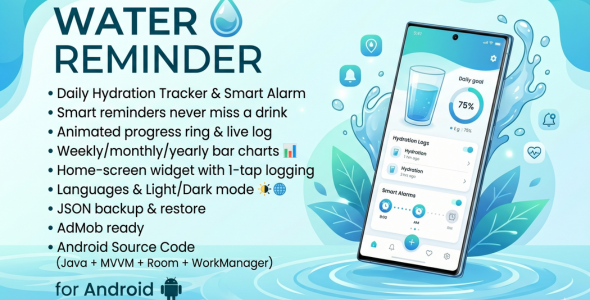
Water Reminder is a full-featured, beautifully designed Android application that helps users stay properly hydrated throughout the day. The app combines a smart, science-backed goal recommendation engine with flexible reminder scheduling, animated circular progress, a home-screen widget, and a rich statistics screen — all packaged in clean, maintainable Java code following Google’s recommended MVVM architecture.
Upon first launch, users are guided through a smooth onboarding flow that collects their name, gender, age, weight, height, activity level, and local weather conditions. The app then calculates a personalised daily water intake goal in real time using an evidence-based formula and lets the user fine-tune it with a slider before saving.
The main dashboard presents a large animated circular progress ring showing how much of the daily goal has been reached, a horizontal scrollable container picker (glass, cup, bottle, mug, flask, custom), a live log of every drink recorded today with swipe-to-delete, a streak card showing consecutive days of goal completion, and a motivational message that updates dynamically throughout the day.
The Reminders screen lets users both manually create individual alarms (with custom label, time, and amount) and auto-generate a full schedule derived from their saved wake-up time, bedtime, and preferred interval — a powerful one-tap setup that eliminates tedious manual entry. All alarms survive device reboots via a BootReceiver and are delivered as high-priority notifications with inline Drink Now and Skip action buttons that log or dismiss the entry without opening the app.
The History screen shows interactive bar charts (via MPAndroidChart) for weekly, monthly, and yearly periods, with goal-achieved bars highlighted in a distinct colour and summary statistics (average, maximum, minimum, and total intake) shown below the chart.
A home-screen widget shows the current intake, goal, percentage progress bar, and a one-tap Drink button — all updated in real time from the Room database without opening the app.
Data safety is covered by a JSON-based backup and restore system that exports all records to the device’s external storage with a timestamped filename, and imports them back with a single file picker. An optional automated backup can be scheduled via WorkManager. The app also sends an end-of-day summary notification and a goal-achieved celebration notification with confetti vibration pattern.
The codebase is clean, fully commented, and ready for immediate branding — just replace the package name, launcher icons, AdMob IDs, and colour palette in a few minutes.
Home Dashboard
- Animated circular progress ring with smooth value interpolation (800 ms animator)
- Real-time intake display in ml or fl oz depending on user preference
- Motivational message that dynamically reflects current hydration status
- Drink count badge and today’s intake log (RecyclerView with DiffUtil)
- Horizontal container picker — Glass, Cup, Bottle, Mug, Flask, and Custom
- FAB (Floating Action Button) to instantly log the selected container volume
- Custom-amount dialog accepting any value from 1–2000 ml
- Undo last drink via Snackbar action or dedicated button
- Streak counter displaying consecutive days with completed goals
- Pull-to-refresh for streak recalculation
- Quick navigation to Settings and History
⏰ Smart Reminders
- Create unlimited individual reminders with custom time, label, and drink amount
- Auto-generate a full reminder schedule from wake time, bedtime, and interval
- Enable/disable each reminder individually via toggle switch
- High-priority notifications with Drink Now and Skip inline action buttons
- Logging a drink directly from the notification updates app data in the background
- Exact alarm scheduling (
AlarmManager.setExactAndAllowWhileIdle) for reliable delivery - Alarms rescheduled automatically after device reboot via
BootReceiver - Alarms rescheduled automatically after app update via
MY_PACKAGE_REPLACED - Foreground service for reliable reminder delivery on strict battery-saver devices
- Separate clear buttons for auto-generated and manually created reminders
- Custom notification sound — pick any audio file from the device or reset to default
- Three dedicated notification channels: Reminders, Goal Achieved, Daily Summary
History & Statistics
- Interactive bar chart (MPAndroidChart) with animated entry
- Weekly, Monthly, and Yearly tabs for flexible time-range switching
- Goal-achieved bars highlighted in a distinct accent colour
- Summary cards: Average, Maximum, Minimum, and Total intake for the selected period
- All values honour the user’s ml / fl oz unit preference
User Profile & Goal Engine
- Collects name, gender, age, weight, height, activity level, and weather condition
- Real-time personalised goal calculation using a science-based formula (weight × 35 ml base, adjusted for activity, gender, weather, and age)
- Goal slider (500–5000 ml, step 50 ml) with live label and recommended value display
- Configurable wake-up time, bedtime, and reminder interval
- Optional profile photo from device gallery
- ml / fl oz unit toggle with automatic conversion throughout the entire app
- Profile data persisted in Room database as a singleton row
Home-Screen Widget
- Shows current intake, daily goal, percentage progress bar, and percentage text
- One-tap Drink button logs the configurable widget drink amount directly
- Widget drink amount configurable via a slider in Settings (e.g., 150–500 ml)
- Tapping the widget body opens the main app
- Updates itself after every logged drink
⚙️ Settings
- Light / Dark / System theme selection (applied instantly, no restart required)
- In-app language switcher (English, German, Spanish, French, Hindi) — full app restart for instant locale change
- Custom notification sound picker with reset-to-default option
- Manual JSON backup with timestamped filename saved to external storage
- One-tap JSON restore from any file picker-accessible location
- Automatic backup toggle (WorkManager periodic task)
- Widget default drink amount slider
- Edit profile shortcut
- Clear all water intake data with confirmation dialog
- Last backup timestamp displayed
Monetisation
- Google AdMob SDK integrated and initialised at application startup
- AdMob App ID configurable in
AndroidManifest.xml— swap one line to go live - Ad placement slots ready to add banner/interstitial/rewarded ads as needed
️ Architecture & Code Quality
- MVVM architecture with Android Jetpack ViewModel and LiveData
- Room database with three DAOs: WaterIntake, Reminder, UserProfile
- Repository pattern separating data layer from ViewModels
- View Binding throughout — no
findViewByIdcalls - WorkManager for recurring daily summary and auto-backup tasks
- Dedicated executor thread for all database I/O
- Clean package structure: activities, fragments, adapter, database, model, receiver, repository, service, utils, viewmodel, widget, worker
- All strings externalised and localised — easy to add new languages
- Fully commented, readable Java code
Requirements
| Requirement | Details |
|---|---|
| Language | Java (Android) |
| Minimum Android SDK | Android 6.0 Marshmallow (API 23) |
| Target / Compile SDK | Android 14 (API 34) |
| Build System | Gradle 8.4 with Android Gradle Plugin |
| IDE | Android Studio Hedgehog or newer (any version supporting Gradle 8.x) |
| Java Version | Java 8 (sourceCompatibility / targetCompatibility) |
| Internet | Required for AdMob initialisation; all other features work fully offline |
| Permissions |
RECEIVE_BOOT_COMPLETED, SCHEDULE_EXACT_ALARM, USE_EXACT_ALARM,
POST_NOTIFICATIONS (Android 13+), VIBRATE, FOREGROUND_SERVICE,
INTERNET, ACCESS_NETWORK_STATE,
READ_EXTERNAL_STORAGE (≤ API 32), WRITE_EXTERNAL_STORAGE (≤ API 29),
READ_MEDIA_IMAGES (API 33+)
|
| Key Libraries | Room (database), Lifecycle ViewModel & LiveData, WorkManager, Navigation Component, MPAndroidChart (bar charts), Google AdMob, Material Components, CircularProgressIndicator, AndroidX AppCompat, RecyclerView, DataBinding, ConstraintLayout |
| AdMob | A valid AdMob App ID must be added to AndroidManifest.xml before publishing (test ID is included in the source) |
| Keystore | A release keystore is required to sign the APK / AAB for Play Store distribution |
Instructions
1. Open the Project
- Unzip the downloaded archive to a local folder.
- Launch Android Studio and choose File → Open.
- Select the root
WaterReminderApp/folder (the one containingsettings.gradle). - Wait for Gradle sync to finish and all dependencies to download.
2. Rebrand the App (Optional)
- Package name: Right-click the
com.waterreminder.apppackage in the Project pane → Refactor → Rename to your own package (e.g.,com.yourcompany.hydrate). Also updateapplicationIdinapp/build.gradle. - App name: Edit
app_nameinres/values/strings.xml(and allvalues-XXfolders). - Launcher icons: Replace all
ic_launcher/ic_launcher_roundfiles in themipmap-*folders, or use File → New → Image Asset in Android Studio. - Colours: Edit
res/values/colors.xml— changecolorPrimaryandcolorSecondaryto match your brand palette.
3. Configure AdMob
- Open
AndroidManifest.xmland replace the test AdMob App ID value (ca-app-pub-3940256099942544~3347511713) with your own real App ID from the AdMob console. - Add your ad unit IDs wherever you place banner, interstitial, or rewarded ad views in the layouts and activities.
4. Add / Remove Languages
- The app ships with English (default), German (
values-de), Spanish (values-es), French (values-fr), and Hindi (values-hi). - To add a new language, create a new
values-XXfolder (e.g.,values-pt) and copystrings.xmlfromvalues/, then translate all values. - Add the language display name and BCP-47 code to
res/values/arrays.xml(arrayslanguage_optionsandlanguage_codes). - To remove a language, delete its
values-XXfolder and remove its entry from the arrays.
5. Customise Containers
- Container types, icons, and default volumes are defined in
ContainerHelper.java. - Add or remove container entries and pair them with vector drawables in
res/drawable/.
6. Build & Run
- Debug: Connect an Android device (API 23+) or start an emulator, then click Run ▶ in Android Studio.
- Release APK / AAB: Go to Build → Generate Signed Bundle / APK, provide your keystore, and follow the wizard. Upload the resulting
.aabto the Google Play Console.
7. Notification Permissions (Android 13+)
- On Android 13 (API 33) and above, the app requests the
POST_NOTIFICATIONSruntime permission. The request is triggered automatically; users must grant it for reminders to appear. - On Android 12+ (API 31+), the
SCHEDULE_EXACT_ALARMpermission may also require the user to enable it manually via Settings → Apps → Special app access → Alarms & reminders. The app handles this gracefully.
8. Backup & Restore
- Tap Settings → Backup Now to export a timestamped JSON file to
<external storage>/Android/data/<package>/files/WaterReminder/. - Tap Settings → Restore Backup and select a previously exported
.jsonfile to restore all records. - Enable Auto Backup to schedule a periodic background backup via WorkManager.
APK: https://www.mediafire.com/file/dvxikdy4oy2ggde/waterreminderav.apk/file
| Type | Android App |
|---|---|
| Author | DevWizard24 |
| Price | $25 |
| Sales | 2 |
| Rating | 0 (0) |
| Published | Apr 22, 2026 |
| Last Update | Apr 22, 2026 |
| Compatible Software | Kotlin 1.x, Android 15.0, Android 12.0, Android 11.0, Android 10.0, Android 9.0, Other |
| Demo Url | https://www.mediafire.com/file/dvxikdy4oy2ggde/waterreminderav.apk/file |
| Mobile Files Included | .db, .java, .xml, Layered PNG |
Categories
Tags
External listing. code.market does not sell this product and does not process payment for it. Pricing, payment, delivery, licensing, refunds, and support are handled by the third-party merchant on its own website. We may earn an affiliate commission from a referral. Details.
Products of the Week.
Submit🥇

Perceptle
Perceptle is a daily browser-based game that challenges you to test your sensory intuition through five quick estimation and rhythm-based rounds.
Other · 1 views · 0 clicksOther · Week 47 · 1 views · 0 clicks
🥈

Free LinkedIn Likes From Real
Get free LinkedIn likes on your posts from real members who react by hand. No
SaaS · 124 views · 2 clicksSaaS · Week 47 · 124 views · 2 clicks
🥉

STOP GUESSING WHAT TO POST
AI that learns your brand voice and builds a month of consistent, on-brand social content: carousels, posts and hooks that sound like you, not like everyone else's AI.
SaaS · 7,686 views · 71 clicksSaaS · Week 47 · 7,686 views · 71 clicks
#4

aaas.market
407 reliable micro tools for solo founders, marketers and creators. They work in your browser
SaaS · 122 views · 0 clicksSaaS · Week 47 · 122 views · 0 clicks