
Waniyas - Kids Fashion WooCommerce Theme
Description
Waniyas – Premium Kids Fashion WooCommerce WordPress Theme
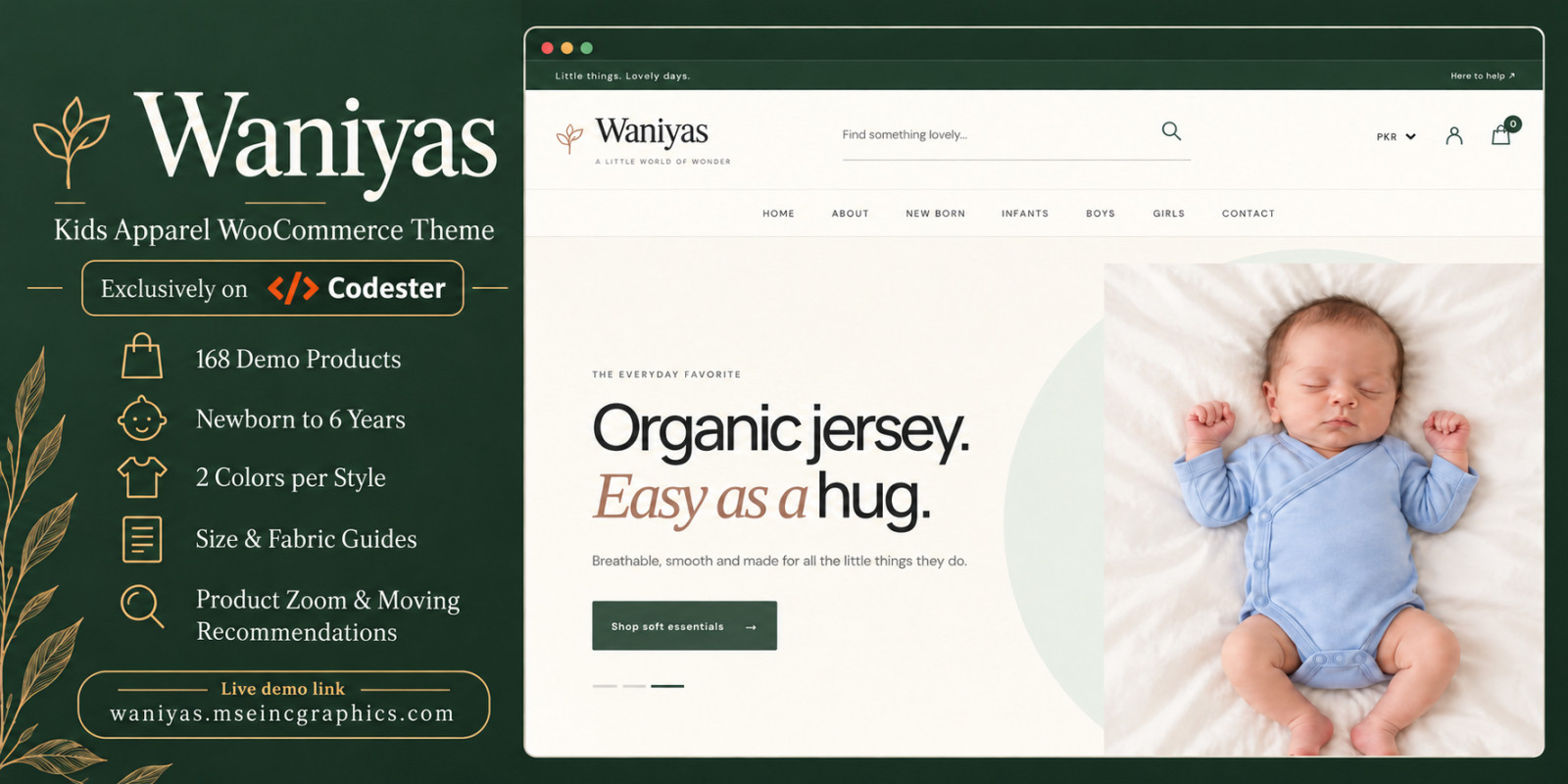
Create a beautiful, modern and engaging online shopping experience for children's fashion. Waniyas is a premium WooCommerce WordPress theme designed for baby clothing, toddler fashion, kids' apparel boutiques and children's lifestyle stores. With its elegant layouts, playful visual details, intuitive navigation and mobile-friendly shopping experience, Waniyas helps you showcase children's clothing in a professional and attractive way.
Beautiful Shopping Experience
Waniyas combines premium fashion-store aesthetics with practical eCommerce functionality. Its clean product layouts, attractive category sections and carefully organized shopping experience help customers discover their favorite outfits.
Designed for Kids' Fashion
Organize collections by gender and age to make shopping easier for parents.
- Boys' fashion collections
- Girls' fashion collections
- Age-based clothing categories
- Baby and toddler apparel
- Featured products and collections
- Related product recommendations
Interactive Product Presentation
Present products through attractive image galleries and interactive shopping features.
- Product image hover zoom
- Color variation selection
- Detailed product information
- Related products section
- Product image galleries
- WooCommerce product pages
Modern Homepage Design
Showcase your brand through visually engaging sections, including featured collections, product carousels, promotional content and category highlights.
Responsive and User-Friendly
Waniyas is designed to deliver a consistent shopping experience across desktop, tablet and mobile devices.
WooCommerce Integration
Built for WooCommerce, Waniyas supports standard online store workflows including product management, variations, cart and checkout.
Ideal For
- Kids' clothing boutiques
- Baby fashion stores
- Toddler apparel shops
- Children's fashion brands
- Online kids' merchandise stores
- Baby accessories shops
Waniyas brings together elegant design, organized shopping and engaging product presentation to help create a distinctive children's fashion storefront.
Features
- Premium kids' fashion WordPress theme
- WooCommerce integration
- Fully responsive layouts
- Modern homepage and hero sections
- Boys' and girls' clothing categories
- Age-based product browsing
- Product color variation selection
- Interactive product image hover zoom
- Product galleries and detailed product pages
- Featured product carousels
- Related product recommendations
- Attractive category and collection sections
- Modern header and footer layouts
- Mobile-friendly navigation
- Product search and shopping cart
- Organized product information sections
- Demo content package
- Customizable WordPress theme settings
- Clean, modern typography
- Fashion-focused shopping experience
Requirements
- Self-hosted WordPress installation
- WooCommerce plugin installed and activated
- PHP 8.1 or higher (subject to theme compatibility testing)
- MySQL 5.7+ or MariaDB 10.4+
- HTTPS-enabled web hosting recommended
- Apache or Nginx web server
- Minimum 256 MB PHP memory limit recommended
- Modern web browser
- Administrator access to WordPress dashboard
- Sufficient hosting storage for theme files and product images
Instructions
Waniyas Theme Installation Guide
Step 1 – Install WordPress
Install WordPress on your hosting server and log in to the WordPress administration dashboard.
Step 2 – Install the Theme
- Navigate to Appearance → Themes.
- Click Add New → Upload Theme.
- Select the Waniyas installable theme ZIP file.
- Click Install Now.
- Activate the theme.
Step 3 – Install WooCommerce
- Navigate to Plugins → Add New.
- Search for WooCommerce.
- Install and activate WooCommerce.
- Complete the WooCommerce store setup wizard.
Step 4 – Install Additional Plugins
Install any additional plugins specified in the included theme documentation.
Step 5 – Import Demo Content
Use the demo import instructions provided with the package to import the sample pages, categories and products.
Step 6 – Configure Navigation
- Open Appearance → Menus, or the navigation settings available in your WordPress installation.
- Configure the primary navigation.
- Add Boys, Girls, Shop and other required pages.
- Save the navigation settings.
Step 7 – Configure WooCommerce
- Open WooCommerce → Settings.
- Configure currency, shipping, taxes and payment methods.
- Check cart and checkout pages.
- Add or edit products and product variations.
Step 8 – Customize the Store
Update the logo, branding, homepage content, product images, banners, categories and footer information using the available WordPress customization options.
Step 9 – Final Testing
Check desktop and mobile layouts, product image galleries, variation selections, navigation, shopping cart and checkout before launching the store. For additional configuration information, consult the documentation included in the downloadable package.
| Author | muhammadshahidsharif |
|---|---|
| Category | Themes / WordPress |
| Price | $30 |
| Extended License | $90 |
| First Release | Oct 13, 2026 |
| Last Update | Oct 13, 2026 |
| Supported cms | WordPress 6.4, WordPress 6.5, WordPress 6.6, WordPress 6.7, WordPress 6.8, WordPress 6.9, WordPress 7.0, WordPress 7.1, WooCommerce 11.x |
| Files included | .php, .css, .html, .json, .svg, .webp, .md, Layered .png, JavaScript .js |
| Javascript framework | jQuery |
Categories
Tags
External listing. code.market does not sell this product and does not process payment for it. Pricing, payment, delivery, licensing, refunds, and support are handled by the third-party merchant on its own website. We may earn an affiliate commission from a referral. Details.
Products of the Week.
Submit🥇

Poople
Poople is the ultimate daily word ladder challenge that tasks you with transforming a 4-letter word into POOP, one letter at a time. Designed for quick, satisfying brain-teasers, this free browser-based game requires no sign-ups or downloads. Simply navigate through real-word steps to reach the target, test your vocabulary against a global daily puzzle, and track your streaks effortlessly. Whether you're a fan of Wordle or Weaver, Poople offers a fast, polished, and addictive way to train your brain.
Other · 21 views · 2 clicksOther · Week 44 · 21 views · 2 clicks
🥈

Actionbook
It works inside the user's own browser with the accounts already signed in. The user describes the result they need, and the agent reads, clicks and types through the pages, then delivers a dashboard or report where each data links back to its source.
Other · 966 views · 22 clicksOther · Week 44 · 966 views · 22 clicks
🥉

Free social media tools for creators & solofounders
295 free tools for growing your social media: write, plan, grow on local AI models, 100% free forever, No sign-up required, No trial. Write, check and measure posts on LinkedIn, Instagram, TikTok, X, YouTube, Reddit, Product Hunt and more: a free social media scheduler for 17 networks, engagement rate calculators, character counters, best time to post, hook generators and follower growth calculators. No login anywhere, no API or credit usage.
935 views · 7 clicksWeek 44 · 935 views · 7 clicks
#4

STOP GUESSING WHAT TO POST
AI that learns your brand voice and builds a month of consistent, on-brand social content: carousels, posts and hooks that sound like you, not like everyone else's AI.
SaaS · 2,177 views · 22 clicksSaaS · Week 44 · 2,177 views · 22 clicks
#5

Hand-Placed Backlinks $9.99 per link. Flat rate.
Buy hand-placed forum, Q-A and directory backlinks. Flat $9.99 per link, no subscriptions — you only pay for approved listings.
Website · 2,118 views · 17 clicksWebsite · Week 44 · 2,118 views · 17 clicks
#6

Conversational Backlinks for Busy Founders
Place Backlink Relevant Conversation for your domain across Forums and Conversations
39,568 views · 211 clicksWeek 44 · 39,568 views · 211 clicks
#7

Free Invoice Generator - PDF Invoices in Your Browser, No Sign-Up
A free invoice maker for freelancers and small businesses: fill in the invoice, check the live preview, and download a PDF that looks exactly like it. Any currency, tax per item, three templates, no sign-up, and nothing leaves your device.
834 views · 12 clicksWeek 44 · 834 views · 12 clicks
#8

Merge PDF Files Free - Combine PDFs in Your Browser, No Upload
A free PDF merger for office workers, students, and freelancers: combine PDFs and images into one file in the browser, reorder files and pages, pick page ranges, keep bookmarks, and open password-protected PDFs. Nothing is uploaded, no sign-up, no watermark.
789 views · 8 clicksWeek 44 · 789 views · 8 clicks