
WalletKit - Flutter Banking and E-Wallet UI Kit
Description
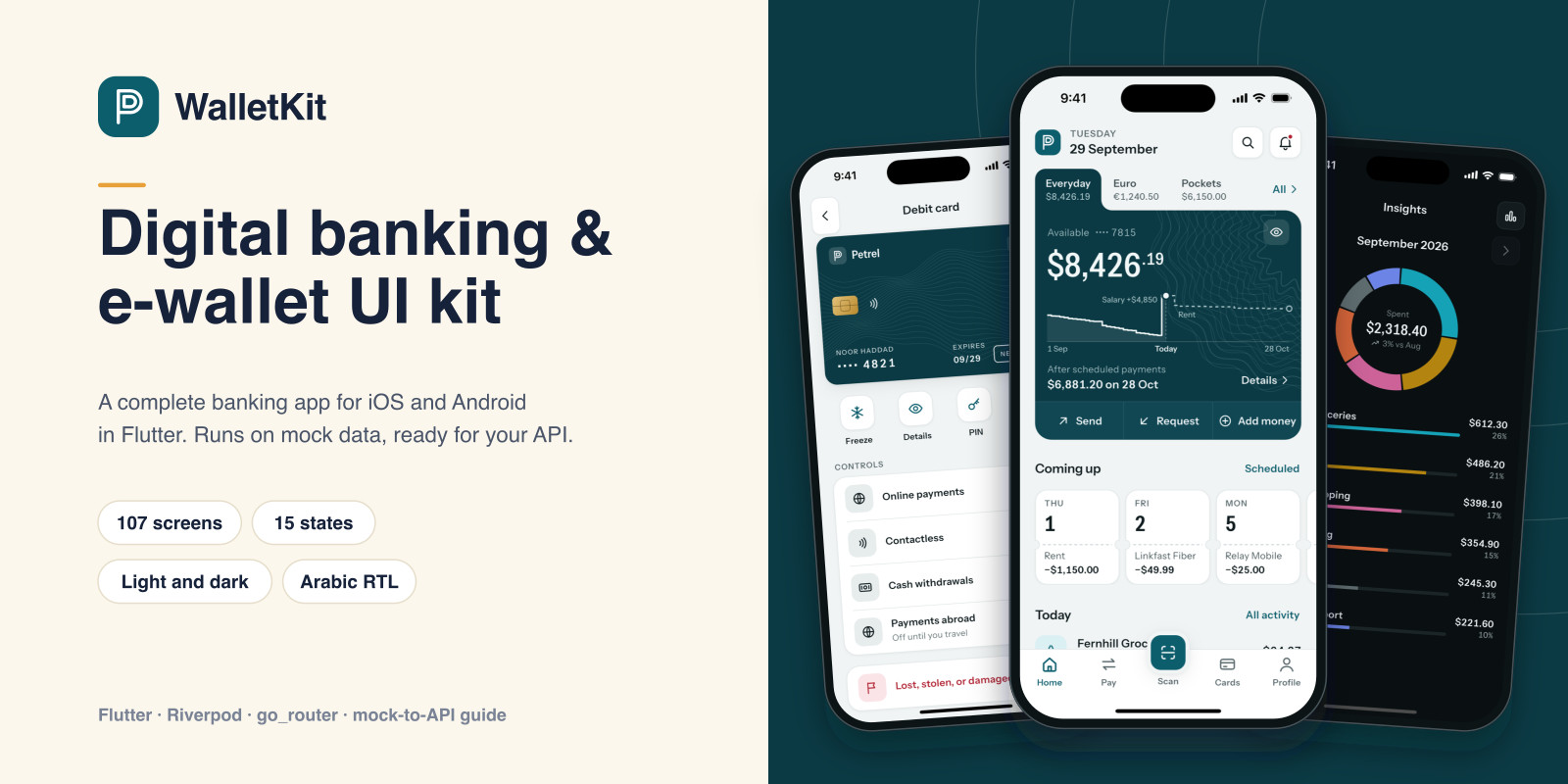
WalletKit is a complete digital banking and e-wallet app for iOS and Android, built in Flutter. It runs on mock data out of the box, so you can open it, try every flow, and then connect your own backend by replacing one set of classes. The demo bank is called Petrel; every name and number in it is fictional.
It covers the whole customer journey: onboarding, sign-in with a one-time code and PIN, and account opening with ID and selfie capture screens; a Home built around time, with a balance runway to payday and the payments coming up; activity with search and filters; sending money with a name check, review, PIN, and receipt; scheduled payments, requests, and saved recipients; QR payments and My QR; bills, auto-pay, mobile top-up, and adding money; cards with freeze, limits, card PIN, details behind a PIN, ordering, and lost or stolen; savings pockets; spending insights; exchange with held sample rates; rewards, invites, and statements; and profile, security, and settings. The main screens have loading, empty, error, and offline states.
Screens read from repository interfaces through Riverpod providers. Mock implementations with consistent, clearly fictional data are bound in one file: a transfer or a pocket move updates balances, history, and Home together. Replace them with your own API classes and no screen needs to change; the documentation walks through the swap step by step. Money is stored in integer minor units throughout.
The design system has light and dark themes, four brand presets, and a palette file for your own colors. English and Arabic are included with a full right-to-left layout, and you can add languages with .arb files. Currency, symbol position, number style, date format, 12/24-hour time, and first weekday are settings. Charts, card designs, and illustrations are drawn in code, so there are no stock images to license. The documentation includes release steps for Google Play and the App Store and a checklist of what a real banking app needs before going live.
Not included: a backend, real payments or card issuing, identity verification, biometrics, push notifications, or an admin panel. PIN, code, and identity screens are user interface only, and the kit gives no financial advice.
Features
- 107 screens and 15 loading, empty, error, offline, and confirmation states - Sign-in with a one-time code and PIN, unlock, forgot PIN, and a new-device check - Account opening in five steps with ID capture, photo check, selfie, and review screens - Home with account tabs, a balance runway to payday, upcoming payments, pockets, and spending - Send money with a name check, review, PIN, and receipt; send abroad, move between accounts, scheduled payments, requests, and saved recipients - QR payments and My QR, bills and auto-pay, mobile top-up, add money, and a cash-in code - Cards: freeze, limits, card PIN, details behind a PIN, order a card, lost or stolen - Savings pockets, spending insights with a category donut and monthly trend, exchange with held sample rates, rewards, invites, and statements - Profile, security, trusted devices, login activity, limits, language, formats, appearance, help, and chat - Light and dark themes, four brand presets, and a palette file for your own colors - English and Arabic with full right-to-left layout; add languages with .arb files - Money in integer minor units; currency, symbol position, number style, date format, 12/24-hour time, and first weekday are settings - 18 repository interfaces with mock implementations, bound in one file (Riverpod) - Charts, card designs, and illustrations drawn in code: no stock images to license - Component gallery and a formats reference screen - 288 unit, widget, and route tests; HTML documentation with release steps for Google Play and the App Store
Requirements
Flutter 3.44 or later (Dart 3.12). Xcode 16 or later for iOS (deployment target iOS 13). Android Studio with an Android SDK for Android. Packages: flutter_riverpod, go_router, flutter_svg, qr_flutter, intl. No API keys or accounts are needed to run the demo.
Instructions
1. Unzip the download and open a terminal in WalletKitUI/wallet_kit. 2. Run "flutter pub get", then "flutter run" with an iOS simulator or Android emulator selected. 3. The app opens on the splash and onboarding. Tap "I already have an account", then Continue, enter any six digits as the code, and create a PIN (any PIN except 000000, which shows the wrong-PIN state). 4. To connect your backend, implement the interfaces in lib/data/repositories/repositories.dart and bind your classes in lib/data/providers.dart. No screen changes are needed, and you can move one repository at a time. 5. To rebrand, change the brand ramp in lib/core/design_system/palette.dart, the mark in lib/core/art/logo.dart, the appName string in the .arb files, and the app name in the iOS Info.plist and the Android manifest. 6. To release under your own name, follow Documentation/index.html#release: Android upload keystore, android/key.properties, signed APK and App Bundle builds, iOS signing, archive, and export, and the splash-screen files on both platforms. 7. Documentation/index.html also covers the before-going-live checklist, architecture, the mock-to-API guide, money and formats, localization, deep links, accessibility, testing, and licenses.
| Author | oncombalado |
|---|---|
| Category | App Templates / Flutter / UI Kits |
| Price | $19 |
| Extended License | $57 |
| First Release | Sep 30, 2026 |
| Last Update | Oct 19, 2026 |
| Files included | .html, .json, .dart, pubspec.yaml |
| Operating systems | Android 8.0, Android 9.0, Android 10.0, iOS 14.0, iOS 13.0, iOS 15.0, Android 11.0, Android 12.0, Android 13.0, Android 14.0, Android 15.0, Android 16.0, iOS 16.0, iOS 18.0, iOS 26.0 |
| Programming language | Dart |
| App framework / engine | Flutter |
Categories
Tags
External listing. code.market does not sell this product and does not process payment for it. Pricing, payment, delivery, licensing, refunds, and support are handled by the third-party merchant on its own website. We may earn an affiliate commission from a referral. Details.
Products of the Week.
Submit🥇

Actionbook
It works inside the user's own browser with the accounts already signed in. The user describes the result they need, and the agent reads, clicks and types through the pages, then delivers a dashboard or report where each data links back to its source.
Other · 712 views · 9 clicksOther · Week 44 · 712 views · 9 clicks
🥈

Free social media tools for creators & solofounders
295 free tools for growing your social media: write, plan, grow on local AI models, 100% free forever, No sign-up required, No trial. Write, check and measure posts on LinkedIn, Instagram, TikTok, X, YouTube, Reddit, Product Hunt and more: a free social media scheduler for 17 networks, engagement rate calculators, character counters, best time to post, hook generators and follower growth calculators. No login anywhere, no API or credit usage.
682 views · 6 clicksWeek 44 · 682 views · 6 clicks
🥉

STOP GUESSING WHAT TO POST
AI that learns your brand voice and builds a month of consistent, on-brand social content: carousels, posts and hooks that sound like you, not like everyone else's AI.
SaaS · 1,927 views · 21 clicksSaaS · Week 44 · 1,927 views · 21 clicks
#4

Hand-Placed Backlinks $9.99 per link. Flat rate.
Buy hand-placed forum, Q-A and directory backlinks. Flat $9.99 per link, no subscriptions — you only pay for approved listings.
Website · 1,880 views · 17 clicksWebsite · Week 44 · 1,880 views · 17 clicks
#5

Conversational Backlinks for Busy Founders
Place Backlink Relevant Conversation for your domain across Forums and Conversations
39,338 views · 211 clicksWeek 44 · 39,338 views · 211 clicks
#6

Free Invoice Generator - PDF Invoices in Your Browser, No Sign-Up
A free invoice maker for freelancers and small businesses: fill in the invoice, check the live preview, and download a PDF that looks exactly like it. Any currency, tax per item, three templates, no sign-up, and nothing leaves your device.
620 views · 11 clicksWeek 44 · 620 views · 11 clicks
#7

Merge PDF Files Free - Combine PDFs in Your Browser, No Upload
A free PDF merger for office workers, students, and freelancers: combine PDFs and images into one file in the browser, reorder files and pages, pick page ranges, keep bookmarks, and open password-protected PDFs. Nothing is uploaded, no sign-up, no watermark.
562 views · 4 clicksWeek 44 · 562 views · 4 clicks