
Wagora | Flutter Work Hours and Paycheck App With Laravel Cloud Backup
Description
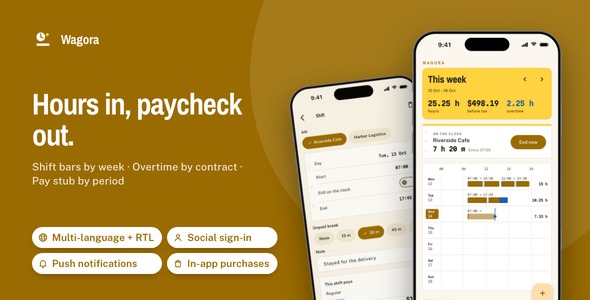
Give hourly workers the app their employer never will: a week of shifts drawn as time bars, overtime counted by each job’s own rules, and a pay stub for every pay period, with sign-in, in-app purchases, push, three languages, a Laravel cloud backup server with its admin panel and a landing page already wired in. Light and dark, every rule pinned by a test.

Firebase runs on your own project. Push, analytics and crash reports use a Firebase project you create. They stay off until you run flutterfire configure and set firebaseConfigured = true in lib/firebase_config.dart; the app and the server work without them.
Demo Instructions
The Live Preview opens on four demos, described below under Open all four parts before you buy. In a demo build (flutter run, and the Live Preview) the sign-in screen accepts any credentials: use the pair below, tap Sign in with both fields empty, or Not now. Demo mode is on in a demo build, so the Week board, the pay stubs and both sample jobs are filled the moment the app opens, and the Google / Apple buttons, the paywall and every switch in Me work on that sample.
- App sign-in: Email demo@wagora.app · Password demo1234
- Admin panel of the included server, once you install it: Email admin@wagora.test · Password password (it asks for a new password at the first sign-in)
Costs not included in the price
Publishing to the stores, Sign in with Apple and in-app purchases need your own Apple Developer Program membership and Google Play Console account; Google sign-in, push, analytics and crash reports need your own Google Cloud and Firebase projects. Sign-up and reset codes are mailed through an SMTP provider you choose, and the backup server runs on hosting you rent. Those providers charge you themselves; none of it is part of what this item costs.
What makes it worth it
- The pay math is done and tested: daily and weekly overtime, double time, night, weekend and holiday premiums, four kinds of pay period and a work week that differs from the pay period, all in one pure Dart engine with a test per rule.
- The integrations are already done: Google and Apple sign-in, in-app purchases with a paywall, push, analytics and crash reports, Face ID / fingerprint lock, update prompts, three languages with RTL, a share sheet and remote images, each behind one interface and switched on from one config file. The paywall unlocks a third employer and CSV export; the share sheet sends the pay stub as a picture.
- A server and a landing page come with it:
backend/is a Laravel API with a Filament admin panel that keeps each worker’s last five snapshots of jobs and shifts, restores them on a new phone and opens any snapshot store by store, plus App updates and Push history pages;landing/is a one-page product site already in Wagora’s colors.
Nine things you will not have to build
- Sign in with Google and Apple: the id token is exchanged with the included server for a session; a button appears only for a provider you configure.
- In-app purchases and a paywall: App Store and Play products behind
PurchaseGateway, prices from the store, Pro kept offline, restore in one tap. - Push notifications: send from your admin panel to every install; permission is asked from Me, never at launch.
- Analytics and crash reports: screen views and real errors, behind a consent switch that starts off.
- Face ID / Touch ID / fingerprint lock: lock on launch, disabled on a phone with nothing enrolled.
- Three languages with RTL: English, Spanish and Arabic; add one by copying a file, and the server answers in the same language.
- Update prompts: a gentle prompt or a required update, set by four lines in the server’s
.env. - Share sheet: the pay stub as an image, the period as CSV and the backup file, iPad anchored.
- Remote images: every illustration loads through one widget that takes a bundled file or your server’s URL, with a quiet fallback.
Open all four parts before you buy
Each part this page describes opens from the Live Preview, not just the app. It starts on a page with four demos, and All demos brings you back from each one:

- Mobile app: the Flutter app running in a phone frame with the sample week loaded.
- Documentation: the full HTML manual, the same file that ships in the download.
- Admin panel: a read-only snapshot of the Laravel admin from a live install: the dashboard, every sidebar page, one snapshot opened.
- Landing page: the product website from the download, in Wagora’s colors and type.
The full source code is included with every license type, Regular and Extended alike.
Every shift on one board
The week board: seven time lines with one bar per shift; drag a bar’s end and the part past the threshold turns blue while the week’s totals follow.

A pay stub for every pay period
The pay stub: hours, rate and amount per kind of pay, unpaid breaks listed, total before tax, a perforated edge; swipe to earlier periods.

Rules set once per job
The rule card: thresholds, multipliers, pay period, work-week start and premiums per job, with this period’s pay recounted as you change them.

Two jobs side by side
The name tags: every employer as a stacked tag in its own color, showing its rate and what this period has paid.

A shift in a few taps
Clock in with one tap on the Week tab, or add a shift afterwards with its break and a note, and see what it pays before you save.

The same yellow in the dark
Every screen in light and dark, with the hi-vis panels and the overtime blue unchanged.

Ready for people on the first day
Onboarding, sign-in with email, Google or Apple, and a Pro plan are part of the app from the start.

Plus the screens a real app needs: onboarding, sign-in and sign-up with an emailed code, password reset, the shift editor, cloud backup, Me with appearance, language, currency and 12- or 24-hour time, About, legal pages and the paywall.
Landing page included
The download ships a one-page product website for your app (landing/): a hero with two phone mock-ups, three feature tiles, a swipeable screen gallery, FAQ and store buttons, already set in Wagora’s colors and type; swap the copy and the store links and publish it anywhere static HTML is served.

Laravel back end included
backend/ is a Laravel 13 API with a Filament admin panel for cloud backup: accounts with emailed sign-up codes, social sign-in, five snapshot versions per account, the version endpoint and a Docker compose file. Point the app at it with one --dart-define=API_BASE_URL or one line in feature_config.dart. It runs on PHP 8.4 or newer, under Docker, from a terminal installer, or on shared hosting.

Handing it to a developer
- One engine for every number:
PayEngineis pure Dart with no clock, so the board, the shift preview and the stub always agree. - Clean GetX architecture: View, Controller, Service, Model, with lazy bindings per route and one service between screens and data.
- One config file for every integration:
feature_config.dartholds product ids, client ids and switches;feature_packs.dartis the only place an implementation is chosen. - Re-skin from four files: colors, type, spacing and the punch card; light and dark side by side.

What you get: full Flutter source code with the nine feature packs, the Laravel back end with admin panel, the landing page, a README, offline HTML documentation (37 chapters, 17 figures), a sample data layer, light and dark themes.
AI disclosure
AI-assisted tools were used to help write and review the source code and the documentation of this item. The author reviewed, tested and finalized every part before release. The illustrations are SVG drawings written as code for this item, with their sources included; no image-generation model was used. The app itself has no AI features.
Notes
Every amount is gross pay before tax; withholding and deductions are left to the employer’s payroll. The currency sign is a label only, and amounts are never converted.
Without a server the app runs in demo mode on the bundled sample week and keeps shifts on the phone; connect the included back end when you deploy it.
Store receipts are checked on the phone; a server-side check plugs into the purchase gateway’s verify function. The design lives in the Dart code itself, and there is no separate Figma or Sketch file. Connecting the services above will involve third-party providers which will incur their own separate costs.
| Author | coderqh |
|---|---|
| Price | $69 |
| Sales | 0 |
| Rating | 0 (0) |
| Published | Nov 4, 2026 |
| Last Update | Nov 4, 2026 |
| Compatible Software | Flutter 3.x |
| Mobile Files Included | Dart, YAML, JavaScript JSON, .kotlin, .swift, JavaScript JS, CSS, PHP, HTML |
Categories
Tags
External listing. code.market does not sell this product and does not process payment for it. Pricing, payment, delivery, licensing, refunds, and support are handled by the third-party merchant on its own website. We may earn an affiliate commission from a referral. Details.
Products of the Week.
Submit🥇

Perceptle
Perceptle is a daily browser-based game that challenges you to test your sensory intuition through five quick estimation and rhythm-based rounds.
Other · 1 views · 0 clicksOther · Week 47 · 1 views · 0 clicks
🥈

Free LinkedIn Likes From Real
Get free LinkedIn likes on your posts from real members who react by hand. No
SaaS · 124 views · 2 clicksSaaS · Week 47 · 124 views · 2 clicks
🥉

STOP GUESSING WHAT TO POST
AI that learns your brand voice and builds a month of consistent, on-brand social content: carousels, posts and hooks that sound like you, not like everyone else's AI.
SaaS · 7,686 views · 71 clicksSaaS · Week 47 · 7,686 views · 71 clicks
#4

aaas.market
407 reliable micro tools for solo founders, marketers and creators. They work in your browser
SaaS · 122 views · 0 clicksSaaS · Week 47 · 122 views · 0 clicks