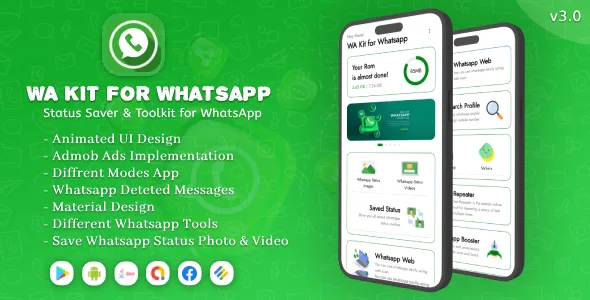
WA Kit for Whatsapp 2023 : Tools for Whatsapp with admob Ads
Description


WA Kit for Whatsapp is the best Whats app which contains various tools like Whats Sticker, Direct Chat, Status Story Saver, Whats Web, Scanner And QR Code Generator etc. Get all these tools Whats Web, Status Saver or Status Downloader, Whats Direct Chat – Direct Chat without saving numbers, Sticker Maker, etc in this What’s Tools Scan app.
Our app comes with a remarkably beautiful and easy-to-use interface created with the latest trends in mind. Here’s a full list of main
• Features of WA Kit for Whatsapp - Whats Web (Dual whatsapp accounts) - Whatsapp & Whatsapp business status saver - WhatsApp Direct Message - WhatsApp Deleted Messages - Whats App Stickers - Stylish Fonts - WhatScan QR Code Generator and scanner

AMAZING KEY FEATURE WE OFFER
• Animated UI Design • Splash screen with progressbar animation • Onboarding Screen with professional ui intro display • Beautiful Gridview with CardView and modern design • Find your deleted messages by someone • Generate your text to emoticon • Share your emoticon to whatsapp or all social media • Search your emoticon • About page with elegant UI • Contact page with smart action • Privacy Policy • Rate app lets you get feedback • Share app allows you to get a lot of new users • More app allows users to browse and try all of your app • Banner AdMob ADs integrations • Native AdMob ads integrations • Interstitial AdMob ads integrations • Android Studio Project • Developed with java programming language • No programming skills required • Latest SDK Version support android 13 • Perfect and minimal clean material design • Easy to customize • Easy Documentation step by step with screenshot • Feature update and supports • Ready release and get large incomeWHATS WEB :- Start using now by downloading this Whats web scan app and use the amazing feature. Follow the simple three steps and use dual chat feature. 1) Open Whats web scan app where you get the QR Code. 2) Open Whats App on another mobile and go to 3 dots on top right corner. 3) Open Whats Web option and Point to the earlier opened QR Code.
That’s it and now you get sync all the chat on the mobile where you have installed the Whatapp Web App.
WHATSAPP DIRECT CHAT :- Most of the time we do not want to save number for checking What application number and also want to start direct chat without saving the number. So now, you have this Whats web with Direct chat option. There are simple three steps. 1) Open Direct Chat option from Whats web app. 2) Select country code, enter number and text message. 3) Hit send button.
STATUS SAVER :- Status Saver can download statuses in your device so that you can keep it permanently even original status expires after 24 hrs. Status Downloader – Status Saver is very easy to use and it works on every Device.
STYLISH FONT :- Use our cool text generator & stylish font creator as font whats trick and start conversations with lovely fun fonts for amazing looks! With Chat Styles, you can write text with cool fonts and send message on Whats, Messenger or many social network in stylish text. Chat with your friends with special characters in very cool and beautiful way.
QR CODE GENERATOR & SCANNER :- QR Code Generator & Scanner is a very simple and useful application by which, you can create your own custom Bar-code image. you can use this bar code image for advertisement, for sharing information and being a part of modern world..
WA Deleted Messages:- The only solution available is to read them from the notifications that you receive and create a message backup based on your notification history. Lost Messages The following situations prevent the recovery utility from working • If you have muted a chat • If you’re following the conversation right now. • If you have your device’s alerts turned off. • If you deleted the texts before installing the app
FONT TO EMOJI CONVERTER :- Text to Emoji converter for whatsapp is the best tool to draw letters and words made up of emoji. Create Emoji text and share it with friends, family, or in groups by copying the emoji art or directly sharing it.
Now say goodbye to simple text messages when the text to emoji converter is here. Making text from emoji has never been so easy.
STICKER :- WA Kit for Whatsapp helps to easily express your emotions, send stickers on WhatsApp instead of emoji, keyboard type and make your overall chat looks more fun than the usual text and emoji. You can even use these stickers to reply on status & groups. Our sticker packs are small and light weight, and you can add them easily to your collection to share & chat with others
CAPTION :- Caption feature option is also provided in WA Kit for Whatsapp app in which you can copy paste the caption anywhere and also share it so that the caption can be sent directly to the WhatsApp app.
MESSAGE REPLAY :- This is fantastic feature you are able to reply message automatically. There is special feature of reply according to message. You can send message as you define on predefine person. So you can only reply to those message and those person whome you want to reply.

Contact
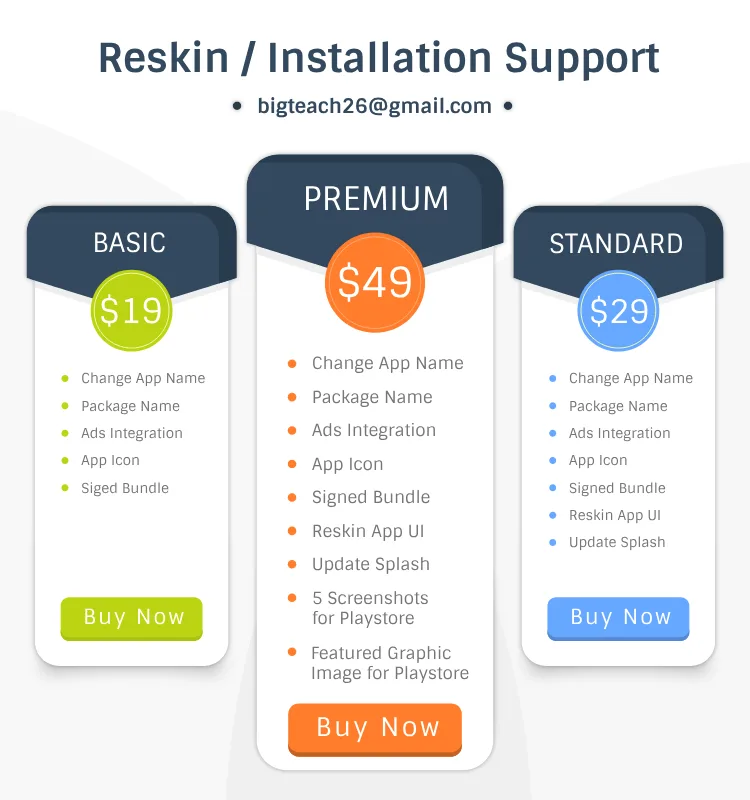
For any question, you can catch us via email bigteach26@gmail.comThanks for your support.
Version 3.0
- Fix permission issue
- Added whatsapp deleted messages feature
Version 2.0
- Fix Whatsapp Status Image Issue
- Add Delete Option Message Reply
- Bug Solved in Stickers
- Layout Fixed in Whatsapp Cleaner
Version 1.0
- Photo & Video Status Saver
- Stylist Fonts
- QR Code Generator & Scanner
- Font to Emoji Converter
- WhatsApp Direct Reply
- Many More Features....
Categories
Tags
External listing. code.market does not sell this product and does not process payment for it. Pricing, payment, delivery, licensing, refunds, and support are handled by the third-party merchant on its own website. We may earn an affiliate commission from a referral. Details.
Products of the Week.
Submit🥇

STOP GUESSING WHAT TO POST
AI that learns your brand voice and builds a month of consistent, on-brand social content: carousels, posts and hooks that sound like you, not like everyone else's AI.
SaaS · 4,291 views · 38 clicksSaaS · Week 45 · 4,291 views · 38 clicks
🥈

Conversational Backlinks for Busy Founders
Place Backlink Relevant Conversation for your domain across Forums and Conversations
Website · 42,004 views · 223 clicksWebsite · Week 45 · 42,004 views · 223 clicks
🥉

upvote.club
Free Social Media Engagement that Helps Boost Your Content. Upvote Club supports 19 social networks with 100+ engagement actions in one dashboard. Add links to your posts and get free engagement from real users.
SaaS · 40,045 views · 117 clicksSaaS · Week 45 · 40,045 views · 117 clicks
#4

Substack Posting API
Onboard your Agent to Substack. Write Publish on Substack via API
SaaS · 59,054 views · 198 clicksSaaS · Week 45 · 59,054 views · 198 clicks
#5

Seenshot App
Free, Fast, MacOS Screenshot app. Make Screenshot cmd+shift+2 and send it via link
Desktop App · 28,432 views · 122 clicksDesktop App · Week 45 · 28,432 views · 122 clicks
#6

Hand-Placed Backlinks $9.99 per link. Flat rate.
Buy hand-placed forum, Q-A and directory backlinks. Flat $9.99 per link, no subscriptions — you only pay for approved listings.
Website · 4,264 views · 19 clicksWebsite · Week 45 · 4,264 views · 19 clicks
#7

Free Invoice Generator - PDF Invoices in Your Browser, No Sign-Up
A free invoice maker for freelancers and small businesses: fill in the invoice, check the live preview, and download a PDF that looks exactly like it. Any currency, tax per item, three templates, no sign-up, and nothing leaves your device.
2,940 views · 17 clicksWeek 45 · 2,940 views · 17 clicks
#8

Merge PDF Files Free - Combine PDFs in Your Browser, No Upload
A free PDF merger for office workers, students, and freelancers: combine PDFs and images into one file in the browser, reorder files and pages, pick page ranges, keep bookmarks, and open password-protected PDFs. Nothing is uploaded, no sign-up, no watermark.
2,717 views · 13 clicksWeek 45 · 2,717 views · 13 clicks