
W8 Contact Form - WordPress Contact Form Plugin

Description
W8 Contact Form for WordPress is one of the most flexible Contact Form plugin with multiple recipients, unlimited forms, different styles, animations, auto reply option and huge variety of additional customization options. Provides embed and floating, sliding methods to attract the visitors

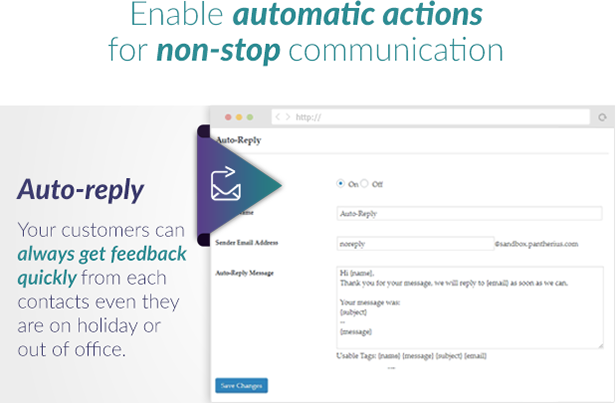
Ensures a professional system to get in touch with your customers easily. You can highly customize the entire form with optional image, description and social links. Also possible to send different auto-reply message for each recipients or set it globally. The plugins grants, you will never lose any messages, just turn the logging option to on and the emails will be saved, then you can read them directly on your WordPress admin area.
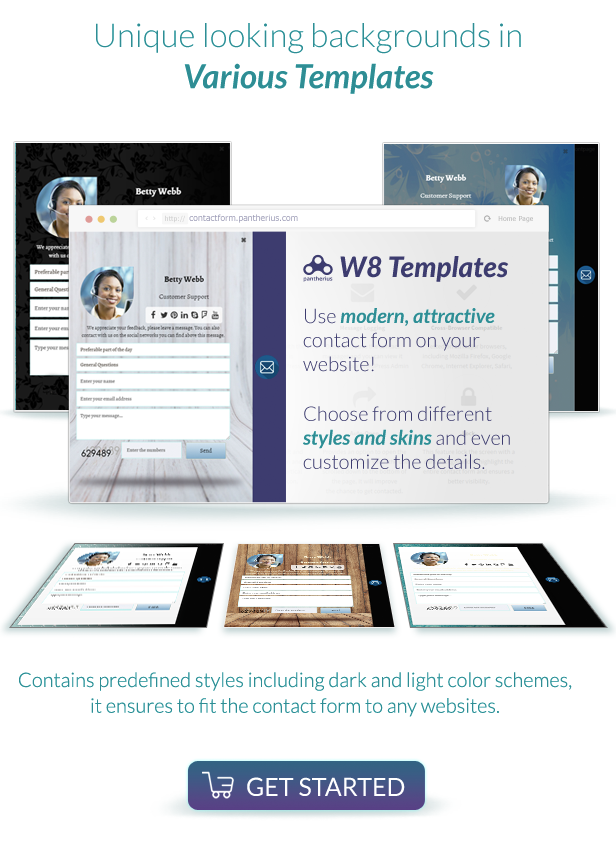
Styles and Skins
Provides different skins and styles combinations. The styles are mostly color schemes and you can choose it separately with unique skins. The default is the sliding or floating view, but it can be embed to any page to get a flat type form. The flat type also customized by the predefined styles and skins. Additional style and skin customization is possible via editing the CSS file of the plugin.
Unlimited Recipients and Contacts with Social Icons
Create as many recipients as you wish in the W8 Contact Form. Each one has it’s own fields, social icons and image, in addition you can specify individual auto-reply message. Social Icons can be linked to Facebook, Google Plus, Twitter, Pinterest, LinkedIn, Skype, Tumblr, Flickr and Foursquare. It is possible to set the status of any of the recipients to active or passive, therefore you don’t have to delete when it is not available for short period. (for example: vacation)
Various Captcha Modes
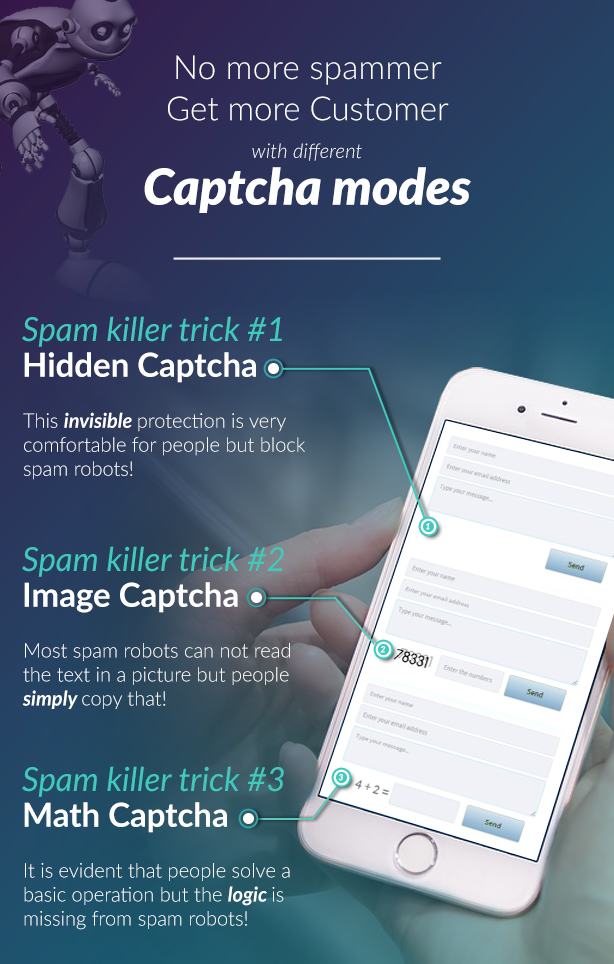
Offers 4 different captcha modes, including the disabled mode. In this case you won’t see any captcha on the form. The plugin works with AJAX, therefore the spam bots can’t submit the form easily. It can be also works well with disabled captcha mode, but if you need any further security, simply enable one of the three unique captchas. The Math Captcha add a simple calculation task to the sliding contact form via jQuery. It is a popular captcha mode, because the robots can’t fill it with the correct result. With Image Captcha mode, the plugin generates a random image with numbers and the visitor has to fill out a field with the correct numbers. This solution is handled by on the server side with PHP, therefore it is almost impossible to manipulate. Hidden Field Captcha is a new solution based on the spam robots logic. These robots try to fill out all input fields on the website. The plugin add a hidden empty field in this mode then check the value during the form submit. If the field still empty, the form will be successfully sent otherwise the process will be terminated.
Global and Individual Auto-Reply
Individual or global autoresponse can be also set on the WordPress admin. You can specify it in each recipients or set it globally for all recipients. The usage is really easy, just leave empty the individual auto-reply area and the WordPress Plugin will use the global auto-reply message. If you don’t fill out the global and the individual, the auto-reply option will be disabled.
Logging User Activities
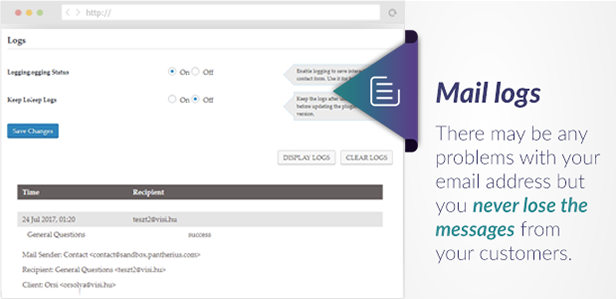
The user activities will be recorded with this option and you can see all emails directly on your admin panel even your email address temporary doesn’t work. Pay attention to the size of the logs, hundreds or thousands of log entries might be affect the performance of your website, therefore don’t forget to clear the logs periodically.
Mobile Friendly and Responsive Layout
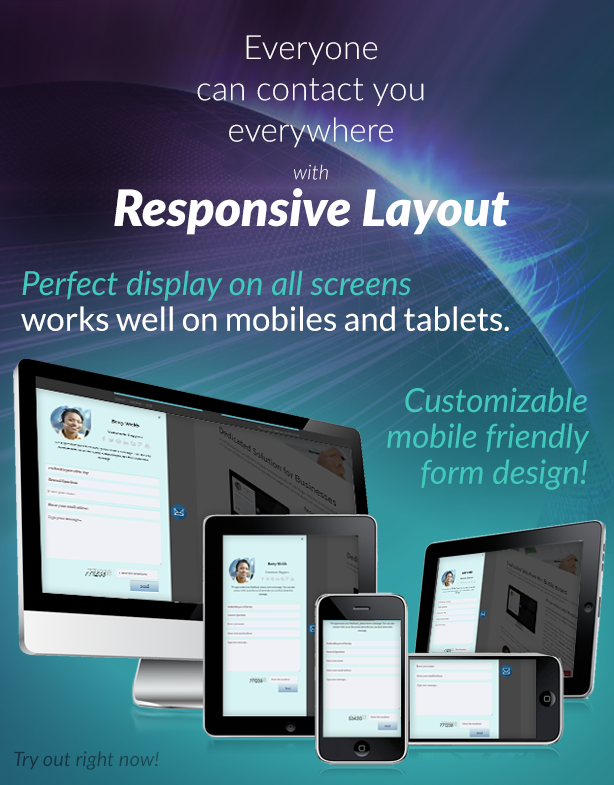
Compatible with most device screens, including tablets and mobiles. As a result, you can add a slide form to your website, that is fully fit to the visitors’ screen. Fancy navigation bar helps to scroll down inside the form if the content is larger than the form.
Unique Styles
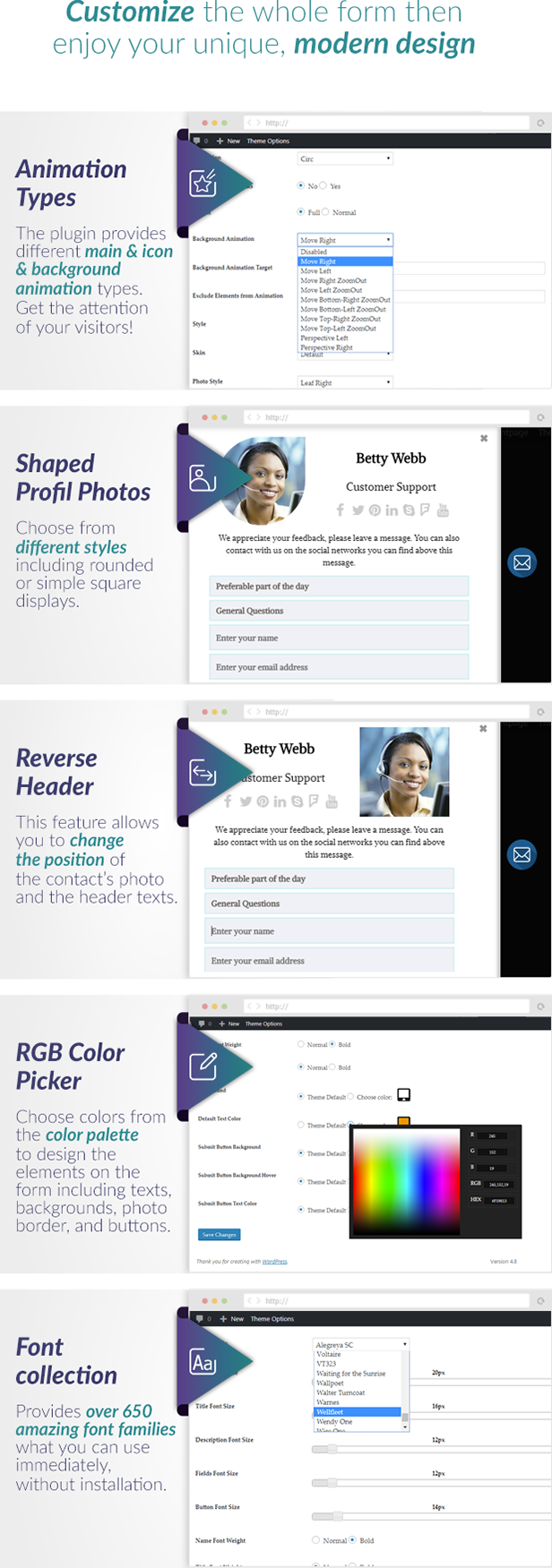
Next to the overall skins and styles, the contact us form’s parts can be customized with some additional options as well. Photo border can be disabled or set a custom color via the built-in RGB Color Picker. You have also an opportunity to choose form 10 different photo styles. These styles mostly change the shape of the recipients’ images in the form.
Key Features
- Display as Global or use Multiple Contact Forms with Shortcodes
- Provides Total Customization with Shortcodes as well
- Enable or Disable Sending Copy to the Customer
- Attractive Animation when you Change the Target Contact(Subject)
- Unlimited Contacts, Unlimited Contact Forms
- Animated Instant Validation
- Automatically Preload the Contact’s Images
- Option to Hide Contact’s Photos
- Ajax-Based Contact Form, Works without Reloading the Page
- Four Different Captcha Modes: Image, Math, Hidden Field or Disabled
- Option to do not Display on Mobiles
- Custom Vertical Position
- Upload your Own Contact Icon
- Ability to Reverse the Contact’s Header (Change the Photo and Titles Order)
- Light and Dark Styles
- Minimal and Default Skins
- Contains the Original and a Minified jQuery File.
- Usable HTML Template/Tags in Auto-Reply Messages
- 10 Unique Photo Styles
- Customize Contacts’ Order with Shortcodes
- Disable Photo’s Border Color or use the RGB Color Picker to set
- Shake and HeartBeat Icon animations with Custom Shake Animation Time
- 9 Social Icons, Active or Passive Status, Auto-Reply Message and Additional Custom Parameters for Contacts
- Global Auto-Reply or Set Different Ones for Each Contacts
- Joker Tags to dynamically include Client’s Name, Message, Email Address, Subject to the Auto-Reply Message
- Enable or Disable Detailed Logging
- Logs Contains All Informations about the Contact Form Activity including Status (Success or Failed), Sender and Recipient Informations, Messages, Autoreply and More
- With Inline/Flat Style Include it to the Content as an Integrated Contact Form.
- Ability to Open, Close, Hide, Show the Contact Form with Clicking on a Link
- Responsive, Mobile Friendly
- Ability to Lock the Screen with a Dark, Transparent Background
- Fixed Positions
- Optional Automatic Slide-In when the Visitor Reach the Bottom of the Page
- Enable or Disable the Close Icon
- 10 Different Open/Close Easing Animations
- Translation-Ready, Contains a Simple Custom, Built-In Translator and also Supports WPML (Standard WordPress Localization)
- Select the Direction of the Contact Form (Left or Right)
- Option to Auto-Open the Contact Form just once for each Visitors
- Unlocks Screen and Close the Contact Form with Clicking on the Background
- Hide/Show the Contact Icon
- Adjustable Transparency
- Three Different Icon Sizes
- Detailed Documentation
The plugin featured in the 5 Best Form Plugins for WordPress by AYS Pro
Changelog
—-—-—-—-—-—-—-—-—-—-—-—-—-—-—-—-—-— Version 1.5.9 – 17/05/2022
- minor code optimization
—-—-—-—-—-—-—-—-—-—-—-—-—-—-—-—-—-— Version 1.5.8 – 10/08/2021
- fixed Flower Light Blue skin with Light and Dark style - issues identified by library management have been fixed
—-—-—-—-—-—-—-—-—-—-—-—-—-—-—-—-—-— Version 1.5.7 – 30/06/2020
- added option to use link in custom fields
—-—-—-—-—-—-—-—-—-—-—-—-—-—-—-—-—-— Version 1.5.6 – 03/07/2019
- fixed auto-reply admin page doesn’t appear
—-—-—-—-—-—-—-—-—-—-—-—-—-—-—-—-—-— Version 1.5.5 – 16/02/2018
- fixed color picker layout issue on admin
—-—-—-—-—-—-—-—-—-—-—-—-—-—-—-—-—-— Version 1.5.4
- improved backend with floating submit - fixed some CSS issues on mobile - improved animations
—-—-—-—-—-—-—-—-—-—-—-—-—-—-—-—-—-— Version 1.5.3
- fixed unnecessary box-shadow on custom checkboxes and radio buttons - added 7 new skins (curved wood, decorated, elegant black, lines, pages 1, pages 2, wooden floor) - fixed minor tranlation issue - added TRPHONE as a static translatable custom field
—-—-—-—-—-—-—-—-—-—-—-—-—-—-—-—-—-— Version 1.5.2
- changed icon H2 element to SPAN
—-—-—-—-—-—-—-—-—-—-—-—-—-—-—-—-—-— Version 1.5.1
- fixed minor escaping issue with the contacts’ details - fixed auto-reply issue
—-—-—-—-—-—-—-—-—-—-—-—-—-—-—-—-—-— Version 1.5
- added option to specify any number of email address for the contacts (comma separated list, added as CC in the email)
—-—-—-—-—-—-—-—-—-—-—-—-—-—-—-—-—-— Version 1.4.1
- minor improvements frontend styles - fixed SSL issue - fixed demo contacts delete issue - reconstructed the entire admin area - reconstructed documentation - added Custom CSS feature - added ZIP Updater
—-—-—-—-—-—-—-—-—-—-—-—-—-—-—-—-—-— Version 1.4
- added custom fields (text, textarea, select, checkbox, radio button, hidden field) - minor visibility improvements - fixed floating admin bar issue - added option to set font weight for name, title, description, input fields and submit button (overwrite theme default) - added option to set font color for the entire contact form and submit button (overwrite theme default) - added option to set the background color for the entire contact form, submit button and submit button hover (overwrite theme default) - fixed minor visibility issues - added sender URL to message body - improved frontend style - added 10 new skins - added transparent background to image captcha - added full height slide option - added YouTube icon - fixed autoreply email address bug on admin - added option to specify target div for background animation - added option to use single contact without subject (hide subject selector) - improved mail sending - added option to install demo contacts
—-—-—-—-—-—-—-—-—-—-—-—-—-—-—-—-—-— Version 1.3
- added 10 background animations - improved mail sending - improved display on large screens - fixed minor visibility bugs - fixed custom icon bug - fixed minor bug with cookies
—-—-—-—-—-—-—-—-—-—-—-—-—-—-—-—-—-— Version 1.2
- fixed minor visibility issues with light style - fixed www domain prefix email sender bug - decreased minimal character length of the name field to 2
—-—-—-—-—-—-—-—-—-—-—-—-—-—-—-—-—-— Version 1.1 —-—-—-—-—-—-—-—-—-—-—-—-—-—-—-—-—-— - added option to set font family (Google Fonts) - added option to set name font size - added option to set title font size - added option to set description font size - added option to set fields font size - added option to set button font size - updated documentationSupport
If you have any question or feedback, please feel free to email me via my user page contact form. The plugin’s FAQ also contains some useful informations.

Contact’s Images on the demo website is not the part of the plugin, you can download it from the links you can find in the Credits.
ThemeForest Theme Developers
Would you like to include this plugin into your theme? Purchase one extended license for each theme you want to sell on any Envato Marketplaces. Drop me a line via my profile page mail sender and I will add your theme link to this page.
Refund Policy
Full refund can be given, if the plugin doesn’t work on your website as it described, the issue caused by the product and can’t be fixed in 48 hours. In most cases, if the plugin doesn’t work on your website, that caused by any of the following reasons:
- outdated WordPress Theme, that has an error in the background
- outdated other plugin(s), that has an error in the background
- other plugin or theme, that includes invalid jQuery version instead of using the WordPress built-in jQuery
- hosting limitations or configuration issues
- incorrect plugin configuration
Before you send a refund request, please make sure you already contacted with the support here and provided your website’s URL. If the plugin doesn’t work as it described and the problem is with the plugin, that can’t be fixed in 48 hours, then you can get a full refund. If you refusing the free support and the issue can’t be investigated, then you can’t get a refund.
Credits
I owe a big thank you for the following websites and people:
- jQuery
- Photos by Steve Wilson,Frank Kovalchek and Michael Coté
- WordPress & jQuery Plugins
| Type | WordPress Plugin |
|---|---|
| Author | pantherius |
| Category | Wordpress / Forms |
| Price | $29 |
| Sales | 474 |
| Rating | 4.66 from 32 ratings |
| Published | Nov 30, 2014 |
| Last Update | Feb 26, 2026 |
| Compatible Browsers | IE11, Firefox, Safari, Opera, Chrome, Edge |
| Compatible Software | WordPress 6.0.x, WordPress 5.9.x, WordPress 5.8.x, WordPress 5.7.x, WordPress 5.6.x |
| Compatible With | WooCommerce 6.x.x, WPML |
| Source Files Included | JavaScript JS, HTML, CSS, PHP, Layered PNG |
Categories
Tags
External listing. code.market does not sell this product and does not process payment for it. Pricing, payment, delivery, licensing, refunds, and support are handled by the third-party merchant on its own website. We may earn an affiliate commission from a referral. Details.
Products of the Week.
Submit🥇

STOP GUESSING WHAT TO POST
AI that learns your brand voice and builds a month of consistent, on-brand social content: carousels, posts and hooks that sound like you, not like everyone else's AI.
SaaS · 4,319 views · 38 clicksSaaS · Week 45 · 4,319 views · 38 clicks
🥈

Conversational Backlinks for Busy Founders
Place Backlink Relevant Conversation for your domain across Forums and Conversations
Website · 42,055 views · 223 clicksWebsite · Week 45 · 42,055 views · 223 clicks
🥉

upvote.club
Free Social Media Engagement that Helps Boost Your Content. Upvote Club supports 19 social networks with 100+ engagement actions in one dashboard. Add links to your posts and get free engagement from real users.
SaaS · 40,099 views · 117 clicksSaaS · Week 45 · 40,099 views · 117 clicks
#4

Substack Posting API
Onboard your Agent to Substack. Write Publish on Substack via API
SaaS · 59,103 views · 198 clicksSaaS · Week 45 · 59,103 views · 198 clicks
#5

Seenshot App
Free, Fast, MacOS Screenshot app. Make Screenshot cmd+shift+2 and send it via link
Desktop App · 28,477 views · 122 clicksDesktop App · Week 45 · 28,477 views · 122 clicks
#6

Hand-Placed Backlinks $9.99 per link. Flat rate.
Buy hand-placed forum, Q-A and directory backlinks. Flat $9.99 per link, no subscriptions — you only pay for approved listings.
Website · 4,310 views · 19 clicksWebsite · Week 45 · 4,310 views · 19 clicks
#7

Free Invoice Generator - PDF Invoices in Your Browser, No Sign-Up
A free invoice maker for freelancers and small businesses: fill in the invoice, check the live preview, and download a PDF that looks exactly like it. Any currency, tax per item, three templates, no sign-up, and nothing leaves your device.
2,984 views · 17 clicksWeek 45 · 2,984 views · 17 clicks
#8

Merge PDF Files Free - Combine PDFs in Your Browser, No Upload
A free PDF merger for office workers, students, and freelancers: combine PDFs and images into one file in the browser, reorder files and pages, pick page ranges, keep bookmarks, and open password-protected PDFs. Nothing is uploaded, no sign-up, no watermark.
2,755 views · 13 clicksWeek 45 · 2,755 views · 13 clicks