
Voixto | Offline Text-to-Speech Generator Windows App
Description
Turn Any Text Into Natural Speech — 100% Offline.
No internet. No subscriptions. No privacy risks.
Just install, type, and generate professional-quality audio instantly.
Voixto runs entirely on your Windows PC — giving you full speed, privacy, and control.
Perfect for creators, educators, and developers who need fast, reliable voice generation.
Perfect For
✔ YouTube creators & video narrators
✔ Audiobook producers
✔ E-learning content developers
✔ Marketers & ad creators
✔ Accessibility tool builders
✔ Developers & automation engineers
✔ Educators & teachers
Key Features
 |
100% Offline Processing No internet required — ever. All voice generation runs locally on your PC. Full privacy, zero data tracking, zero cloud dependency. |
|
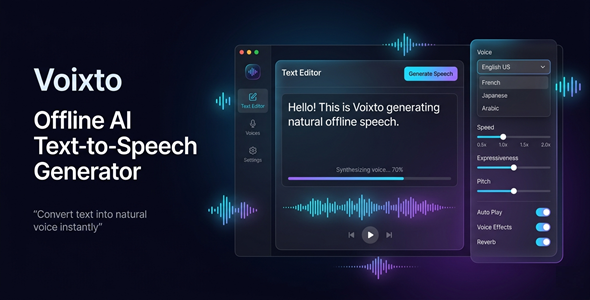
Multi-Language Voice Support Supports 16+ languages including English (US/UK), French, German, Spanish, Arabic, Chinese, Japanese & more. Preview and download additional voice packs inside the app. |
|
Batch Processing Mode Convert multiple files at once — hands-free. Track individual and overall progress in real time. |
|
Advanced Voice Controls Adjust speed, expressiveness, rhythm, pause timing, and audio effects. Add equalization and reverb for a polished, studio-ready output. |
|
Smart Text Preprocessor Auto-handles numbers, dates, abbreviations, URLs, and symbols. Ensures natural-sounding pronunciation every time. |
|
File Import Support Import TXT, Markdown, and DOCX files directly into the editor. Real-time word, character, and sentence count tracking included. |
|
WAV & MP3 Export Export audio in your preferred format with custom output folder selection. Files are automatically organized with clean naming. |
|
Local History System Every generation is saved locally for easy replay, re-export, or review. No cloud sync — your content stays on your machine. |
|
Waveform Visualization Built-in waveform display gives you visual feedback during playback. Toggle it on or off from settings. |
|
Fully Customizable Settings Choose CPU performance mode, processing threads, auto-save drafts, and theme. Switch between dark and light modes instantly. |
Why You Need This
❌ Tired of paying monthly fees for online TTS tools?
❌ Worried about uploading sensitive content to the cloud?
❌ Frustrated by slow processing and internet dependency?
❌ Spending hours manually recording voiceovers?
Voixto solves all of this — in one offline Windows app.
Install once. Pay once. Use forever.
No subscriptions. No data leaks. No waiting for API calls.
Just fast, private, professional voice generation — right on your desktop.
How You Can Profit
✔ Produce YouTube narrations and sell channels or content packages
✔ Create and sell audiobooks on ACX, Findaway, or Gumroad
✔ Offer voiceover services on Fiverr and Upwork
✔ Build e-learning courses with professional narration
✔ Create ad voiceovers for local businesses
✔ Automate accessibility content for websites and apps
Every output you generate has commercial value.
This is not just a tool — it’s a full income system.
⚡ Fast Results
Generate a full voiceover in seconds — not hours.
Batch convert entire projects while you work on something else.
No recording setup. No microphone. No retakes.
Just text in — audio out.
Example:
Convert a 5,000-word article into a full MP3 narration in under 2 minutes.
Simple 3-Step Setup
 |
Step 1 — Install Download and install Voixto on your Windows PC. No configuration needed. |
 |
Step 2 — Type or Import Paste your text, type directly, or import a TXT / DOCX / Markdown file. |
 |
Step 3 — Generate & Export Choose your voice, adjust settings, and export your audio as WAV or MP3. |
- Version 1.0.0 — Initial release with full offline TTS engine, batch processing, multi-language support, advanced voice controls, history system, and customizable settings panel.
 |
Does Voixto require an internet connection? No. Voixto runs 100% offline on your Windows PC. No internet is needed for text-to-speech generation. |
|
What languages are supported? Voixto supports 16+ languages including English (US/UK), French, German, Spanish, Italian, Portuguese, Arabic, Chinese, Japanese, Korean, and more. |
|
What audio formats can I export? You can export as WAV or MP3. Choose your preferred format in the settings panel. |
|
Can I process multiple files at once? Yes. Voixto includes a batch processing mode. Convert multiple files simultaneously with individual progress tracking. |
|
Is there a subscription or recurring fee? No. Voixto is a one-time purchase. No monthly fees, no API costs, no hidden charges. |
|
What file types can I import? You can import TXT, Markdown (.md), and DOCX files directly into the editor. |
|
Is my data private and secure? Completely. Everything is processed locally on your machine. No data is sent to any server — ever. |
|
Does it require an API key? No. Voixto uses a built-in offline TTS engine. No API keys, no third-party accounts needed. |
| Type | Windows App |
|---|---|
| Author | GoGrowTools |
| Price | $29 |
| Sales | 2 |
| Rating | 0 (0) |
| Published | May 29, 2026 |
| Last Update | May 29, 2026 |
| Application Runtime | Native |
| Operating System Versions | Windows 11, Windows 10 |
Categories
Tags
External listing. code.market does not sell this product and does not process payment for it. Pricing, payment, delivery, licensing, refunds, and support are handled by the third-party merchant on its own website. We may earn an affiliate commission from a referral. Details.
Products of the Week.
Submit🥇

STOP GUESSING WHAT TO POST
AI that learns your brand voice and builds a month of consistent, on-brand social content: carousels, posts and hooks that sound like you, not like everyone else's AI.
SaaS · 7,352 views · 67 clicksSaaS · Week 46 · 7,352 views · 67 clicks
🥈

Conversational Backlinks for Busy Founders
Place Backlink Relevant Conversation for your domain across Forums and Conversations
Website · 46,632 views · 232 clicksWebsite · Week 46 · 46,632 views · 232 clicks
🥉

upvote.club
Free Social Media Engagement that Helps Boost Your Content. Upvote Club supports 19 social networks with 100+ engagement actions in one dashboard. Add links to your posts and get free engagement from real users.
SaaS · 44,574 views · 127 clicksSaaS · Week 46 · 44,574 views · 127 clicks
#4

Substack Posting API
Onboard your Agent to Substack. Write Publish on Substack via API
SaaS · 63,460 views · 206 clicksSaaS · Week 46 · 63,460 views · 206 clicks
#5

Seenshot App
Free, Fast, MacOS Screenshot app. Make Screenshot cmd+shift+2 and send it via link
Desktop App · 32,710 views · 127 clicksDesktop App · Week 46 · 32,710 views · 127 clicks
#6

Hand-Placed Backlinks $9.99 per link. Flat rate.
Buy hand-placed forum, Q-A and directory backlinks. Flat $9.99 per link, no subscriptions — you only pay for approved listings.
Website · 8,332 views · 19 clicksWebsite · Week 46 · 8,332 views · 19 clicks
#7

Free Invoice Generator - PDF Invoices in Your Browser, No Sign-Up
A free invoice maker for freelancers and small businesses: fill in the invoice, check the live preview, and download a PDF that looks exactly like it. Any currency, tax per item, three templates, no sign-up, and nothing leaves your device.
6,958 views · 29 clicksWeek 46 · 6,958 views · 29 clicks
#8

Merge PDF Files Free - Combine PDFs in Your Browser, No Upload
A free PDF merger for office workers, students, and freelancers: combine PDFs and images into one file in the browser, reorder files and pages, pick page ranges, keep bookmarks, and open password-protected PDFs. Nothing is uploaded, no sign-up, no watermark.
6,439 views · 18 clicksWeek 46 · 6,439 views · 18 clicks