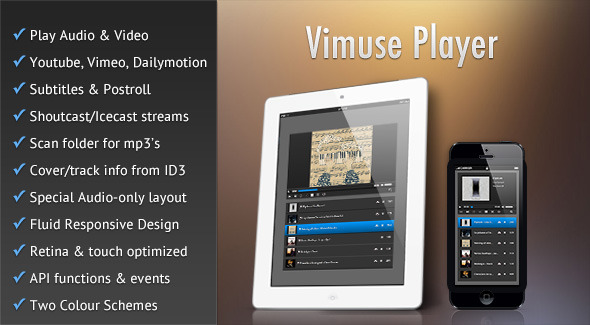
Vimuse - HTML5 Media Player
Description
Wordpress plugin version available here
Layers extension version available here
Vimuse HTML5 Media Player is a jQuery plugin that allows you to play both audio and video in a modern and sleek interface. You can choose to play your own self-hosted audio/video files or videos from Youtube/Vimeo/Dailymotion or even Shoutcast/Icecast streams. The player features a fluid responsive design and can fit in any screen size ranging from mobile phones to desktop browsers. The player is also optimized for retina and touch screens and provides the feel of a native app.
Vimuse plays audio/video using HTML5 in supported browsers and fallbacks to Flash in older browsers. You can pass only a mp4 file for video and mp3 file for audio or pass all the necessary formats for the widest possible support of native HTML5 playback. Whatever you choose to do the player will work in both modern and old browsers (with suitable fallbacks where necessary).
The key features are:
- Play video and audio files.
- HTML5 playback with Flash/Silverlight fallback.
- Show subtitles for videos (only for video files).
- Show postroll content for videos (only for video files).
- Playlist data is passed through JSON or a javascript object.
- Special layout for audio-only mode.
- Play videos from Youtube, Vimeo and Dailymotion.
- Pull videos from Youtube user, playlist or search query.
- Pull videos from Vimeo user, album or channel.
- Pull videos from Dailymotion user, group, playlist or channel.
- Play Shoutcast/Icecast streams and show track info and cover-art.
- Extract audio info from ID3 tags – cover, track, artist, album.
- Build playlist by scanning folder for mp3 files or mp4 files.
- Several layout options.
- Player API functions and events.
- Mobile, retina and touch screen optimized
- The player features a fluid responsive design to account for various screens sizes ranging from mobile phones to desktop browsers and can also be placed in a container of any width.
- Two colour schemes – Dark and Light.
Configurable options are:
- Playlist can either comprise of both audio and video or can only contain audio with a corresponding special layout for the main player area.
- Option to have autoplay of media.
- Option to start autoplay only when the user manually starts playback after the player loads.
- Can set the volume during initialization (or change later with player API).
- Option to turn on playlist shuffle when the player loads.
- Option to set the starting language for subtitles.
- Option to show/hide the playlist when the player loads.
- Choose to have auto-progression of playlist as each media finishes playing.
- Option to show links to external pages in the playlist.
- Can choose to open the external page links in new windows/tabs.
- Option to show links for purchase pages of items in the playlist.
- Can choose to open the purchase page links in new windows/tabs.
- Option to show download links to media files.
- Option to provide lyrics for audio items whose download links are shown in the playlist.
- Option to show file-type icons (audio, video, radio) in the playlist.
- Can choose to show delete buttons in the playlist.
- Option to show item durations in the playlist.
- Can make the playlist sortable.
- Can choose to stop playback when the tab/window in which the player is embedded loses focus. This feature only works in browsers that support the HTML5 Page Visibility API.
- The playlist can be at the bottom, left or right of the main player.
- If the playlist position is set to “bottom” then option to set a max-height for it or just let it have auto-height.
- Option to show thumbnails for the media in the playlist.
- Can choose to show audio item details, such as cover-art, track, artist, album, in the main player area when “audio-only” mode is chosen.
- Option to show cover-art when audio-only mode is chosen.
- Option to show track details in audio-only mode.
- Can choose to show the auxiliary control-bar beneath the main player.
- Option to fix the main player at the top when scrolling the playlist. This option is only effective when the “bottom” playlist position is chosen.
- Can specify the url to the json file containing the playlist details.
- Can pass a javascript object containing the playlist details.
- Option to extract information from mp3 id3 tags, such as cover-art, track, album, artist, duration. You can also of course provide all this information yourself, in which case this option should be disabled.
- Option to pull cover-art for the currently playing track in a Shoutcast/Icecast stream.
- Can set the polling interval during which the track information for a Shoutcast/Icecast stream will be refreshed.
- A playlist caching option is provided. This is very useful when pulling videos from Youtube/Vimeo or extracting ID3 info or scanning folders for mp3’s, because the entire generated playlist is stored in the cache thus resulting in substantially faster loading of the player. Can also mention the interval after which the cache will be refreshed.
- Option to build playlist by scanning a folder for mp3 files.
- Option to build playlist by scanning a folder for mp4 files (and other video formats).
- Option to detect mobile devices, so that they can be served special low resolution videos. The details for these low resolution videos have to be mentioned in the playlist json.
- Can specify the source from which Youtube videos will be pulled (user, playlist or search query). Option to also specify the number of videos that are to be pulled.
- Can specify the source from which Vimeo videos will be pulled (user, album or channel). Option to also specify the number of videos that are to be pulled.
- Can specify the source from which Dailymotion videos will be pulled (user, group, playlist or channel). Option to also specify the number of videos that are to be pulled.
Special Notes
- Autoplay option will not work in mobile devices. This is disabled by device manufactures.
- Only mp3 streams for Shoutcast and Icecast are supported. aacp streams are not supported
- Player volume setting will not show up or work in Android devices. You have to control the volume through the device’s own volume buttons.
- Some API functions will not work for Vimeo and Dailymotion videos.
- Also some of the modern HTML5 features such as Fullscreen and Page Visibility will only work in modern browsers.
- The player uses Youtube API v3 for which you will need to get an API key from Youtube.
- The player script has been tested and is fully compatible with jQuery 1.9+, jQuery 2.0+ and also jQuery 3.0+.
- If you have any query regarding any feature of the player before purchasing then please post your query in the comments section and I will get back to you as soon as possible.
Reviews
Changelog
Version 4.1.7 (22 February 2021)
• Fixed an issue with parsing the response from the Vimeo API
Version 4.1.6 (3 October 2019)
• Fixed issue in Firefox where old media item kept playing in the background when changing to a new item in the playlist
Version 4.1.5 (27 November 2017)
• Fixed an issue with auto-progressing of playlist items when playlist is built with Vimeo/Dailymotion feeds.
Version 4.1.4 (18 April 2017)
• Fixed the issue of audio files not playing in Chrome.
• Fixed an issue with Youtube fullscreen mode.
Version 4.1.3 (25 August 2016)
• Fixed an issue with the playlist progression of Youtube videos in mobile devices.
• Medialelement.js XSS fix.
Version 4.1.2 (21 February, 2016)
• Fixed an issue with autoplay not working for Youtube videos.
Version 4.1.1 (18 February, 2016)
• Fixed a problem with the playback of Flash Youtube videos in Firefox.
Version 4.1 (31 December, 2015)
• Added option to show/hide the player overlay containing the title of the current item.
• Added option to reverse the playlist items' order.
• Fixed a video resizing issue after the video exited from fullscreen.
• Removed min-width restriction of the player container.
• Modified the fix for preventing radio stream caching.
• Improved the internal management of the playlist object.
• Improved the event name spacing.
Version 4.0.1 (24 December, 2015)
• Improved the scrolling behaviour of playlist when selecting new items.
• Fixed the position of the overlay play button for videos in fullscreen mode.
• For Youtube videos in Android the native controls are now used for proper fullscreen functionality.
Version 4.0 (26 November, 2015)
• Added player instance destroy api method.
• Added option to initialize player by passing javascript object instead of json.
• Added option to build playlist by scanning a folder of videos.
• Added option to append new items to playlist. Also added a new "onItemsAppended" event.
• Added option to insert Dailymotion syndication key in embeds.
• Fixed small video size bug in Flash mode for IE and Edge.
• Loop button can be clicked once to repeat playlist, twice to repeat current track, and on clicking the third time looping is again deactivated.
• Fixed a bug with loading of audio cover art in Safari.
• Some UX/UI tweaks.
Version 3.2.1 (27 April, 2015)
• Fixed a bug regarding the showing of download links for media files in the playlist when caching was enabled.
Version 3.2 (14 April, 2015)
• The plugin now uses Youtube API v3.
• Fixed a bug which in a particular case prevented the first playlist item from being played when clicked
Version 3.1 (15 January, 2015)
• Added the option to start autoplay only when the user manually starts playing after the player gets loaded.
• Prevented caching of radio stream in browser when paused.
• Fixed control bar issues with minimal audio player (no cover art and track info).
• Fixed responsive resizing of videos when played with Flash fallback.
• Fixed loading of Icecast track info in IE.
Version 3.0 (18 December, 2014)
• Show original titles of Youtube/Vimeo/Dailymotion videos when user does not supply any custom titles.
• Added the "timeupdate" event.
• Added the method of getting current play-time in player api.
• Added option to download lyrics as text file.
• Added option to show external page links in playlist that can optionally open in new tabs/windows.
• Added option to show links to purchase pages for playlist items. These links can optionally open in new tabs/windows.
• Play Icecast mp3 streams and get track info.
Version 2.0.1 (6 September, 2014)
• Fixed the loading of Youtube user videos feed.
• Fixed the loading of Youtube feeds in IE8.
• Fixed a bug in the "Shuffle" playlist feature.
Version 2.0 (26 August, 2014)
• Added the option showing postroll content after a video file finishes playing.
• Added the option of showing subtitles for video files.
• Added support for displaying Dailymotion videos, including pulling videos from feeds.
• Fixed a bug that prevented passing of data through ajax when a large number of items were in the playlist.
• Various other small bug fixes.
Version 1.0.3 (17 August, 2014)
• Fixed the loading of Youtube playlist feed.
• Fixed some issues with the player fullscreen button in iPad.
• Other small tweaks and fixes.
Version 1.0.2 (30 June, 2014)
• Fixed a problem of videos not changing when clicking/tapping on the playlist for a Youtube feed in an Android device.
Version 1.0.1 (8 June, 2014)
• Fixed a responsive resizing issue for the audio-only mode.
• Fixed the occurrence of an error when there were multiple player instances in the same page.
More Items by CosmoCoder
Categories
Tags
External listing. code.market does not sell this product and does not process payment for it. Pricing, payment, delivery, licensing, refunds, and support are handled by the third-party merchant on its own website. We may earn an affiliate commission from a referral. Details.
Products of the Week.
Submit#1

wanapi.app
Wan API is a developer platform for the Wan video model family. Compare Wan 3.0, Prime and Pro specifications and prices, then prepare a request in the preview playground.
Other · 9,183 views · 28 clicksOther · Week 42 · 9,183 views · 28 clicks
#2

wanapi.ai
Wan API is a developer platform for the Wan video model family. Compare Wan 3.0, Prime and Pro specifications and prices, then prepare a request in the preview playground.
Other · 8,514 views · 15 clicksOther · Week 42 · 8,514 views · 15 clicks
#3

yee.site
Your link in bio, but a real website. Start from beautiful templates and ready-made sections, then add a shop, bookings, a blog and as many pages as you need. Perfect for your link in bio, portfolio or personal site.
Other · 14,715 views · 25 clicksOther · Week 42 · 14,715 views · 25 clicks
#4

upvote.club
Free Social Media Engagement that Helps Boost Your Content. Upvote Club supports 19 social networks with 100+ engagement actions in one dashboard. Add links to your posts and get free engagement from real users.
SaaS · 35,603 views · 104 clicksSaaS · Week 42 · 35,603 views · 104 clicks
#5

Seenshot App
Free, Fast, MacOS Screenshot app. Make Screenshot cmd+shift+2 and send it via link
Desktop App · 24,084 views · 115 clicksDesktop App · Week 42 · 24,084 views · 115 clicks
#6

Conversational Backlinks for Busy Founders
Place Backlink Relevant Conversation for your domain across Forums and Conversations
Website · 35,849 views · 206 clicksWebsite · Week 42 · 35,849 views · 206 clicks
#7

Substack Posting API
Onboard your Agent to Substack. Write Publish on Substack via API
SaaS · 54,691 views · 190 clicksSaaS · Week 42 · 54,691 views · 190 clicks
#8

codester.com
SocialDesk+: Omnichannel Social Commerce & Business Management Platform This is stronger than simply “Social Commerce and Messaging” because it tells buyers this is a complete business platform, not just a messaging script. Turn Social Conversations Into Sales SocialDesk+ is a complete omnichannel social commerce and business management platform built for businesses that sell and communicate with customers through social media. Instead of switching between WhatsApp, Facebook, Instagram and TikTok, businesses can manage customer conversations, comments, products, leads, follow-ups, automation, teams and business reports from one professional workspace. And because the full source code is included, developers, agencies and entrepreneurs can customize, rebrand and launch SocialDesk+ as their own business solution or SaaS platform. 🚀 Build Your Own Social Commerce Business SocialDesk+ gives you the foundation to launch: - Your own SaaS platform - A white-label social CRM - A social-commerce management system - A customer communication platform - A business messaging solution - A custom solution for clients - A multi-business subscription platform 💬 Connect Your Customers Supported social channels include: WhatsApp • Facebook • Instagram • TikTok Bring supported conversations into one centralized workspace and help businesses respond faster without constantly switching between platforms. 🛍️ More Than a Messaging Platform SocialDesk+ combines communication with the tools businesses need to manage customer opportunities: Inbox Manage customer conversations from connected channels. Comments Monitor and respond to social-media comments. Customers & Leads Organize customer information and potential buyers. Products & Catalog Manage products and give your team quick access to product information. Follow-Ups Make sure potential customers don't get forgotten. Automation Automate repetitive customer questions and responses. AI Assistant Provide AI-assisted communication when configured. Team Management Give managers and staff access to the business workspace. Reports & Analytics Track activity using business reports and analytics. The current product listing already includes these capabilities. 🔥 Why Buyers Will Want It Launch Faster Start with an already-built business platform instead of developing the entire system from zero. Customize Everything The full source code is included, allowing developers to change branding, features, workflows and integrations. Build a SaaS Create multiple business workspaces and offer SocialDesk+ as a subscription-based service. Sell to Businesses Offer it to retailers, restaurants, service businesses, online sellers, agencies and other businesses that communicate with customers through social media. Mobile + Web + Backend This isn't just a mobile UI template. It includes: - Flutter mobile application - Python / FastAPI backend - Web interface - Administration tools - Database infrastructure - API-based architecture - SQLite / PostgreSQL support - Android and iOS project structure 💼 One Platform. Multiple Business Opportunities. For SaaS Entrepreneurs Launch your own subscription platform and allow multiple businesses to operate inside separate workspaces. For Software Agencies Customize and rebrand the platform for clients instead of building an omnichannel business system from scratch. For Developers Use the complete source code as a foundation for your own social-commerce or customer-management product. For Businesses Deploy a dedicated version for your own customer-service and social-commerce operations. 🧩 What's Included Mobile - Flutter / Dart - Android - iOS project Backend - Python - FastAPI - SQLAlchemy - Alembic Database - SQLite - PostgreSQL Web - HTML5 - CSS3 - JavaScript Deployment - Docker - Docker Compose - Production configuration Business Platform - Multi-workspace architecture - Authentication - Teams - Customers - Products - Messaging - Comments - Automation - Reports - Subscriptions - Administration The current listing also documents third-party integrations such as Meta, TikTok, Stripe, Firebase, SMTP and optional OpenAI configuration. ⚡ What Makes SocialDesk+ Different? You're not buying a simple: ❌ Chat UI ❌ WhatsApp clone ❌ Flutter template ❌ Admin dashboard ❌ Basic CRM You're getting a complete business platform foundation that can be customized, branded and commercialized. Connect. Automate. Manage. Grow. SocialDesk+ Omnichannel Social Commerce & Business Management Platform One important change I'd make to the current listing The current page starts with: “A simple guide to managing your social conversations, customers, products and business activity.”
Other · 22,047 views · 35 clicksOther · Week 42 · 22,047 views · 35 clicks
#9

sandbook.app
Sandbook reads EPUB, PDF, web pages and scanned pages aloud with Kokoro TTS, an open neural voice model that runs on your iPhone, free and offline. Choose from 41 natural voices in English, Spanish, French, Italian, Brazilian Portuguese and Hindi and follow each word as it is spoken. Try the same voices in your browser first with the free Kokoro TTS online demo.
Other · 21,922 views · 18 clicksOther · Week 42 · 21,922 views · 18 clicks