
Vidora | AI Video Generator With Text to Video, Image to Video - SwiftUI Template
Description
Vidora – AI Video Generator Template for iOS
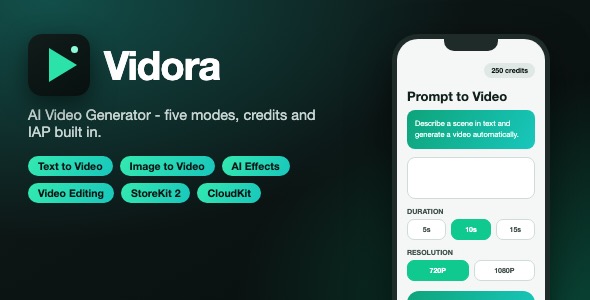
Vidora is a complete, production-ready SwiftUI template for launching your own AI video generation app. It ships with five generation modes, a credit-based monetization system with in-app purchases, CloudKit-synced user settings, 20+ localizations, and a clean client-server architecture that talks to your own PHP backend.
Demo Instructions
This app is a client for your own backend service. There is no login and no demo credentials are required. The template ships with placeholder backend configuration, so generation requests will not return real videos until you connect your own server:
- Open
Vidora/VidoraApp.swiftand replace the placeholder endpoint URLhttps://yourdomain.com/api.phpwith your server URL. - Open
API/imgB64.swiftand replacePLACEHOLDER_YOUR_VIDEO_APP_TOKEN_HEREwith the client token configured in your backend. - A reference PHP contract (JSON operations such as
announce, text-to-video, image-to-video, effects, and editing) is documented in the source code comments and the buyer documentation, including a complete example request payload for every one of the five generation modes and a minimal PHP backend skeleton (api.php) showing the full vidgen / video-status job lifecycle: receive request, validate token, persist the job, dispatch to your AI provider, and serve polling responses until the video URL is ready. - Browsing the five mode screens, the settings screen, and the paywall UI works out of the box without a backend.
- In-App Purchase product identifiers ship as placeholders (
com.yourcompany.yourapp.credits.*) inAPI/iAP.swiftandVidora/Products.storekit– replace them with the IDs of the products you create in your own App Store Connect account. This required setup step is documented in the buyer documentation.
Everything the App Does
- Prompt to Video: describe a scene in text and generate an AI video, with duration (5s, 10s, 15s), resolution (480P, 720P, 1080P) and an audio toggle.
- Image to Video: animate a photo or illustration into a short AI video with an optional style prompt.
- Character Animate: upload a static image and a reference video to animate the character in the image.
- Video Effects: apply preset effects (Flying, Money Raining, Evaporating, Rotating, Inflating, Praying, Dancing) or type a custom effect.
- Video Editing: upload a video and modify it with AI actions – Edit, Outpaint, Repaint and Extend.
- Per-mode intro popup banners that auto-dismiss, remember dismissal, and support swipe-to-dismiss.
- Credit system with live credit balance in the top bar on every screen.
- Paywall with credit packs (Starter 500, Creator 1200, Pro 2800, Studio 6000) and an optional weekly subscription (Pro, 70 credits granted on purchase and on every weekly renewal), built on StoreKit 2 with restore purchases. All credits – packs, subscription grants and free credits – go into one pooled balance: credits never expire, unused credits roll over across renewal periods, and cancelling the subscription stops future grants without clawing back credits already granted.
- Backend-driven free credits: the server can grant free credits on first launch, claimed once and synced via CloudKit.
- Settings screen: negative prompt, remove watermark toggle, guidance scale, image size, seed and steps.
- Generation result screen with video playback and native share sheet export.
- Support screen for contacting the app owner.
- Backend announce call on launch returns server config, ads and rating flags, API key and server messages.
- Unique device identifier stored securely in the Keychain.
- User settings persisted with SwiftData and synced across devices with CloudKit (automatic local fallback).
- Localizable in 20+ languages including English, German, French, Spanish, Portuguese, Arabic, Japanese, Korean, Thai and Vietnamese.
- Full light and dark mode support with a modern emerald green accent theme.
- Custom five-tab bottom navigation with SF Symbols icons.
- BONUS – complete raster canvas editor source bundle: a self-contained, multi-layer image editor (layers, free-draw, erase, mask, smart filters, line draw, shapes, text, crop, rotate, gradients, custom color picker) built on a CanvasManager/LayersWindow architecture. This is original code written for this template with AI assistance. It compiles with the app but is architecturally separate from the five generation tabs and is not wired into the tab UI – it ships as extra source code you can integrate into your own flow (the CanvasManager also carries the shared generation settings used by the settings sheet).
Technology
- SwiftUI – declarative UI for every screen
- SwiftData – local persistence of user settings
- CloudKit – iCloud sync with automatic local fallback
- StoreKit 2 – credit packs and weekly subscription
- URLSession – JSON API client for the PHP backend
- Keychain – secure device identifier
- PHPickerViewController and UIImagePickerController – media selection
- Deployment target: iOS 17.0 – no third-party dependencies
What the Buyer Gets
- Complete Xcode source code (Swift files, asset catalog, app icons, fonts, 20+ localization files)
- README file with system requirements, backend configuration instructions and run steps
- PrivacyInfo.xcprivacy privacy manifest (UserDefaults required-reason API declared)
- Step-by-step buyer documentation with screenshots: setup, renaming, re-skinning, backend configuration and App Store submission checklist
- Styled item description, reviewer message, preview image and thumbnail
- Screenshot pack (700px height JPEGs) ready for upload
Important: AI Provider Costs Are Not Included
This template is a client for your own backend. The external AI provider costs (API credits charged by the provider you connect, for example Gemini, OpenAI, Replicate or fal.ai) are NOT included in the purchase price of this item. Buyers are fully responsible for creating their own AI provider account, configuring their own backend, and paying all usage costs incurred by the app and its users.
Development Disclosure
AI-assisted tools were used to generate or assist with portions of this template’s source code, documentation and graphics. All code has been reviewed, tested and prepared for release by the author.
Please note: this is a source code template. Xcode and basic iOS development knowledge are required to build, customize and publish the app. Video generation requires your own backend service and AI provider account.
| Author | mefjudevllc |
|---|---|
| Price | $14 |
| Sales | 0 |
| Rating | 0 (0) |
| Published | Oct 26, 2026 |
| Last Update | Oct 26, 2026 |
| Compatible Software | Other |
| Compatible With | Swift |
| Mobile Files Included | .xib/.nib |
Categories
Tags
External listing. code.market does not sell this product and does not process payment for it. Pricing, payment, delivery, licensing, refunds, and support are handled by the third-party merchant on its own website. We may earn an affiliate commission from a referral. Details.