Um-Switcher | Sell subscriptions for Ultimate Member powered by WooCommerce
Description
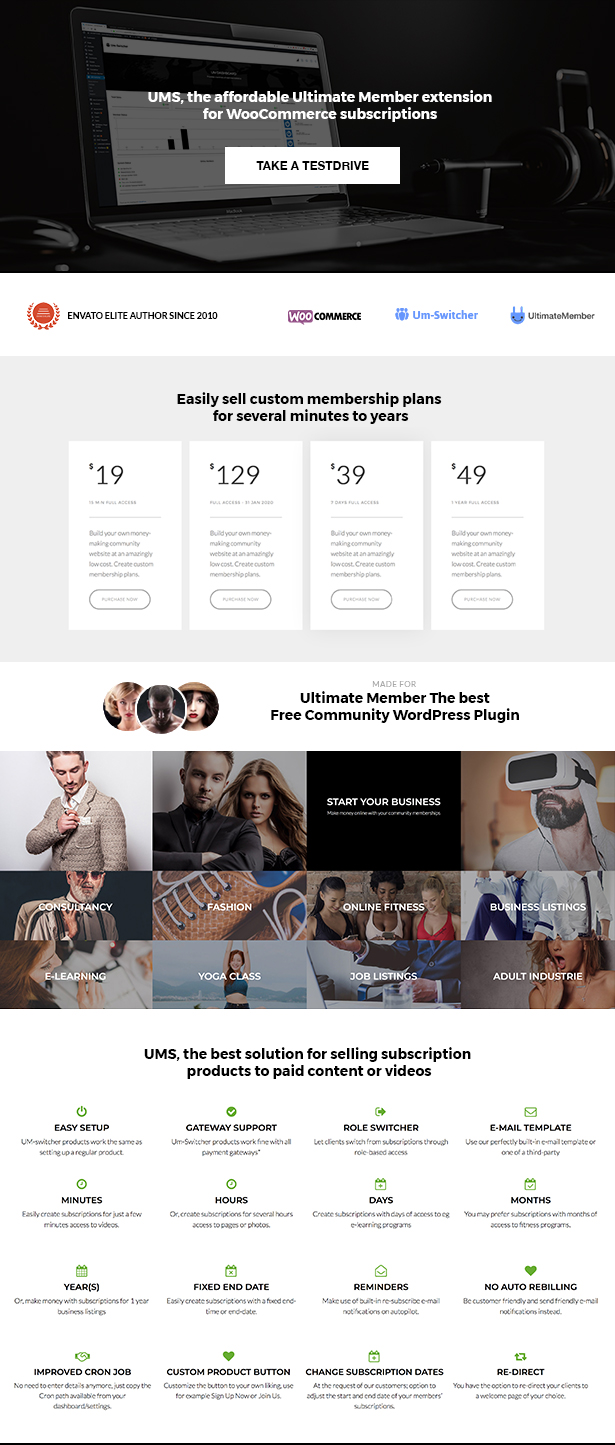
Are you looking for a way to make money with your Ultimate Member Community / Membership? Look no further! Purchase UMS, the affordable Ultimate Member extension for WooCommerce subscriptions. How it works? UMS creates new WooCommerce products for membership plans, based on WP user roles.
UM-SWITCHER is the perfect solution for a wide audience that wants to make money with a Membership / Community website ’’without auto recurring payment’’.
- Theme and Plugin authors that offer paid support.
- Freelancer website, sell subscriptions for access contact details.
- Jobsites, sell access to contact details and more.
- Consulting sites, sell access to contact details and more.
- Video websites, give access to video’s for a limited time. (even 15 min.)
- Model website, sell subscriptions for access to portfolio + contact details.
- Sell subscriptions for your White papers or service.
- And many more.. The possibilities are endless.
Ultimate Member WordPress Plugin
Create your own online Free community with the World’s most popular Community & User Profile WordPress Plugin. The plugin is available for free from the wordpress.org repository. UM is one of the most professional membership plugins on the market today.
Powered by WooCommerce
Um-switcher is powered by WooCommerce, the best and free e-commerce solution. Create your um-switcher product and sell your subscriptions in just minutes.
Feature List
- Create subscription products: days, hours and even minutes.
- Create memberships with fixed End date (new feature since 2.0)
- Send email reminders, the perfect marketing Tool to increase re-subscriptions.
- Restrict your UM custom fields based on user roles.
- Restrict pages, post, menu items and custom profile fields.
- Sell your um-switcher product easy via WooCommerce.
- UMS product button customizable to your own liking (new feature since 2.1)
- Email template included, or use your third party plugin.
- Easily create a cronjob for accurate sending reminders (easy feature since 2.1)
- 5 minutes setup, easy installation support available
- Re-direct option after checkout (new feature since 2.1)
- Change manual subscription start and end date (new feature since 2.1)
UM-Switchers’ alternative for recurring payment
We have designed UM-Switcher without the need of using an auto recurring payment provider like PayPal or Stripe. We didn’t want to use those for 2 reasons:
1. We want to offer a more customer friendly way for re-subscribing. Therefore we decided to add the Email reminder system instead. When a client‘s subscription is about to expire, the system sends an email on autopilot including link to your subscription page. You have total freedom, and combined with a discount coupon you will have a great marketing tool.
The thought: Happy and loyal subscribers keep coming back without the need of an auto recurring payment plan. Our own experience is that it’s an annoying method of keeping members. Some of you will disagree and that’s fine too.
2. With PayPal it’s not 100% guaranteed that you get your money. Even after 6 months chargebacks are possible. And, there is nothing you can do about it and your money will be gone forever.
Requirements
To use this extension you have to install the following Wordpress plugins, both are free available from your WordPress Plugin Dashboard.
- Ultimate member (free)
- WooCommerce (free)
Hosting Requirements
We cannot emphasise enough how important a good hosting provider is, that offers a cronjob option, and is ready for WordPress and WooCommerce. A simple shared hosting is somtimes not sufficient combined with Ultimate Member and some extra add-ons.
We see sites are sometimes not available for a moment on shared hosting platforms. We also see that some server settings are not able to handle WordPress websites properly. These kinds of issues are not covered by item-support (via Envato and us). Cost of researching hosting providers extend the revenue we make on sales of our plugin.
Besides that, we assume you want to make money with you website and this is the main purpose of Um-switcher. A community website requires stable and fast hosting! Your visitors expect a fast loading website and will leave your webpage soon if it’s loading slowly. For a small website, a low-budget hosting may work, for a full-blown membership you can forget about it.
- Hosting offers a cronjob feature.
- Hosting ready for WordPress, WooCommerce and Ultimate member. (See their websites for information about requirements)
- Preferable PHP version 7 and up; php 7 is much faster and some older versions can have issues.
Support
We offer support on weekdays from 10.00 – 18.00 hours Dutch Time. Visit www.umswitcher.com for 1 on 1 support. Our support staff will answer all your questions within 24 hours and sometimes even faster.
Update to 2.1
Since 2.1 UMS works on the default WordPress user roles, you need to update your member user roles.
- Visit Ultimate member/User roles and check your user roles. For more info about the new user roles visit ultimatemember.com
- Visit WooCommerce/Products and open your UMS product and scroll to ‘Select User Roles’ select the user role and hit save! (always hit save for the new user roles to be applied)
Change log
Version 3.4 – 4-05-2021
FIXED: End Date to Reminders Calculation Issue
FIXED: Cronjob Bug
FIXED: Roles, Reminders and Subscription Update
FIXED: UM-shortcode and Predefined field bugs
Version 3.3 – 4-02-2021
FIXED: WooCommerce 4.9.2 compatibility issue
Version 3.0 – 16-07-2020
FIXED: Fixed Ajax issue
FIXED: Fixed Cronjob link issue
FIXED: Roles, reminders and subscription.
UPDATE: Expiration display on Profile / UM-shortcode field / use short-code:
Version 2.5 – 30-07-2019
FIXED: Fixed Cronjob issue
FIXED: Roles Update
Version 2.4 – 13-03-2019
UPDATE: Reminder 1 and 2 manual update from the subscription tab
NEW: Manual Update Roles from the subscription tab
NEW: New histories tab for users with admin notes.
NEW: New Dashboard Design
FIXED: Mobile Responsiveness
Version 2.3 – 15-10-2018
Fixed Subcription Date field on User Profile
UPDATE/ACTION REQUIRED: Admin should regenerate new UMS subscription date field and hit save. (For those user who can see HTML codes only for old accounts)
NEW: Subscription Date – Added a text when user had no subscription
NEW: Remove Header Image in Subscription Tab for better loading speed
UPDATE: Fixed styling issues on mobile and desktop.
NEW: Add Pop Up window “SAVED DATE” with refresh button
UPDATE: Display clients name on Overview list Portrait mobile
Version 2.2 – 04-09-2018
FIXED: roles not updating
Version 2.1 – 07-05-2018
NEW: Default WP User Roles system REMOVED: Community roles since Ultimate member 2.0 NEW: UMS Product button (see settings) add your custom text e.g. Sign Up Now NEW: Enabling admin users to modify the date of subscriptions NEW: Added a note on umswitcher subscription when an order from WC is deleted NEW: warning popup when deleting a subscription from UM-Switcher Overview NEW: WordPress properties for cronjob (see settings/server settings) UPDATE: desktop/mobile styling issues UPDATE: fix date picker design issue UPDATE: on-hold and auto complete orders UPDATE: UM 2.0 hooks and variables updated REMOVED: SAVE icon from UM-Switcher Overview REMOVED: Add to Cart Button Default Values for umswitcher product REMOVED: File handling codes
Version 2.0.9 – 05-10-2017
NEW: on-hold and auto complete orders
Version 2.0.8 – 25-09-2017
CHECK: spaces on the footer removed on umswticher.php
Version 2.0.7 – 18-09-2017
FIXED: Orders auto complete problem
NEW: Predefined Field Display expire date
Version 2.0.6 – 23-08-2017
CHECK: Cronjob vs wp-refresh crojob
Version 2.0.5 – 23-08-2017
CHECK: Cronjob connect errors
Version 2.0.4 – 22-08-2017
UPDATE: Updates on the database and codes – Default value is invalid for product type.
Version 2.0.3 – 9-08-2017
UPDATE: Auto generation of files in root directory being used in file handling
Version 2.0.2 – 8-08-2017
UPDATE: Moving files to root directory
Version 2.0.1 – 2-08-2017
UPDATE: Change date formats
Version 2.0 – 16-07-2017
NEW: End date Product
NEW: Admin panel
Version 1.2.8 – 13-04-2017
UPDATE: WooCommerce 3.0
UPDATE Change add to cart template in um-switcher as WooCommerce template changed
UPDATE Change product type extended wp_product_simple to wc_product
UPDATE At Refresh cron job page change checkmail condition yes and no to on and off
UPDATE Change order access functions in um_switcher.php
UPDATE Change default value to off at email template settings
UPDATE Change conditions at time of product save class-um-switcher-meta-box.php
ADD: Add Dashboard widget for plugin summary
Version 1.2.7 – 03-03-2017
FIXED: email template option saving issue for email template
FIXED: multi-site Network settings issue
Version 1.2.6 – 01-03-2017
FIXED: notice from order page when new user purchase product
FIXED: notice from email template and overview page
FIXED: page navi not showing
Version 1.2.5 – 03-02-2017
UPDATE code at um-switcher/um-switcher.php on line 752
UPDATE code at um-switcher/um-switcher.php on line 817
Version 1.2.4 – 21-01-2017
FIXED: Send test mail character cutting issue.
Version 1.2.3 – 16-12-2016
FIXED: deprecate issue for user role.
Version 1.2.2 – 09-12-2016
FIXED: Minor issue with email template
Version 1.2.1 – 08-12-2016
NEW: Gets Timezone from default WordPress settings
Version 1.2 – 29-11-2016
NEW: Search filter and pagination subscribers overview page.
Version 1.1 – 23-11-2016
NEW: Set email template in reminder mail.
Version 1.0 – 20-10-2016
**Initial release
Search keywords
Ultimate member WordPress Plugin, WooCommerce WordPress Plugin, Umswitcher WordPress Plugin, Membership, subscription for memberships, Themedutch, Restrict content, Ultimate member user Roles switcher, Custom User Profile, suitable for model websites, freelancer websites, marketing websites, paid support websites and many more…

External listing. code.market does not sell this product and does not process payment for it. Pricing, payment, delivery, licensing, refunds, and support are handled by the third-party merchant on its own website. We may earn an affiliate commission from a referral. Details.
Products of the Week.
Submit#1

wanapi.app
Wan API is a developer platform for the Wan video model family. Compare Wan 3.0, Prime and Pro specifications and prices, then prepare a request in the preview playground.
Other · 7,595 views · 19 clicksOther · Week 42 · 7,595 views · 19 clicks
#2

wanapi.ai
Wan API is a developer platform for the Wan video model family. Compare Wan 3.0, Prime and Pro specifications and prices, then prepare a request in the preview playground.
Other · 7,002 views · 11 clicksOther · Week 42 · 7,002 views · 11 clicks
#3

yee.site
Your link in bio, but a real website. Start from beautiful templates and ready-made sections, then add a shop, bookings, a blog and as many pages as you need. Perfect for your link in bio, portfolio or personal site.
Other · 13,033 views · 20 clicksOther · Week 42 · 13,033 views · 20 clicks
#4

upvote.club
Free Social Media Engagement that Helps Boost Your Content. Upvote Club supports 19 social networks with 100+ engagement actions in one dashboard. Add links to your posts and get free engagement from real users.
SaaS · 33,940 views · 104 clicksSaaS · Week 42 · 33,940 views · 104 clicks
#5

Seenshot App
Free, Fast, MacOS Screenshot app. Make Screenshot cmd+shift+2 and send it via link
Desktop App · 22,437 views · 114 clicksDesktop App · Week 42 · 22,437 views · 114 clicks
#6

Conversational Backlinks for Busy Founders
Place Backlink Relevant Conversation for your domain across Forums and Conversations
Website · 34,223 views · 204 clicksWebsite · Week 42 · 34,223 views · 204 clicks
#7

Substack Posting API
Onboard your Agent to Substack. Write Publish on Substack via API
SaaS · 53,108 views · 190 clicksSaaS · Week 42 · 53,108 views · 190 clicks
#8

codester.com
SocialDesk+: Omnichannel Social Commerce & Business Management Platform This is stronger than simply “Social Commerce and Messaging” because it tells buyers this is a complete business platform, not just a messaging script. Turn Social Conversations Into Sales SocialDesk+ is a complete omnichannel social commerce and business management platform built for businesses that sell and communicate with customers through social media. Instead of switching between WhatsApp, Facebook, Instagram and TikTok, businesses can manage customer conversations, comments, products, leads, follow-ups, automation, teams and business reports from one professional workspace. And because the full source code is included, developers, agencies and entrepreneurs can customize, rebrand and launch SocialDesk+ as their own business solution or SaaS platform. 🚀 Build Your Own Social Commerce Business SocialDesk+ gives you the foundation to launch: - Your own SaaS platform - A white-label social CRM - A social-commerce management system - A customer communication platform - A business messaging solution - A custom solution for clients - A multi-business subscription platform 💬 Connect Your Customers Supported social channels include: WhatsApp • Facebook • Instagram • TikTok Bring supported conversations into one centralized workspace and help businesses respond faster without constantly switching between platforms. 🛍️ More Than a Messaging Platform SocialDesk+ combines communication with the tools businesses need to manage customer opportunities: Inbox Manage customer conversations from connected channels. Comments Monitor and respond to social-media comments. Customers & Leads Organize customer information and potential buyers. Products & Catalog Manage products and give your team quick access to product information. Follow-Ups Make sure potential customers don't get forgotten. Automation Automate repetitive customer questions and responses. AI Assistant Provide AI-assisted communication when configured. Team Management Give managers and staff access to the business workspace. Reports & Analytics Track activity using business reports and analytics. The current product listing already includes these capabilities. 🔥 Why Buyers Will Want It Launch Faster Start with an already-built business platform instead of developing the entire system from zero. Customize Everything The full source code is included, allowing developers to change branding, features, workflows and integrations. Build a SaaS Create multiple business workspaces and offer SocialDesk+ as a subscription-based service. Sell to Businesses Offer it to retailers, restaurants, service businesses, online sellers, agencies and other businesses that communicate with customers through social media. Mobile + Web + Backend This isn't just a mobile UI template. It includes: - Flutter mobile application - Python / FastAPI backend - Web interface - Administration tools - Database infrastructure - API-based architecture - SQLite / PostgreSQL support - Android and iOS project structure 💼 One Platform. Multiple Business Opportunities. For SaaS Entrepreneurs Launch your own subscription platform and allow multiple businesses to operate inside separate workspaces. For Software Agencies Customize and rebrand the platform for clients instead of building an omnichannel business system from scratch. For Developers Use the complete source code as a foundation for your own social-commerce or customer-management product. For Businesses Deploy a dedicated version for your own customer-service and social-commerce operations. 🧩 What's Included Mobile - Flutter / Dart - Android - iOS project Backend - Python - FastAPI - SQLAlchemy - Alembic Database - SQLite - PostgreSQL Web - HTML5 - CSS3 - JavaScript Deployment - Docker - Docker Compose - Production configuration Business Platform - Multi-workspace architecture - Authentication - Teams - Customers - Products - Messaging - Comments - Automation - Reports - Subscriptions - Administration The current listing also documents third-party integrations such as Meta, TikTok, Stripe, Firebase, SMTP and optional OpenAI configuration. ⚡ What Makes SocialDesk+ Different? You're not buying a simple: ❌ Chat UI ❌ WhatsApp clone ❌ Flutter template ❌ Admin dashboard ❌ Basic CRM You're getting a complete business platform foundation that can be customized, branded and commercialized. Connect. Automate. Manage. Grow. SocialDesk+ Omnichannel Social Commerce & Business Management Platform One important change I'd make to the current listing The current page starts with: “A simple guide to managing your social conversations, customers, products and business activity.”
Other · 20,486 views · 35 clicksOther · Week 42 · 20,486 views · 35 clicks
#9

sandbook.app
Sandbook reads EPUB, PDF, web pages and scanned pages aloud with Kokoro TTS, an open neural voice model that runs on your iPhone, free and offline. Choose from 41 natural voices in English, Spanish, French, Italian, Brazilian Portuguese and Hindi and follow each word as it is spoken. Try the same voices in your browser first with the free Kokoro TTS online demo.
Other · 20,410 views · 17 clicksOther · Week 42 · 20,410 views · 17 clicks