
Ultimate World Radio - PHP Script
Description
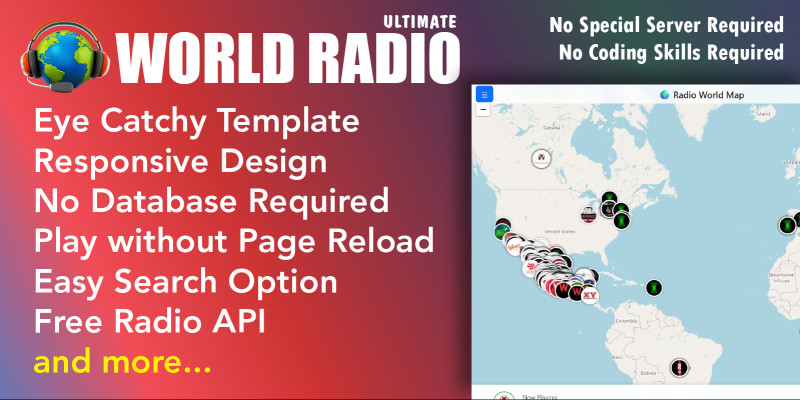
Ultimate World Radio is a beautifully designed, responsive web app that connects users to a diverse collection of live radio stations worldwide. With its interactive map-based UI, users can easily discover and play music, news, and cultural broadcasts by clicking on map markers representing stations by geography.
From spiritual Indian chants to German pop or Caribbean rhythms — this platform brings the world’s audio right to your ears.
It also offers a backend configuration option for managing website settings, metadata, SEO, banner ads, and more, ensuring a fully customizable deployment.
v1.2 update changelogs
New : Record Radio Stations and Save to your computer
📻 Music Player & Design Updates
- 3D Play/Pause Button: The Play button now feels like a real button. It rises slightly when you hover over it and pushes down when you click it.
- 3D Volume Slider: The volume button is now a round, easy-to-grab green circle that gets slightly bigger when you hover over it.
- Music Visualizer (Equalizer): Added dancing green sound bars next to the song name that bounce when music is playing and freeze when you pause.
- Perfect Circle Station Logos: Fixed a bug where wide logos looked stretched out like ovals. Now, all station logos fit into perfect circles.
⚡ Super Fast Loading
- Instant Map Loading: The page now loads the map and all 30,000 stations almost instantly, instead of making you wait several seconds for the system to retrieve them.
🗺️ Map Styles & Filters
- Map Styles Selector: You can now switch the map style using a dropdown menu in the header. Choose between a Standard map, a Night map, a Satellite view, or a Terrain mountain view.
- Filter by Music Genre: You can filter the map to only show stations of a specific genre, like Jazz, Rock, Pop, Classical, or Electronic.
- Pulsing Map Pin: The station you are currently listening to will pulse on the map, helping you spot it instantly on the globe.
🧭 Fun Tools & Navigation
- ❤️ Favorites List: You can click the heart icon on any station to add it to your favorites. A new red floating button lets you open your list and play them instantly.
- 🎲 "Surprise Me" Button: A new orange floating button picks a random station from anywhere in the world, flies the map there, and starts playing.
- ⏱️ Sleep Timer: You can set a timer (15, 30, 45, or 60 minutes) to automatically turn off the radio when the timer runs out.
- 🌤️ Local Time & Location Card: When listening to a station, a small card in the bottom-left corner displays where the station is located and its current local time.
🔗 Easy Sharing
- Share Stations: Click the "Share" button next to the station name to copy a direct link. Sending this link to friends allows them to open the page directly on that station.
📂 Sleek Side Menu
- Sliding Animation: The cards in the side menu slide in one by one when you open it.
- glowing Social Buttons: The social media links are now neat round buttons that turn into their correct brand colors (Facebook Blue, YouTube Red, WhatsApp Green) when you hover over them.
- Keyboard Controls: You can now control the radio using your keyboard:
Spacebar➔ Play or Pause.Up / Down Arrows➔ Adjust Volume.M Key➔ Mute or Unmute.R Key➔ Play a random station.
The demo website displays only a limited number of channels, but you can retrieve over 30,000+ channels.
To retrieve more radio channels, simply adjust the limit= parameter to the desired number.
Features

🚀 Features List:
🌍 Map & Radio Experience
- 🌐 Interactive World Map using Leaflet.js.
- 📡 Click-to-Play Stations via map markers with logos.
- 🔍 Live Search for radio channels.
- 🎧 Now Playing Panel with real-time station info.
- 📍 Geolocation Fallbacks for stations with missing coordinates.
- 💡 Dark/Light Mode Toggle.
JUST CHANGE THE LIMIT IN THE CONFIG AND GET MORE CHANNELS
⚙️ Configuration & Integration
-
🛠️ Easy customization via
config.php. - 🎛️ Website settings: name, logo, contact, social links.
-
🧾 SEO ready:
meta_title,meta_desc,meta_keywords. - 📱 Mobile responsive and tablet-friendly UI.
🧩 Data & API Features
-
🎙️ Fetches from external API:
api-geo-radio2.php. -
📊 Limit response via
?limit=query parameter.
📢 Advertising Support
-
📌 Ad Enable Toggle via
ad_enabled = 1. -
🖼️ Banner Image & Link via
banner_urlandbanner_imglink.
📣 Sidebar / Offcanvas Info Panel
- 🏢 About section using dynamic website name and meta description.
- 📬 Contact info: email, phone, address.
- 📲 Social media icons (Facebook, Twitter, Instagram, YouTube, LinkedIn, WhatsApp).
Requirements
ComponentRequirementWeb ServerApache, Nginx, or LiteSpeedPHP VersionPHP 7.4 or higher (PHP 8.x recommended)cURLEnabled (for remote API requests)JSONEnabled (built-in in PHP 5.2+ by default)SSL SupportRecommended (for HTTPS API calls)Instructions
Just run install.php and it's done
V 1.1 Released
Release — Version 1.1 (09-10-2025)
Highlights & improvements for the radio map application v1.1Summary
Performance and usability update: faster data fetching from the radio API, a new preloader for smoother loading, configurable radio limits, multiple feature enhancements, and several bug fixes.
What’s new
- Faster API fetching — Optimized requests and response handling to reduce load times and improve reliability.
- Preloader added — A visible loading indicator provides better feedback while stations and assets load.
- Configurable radio limits — Manage maximum radio/station limits from the
configfile for better resource control.
Improvements
- Improved station list rendering for faster searching and scrolling.
- Enhanced UI responsiveness on mobile and desktop.
- Reduced initial payload by lazy-loading station artwork and heavy assets.
Bug fixes
- Fixed multiple issues causing intermittent API timeouts.
- Resolved visual glitches with the map markers and station icons.
- Corrected various minor UI and accessibility issues.
config file to set the preferred radio limit and test on a staging environment before deploying to production.| Author | kodemart |
|---|---|
| Category | Scripts & Code / PHP Scripts / Multimedia / Music |
| Price | $25 |
| Extended License | $75 |
| Rating | 4.00 from 3 ratings |
| Reviews | 3 |
| Likes | 4 |
| First Release | Jun 23, 2025 |
| Last Update | Sep 21, 2026 |
| Files included | .php, .css, .html, JavaScript .js |
| Software version | PHP 8.0, PHP 8.1, PHP 8.2, PHP 8.3, PHP 8.4 |
Categories
Tags
External listing. code.market does not sell this product and does not process payment for it. Pricing, payment, delivery, licensing, refunds, and support are handled by the third-party merchant on its own website. We may earn an affiliate commission from a referral. Details.
Products of the Week.
Submit🥇

Perceptle
Perceptle is a daily browser-based game that challenges you to test your sensory intuition through five quick estimation and rhythm-based rounds.
Other · 1,489 views · 9 clicksOther · Week 47 · 1,489 views · 9 clicks
🥈

Free LinkedIn Likes From Real
Get free LinkedIn likes on your posts from real members who react by hand. No
SaaS · 1,632 views · 10 clicksSaaS · Week 47 · 1,632 views · 10 clicks
🥉

STOP GUESSING WHAT TO POST
AI that learns your brand voice and builds a month of consistent, on-brand social content: carousels, posts and hooks that sound like you, not like everyone else's AI.
SaaS · 9,176 views · 75 clicksSaaS · Week 47 · 9,176 views · 75 clicks
#4

aaas.market
407 reliable micro tools for solo founders, marketers and creators. They work in your browser
SaaS · 1,597 views · 5 clicksSaaS · Week 47 · 1,597 views · 5 clicks