Ultimate Radio - iOS Full Application icon

Ultimate Radio - iOS Full Application

Hot or Not
Ultimate Radio - iOS Full Application

Description

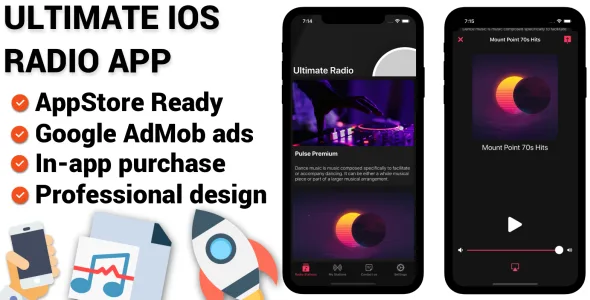
Ultimate iOS Radio application is an app to play the Internet Radio stations.

This application allows you to listen and enjoy variety of genres like classical, rock, pop, instrumental, hip-hop, music, talks, news, comedy, shows, concerts and other variety of programs or audio content made available by various Internet Radio Broadcasters across the world!

Ultimate iOS Radio offers you an unique music user friendly experience:
  • Simple and intuitive user interface
  • Listen and enjoy your favourite music genres
  • Share your favourite station via any social network
  • Add your own online radio stations via few clicks and listen to them
  • Enjoy and control your music in the background mode to save your battery life
  • Cast radio streams to your TV via AirPlay with one click
  • Send email requests without leaving the app

Enjoy Ultimate iOS Radio anywhere and everywhere! While in your car, on the train, on your way to work, working out or streamed on your TV!

Explore the world of music now!

FEATURES:
  • Google AdMob banner and interstitial
  • In-App purchase to remove ads
  • Fully step by step illustrated documentation
  • 100% Ready to style and publish on AppStore
  • Extremely easy to re-skin
  • Beautiful and professional looking design
  • High Quality image assets
  • Pre-installed database structure for the online radio stations
  • Native libraries to load url audio inside the application
  • Manage new radio stations with ease within Google Firebase
  • User Notifications (push notification can be added on request)
  • Google Firebase application analytics
  • Nice and minimal iOS native design
  • In-app contact page to send emails within the app
  • List of cool resources to use

External listing. code.market does not sell this product and does not process payment for it. Pricing, payment, delivery, licensing, refunds, and support are handled by the third-party merchant on its own website. We may earn an affiliate commission from a referral. Details.

Sixdeo | iOS Social Video Sharing Application icon

Sixdeo | iOS Social Video Sharing Application

Hot or Not
Sixdeo | iOS Social Video Sharing Application

Description

Sixdeo is a great solution for you to quickly build a mobile app where people can watch and upload short videos to show their skills and talent, even if you don’t know how to code

Description

Sixdeo is a full-working template (UI + Source Code) where people can post or watch 6-second short videos and share them to the community. Users are also allowed to report inappropriate content/users, like and comment videos. The Admin can daily check the database for reported content or users and take action for it, as well as manually edit data in the Database.

The design is clean, code is commented and project folders and files are well organized in the package. • Check out the Features section below to see what this app does. • Read the online Documentation to learn how to configure the template’s features and the database. • Check out the demo Database, login as: Username: demo Password: demo • Keep an eye to the Change Log on the bottom of this page when an update gets released.

Backend

The backend of this template is DBase, so you have to install it on your own VPS server (AWS Lightsail strongly recommended. After performing the configurations mentioned below, you will run the app and see no content, so Sign Up with a test user in order to create a test account and start testing the app.

Extended License

As per Envato Marketplace Terms, the Extended License applies to all applications that charge money to their users. In case your users will not be charged of money through your own version of this app, you can still buy it under a Regular license. Therefore, you must buy this template under and Extended License if your plans are either one or more of the following:
  • Add In-App Purchase or any other Payment Gateway in the source code and publish the app for free on the App/Play Store – NOTE: If you want to publish your own version of this application for FREE only, then you can still buy it under a Regular License.
  • Publish this application as a PAID app on the App Store.
  • Transfer the live app of your own verison of this app on the App/Play Store to another owner by selling your ownership on flippa.com or similar marketplaces.
IMPORTANT: You are NOT allowed to sell or share the original source code of this template anywhere due to copyright infringement

Features

iOS Swift language – Native Xcode project – Edit the template as you wish with the power of Xcode and Swift. Storyboard, iOS 11.0 and above, Universal – Run your app on all iOS devices DBase API – Host DBase into your own VPS server (AWS Lightsail is strongly recommended) Watch and post Videos – Users are free to upload an unlimited number of videos of a length of 6 seconds (this duration is also customizable in the code by the Admin). People can like and comment the posted works. Search videos by keywords and Categories – Use the top search field to search for posts by typing your desired search terms, or tap the Categories in the horizontal list. Report inappropriate Users or Content – People can help the Admin by reporting abusive posts or users, this is a good feature to build a stable and reliable community. Profile screen with avatar images – The account screen makes you know who’s in the community Edit profile with Name, Username, Email – Edit your profile and show people your identity, make yourself trustworthy. Follow your favorite people – In the Users Profile screen you can follow them and them and then see their posts in the Home screen, in the ‘Followed’ category. Notifications screen – Check out your account’s activity, from likes to comments and followers. If you tap a row you’ll be redirected to the User’s Profile screen. Terms of Use and Privacy Policy HTML file (GDPR compliant) – The template contains a ‘tou.html’ file the Admin can edit to display his Terms of Service to the app’s folks. Push Notifications – Users will receive notifications for likes, comments, followers and new videos. AdMob Interstitial ads – Get some revenue from full-screen advertisement banners. Modern, clean design – The UI has been carefully crafted to offer the best user experience to your clients. Online Documentation – Read the extensive guide of this template to be able to configure it properly. PSD icons included in the package – App and buttons icons are stored into a PSD folder, for easy image replacement.

Requirements

The latest official version of Xcode – Beta versions of an IDE usually never work 100% properly, and the code of this app has been written using the latest official version of Xcode and you can download it from the Mac App Store. You must use it and avoid Betas. An Apple Mac computer, updated to its latest OS version – It’s always good to keep your macOS up to date, technology keeps growing and I follow its changes, as well as updating my templates every time a new OS gets released. An Apple Developer Account with an active iOS Development Program – This is needed for you to publish apps on the iTunes App Store. You can still edit this template on code without that account, but you won’t be able to run it on your real iOS device since you’ll need a Team ID. Basic knowledge of Xcode and Swift language – You don’t need to be a skilled or professional developer, anyway it’s recommended to have at least the basic knowledge of what you’re dealing with, in order to be able to customize this template and publish your applications on the App Store. DBase API – Host DBase into your own VPS server (AWS Lightsail is strongly recommended) An active AdMob account – Unless you want to remove ads in this app, you need to sign up for an AdMob account to display them. A real device to test the app before submitting it to the App Store – iOS Simulators may fail during tests, they are not reliable as a real device is, so I strongly recommend you to always run this application on a real phone/tablet. This is also suggested by Apple’s official Guidelines.

Change log

Feb 9, 2022

- Due to the upcoming Apple terms about Privacy, I've added a button to completely delete your account in the 'EditProfile' controller in Storyboard, and its relative code in the 'EditProfile.swift' file 

Jan 28, 2022

- Updated to XCode 13.2.1
- Changed backend and SDK to the DBase API -> 

/* IF THIS IS AN UPDATE FOR YOU: This new backend is an evolved version of the previous one, so you can backup your current JSON files and 'uploads' folder, install DBase in your VPS server, and upload those files  **

Support

For any support requests, please contact me through my Profile’s Contact Form

Rate my Work

Your support is always greatly appreciated, from comments to product’s reviews, so please click here to rate your purchases!

External listing. code.market does not sell this product and does not process payment for it. Pricing, payment, delivery, licensing, refunds, and support are handled by the third-party merchant on its own website. We may earn an affiliate commission from a referral. Details.







