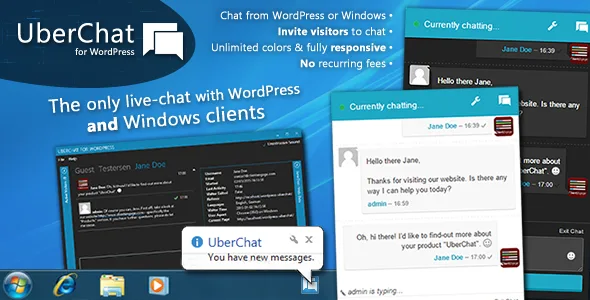
Uber Chat - Ultimate Live Chat with Windows Client
Description
UberChat – The Ultimate WordPress Chat with WordPress and Windows Client
Features & Benefits
- One-time fee
- Seamless live-chat experience
- Beautiful, modern and customisable theme
- WordPress and full Windows clients included
- Canned responses
- Operator-initiated chats
- Enquiry-form fallback
- Multiple operators (WordPress and Windows)
- Unlimited colours & a beautiful dark theme
- Responsive design
- Several audio-notifications to choose from
- Optional email-field
- Full history of past discussions and submitted enquiries
- Chat state remains across your entire website
- And much more… Check-out the demo!


Live Support Chat for WordPress
UberChat allows you to instantly communicate with your website’s visitors. The beautifully modern and easy-to-use interface is very intuitive and allows your visitors to contact you whenever they need to – ultimately generating better leads for your business.
UberChat also comes with the unique feature of having a Windows-based client included out-of-the-box – giving you a beautiful, native interface to actively engage your website’s visitors through operator-initiated chats.
Windows-based Client Included
UberChat is the only live-chat plugin that also has a Windows client. The native client means that you can keep UberChat running in the background without it getting in your way. Whenever a visitor initiates a chat with you, you will be notified with a visual and audio notification.
You can also adapt the look & feel of the Windows client. Several pre-defined colour-themes and audio notifications are there for you to pick what you like.
Live Chat from Within WordPress
Not using Windows? No problem: of course, UberChat also has a fully-featured web-interface that you can use from within your WordPress admin. The interface provides you with all of UberChat’s functions.
Operator-Initiated Chats
The operator interface shows you a list of all visitors (non-admins) currently browsing your site. With a click of a button, you can actively invite them into a support chat.
NO Recurring Fees: One-Time License & Unlimited Use
Unlike subscription services, there are absolutely no recurring fees when choosing UberChat. After purchasing the one-off license, you may use it as much as you want and as long as you want (see the CodeCanyon Regular License for more information).
Canned/Prepared Responses
You can create answers to the most frequently asked questions and then select them when you’re chatting. This way, you save yourself and your visitors valuable time when servicing discussions.
Unlimited Colour Themes
You can choose any colour as your chat’s primary colour. This way, UberChat will seamlessly integrate with your site’s look & feel. Additionally, UberChat also has a beautiful dark-theme which you can activate on darker themed websites.
Enquiry-Form Fallback
Not online 24/7? Not a problem! UberChat will fall-back into the enquiry-form mode. Visitors to your website will be able to send you email-messages which you can read at your convenience.
Multilingual Interface
UberChat was built with internationalisation in mind: currently, English as well as German are included. That said, you can easily translate UberChat into any language by translating the included po-files, or by using WPML.
Works with network sites
UberChat was developed so as to support WordPress’s network-site feature. But remember that all network sites act like totally separate installations – the Windows client can only connect to one site at a time.
View Visitor Metadata
The chat-interface shows you a range of useful metadata about the visitors you chat to – including the page they’re on, their referrer and accepted languages.
System Requirements
In order to be able to use UberChat, you must fulfil the following system requirements:
- WordPress 3.3 (minimum; tried & tested up to 4.1)
- PHP with a version of greater than PHP 5
- PHP’s mbstring enabled
- Enough server-resources for the number of concurrent chatters you expect
- Enough server-resources for the number of concurrent chatters you expect
System requirements of the Windows-based client
- .NET4 Framework (will be installed if not already available; part of Windows since Vista)
- Windows XP, Windows Vista, Windows 7, Windows 8, Windows 8.1
A note on server performance
This chat system employs AJAX technologies and does not rely on WebSockets for its communication. This means that anyone can run UberChat, as long as your server fulfils the requirements outlined below. However, this also means that this system is not intended for heavy-duty use: so don’t build the next Facebook and try to have 10m people use this at once. That being said, on average server-specifications, there is nothing stopping you from having 10-15 concurrent conversations.
Changelog
31/05/2016:
    - Public release of ClientEngage UberChat v2.2.1
        - Fixes compatibility with PHP 7
22/04/2016:
    - Public release of ClientEngage UberChat v2.2
        - WordPress-plugin: fixed compatibility with WordPress 4.5
13/01/2016:
    - Public release of ClientEngage UberChat v2.1.10
        - WordPress-plugin: fixed a DateTime parsing/formatting error that some users encountered
25/10/2015:
    - Public release of ClientEngage UberChat v2.1.9
        - WordPress-plugin: improved handling of dates/times
        - WordPress-plugin: fixed potential PHP class-name collision
05/04/2015:
    - Public release of ClientEngage UberChat v2.1.8
        - WordPress-plugin: hiding/showing UberChat on individual pages now works as expected
02/04/2015:
    - Public release of ClientEngage UberChat v2.1.7r1
        - Windows-client: fixes error messages when Internet connection is lost and keeps the chat active
01/04/2015:
    - Public release of ClientEngage UberChat v2.1.7
        - WordPress-plugin: text inside the visitor-menu are now also translateable
        - WordPress-plugin: the chat now hides users such as "Googlebot" and "null" (other robots)
        - Windows-client: fixed an error that caused a crash when clicking "close" on a conversation (please uninstall the old plugin from the Windows control panel, then install the new version)
16/03/2015:
    - Public release of ClientEngage UberChat v2.1.6
        - Windows-client: fixed a bug where the Windows client may freeze when dragged/moved around the desktop
15/03/2015:
    - Public release of ClientEngage UberChat v2.1.5
        - Fixed a dependency on mb_string for the few users who do not have it installed
04/03/2015:
    - Public release of ClientEngage UberChat v2.1.4
        - Now gravatars are loaded via SSL if the site runs on the HTTPS protocol
27/01/2015:
    - Public release of ClientEngage UberChat v2.1.3
        - Fixed a possible bug when running the minification plugin autoptimizer
25/01/2015:
    - Public release of ClientEngage UberChat v2.1.2
        - NEW: option to use a compact, unintrusive and space-saving chat-header
        - NEW: option to change the default timeout-period until a chat is marked inactive and can be closed
14/01/2015:
    - Public release of ClientEngage UberChat v2.0.7
        - Slight change to language-files
        - Improved session management
09/01/2015:
    - Public release of ClientEngage UberChat v2.0.6
        - "/lib/VisitorSession.php" bug fixed. If you're affected, simply overwrite the plugin-files
07/01/2015:
    - Public release of ClientEngage UberChat v2.0.5
Categories
Tags
External listing. code.market does not sell this product and does not process payment for it. Pricing, payment, delivery, licensing, refunds, and support are handled by the third-party merchant on its own website. We may earn an affiliate commission from a referral. Details.
Products of the Week.
Submit🥇

STOP GUESSING WHAT TO POST
AI that learns your brand voice and builds a month of consistent, on-brand social content: carousels, posts and hooks that sound like you, not like everyone else's AI.
SaaS · 4,277 views · 38 clicksSaaS · Week 45 · 4,277 views · 38 clicks
🥈

Conversational Backlinks for Busy Founders
Place Backlink Relevant Conversation for your domain across Forums and Conversations
Website · 41,987 views · 223 clicksWebsite · Week 45 · 41,987 views · 223 clicks
🥉

upvote.club
Free Social Media Engagement that Helps Boost Your Content. Upvote Club supports 19 social networks with 100+ engagement actions in one dashboard. Add links to your posts and get free engagement from real users.
SaaS · 40,029 views · 117 clicksSaaS · Week 45 · 40,029 views · 117 clicks
#4

Substack Posting API
Onboard your Agent to Substack. Write Publish on Substack via API
SaaS · 59,040 views · 198 clicksSaaS · Week 45 · 59,040 views · 198 clicks
#5

Seenshot App
Free, Fast, MacOS Screenshot app. Make Screenshot cmd+shift+2 and send it via link
Desktop App · 28,411 views · 122 clicksDesktop App · Week 45 · 28,411 views · 122 clicks
#6

Hand-Placed Backlinks $9.99 per link. Flat rate.
Buy hand-placed forum, Q-A and directory backlinks. Flat $9.99 per link, no subscriptions — you only pay for approved listings.
Website · 4,248 views · 19 clicksWebsite · Week 45 · 4,248 views · 19 clicks
#7

Free Invoice Generator - PDF Invoices in Your Browser, No Sign-Up
A free invoice maker for freelancers and small businesses: fill in the invoice, check the live preview, and download a PDF that looks exactly like it. Any currency, tax per item, three templates, no sign-up, and nothing leaves your device.
2,928 views · 17 clicksWeek 45 · 2,928 views · 17 clicks
#8

Merge PDF Files Free - Combine PDFs in Your Browser, No Upload
A free PDF merger for office workers, students, and freelancers: combine PDFs and images into one file in the browser, reorder files and pages, pick page ranges, keep bookmarks, and open password-protected PDFs. Nothing is uploaded, no sign-up, no watermark.
2,704 views · 13 clicksWeek 45 · 2,704 views · 13 clicks