Twitter Email Extractor and scraper
Hot or Not

Description
Want to Resale software ? check video https://youtu.be/ZKtteuNkqxY

What is Twitter Email Extractor?
Twitter Email Extractor – Software can Extract Email from Twitter Profile using below feature
- Software Search Twitter Email from Multiple Search Engine : Google, Yahoo, Bing
- Software Search Twitter Email with User Defined Keyword
- Software Search Twitter Email From All country Search Engine.
- Software extract all private domain email , B2B email also. You just need to select Other Email and define your Email Domain
Software Requirement
- Google Chrome Browser
- Microsoft Excel
- .Net Framework 4.6
Getting Started
After Registration License , Start Software, software start with below screen
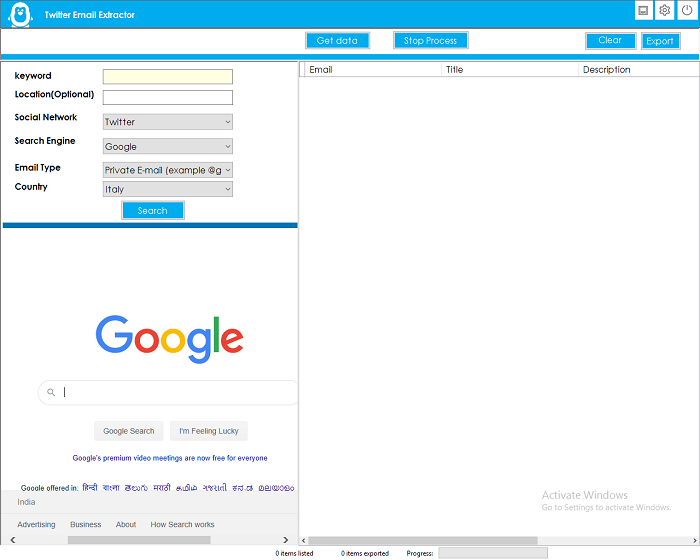
- Now you can Search Using below parameter.
- Keyword : Any Keyword like Jobs,Sales.
- Location : this option is optional but you can write any location .
- Search Engin : You can Scrap Twitter Email from mutlipe Search Engine: Google , Yahoo, Bing .
- Country : Select Country of Email you want to Scrap Email
- Click on Search Button, All Result Display in Software Browser Search Engine.
- Click on Get Data Button, All Detail with Email(Gmail, HotMail, Yohoo Mail), Title , Description, Twitter Profile Link is fetched and show in Table .
- You can Export All Details in Multiple Format : Excel, CSV , And Text Format.
- This Software Also have VPN Setting if you have VPN Then you can Add
- Click on Setting Icon on Top Bar , ,
You can do VPN Setup here. Also can Change Data Export Format , Excel, CSV,Text Format.
Software Support Multiple Language , Can Change Desired Language.

 ,
You can do VPN Setup here. Also can Change Data Export Format , Excel, CSV,Text Format.
Software Support Multiple Language , Can Change Desired Language.

Installation Process
- You will Recieve only Software. Code is not Included
- You will get single computer license and also license swaping from one machine to another not possible
- Refund Not possible, once licence activate so you can check demo video and then purchase
- If have any Question Email me at bhansalisoft781986@gmail.com
- After Purchase Evanto Purchase code is Licence code You can check what is Purchase Code from this link : https://help.market.envato.com/hc/en-us/articles/202822600-Where-Is-My-Purchase-Code-
- Please Unzip Main File and Run TwitterEmailExtractor.exe and Register your Licence as per below Screen.
- Licence Email : Registered Email.
- Registration Code : Evanto Purchase Code.
- After Registration you can Use Software.

Changelog
20-05-2021
- Software extract all private domain email , B2B email also. You just need to select Other Email and define your Email Domain
| Type | Windows App |
|---|---|
| Author | bhansalisoft |
| Category | Apps / Windows |
| Price | $12 |
| Sales | 29 |
| Rating | 0.00 from 1 rating |
| Published | May 23, 2020 |
| Last Update | Aug 7, 2026 |
| Application Runtime | .NET 4 |
| Operating System Versions | Windows 10, Windows 8 Metro, Windows 8 Desktop, Windows 7, Windows Vista, Windows XP |
Categories
Tags
External listing. code.market does not sell this product and does not process payment for it. Pricing, payment, delivery, licensing, refunds, and support are handled by the third-party merchant on its own website. We may earn an affiliate commission from a referral. Details.