
TV Directory - PHP Script
Description
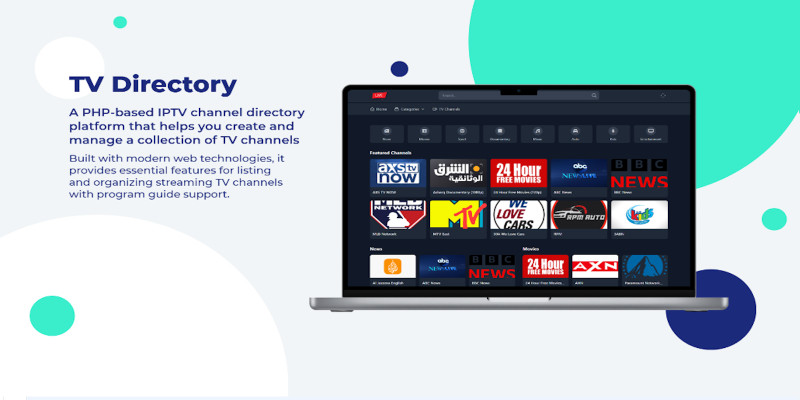
TV Directory TV Directory is a comprehensive TV channel management platform designed to help users create and manage their own streaming services. With an integrated Electronic Program Guide (EPG) and a full-featured admin dashboard, TV Directory offers a seamless experience for viewers and administrators alike. From managing channels to tracking viewer preferences and reports, this platform is the perfect solution for building your own IPTV service. Demo: https://anym3u8player.com/tvonline/
Admin demo: https://anym3u8player.com/tvonline/admin Username: admin Password: admin123!
Features
Features For Viewers
- Channel Browsing: Easily browse channels by categories.
- EPG Integration: View current and upcoming shows using the integrated Electronic Program Guide.
- Favorites: Save favorite channels directly in the browser (cookie-based).
- Search Functionality: Search channels by name, category, or tags.
- Report Issues: Report non-working channels for admin review.
- Toggle between Dark and Light modes for better viewing.
For Administrators
- Channel Management: Add, edit, and delete TV channels.
- Organize Content: Classify channels with categories and tags.
- EPG Integration: Seamless integration with IPTV.org for automatic EPG updates.
- Ad Management: Manage ad placements to monetize the platform.
- Channel Reports: Monitor and address viewer-submitted reports.
- Customization: Basic customization options for site branding and interface adjustments.
Requirements
System Requirements
- PHP: 8.3.0 or higher
- Database: MySQL 5.7+ or MariaDB 10.4+
- Web Server: Apache with mod_rewrite enabled
- Required PHP Extensions:
- PDO MySQL
- GD Library
- JSON
- Fileinfo
- MySQLi
Instructions
Installation Guide 1. Upload Files
- Upload all files to your web server.
2. Set Directory Permissions
- Ensure the following directories are writable (chmod 777):
- uploads/
- uploads/channel-icons/
- uploads/images/
3. Run Installation Wizard
- Visit
your-domain.com/install.phpand follow these steps:- System requirements check
- Database configuration
- Site settings setup
- Database import
4. Post-Installation Steps
- Delete
install.phpto secure the installation. - Verify the existence of
config/installed.php. - Login to the admin panel using the default credentials:
- Username: admin
- Password: admin123!
- Important: Change the default admin password immediately to ensure security.
| Author | Voodooro |
|---|---|
| Category | Scripts & Code / PHP Scripts / Multimedia / Video |
| Price | $85 |
| Extended License | $255 |
| Rating | 5.00 from 3 ratings |
| Reviews | 3 |
| Likes | 10 |
| First Release | Dec 30, 2024 |
| Last Update | Dec 30, 2024 |
Categories
Tags
External listing. code.market does not sell this product and does not process payment for it. Pricing, payment, delivery, licensing, refunds, and support are handled by the third-party merchant on its own website. We may earn an affiliate commission from a referral. Details.
Products of the Week.
Submit🥇

STOP GUESSING WHAT TO POST
AI that learns your brand voice and builds a month of consistent, on-brand social content: carousels, posts and hooks that sound like you, not like everyone else's AI.
SaaS · 6,527 views · 59 clicksSaaS · Week 46 · 6,527 views · 59 clicks
🥈

Conversational Backlinks for Busy Founders
Place Backlink Relevant Conversation for your domain across Forums and Conversations
Website · 45,444 views · 229 clicksWebsite · Week 46 · 45,444 views · 229 clicks
🥉

upvote.club
Free Social Media Engagement that Helps Boost Your Content. Upvote Club supports 19 social networks with 100+ engagement actions in one dashboard. Add links to your posts and get free engagement from real users.
SaaS · 43,438 views · 124 clicksSaaS · Week 46 · 43,438 views · 124 clicks
#4

Substack Posting API
Onboard your Agent to Substack. Write Publish on Substack via API
SaaS · 62,372 views · 204 clicksSaaS · Week 46 · 62,372 views · 204 clicks
#5

Seenshot App
Free, Fast, MacOS Screenshot app. Make Screenshot cmd+shift+2 and send it via link
Desktop App · 31,625 views · 125 clicksDesktop App · Week 46 · 31,625 views · 125 clicks
#6

Hand-Placed Backlinks $9.99 per link. Flat rate.
Buy hand-placed forum, Q-A and directory backlinks. Flat $9.99 per link, no subscriptions — you only pay for approved listings.
Website · 7,328 views · 19 clicksWebsite · Week 46 · 7,328 views · 19 clicks
#7

Free Invoice Generator - PDF Invoices in Your Browser, No Sign-Up
A free invoice maker for freelancers and small businesses: fill in the invoice, check the live preview, and download a PDF that looks exactly like it. Any currency, tax per item, three templates, no sign-up, and nothing leaves your device.
5,948 views · 20 clicksWeek 46 · 5,948 views · 20 clicks
#8

Merge PDF Files Free - Combine PDFs in Your Browser, No Upload
A free PDF merger for office workers, students, and freelancers: combine PDFs and images into one file in the browser, reorder files and pages, pick page ranges, keep bookmarks, and open password-protected PDFs. Nothing is uploaded, no sign-up, no watermark.
5,500 views · 16 clicksWeek 46 · 5,500 views · 16 clicks